# Welcome

Welcome to the results of the Agile XR project - Augmented Agile Teamwork for Distance and Blended Learning at Schools, a set of innovative resources for secondary school teachers across Europe. This eBook, funded by the Erasmus+ program, is a comprehensive yet practical guide to navigating the evolving landscape of education in the digital age, particularly in distance learning, agile practices, and web and XR technologies.

## What is This Project About?

As you delve into this eBook, you'll encounter several key themes:

1. **Innovative Online, Distance, Hybrid and Blended Learning**: We address the challenges and offer practical and tangible solutions to learn about and design engaging, collaborative and effective education in these environments, acknowledging the complexities and potential of current technologies.
2. **The Status and Potential of XR for Teamwork and Teaching**: Explore the current limitations and possibilities of XR technologies in education, balancing accessibility issues with their transformative potential.
3. **Fostering Future-Proof Teaching and Learning**: Our human-centred approach has produced a collection of practical deliverables tailored to educators eager to integrate agile practices and XR/web technologies into collaborative digital and blended learning environments.

### **Discover More About the Agile XR Project**

For an in-depth understanding of the Agile XR project's objectives, detailed insights into our dedicated team members, and a comprehensive overview of our extensive range of activities, we warmly invite you to visit our website: [www.agilexr.eu](https://www.agilexr.eu). Here, you will find a wealth of information that extends beyond the scope of this eBook, offering a deeper dive into the project's core mission, the innovative minds behind it, and the impactful activities we've undertaken. The website is a central hub for Agile XR, providing updates, blogs, and additional resources to enrich your knowledge and engagement with our project. Whether you're seeking background information, connecting with the team, or exploring further educational materials, our project website is your go-to resource.

### <mark style="color:green;">Visit the</mark>[ <mark style="color:blue;">Agile XR</mark>](https://results.agilexr.eu/www.agilexr.eu) <mark style="color:green;">project website.</mark>

##

## Who Can Benefit from These Resources?&#x20;

Our meticulously crafted resources are primarily designed for **European secondary school educators** navigating the evolving terrain of distance, blended, and in-person learning. Whether you're a seasoned teacher looking to integrate innovative technologies and methodologies into your curriculum or a newcomer eager to explore agile teaching practices, these tools are tailored for you. Our audience includes **classroom teachers** and **instructional designers**, **school administrators**, and e**ducational technology specialists** seeking to enhance their practices and enrich their students' learning experiences.

The versatility of these resources makes them particularly valuable for educators aiming to adapt to diverse learning environments — from traditional classrooms to fully remote settings. They are especially beneficial for those who wish to foster a more collaborative, engaging, and inclusive learning atmosphere, irrespective of the physical or digital context. By integrating key aspects of agile methodologies and cutting-edge technologies like web and XR, these resources offer a gateway to a more dynamic and effective educational practice, meeting the needs of today's digital-native students.

## Navigating the Resources

The digital resources developed within the Erasmus+ co-funded project are structured into four main parts, each corresponding to our Agile XR project results (PR) as framed in our original proposal. You will find 14 resources dedicated to specific, tangible deliverables we have developed within these parts. These include guides, reports, videos, blog posts, manuals, workshops, templates, and digital tools to enhance your teaching experience and efficacy in various learning environments.&#x20;

We aimed to create a coherent ecosystem. While some focus on supporting educators in keeping up with the technological advancements in education, like web and XR technologies, others delve into the pedagogical strategies essential for cross-modality teaching. Together, they weave a comprehensive narrative, empowering you to create learning environments that are both engaging and collaborative.

To seamlessly navigate the diverse range of resources we offer, we present a visual mapping of all 14 resources along the Modes of Learning Spectrum (Johnson, 2022). At one end of the spectrum, we have distance learning, characterized by its online-centric approach. On the opposite side lies in-person learning, rooted in traditional classroom settings. Bridging these two extremes is the realm of Hybrid and Blended Learning, which combines online and face-to-face instruction.

This visual and succinct resource descriptive below the image is your starting point. To simplify your selection process and ensure that you have the right tools at your fingertips, whether crafting an online course, enhancing a classroom lesson, or blending the two for a hybrid or blended teaching experience.

### Overview of the Resources

<figure><img src="https://3286121452-files.gitbook.io/~/files/v0/b/gitbook-x-prod.appspot.com/o/spaces%2FYWzVX8R8T6klY40zIavG%2Fuploads%2FjkJkasIp4Kov3kPuCj2C%2FAXR-OverviewAllPRs.png?alt=media&amp;token=0a814d2d-7fa6-4c00-bf4b-7ed5ad41dec8" alt=""><figcaption><p>Overview of all resources in this eBook mapped on the Modes of Learning Spectrum (Johnson, 2022).</p></figcaption></figure>

##

## Description of Each Resource

&#x20;       PROJECT RESULT 1

1. [**Guide: Agile Teamwork in Web-Based Learning**](/1-guide-agile-teamwork-in-web-based-learning): This digital guide equips teachers with strategies for enhancing student teamwork in hybrid and remote settings. It combines agile teaching methods with practical web technology applications, enriched by real-world insights from agile education practitioners.
2. [**Video Tutorials: Agile Teaching Rituals**](/2-video-tutorials-agile-teaching-techniques): A series of engaging tutorials demonstrating effective agile teaching practices suitable for remote and in-person learning environments.\
   \
   \
   PROJECT RESULT 2<br>
3. [**Guide: Implementing VR/XR in Team-Based Education**](/project-result-2/3-guide-implementing-vr-xr-in-team-based-education): An instructional guide on employing virtual and extended reality tools to foster teamwork and collaborative learning in online and blended classrooms.
4. [**Manual: Spatial.io for VR-Enhanced Teamwork**](/project-result-2/4-manual-spatial.io-for-vr-enhanced-teamwork): Detailed instructions for setting up Oculus Quest 2 VR devices and effectively utilizing Spatial.io for virtual reality teamwork.\
   \
   \
   PROJECT RESULT 3<br>
5. [**Workshop: Designing Blended Learning Courses**](/project-result-3/5-workshop-designing-blended-learning-courses): Comprehensive workshop templates and a facilitation guide to help teachers design and implement blended learning courses and projects.
6. [**Workshop: Enhancing Existing Lessons for Blended Learning**](/project-result-3/6-workshop-enhancing-existing-lessons-for-blended-learning): A workshop focused on helping teachers reflect on and improve their lessons to cater to blended learning, featuring a suite of practical reflection and ideation tools.
7. [**Templates: Lesson Plans For Online And Hybrid Learning**](/project-result-3/7-lesson-plan-templates-for-online-and-hybrid-learning): A set of exemplary lesson plan templates designed for engaging and collaborative online and hybrid learning environments.\
   \
   \
   PROJECT RESULT 4<br>
8. [**Guide: Mastering Effective Distance Learning**:](/project-result-4/8-guide-mastering-effective-distance-learning) A training guide that documents effective distance learning and teaching methodologies, emphasizing their implementation and impact.
9. [**Reference Guide: EdTech Tools for Interactive Teaching**:](/project-result-4/9-reference-guide-edtech-tools-for-interactive-teaching) An extensive overview and manual of popular educational technology tools to enhance classroom engagement, self-direction, and collaboration.
10. [**Digital Tool: EdTech Decision-Maker**:](/project-result-4/10-digital-tool-edtech-decision-maker) An interactive application to assist teachers in selecting the most suitable educational technology tools for their specific needs.
11. [**Report: Evaluating Agile and VR/XR Teaching Pilots**](/project-result-4/11-report-evaluating-agile-and-vr-xr-teaching-pilots): An in-depth report analyzing the outcomes and impact of pilot projects integrating agile methodologies and VR/XR technologies in remote teaching.\
    \
    \
    TRANSLATIONS<br>
12. [**Multilingual Publication Translations**](/translations/12-multilingual-publication-translations): To maximize accessibility, key publications are translated into Dutch, Finnish, and Spanish, catering to a diverse European audience.

## Imprint

This publication (in English, Finnish, Dutch and Spanish) and other publications and tools produced by the project can be downloaded free of charge from: <https://agilexr.eu/>

<figure><img src="https://3286121452-files.gitbook.io/~/files/v0/b/gitbook-x-prod.appspot.com/o/spaces%2FYWzVX8R8T6klY40zIavG%2Fuploads%2Fr3YmkRF1rmAB6lYpnxqb%2Flicencia%20CC.png?alt=media&amp;token=14b60a8b-6ba3-4f48-a5c2-6df52362c5d2" alt=""><figcaption></figcaption></figure>

This work is licensed under a Creative Commons Attribution-ShareAlike 4.0 International License. To view a copy of this license, visit [http://creativecommons.org/licenses/by-sa/4.0/](https://creativecommons.org/licenses/by-sa/4.0/)

<figure><img src="https://3286121452-files.gitbook.io/~/files/v0/b/gitbook-x-prod.appspot.com/o/spaces%2FYWzVX8R8T6klY40zIavG%2Fuploads%2F2E6bZOsMtji7ZE8V7XU8%2FEN%20Co-funded%20by%20the%20EU_BLACK%20Outline.jpg?alt=media&amp;token=0ff83611-7b4d-42a1-953f-a168ed5fe1d5" alt="" width="188"><figcaption></figcaption></figure>

The project "Augmented Agile teamwork for hybrid learning at Schools” (2021-1-BE02-KA220-SCH-000027889) is co-funded by the Erasmus+ Programme of the European Union. The views expressed in the working papers, deliverables and reports are those of the project consortium partners. These views have not been adopted or approved by the Commission and should not be relied upon as a statement of the Commission’s or its services’ views. The European Commission does not guarantee the accuracy of the data included in the working papers and reports, nor does it accept responsibility for any use made thereof.

\
\
\ <br>


# Key Project Learnings and Reflections

Welcome to our reflective journey through the Agile XR project. This piece aims to synthesise key learnings and insights from our team's experience, providing a robust and insightful perspective on the project's relevant outcomes for secondary school teachers across Europe.&#x20;

The reflections are drawn from the final team reflection workshop during our Transnational Project Meeting 4 in Belgium on 13 and 14th of December 2023. The complementary video fragments are recorded - with permission to publish these videos - during our second LTTA event in Finland between 3 and 5 November 2023.

### **1. Embrace Agile Methodologies in Education for Dynamic Learning**

When adapted for the classroom, Agile practices can significantly enhance flexibility and responsiveness in teaching. Emphasizing iterative processes and continuous feedback can lead to more engaged and adaptive learning environments in any learning environment.

{% embed url="<https://www.youtube.com/watch?index=2&list=PL0tkzrNokpgWVX3-jn1m23XkkVRVo49VY&v=_rJDZxqjOv0>" %}
Agile XR Team Insider insights on Agile Learning
{% endembed %}

### **2. Leverage Pedagogy for Effective Use of VR and Web Technologies**

The potential of VR and web technologies in education is vast. Teachers should explore incorporating these tools to create immersive and interactive learning experiences. However, they should be mindful of the initial challenges, as the user experience for most VR hardware and software with multiple students simultaneously is not optimized. In particular, our team discovered a need for better VR onboarding experiences and the need for user-friendly interfaces. When using VR devices in a classroom context, focus on leveraging pedagogical methods that move away from traditional classroom teaching (e.g., carousel) and allow for smart onboarding (e.g., peer-to-peer teaching).

{% embed url="<https://www.youtube.com/watch?index=3&list=PL0tkzrNokpgWVX3-jn1m23XkkVRVo49VY&v=iWYLhsCQN6c>" %}
Agile XR Team Insider Insights on Extended Reality Accessibility
{% endembed %}

### **3. Foster Digital Literacy and Technological Proficiency for Teachers and Students**

Introducing emerging technologies like VR to teachers and students in the classroom is key to enhancing digital literacy. Teachers should view the integration of these technologies not just as a subject matter, but as a means to develop essential 21st-century skills in students.

### **4. Collaborative Transnational Projects Accelerate Learning**&#x20;

Our team discovered while doing that engaging in collaborative projects involving diverse teams, and nationalities exposed the team to various perspectives and fostered better project results and a global outlook in learning.

### **5. Customise Teaching Approaches for Diverse Learning Needs**

Recognize and address the diverse learning needs and preferences of students. This includes considering accessibility for students with disabilities and adapting teaching methods accordingly. This commitment to inclusivity ensures that education is accessible and enriching for all students, acknowledging and valuing their unique learning paths.

### **6. The Importance of Infrastructure in Technology-Driven Education**

Advocate for and work towards improving school infrastructure to support the effective use of technology in education. Reliable internet connectivity and device access are crucial for successfully implementing digital learning tools. Still, this fundamental infrastructure requirement is challenging for many schools we encountered.

### **7. Apply a Digital-first Approach to Increase Flexibility in Teaching for all Modalities**

Teachers should be prepared to bridge the gap between traditional teaching methods and the integration of new technologies. This involves understanding the technology and rethinking pedagogical approaches to make learning more interactive and student-centred. Adopting a 'digital-first' mentality while developing teaching materials is key to flourishing in all learning environments.

{% embed url="<https://www.youtube.com/watch?index=2&list=PL0tkzrNokpgWVX3-jn1m23XkkVRVo49VY&v=OufK0bOtc_Q>" %}
Agile XR Team Insider Insights on Distance Learning
{% endembed %}

### **8. Embody Lifelong Learning For Educators in EdTech**

Emphasize the importance of self-learning and professional growth in emerging educational technologies. Teachers should be encouraged to continuously update their skills and knowledge to keep pace with technological educational advancements.

## **Conclusion**

The Agile XR project offered valuable insights into the intersection of agile methodologies, VR & web technology, and different learning modalities. While we achieved substantial progress, there's room for deeper exploration and more integrated approaches in future projects. These insights can serve as valuable guidelines for educators looking to innovate and improve their teaching practices in line with modern educational trends and technologies. This reflection captures our journey and paves the way for future digital and blended learning innovations.&#x20;


# 1 - Guide: Agile Teamwork in Web-Based Learning

### Table of Contents

<details>

<summary>Chapter 1 - Agile in Software</summary>

1.1 Values in Agile Software Development

1.2 Principles in Agile Software Development

1.3 Agile Project Management and practices

1.4 Agile Mindset

</details>

<details>

<summary>Chapter 2 - Agile in Education</summary>

2.1 Agile Compass for Education

2.2 eduScrum

2.3 Agora schools

2.4 Agile Learning Centers

</details>

<details>

<summary>Chapter 3 - Agile practices for project-based learning</summary>

3.1 Sprint Planning and Execution

3.2 Daily Stand-Up Meetings

3.3 Collaborative Learning and Projects

* 3.3.1 Project initiation
* 3.3.2 Project planning
* 3.3.3 Project execution
* 3.3.4 Project performance/monitoring
* 3.3.4 Project closing
* 3.3.4 Agile rituals using Mural

</details>

<details>

<summary>Conclusions</summary>

</details>

***

## Introduction

Agile methods came about as a solution to the software issues in the 1990s. In 2001, they took a big step forward with the release of the [Agile Manifesto](https://techbeacon.com/app-dev-testing/agility-beyond-history-legacy-Agile-development). Over the next ten years, Agile methods started to influence different areas, including education. In 2015, the Agile in Education Alliance was created, following the model from the software industry, and they made an [Agile in Education Manifesto](https://www.agilealliance.org/resources/sessions/Agile-education/).

Since then, more and more educators have been using and adjusting Agile ideas to fit their own teaching styles. In 2016, Liliana Carrillo from [CollectiveUP](https://www.collectiveup.be/) and [ALC Talent-In](https://ghent.agilelearningcenters.org/) followed several Agile Learning Facilitation trainings in the USA, and in 2017 she brought the method and practices to Belgium and Europe by way of several Agile Learning Facilitation trainings.

In the COVID-19 crisis due to the lockdown, education changed drastically, making it necessary to transition to online and hybrid learning and a more active pedagogy. These were perfect conditions for the Agile Learning movement to flourish in Europe and in this context, CollectiveUP continued with its international partnerships to move Agile Learning forward in Europe. 2 Erasmus+ proposals were submitted to the Erasmus+ program via the National Agency EPOS, and both were approved: [Agile4Collaboration](https://agileforcollaboration.eu/) and [AgileXR](https://agilexr.eu/).

Thanks to these Erasmus+ projects and thanks to the support of the Province of West Flanders, the access to resources on Agile learning facilitation has been democratized and one of the concrete results is this e-book.

We invite you to explore each of the five chapters in this book. The first chapter explains the idea of Agile in software; the second chapter is all about using Agile in education; the third goes into how to use Agile practices for project-based learning and offers clear explanations about running these kinds of projects. The e-book concludes with some conclusions and encourages you to try out Agile practices in education.

Enjoy your reading!

## Imprint

We suggest citing this report as follows: Carrillo, L., Alvarado, R., Katrini, C., Fraile J., Van Cauwenberghe J., & Lassenius, P. (2023). Agile Teamwork in Web-Based Learning. Augmented Agile teamwork for hybrid learning at Schools (AgileXR).[ https://agilexr.eu/](https://agilexr.eu/)

Editors/Partners: CollectiveUP (BE), Fundación Universidad Francisco de Vitoria (SP), RHIZO School (BE), Metropolia University of Applied Sciences (FI).

Authors: Liliana Carrillo (CollectiveUP), Ruben Alvarado (CollectiveUP), Chrysanthi Katrini (CollectiveUP), Juan Fraile (UFV), Daniel Orgaz-Rincón (UFV), Paula Esteban-Manrique (UFV), Joos Van Cauwenberghe (RHIZO), Petra Lassenius (Metropolia University).

Translation: Dutch version by Joos Van Cauwenberghe (RHIZO), Finnish version by Petra Lassenius (Metropolia University), and Spanish version by Juan Fraile (UFV), Daniel Orgaz-Rincón (UFV) & Paula Esteban-Manrique (UFV).

This publication (in English, Finnish, Dutch and Spanish) and other publications and tools produced by the project can be downloaded free of charge from: <https://agilexr.eu/>

<figure><img src="https://3286121452-files.gitbook.io/~/files/v0/b/gitbook-x-prod.appspot.com/o/spaces%2FYWzVX8R8T6klY40zIavG%2Fuploads%2Fr3YmkRF1rmAB6lYpnxqb%2Flicencia%20CC.png?alt=media&amp;token=14b60a8b-6ba3-4f48-a5c2-6df52362c5d2" alt=""><figcaption></figcaption></figure>

This work is licensed under a Creative Commons Attribution-ShareAlike 4.0 International License. To view a copy of this license, visit [http://creativecommons.org/licenses/by-sa/4.0/](https://creativecommons.org/licenses/by-sa/4.0/)

<figure><img src="https://3286121452-files.gitbook.io/~/files/v0/b/gitbook-x-prod.appspot.com/o/spaces%2FYWzVX8R8T6klY40zIavG%2Fuploads%2F2E6bZOsMtji7ZE8V7XU8%2FEN%20Co-funded%20by%20the%20EU_BLACK%20Outline.jpg?alt=media&amp;token=0ff83611-7b4d-42a1-953f-a168ed5fe1d5" alt="" width="188"><figcaption></figcaption></figure>

The project "Augmented Agile teamwork for hybrid learning at Schools” (2021-1-BE02-KA220-SCH-000027889) is co-funded by the Erasmus+ Programme of the European Union. The views expressed in the working papers, deliverables and reports are those of the project consortium partners. These views have not been adopted or approved by the Commission and should not be relied upon as a statement of the Commission’s or its services’ views. The European Commission does not guarantee the accuracy of the data included in the working papers and reports, nor does it accept responsibility for any use made thereof.


# Chapter 1 - Agile in Software

Back in the 1990s, the software industry was facing some big problems. First, it was still pretty young, and there weren't enough skilled software developers around. Second, the industry was stuck using a rigid project management method called "waterfall." This method puts a lot of emphasis on creating long lists of requirements, often more for legal contracts than for actually working with clients. This lack of collaboration led to a lot of mistrust.&#x20;

What's more, software wasn't made the way it is today, with small, gradual improvements. Instead, it was created in massive packages. Think of the old Office 95 software – it had thousands of features, but hardly anyone used them all. Developing such huge packages took years, and even then, they often had bugs. The Pareto Law shows that only about 20% of the software was used, meaning 80% of the resources and development went to waste.

The industry was exhausted and desperately needed a change. That change was brought about by some skilled software developers. In 2001, a group of them got together to transform the way software was made. They created the [Agile Manifesto for software](https://Agilemanifesto.org/), which laid out four new core values (in section 1.1) and 12 principles (in section 1.2) for the industry. These changes led to various practices and new ways of managing Agile projects (in section 1.3), resulting in a fresh mindset (in section 1.4).


# 1.1 Values in Agile Software Development

Values lie at the heart of [Agile software development](https://Agilemanifesto.org/), guiding the principles and practices that enable teams to deliver high-quality, customer-centric solutions efficiently. In this context, let's delve into the core values that underpin the Agile approach and their impact on the software development process.

<figure><img src="https://3286121452-files.gitbook.io/~/files/v0/b/gitbook-x-prod.appspot.com/o/spaces%2FYWzVX8R8T6klY40zIavG%2Fuploads%2FC8PfuAe9rFoRESKloWak%2FAgileXR_GitBook_Visual%201%402x.png?alt=media&amp;token=4930d3b0-58d9-4f63-89fa-634c8a8d9313" alt=""><figcaption><p>Manifesto for Agile Software Development</p></figcaption></figure>

Authors:

<table data-header-hidden><thead><tr><th width="40"></th><th></th><th></th><th></th></tr></thead><tbody><tr><td><br></td><td>Kent Beck<br>Mike Beedle<br>Arie van Bennekum<br>Alistair Cockburn<br>Ward Cunningham<br>Martin Fowler</td><td>James Grenning<br>Jim Highsmith<br>Andrew Hunt<br>Ron Jeffries<br>Jon Kern<br>Brian Marick</td><td>Robert C. Martin<br>Steve Mellor<br>Ken Schwaber<br>Jeff Sutherland<br>Dave Thomas</td></tr></tbody></table>

© 2001, the above authors\
this declaration may be freely copied in any form,\
but only in its entirety through this notice.

<br>


# 1.2 Principles in Agile Software Development

Principles in [Agile software development](https://Agilemanifesto.org/) serve as guiding philosophies that empower teams to embrace change, foster collaboration, and consistently deliver value to customers.

<figure><img src="https://3286121452-files.gitbook.io/~/files/v0/b/gitbook-x-prod.appspot.com/o/spaces%2FYWzVX8R8T6klY40zIavG%2Fuploads%2FGHIlQ4Cg8O3GSOLhszLK%2FAgileXR_GitBook_Visual%202%402x.png?alt=media&amp;token=569575b8-bf6c-4dfb-af42-9076d75a58ce" alt=""><figcaption><p>The 12 agile principles </p></figcaption></figure>

<br>


# 1.3 Agile Project Management and practices

In the 1990s, the software industry faced significant challenges. First, it was relatively young, and there weren't enough skilled software developers available. Second, the industry relied on a strict project management approach known as "waterfall." This method prioritized creating extensive lists of requirements, often more for legal agreements than collaborating with clients. This lack of cooperation led to widespread distrust.

Additionally, software development differed from the incremental approach used today. Instead of gradual improvements, software was created in large packages. Consider software like the old Office 95, with numerous features that most people didn't use. Developing such extensive packages took years and often resulted in bugs. The Pareto Law illustrated that only around 20% of the software was utilized, leaving 80% of resources wasted.&#x20;

<figure><img src="https://3286121452-files.gitbook.io/~/files/v0/b/gitbook-x-prod.appspot.com/o/spaces%2FYWzVX8R8T6klY40zIavG%2Fuploads%2FRPdbQbOL2ieQ2xWKC26Z%2FAgileXR_GitBook_Visual%203%402x.png?alt=media&amp;token=b66a2f80-bfc3-4c07-b25d-2735380beb09" alt=""><figcaption><p><a href="https://apifuse.io/blog/agile-vs-waterfall-methodology/">Waterfall vs Agile</a></p></figcaption></figure>

In the traditional "waterfall" approach, a software project might take a whole year to complete without any input from the client. However, in the Agile approach, that same software gets delivered to the client every month or during a "sprint," allowing for early feedback and gradual improvements. This way, by the end of the year, you have a successful final solution.&#x20;

The [Agile development process](https://www.ariadgroup.com/en/blog/all-about-scrum-Agile/details-about-scrum-Agile-components) involves several key practices. First, there's the "product backlog," which is a list of desired features and tasks for the entire year. Then, for each month, you have a "sprint backlog," which is a list of things to work on during that month. The Agile cycle happens regularly, usually every two weeks or a month, as decided by the team, and it involves steps like planning, designing, developing, testing, and releasing the software. This cycle keeps repeating, with each sprint drawing from the sprint backlog, and it leads to the delivery of the final product.

<figure><img src="https://3286121452-files.gitbook.io/~/files/v0/b/gitbook-x-prod.appspot.com/o/spaces%2FYWzVX8R8T6klY40zIavG%2Fuploads%2FifJu6uKpdQuXv21apw1k%2FAgileXR_GitBook_Visual%204%402x.png?alt=media&amp;token=eb6ff70e-f99d-4d72-ba44-fe2560b542cd" alt=""><figcaption><p><a href="https://www.altexsoft.com/whitepapers/agile-project-management-best-practices-and-methodologies/">Agile Development Cycle</a></p></figcaption></figure>

Various methods and approaches can be used to work in an Agile way. They all follow the principles and values we talked about earlier.&#x20;

Some well-known [Agile frameworks in software developmen](https://www.altexsoft.com/whitepapers/Agile-project-management-best-practices-and-methodologies/)t include Scrum, Kanban, Hybrid, Lean, Bimodal, XP, and Crystal. Among these, Scrum is the most widely used.

<br>

<figure><img src="https://3286121452-files.gitbook.io/~/files/v0/b/gitbook-x-prod.appspot.com/o/spaces%2FYWzVX8R8T6klY40zIavG%2Fuploads%2FPdipILCjlDrmqpYhJB8u%2FAgileXR_GitBook_Visual%205%402x.png?alt=media&amp;token=9e429fa0-14bd-4393-8da3-6c8ee004c9f0" alt=""><figcaption><p><a href="https://www.altexsoft.com/whitepapers/agile-project-management-best-practices-and-methodologies/">How Scrum framework works</a></p></figcaption></figure>


# 1.4 Agile Mindset

The idea of the Agile mindset has been a subject of conversation at many conferences and has been examined in numerous books. A helpful article on this topic from [Forbes](https://www.forbes.com/sites/stevedenning/2019/08/13/understanding-the-Agile-mindset/?sh=479bc6475c17) helps us understand what the Agile mindset is all about. It's important to mention that the term 'Agile mindset' was first introduced in 2010 by Ahmed Sidky, who is a well-known figure in the Agile community.

“Really, [Agile is a mindset](<https://medium.com/icAgile/the-Agile-mindset-5e8328452a23 >) — it’s a way of thinking — that’s defined by four values, described by twelve principles, and then manifested through an unlimited number of practices or different ways of working. It’s simply a deep understanding and culture of learning and experimentation and trying things out. Any creative work will benefit from this notion of an Agile way of working.” By: [Ahmed Sidky.](https://www.slideshare.net/AgileNZ/ahmed-sidky-keynote-Agilenz)

<figure><img src="https://3286121452-files.gitbook.io/~/files/v0/b/gitbook-x-prod.appspot.com/o/spaces%2FYWzVX8R8T6klY40zIavG%2Fuploads%2FVtbDmWmQ2aSUBeObC3YO%2FAgileXR_GitBook_Visual%2038%402x.png?alt=media&amp;token=bffc8caf-2c4e-4aa1-a52c-d4ea59f2f05b" alt=""><figcaption><p><a href="https://medium.com/@AlphaApps/what-is-agile-bc4e7b62cb17">Being Agile by Ahmed Sidky </a></p></figcaption></figure>

*Disclaimer: Implementing the practices, tools and processes without the Agile mindset, values and principles of the Agile Manifesto is not Agile.*

\ <br>


# Chapter 2 - Agile in Education

Agile methods initially emerged in the software industry but soon found their way into various other sectors, including education. Educators worldwide began to adjust and embrace Agile techniques in the classroom.&#x20;

In education, there are numerous and varied approaches to Agile, like eduScrum (section 2.2), Agora schools (section 2.3), and Agile Learning Centers (section 2.4). However, it wasn't until 2016 that a group of educators following Agile principles met in person at the Scrum Gathering in Orlando, Florida. During this meeting, they created the "Agile Compass for Education" (section 2.1), which established the core values and principles for [Agile in Education](https://results.agilexr.eu/1-guide-agile-teamwork-in-web-based-learning/www.Agileineducation.org).

<br>


# 2.1 Agile Compass for Education

From April 18th to April 20th, 2016, a group of passionate Agile Educators came together at the Scrum Gathering in Orlando, Florida. Their focus was on the realization that traditional learning methods no longer met the changing world's needs and the unique requirements of individual learners. They, along with many others, aimed to create more authentic and flexible educational approaches that could adapt to the needs of learners, educators, and our fast-evolving world.&#x20;

Collectively, they gave birth to the Agile Compass for Education, a tool designed to help us build an educational system capable of quickly responding to the ever-shifting educational landscape. Specifically, the Agile Compass aimed to instill Agile values within the education community.&#x20;

The individuals responsible for creating the Agile Compass include Arno Delhij, Guido van Dijk, Mark French, Erin Horn, Marmy Kodras, John Miller, Tomis Parker, Martin Peters, Robert Rodenbaugh, Krissyn Sumare, Marian Willeke, Willy Wijnands, and Mike Vizdos (who served as the facilitator).&#x20;

Find more about the [Agile Compass](https://www.Agileleadershipjourney.com/leadership-journey/Agile-leadership-compass).

<figure><img src="https://3286121452-files.gitbook.io/~/files/v0/b/gitbook-x-prod.appspot.com/o/spaces%2FYWzVX8R8T6klY40zIavG%2Fuploads%2FXXRvO3v7Mqxmbagopok8%2FAgileXR_GitBook_Visual%206%402x.png?alt=media&amp;token=ac0250e0-fcfe-4d99-b493-cc84cfbcf795" alt=""><figcaption><p><a href="https://www.agileineducation.org/">Agile Compass</a></p></figcaption></figure>

*Disclaimer: Implementing Agile practices, tools and processes without the values of the Agile in Education Compass is not Agile Education.*

<br>


# 2.2 eduScrum

EduScrum was originally developed in the Netherlands and is used in public schools to achieve educational goals through project-based learning. In this Agile educational approach, the teacher decides what students need to learn based on educational objectives, which are then translated into projects.&#x20;

Similar to the Scrum method used in software development, in [eduScrum](<https://eduscrum.org/how-eduscrum-works/ >), people form teams to carry out tasks. Each team consists of a team captain (referred to as the eduScrum master), a teacher (the product owner), and a team of students. Together, they prepare for the eduScrum Agile cycle, which includes planning, an iterative working phase, a review, and a retrospective.&#x20;

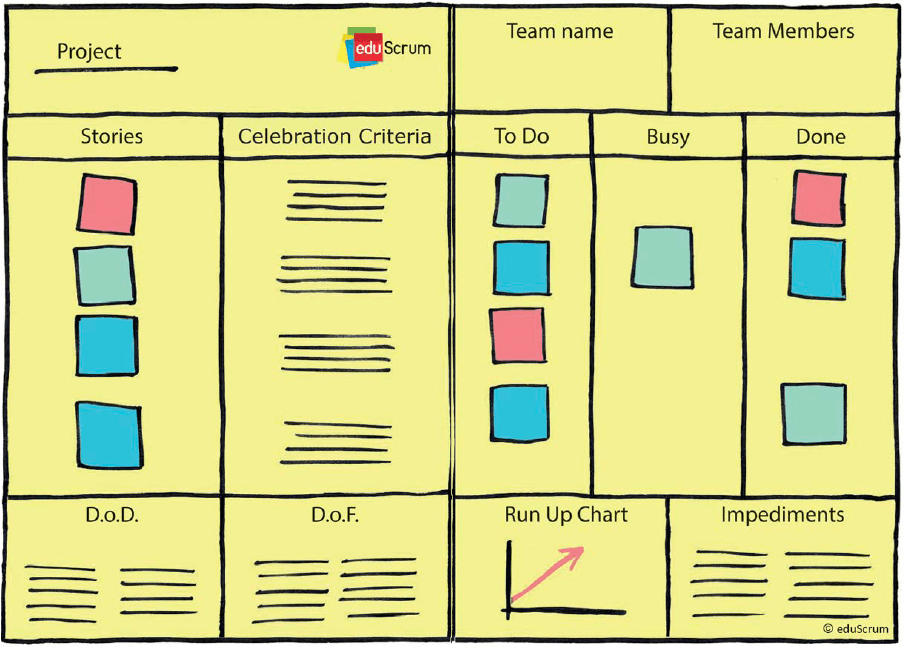
During the planning phase, they set the teaching backlog, assignments, and teamwork agreements. In the working phase, students complete tasks related to the project and track progress visually using a Kanban board with categories like "To Do," "In Progress," and "Done." Students also have a stand-up meeting to discuss their progress.&#x20;

After each working cycle, the [eduScrum team](<https://art2beAgile.slab.com/public/posts/edu-scrum-guides-2-0-fk6r8ill#h43zk-edu-scrum-guides-2-0 >) comes together for a more comprehensive meeting to review the progress. Students present the results of their projects using presentations and other materials. Following the review meeting, there is a retrospective meeting where individuals and the team reflect on the process and how the learning experience was for them both individually and as a group. As a result of the retrospective meeting, the team decides on one improvement they'd like to implement in the next teamwork cycle. For individuals, the retrospective meeting helps answer the question, "What skills do I want to develop in the next cycle?" This contributes to updating their personal learning portfolio.&#x20;

After the review and retrospective, the teams move on to re-plan and start another working cycle, followed by a review and retrospective. This process defines the [entire learning sprint](<https://www.youtube.com/watch?v=TrP5HEUxTgs >).&#x20;

<br>

<figure><img src="https://3286121452-files.gitbook.io/~/files/v0/b/gitbook-x-prod.appspot.com/o/spaces%2FYWzVX8R8T6klY40zIavG%2Fuploads%2Fq6QeCKV2jbv0EDU32jR0%2FAgileXR_GitBook_Visual%207%402x.png?alt=media&amp;token=4162857b-524a-4e3d-afe4-47e35540a6f7" alt=""><figcaption><p><a href="https://eduscrum.org/how-eduscrum-works/">eduScrum</a></p></figcaption></figure>


# 2.3 Agora schools

[Agora schools](<https://wingsroermond.nl/agora/onderwijs-op-agora/onderwijs-op-wings-agora#challenges >), which also originated in the Netherlands, have a slightly different approach compared to eduScrum. In Agora schools, students enjoy more freedom as they get to decide what topics they want to work on. Learning takes place by tackling "Challenges," which involve choosing and working on subjects that students are genuinely interested in, find useful for their own learning, and want to explore through solving, investigating, and experimenting.&#x20;

At Agora schools, teachers transition into the role of coaches. They support students' learning processes by guiding them in selecting learning Challenges. Coaches hold daily morning meetings with students and additional meetings throughout the day to provide support. They assist in aligning the working plan, listen to students' difficulties, answer questions, and help them acquire the necessary knowledge through personalized lessons or by connecting students with experts. Coaches are actively engaged in facilitating the learning journey.&#x20;

Students at Agora schools learn by addressing Challenges and attending inspirational sessions and workshops conducted by coaches, parents, and other experts. Parents also play a significant role as experts with specialized knowledge.&#x20;

Students have the freedom to choose their learning Challenges, with the guidance of their coaches. Once a Challenge is chosen, the student prepares a plan for the work ahead, estimates the time required to complete the Challenge, and identifies the tools, people, and locations needed. Everything and everyone are considered resources for their learning journey. The student presents the plan to a group, including the coach and students of varying ages. Once the plan is approved by the coach, students start working step by step to solve the Challenge.&#x20;

Students maintain a logbook to record progress, including photos, written entries with acquired knowledge or personal reflections, the names of individuals who contributed to the process, and essential locations. Students prepare a final product related to the Challenge they selected and present it to the group. Later, students reflect on the learning process, including successes, failures, and areas for improvement in solving future learning Challenges. This reflection is done together with the coach.&#x20;

At [Agora schools](<https://wingsroermond.nl/agora/blog/alice-in-agoraland >), each student follows a personalized learning path, and coaches and tools support them in completing their secondary education with a diploma and national exam.

<br>


# 2.4 Agile Learning Centers

In [Agile Learning Centers](<https://Agilelearningcenters.org/ >) (ALCs), students take charge of their own learning in a diverse community that includes fellow students and facilitators. Unlike traditional schools, ALCs don't have traditional teachers. Instead, they have Agile learning facilitators who play a role in helping learners with [self-reflection and personal growth](https://www.self-directed.org/sde/). These facilitators engage in various unconventional activities, such as trips to the park, card games, group reading, and other non-traditional school experiences. Some regular school activities are also part of the ALC environment.&#x20;

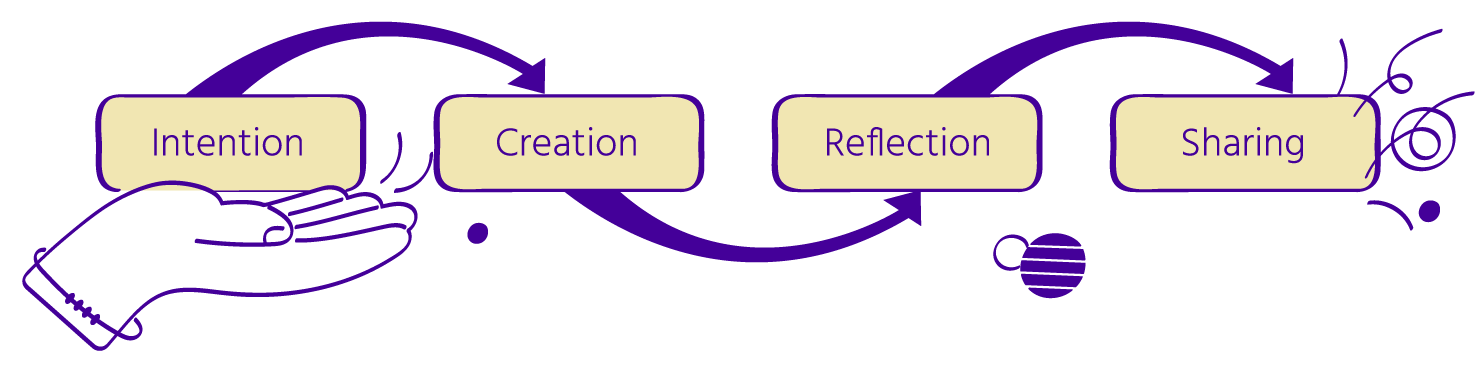
In ALCs, students have the freedom to choose their activities and interests. They can also take breaks whenever they need during the day. The learning process in ALCs follows Agile learning cycles, which begin by setting intentions, then move into creating, reflecting, and sharing, and then restart the cycle by setting new intentions.

<figure><img src="https://3286121452-files.gitbook.io/~/files/v0/b/gitbook-x-prod.appspot.com/o/spaces%2FYWzVX8R8T6klY40zIavG%2Fuploads%2Ffpx6P7mOjOszAy3Gz6ge%2FAgileXR_GitBook_Visual%208%402x.png?alt=media&amp;token=36d5a8d0-00dd-4078-9c29-5aa1955e951a" alt=""><figcaption></figcaption></figure>

An example of an intention is “I want to move today, take care of my body, and do some exercises”. An example of creation for that intention is “I go to the park and play hide and seek with my friends”.  An example of reflection is “I feel happy after playing, I moved a lot, and I laughed with my friends.  I enjoyed it”.  An example of ‘sharing’ for the same intention is “I wanted to move today and do exercises, I went to the park, and I feel very happy about it, my intention for the day is fulfilled”.   An intention can be something more complex as “I want to learn to code”, and this will bring the student to have a longer creation/action phase, or several Agile learning cycles related to the same intention.

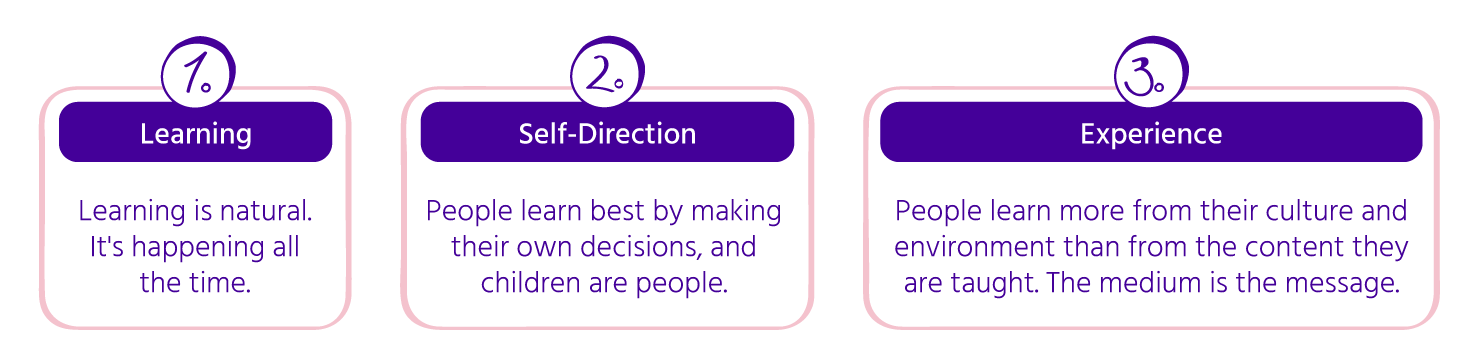
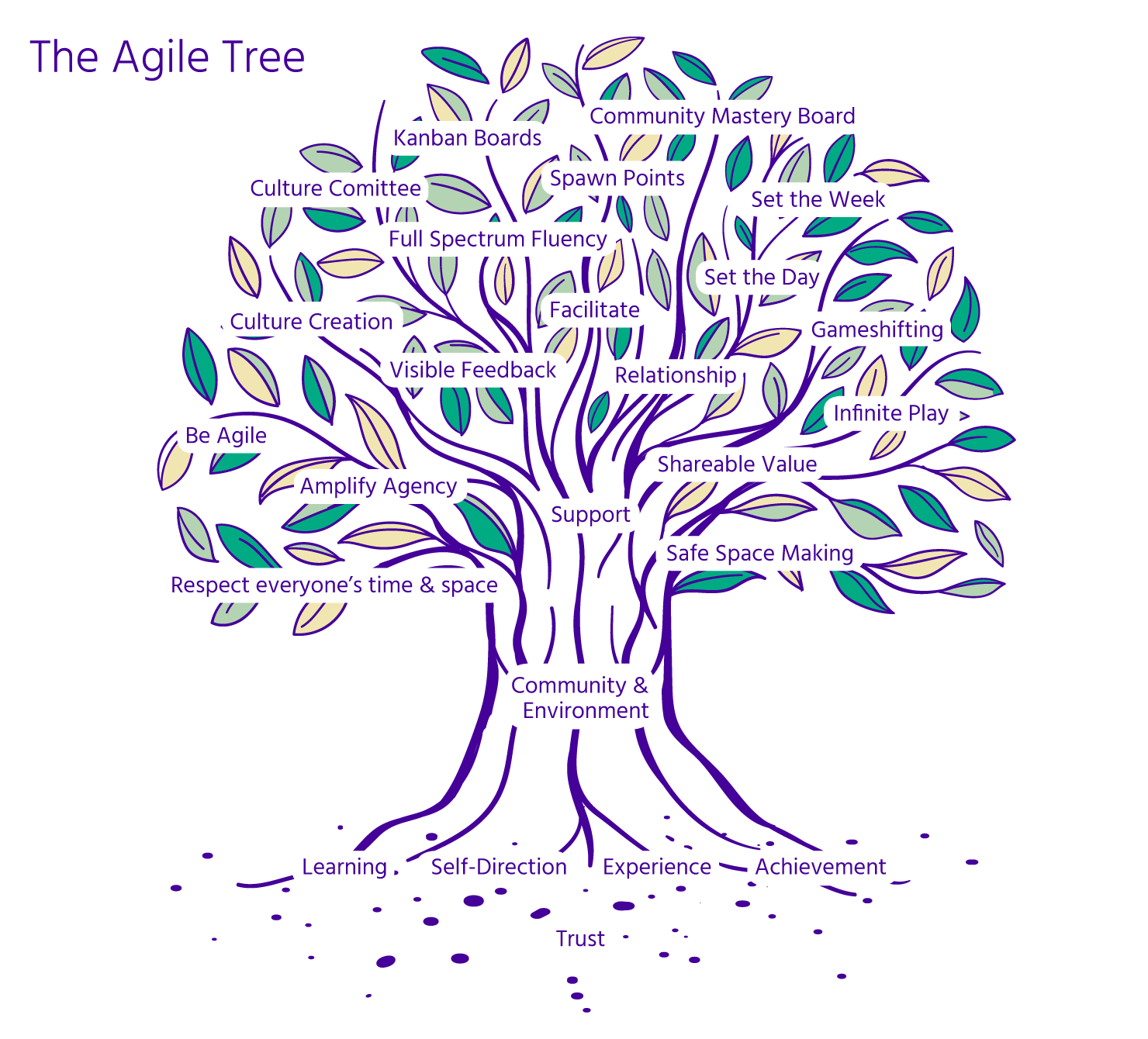
To explain Agile learning the tree analogy is often used. Agile learning is rooted in deep trust, trust in students, in others, in yourself. Trust is the soil. The roots that grow in the soil of trust are the three [Agile learning values](https://Agilelearningcenters.gitbook.io/english/some-basics).&#x20;

<figure><img src="https://3286121452-files.gitbook.io/~/files/v0/b/gitbook-x-prod.appspot.com/o/spaces%2FYWzVX8R8T6klY40zIavG%2Fuploads%2FESTuTSReMtiQ2zcDVIqe%2FAgileXR_GitBook_Visual%209%402x.png?alt=media&amp;token=05b973f1-e6bc-4f9a-96bf-503bbec65198" alt=""><figcaption><p>Agile learning values</p></figcaption></figure>

From a nurturing soil, and strong valuable roots, the trust in each other grows, and the sense of community grows, bringing us to feel protected, supported, valued, and able to do anything, even failing as we are in good trusting hands, the trunk is the community.

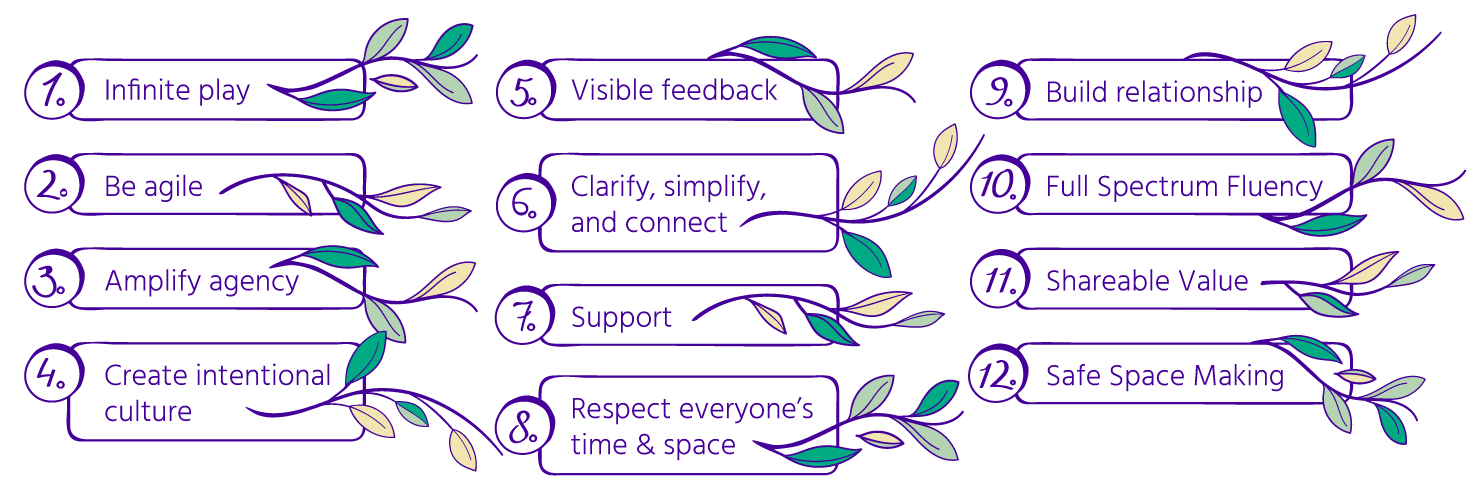
The branches of our tree are the [Agile learning principles](<https://Agilelearningcenters.org/ >).&#x20;

<figure><img src="https://3286121452-files.gitbook.io/~/files/v0/b/gitbook-x-prod.appspot.com/o/spaces%2FYWzVX8R8T6klY40zIavG%2Fuploads%2FTIePSSVCpaXzKcQW4bpH%2FAgileXR_GitBook_Visual%2010%402x.png?alt=media&amp;token=ac790fec-a373-49f8-9bc3-9ded882eb0ab" alt=""><figcaption><p>Agile learning principles</p></figcaption></figure>

To support the Agile learning cycle, which is built on a foundation of trust, values, and principles, Agile Learning Centers (ALCs) have incorporated various Agile practices. Think of these practices like the leaves on a tree. These practices cover a wide range of activities, including using Kanban boards to structure daily or weekly schedules, keeping track of progress, documenting the learning journey, and employing various other strategies.&#x20;

For more in-depth information on Agile Learning practices, you can explore the [Starter Kit](https://starterkit.agilelearningcenters.org/) and visit the Erasmus+ project [Agile4Collaboration's website](https://www.Agileforcollaboration.eu/result1).&#x20;

*Disclaimer: Implementing the practices, tools and processes of Agile learning without practicing deep trust, and Agile values is not Agile Learning.*

<figure><img src="https://3286121452-files.gitbook.io/~/files/v0/b/gitbook-x-prod.appspot.com/o/spaces%2FYWzVX8R8T6klY40zIavG%2Fuploads%2F8S9CRgCafhUvuGYdGGl9%2FAgileXR_GitBook_Visual%2011%402x.png?alt=media&amp;token=1abc9fcc-b2d8-4a06-86a0-b580ff66cf56" alt=""><figcaption><p>The Agile Tree</p></figcaption></figure>

\ <br>


# Chapter 3 - Agile practices for project-based learning

Agile learning practices empower students to take ownership of their education, work collaboratively, and adapt to changing circumstances, all within a structured framework. By integrating these practices into the classroom, educators can create an engaging and adaptable learning environment.


# 3.1 Sprint Planning and Execution

Agile learning follows the sprint model, which involves short, focused periods of intense learning. The process begins with setting clear learning objectives and goals for the sprint. These objectives provide students with a sense of direction and purpose throughout the learning process. Tasks are then defined and broken down into manageable components, which are prioritized based on their importance and alignment with the learning objectives. Sprints are timeboxed, typically lasting two weeks to a month, which creates a sense of urgency and maintains focus. Progress is continuously monitored using Agile tools like Kanban boards or digital project management platforms. The Agile principle of adaptability allows students to adjust their course if a task proves too challenging or less valuable than initially thought.

Have a look at the [Mural template](https://www.mural.co/templates/sprint-planning) for a sprint planning and adapt it to your class needs.

<br>


# 3.2 Daily Stand-Up Meetings

If you opt for a daily meeting, you'll gather your students in the morning for approximately 15 minutes around the Kanban board. During this brief meeting, each student should answer a set of questions in about a minute or two. The primary purpose of the daily meeting is to provide a concise and informative update, setting intentions, sharing accomplishments, and addressing any needs or obstacles. Here are the questions for the Stand-Up meeting:&#x20;

<figure><img src="https://3286121452-files.gitbook.io/~/files/v0/b/gitbook-x-prod.appspot.com/o/spaces%2FYWzVX8R8T6klY40zIavG%2Fuploads%2FoAjkt24qbR3Fzvdfisyq%2FAgileXR_GitBook_Visual%2012%402x.png?alt=media&amp;token=f42371ef-8676-4149-8b09-ff8353e7dd77" alt=""><figcaption></figcaption></figure>

As the meeting progresses, each student should physically move the post-it or card representing their completed task from the "Doing" column to the "Done" column on the Kanban board. Subsequently, they should share their intentions for the day and shift their post-it or card from the "Personal Intention" column to the "Doing" column. If a student needs support, this is also an appropriate time to request assistance from others.

<figure><img src="https://3286121452-files.gitbook.io/~/files/v0/b/gitbook-x-prod.appspot.com/o/spaces%2FYWzVX8R8T6klY40zIavG%2Fuploads%2FpcXsqO6F4LMwEWmJhe3B%2Fkanban%20AXR%20(2).png?alt=media&amp;token=7f8355c7-b157-440f-9f74-62194e4f3c63" alt=""><figcaption><p>Kanban board</p></figcaption></figure>

Download Template:&#x20;

{% file src="/files/fhwrs7bcVaWrAQyaorJI" %}

To facilitate the meeting effectively, you can utilize the gameshifting board to make the meeting structure and steps more explicit. This helps ensure that everyone understands the process and remains focused on the key questions and objectives.&#x20;

Below you can find an example of the gameshifting board that has been designed under the AgileXR Erasmus+ project. From that board you can choose each time the conditions of the daily meeting.&#x20;

<br>

<figure><img src="https://3286121452-files.gitbook.io/~/files/v0/b/gitbook-x-prod.appspot.com/o/spaces%2FYWzVX8R8T6klY40zIavG%2Fuploads%2FWLeWthOsJ1dAyxTTw1xl%2Fgameshifting%20AXR.png?alt=media&amp;token=a61fc193-8864-4a52-869c-7acaed155626" alt=""><figcaption><p>Gameshifting board</p></figcaption></figure>

Download Template:&#x20;

{% file src="/files/ZcK9LyCLsHB7me17Ni7k" %}

After the meeting is concluded, students proceed to the daily Creation phase, where they actively work on executing their tasks. During this phase, they should reflect individually on the work they've completed during the day and document their progress as requested by the project. This documentation helps maintain a record of their daily efforts and achievements.

Have a look at other inspiration sources, [a Mural template](https://www.mural.co/templates/team-standup) for a stand up meeting that you can adapt to your classroom needs.

<br>


# 3.3 Collaborative Learning and Projects

Collaboration is a central theme in Agile learning practices. Collaborative learning and projects promote teamwork, creativity, and adaptability. This approach involves team formation, where students are grouped into teams that work together to complete tasks and projects.

Project-based learning (PBL) is common in Agile education, requiring students to engage in real-world projects that demand research, problem-solving, and creative solutions.

According to the Project Management Institute (PMI), a [typical project management process](https://www.smartsheet.com/blog/demystifying-5-phases-project-management#:~:text=Developed%20by%20the%20Project%20Management,%2Fmonitoring%2C%20and%20project%20close) includes the following phases :

1. <mark style="color:green;">Initiation</mark>
2. <mark style="color:green;">Planning</mark>
3. <mark style="color:green;">Execution</mark>
4. <mark style="color:green;">Performance/monitoring</mark>
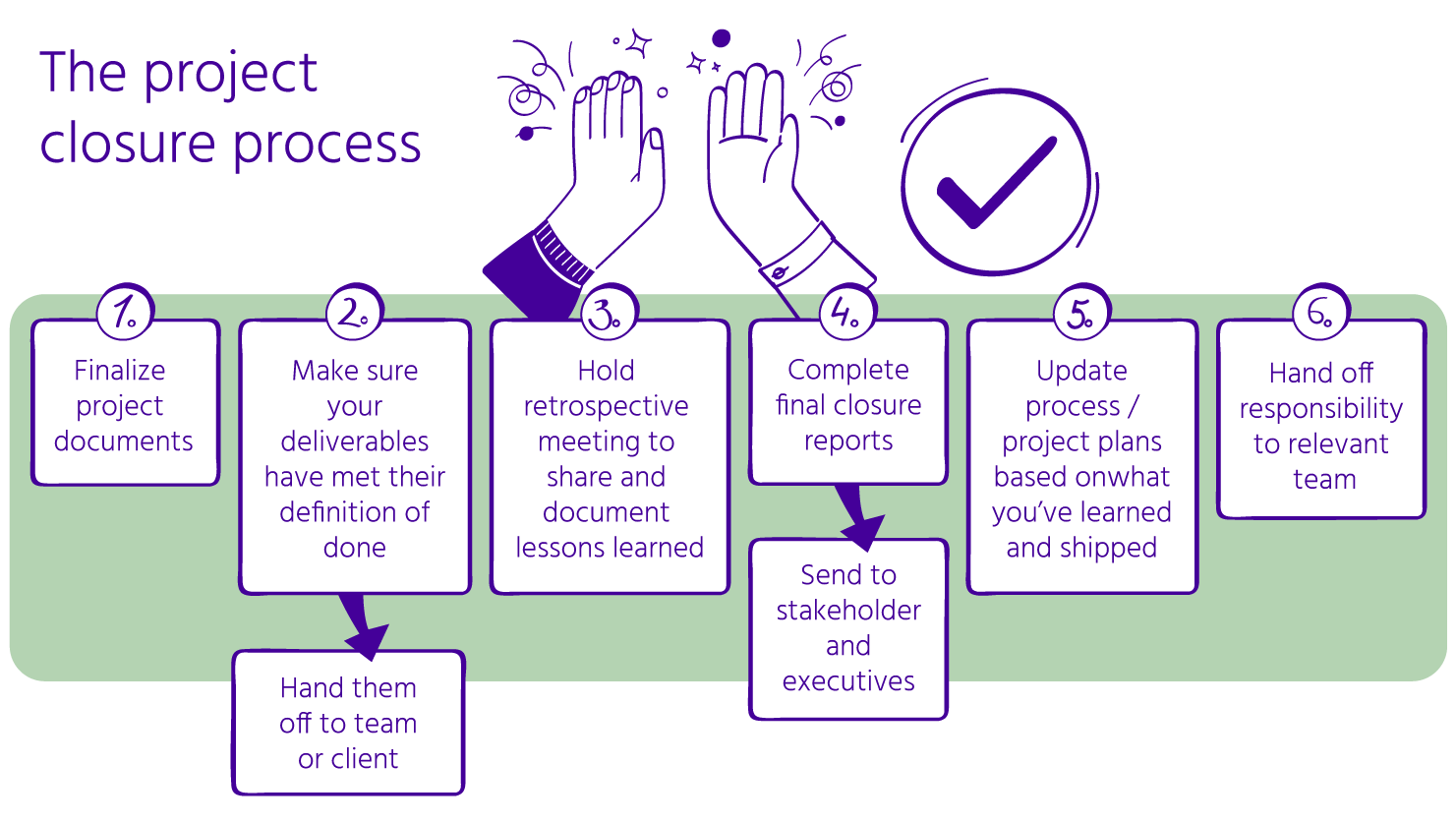
5. <mark style="color:green;">Project close</mark>

Depending on the project complexity each phase may contain sub-phases.

<figure><img src="https://3286121452-files.gitbook.io/~/files/v0/b/gitbook-x-prod.appspot.com/o/spaces%2FYWzVX8R8T6klY40zIavG%2Fuploads%2Fc3YRldhDYyXKW9Zp5aR7%2FAgileXR_GitBook_Visual%2013%402x.png?alt=media&amp;token=51ae2eff-a7a7-4f21-8bcd-005768de25d5" alt=""><figcaption><p>Project management process</p></figcaption></figure>

<br>


# 3.3.1 Project initiation

The aim of project initiation is to establish the project's basic framework. Depending on your school's context, project initiation can be led by the student, the teacher, or both, and it can even involve input from the community. The crucial point is to form a clear project idea that encourages students to define their goals and tasks.&#x20;

In traditional schools, you can take a cue from eduScrum. You can examine the course goals and educational objectives for the quarter and suggest some project ideas that align with the curriculum and the teacher's guidance. You convert your curriculum and educational goals into potential project ideas. You then let students pick the project idea that excites them the most and trust them to complete the work.&#x20;

Alternatively, you can draw inspiration from Agora. Transform educational objectives into Challenges, which are expressed as design questions. You can also allow students to propose their own Challenges and guide them in turning these into design questions.&#x20;

If you're inspired by Agile Learning Centers (ALCs), you can utilize the offerings/requests board along with the gameshifting board. This helps you plan a brainstorming session to collect ideas for activities, projects, or challenges that interest students. You'll need to facilitate this brainstorming session, use Scrum techniques to organize and clarify the ideas, and determine which project ideas students will work on.

#### **Set the** [**gameshifting board**](https://drew.Agilelearningcenters.org/gameshift-board-for-alc-oahu/) **to hold a Brainstorming session.**

The most basic gameshifting board has a column for setting intentions. It also covers the way discussions are conducted, the physical arrangement, the roles people play, and the duration of the meeting. The person organizing the meeting, often called the game architect, outlines the meeting's rules and selects the types of interactions and the overall atmosphere or energy for the meeting.&#x20;

<figure><img src="https://3286121452-files.gitbook.io/~/files/v0/b/gitbook-x-prod.appspot.com/o/spaces%2FYWzVX8R8T6klY40zIavG%2Fuploads%2FRyf7EM0Xt8ZMTSSfFAt3%2FAgileXR_GitBook_Visual%2014%402x.png?alt=media&amp;token=50542db6-8341-4669-8c91-47fd92009510" alt=""><figcaption></figcaption></figure>

As game architect, you can feel free to adapt the board to your needs, see below some handwritten examples:

<div><figure><img src="https://3286121452-files.gitbook.io/~/files/v0/b/gitbook-x-prod.appspot.com/o/spaces%2FYWzVX8R8T6klY40zIavG%2Fuploads%2FFwUuEhJERlB24CfqlujA%2FNancyTilton2-Rb.jpg?alt=media&amp;token=2a1bd928-9eed-46cf-8c1f-f0ab2673097c" alt="" width="375"><figcaption><p><a href="https://www.self-directed.org/tp/spawn-point-vignette/">A <em>GameShifting Board</em> helps facilitate group gatherings</a>.</p></figcaption></figure> <figure><img src="https://3286121452-files.gitbook.io/~/files/v0/b/gitbook-x-prod.appspot.com/o/spaces%2FYWzVX8R8T6klY40zIavG%2Fuploads%2FhjQ3F7XTIbDYfbQAFmsb%2FGameshift_board_1.jpeg?alt=media&amp;token=abba8aeb-5460-49b4-a2d1-64077aeecc4e" alt="" width="375"><figcaption><p><a href="https://everett.agilelearningcenters.org/2015/03/16/alce-tools-game-shifting-board/">Early version of a Gameshifting board</a></p></figcaption></figure></div>

To illustrate this process, let's consider starting the meeting promptly at 9 am and concluding it punctually at 10 am. Our collective objective here is to facilitate a brainstorming session where we freely exchange and share ideas, especially those related to projects and activities.&#x20;

In terms of maintaining our energy levels and creating a relaxed atmosphere, we propose adopting a standing meeting format.&#x20;

As for interaction and communication dynamics, we encourage a "jump-in" approach. This means participants can contribute their ideas at any point when they feel inspired, whether they are students or teachers.&#x20;

In defining roles within the meeting, we recommend designating a facilitator to guide the proceedings and ensure a smooth flow of discussion. Additionally, it's crucial to have someone responsible for reminding participants to record their ideas. To adhere to the 60-minute time frame, having a dedicated timekeeper is essential. If necessary, it can also be beneficial to assign someone to take notes during the meeting.&#x20;

The [Gameshifting board](https://nycagile.org/courses/intro-to-agile-learning-centers/lessons/common-tools-and-practices-at-agile-learning-centers/) serves as a tool to make the implicit social rules of the meeting explicit from the beginning and throughout the meeting. It's versatile and helpful in various settings. These boards clarify expectations and the structure of meetings.&#x20;

For this project initiation phase, we suggest breaking the meeting into three parts, changing the structure of the meeting by explicitly using the gameshifting board. Start with a Brainstorming intention and gather ideas for 15 minutes, then move to Reflect for 30 minutes, and close by Prioritizing/Deciding in the last 15 minutes. Use the gameshifting board to adjust the intention and structure of each meeting phase.

You can read more about the gameshifting board in the following sources:

* [ALCs Starter Kit ](https://starterkit.Agilelearningcenters.org/)
* [Handbook](https://www.Agileforcollaboration.eu/result1/) of the project result 1 for the Erasmus+ project Agile4Collaboration &#x20;
* Videos of the project result 1 for the Erasmus+ [project AgileXR](https://www.Agilexr.eu/result/pr1):&#x20;

<figure><img src="https://3286121452-files.gitbook.io/~/files/v0/b/gitbook-x-prod.appspot.com/o/spaces%2FYWzVX8R8T6klY40zIavG%2Fuploads%2Fx1oEIzH75KyZh5IO02mK%2Fyt_gameprocess.png?alt=media&amp;token=6896d144-fadc-4303-82d2-4fc07e85a4f1" alt="" width="188"><figcaption><p><a href="https://www.youtube.com/watch?v=D0_ERsM-V5g"><mark style="color:purple;">The Gameshifting Board</mark></a></p></figcaption></figure>

<figure><img src="https://3286121452-files.gitbook.io/~/files/v0/b/gitbook-x-prod.appspot.com/o/spaces%2FYWzVX8R8T6klY40zIavG%2Fuploads%2FNIRhijEMIjraUnETZCVj%2Fyt_gameprocess%20(1).png?alt=media&amp;token=c6a37667-8726-4ca5-947a-115d84c5dd3b" alt="" width="188"><figcaption><p><a href="https://www.youtube.com/watch?v=ot_vGZOYa3s&#x26;t=1s"><mark style="color:green;">The Gameshifting Process</mark></a></p></figcaption></figure>

<figure><img src="https://3286121452-files.gitbook.io/~/files/v0/b/gitbook-x-prod.appspot.com/o/spaces%2FYWzVX8R8T6klY40zIavG%2Fuploads%2FPfrKT0GKe6yjHOpr83VQ%2Fyt_gameexample.png?alt=media&amp;token=a2a01a6e-080f-445a-9439-68ca05686df0" alt="" width="188"><figcaption><p><a href="https://www.youtube.com/watch?v=W3OKxIfOYWI&#x26;t=2s"><mark style="color:blue;">The Gameshifting Board (Example)</mark></a></p></figcaption></figure>

**Make and place the offerings/requests board. Adapt it to your needs if needed. Use it in the first 15 minutes to collect ideas from the group.**

&#x20;

<figure><img src="https://3286121452-files.gitbook.io/~/files/v0/b/gitbook-x-prod.appspot.com/o/spaces%2FYWzVX8R8T6klY40zIavG%2Fuploads%2FdJur2XWo8gnFZH2VJkTE%2FAgileXR_GitBook_Visual%2015%402x.png?alt=media&amp;token=858a8f41-f40d-4520-b226-87b8fd51e8f3" alt=""><figcaption></figcaption></figure>

Create a board with two columns: "offerings" and "requests." You can place this board on the wall or use an online platform like Mural, Trello, or any other web tool designed for boards. When using a physical board on the wall, invite students and teachers to jot down their ideas on sticky notes and stick them on the board.&#x20;

This board serves as a way to collect ideas from the brainstorming session, gather topics or activities that students and teachers are interested in working on, and accumulate the offerings that individuals can contribute to the group.&#x20;

In the "offerings" column, participants place sticky notes containing ideas for what they can offer to the group. This could be their expertise, activities they can host, something they can teach, or anything they're willing to share with others. People share their skills, knowledge, and interests with the group. This group activity can also be paired with an individual activity to connect with the students. For instance, you can pose questions to the group based on the [Covideos Ikigai canvas](<https://designtools.be/covideos >) to guide the brainstorming session.&#x20;

In the "requests" column, participants use sticky notes to list topics they want to learn about. They may need help from someone within the group or an external expert. For example, a student might want to learn about climate issues, and someone else in the group may share this interest but lacks expertise. They request assistance, support, lessons, or expertise.&#x20;

The requests can also be framed as ["How Might We" questions](https://www.cocreatingwellbeing.com/module/ideation).&#x20;

Both columns, "offerings" and "requests," can be inspired by the Agora approach and include 'Challenges.' Students and teachers write their ideas on sticky notes and place them on the board.&#x20;

It's essential to remember that everyone has something to offer and something to request, creating a dynamic and collaborative environment for learning and growth.

**Adjust the gameshifting board for a Reflect session according to your specific requirements.**

Instead of standing and aiming for a relaxed atmosphere, it may be more appropriate to have everyone sit down and focus. In this setting, participants can raise their hand when they have an opinion.&#x20;

During this Reflect session, use Scrum techniques to organize the offerings and requests. Take the time to structure and cluster the ideas. Engage in a discussion with the students, considering the pros and cons of the various ideas. Group together ideas that are similar or related, creating clusters of related sticky notes. Assign a label to each group to clearly categorize and identify the clusters. This process helps streamline and make sense of the collected ideas. The Reflect session should last approximately 30 minutes and is a valuable step in refining and prioritizing the ideas generated.

<figure><img src="https://3286121452-files.gitbook.io/~/files/v0/b/gitbook-x-prod.appspot.com/o/spaces%2FYWzVX8R8T6klY40zIavG%2Fuploads%2FTKLOrymBO6kG7aSj2DIS%2FAgileXR_GitBook_Visual%2016%402x.png?alt=media&amp;token=8e724c9a-e300-4936-9af6-00ce617a575c" alt=""><figcaption></figcaption></figure>

Use affinity mapping techniques to do this, get inspired by reading more about brainstorm techniques:

<figure><img src="https://3286121452-files.gitbook.io/~/files/v0/b/gitbook-x-prod.appspot.com/o/spaces%2FYWzVX8R8T6klY40zIavG%2Fuploads%2F8WpB1cBNvkNpfzAo5M4V%2Faffinity%20diagrmas.png?alt=media&amp;token=618b57ea-a886-4dda-aefa-905cf14430fe" alt="" width="188"><figcaption><p><a href="https://www.mitemmc.org/monthly-tips/affinity-diagrams/ ">Affinity diagrams</a></p></figcaption></figure>

<figure><img src="https://3286121452-files.gitbook.io/~/files/v0/b/gitbook-x-prod.appspot.com/o/spaces%2FYWzVX8R8T6klY40zIavG%2Fuploads%2FZDsLQBotL1ku5bEB2kim%2Fideation.png?alt=media&amp;token=afe401c0-d889-4bef-b709-f1eec4841c67" alt="" width="188"><figcaption><p><a href="https://www.cocreatingwellbeing.com/module/ideation ">Ideation</a></p></figcaption></figure>

<figure><img src="https://3286121452-files.gitbook.io/~/files/v0/b/gitbook-x-prod.appspot.com/o/spaces%2FYWzVX8R8T6klY40zIavG%2Fuploads%2FgNsiKbkz8icu104uV7VL%2FMethodKit%20for%20Team%20Development.png?alt=media&amp;token=f4144c30-51ef-40a4-b182-fa76bcbdf5f6" alt="" width="188"><figcaption><p><a href="https://toolbox.hyperisland.com/methodkit-for-team-development  ">MethodKit for Team Development</a></p></figcaption></figure>

<figure><img src="https://3286121452-files.gitbook.io/~/files/v0/b/gitbook-x-prod.appspot.com/o/spaces%2FYWzVX8R8T6klY40zIavG%2Fuploads%2FcFHF42Olew2L38l6DVe9%2Faffinity%20mappibg.png?alt=media&amp;token=d8916e5d-aca8-43c6-85fa-e26dde68b394" alt="" width="188"><figcaption><p><a href="https://www.skillsofthemodernage.com.au/workshop-playshop/affinity-mapping ">Affinity mapping</a></p></figcaption></figure>

<figure><img src="https://3286121452-files.gitbook.io/~/files/v0/b/gitbook-x-prod.appspot.com/o/spaces%2FYWzVX8R8T6klY40zIavG%2Fuploads%2Fgx6vRcyfNgNvZ3olTbbf%2FDigital%20Visual%20Facilitation.png?alt=media&amp;token=f11b2a5f-1e55-48c3-8052-cfc7efe3336a" alt="" width="188"><figcaption><p><a href="https://digitalfacilitation.net/?p=596">Digital Visual Facilitation</a></p></figcaption></figure>

<figure><img src="https://3286121452-files.gitbook.io/~/files/v0/b/gitbook-x-prod.appspot.com/o/spaces%2FYWzVX8R8T6klY40zIavG%2Fuploads%2FgecM5BbnHjru4TvLPsKr%2FAgileXR_GitBook_Visual%2017%402x.png?alt=media&amp;token=c6602d3e-ab1c-4de4-acde-49b9c911c6e3" alt=""><figcaption></figcaption></figure>

**Set the gameshifting board to hold a Decide session. Adapt it to your needs. A suggestion is to do this part of the session by standing up and being focused. Silent and jump-in to place the voting dots.**

After clustering the requests and offerings, you'll have a board with cards that need to be prioritized. To conclude the brainstorming session and decide which ideas will progress to the creation phase, you can employ various prioritization methods, and one of them is called [Dotmocracy](<https://www.skillsofthemodernage.com.au/workshop-playshop/dot-mocracy >) or Dot voting.&#x20;

Here's how it works: Each student is given a set of colored dots to vote with. The number of dots should be roughly around 25% of the total available options to vote on. Students use these dots to indicate which ideas or cards they consider the most important or valuable.&#x20;

This method allows for a democratic and visual way to determine the ideas that have the most support and should be given priority for further development. It helps ensure that the collective preferences and interests of the group are considered when selecting ideas to move forward with.

<figure><img src="https://3286121452-files.gitbook.io/~/files/v0/b/gitbook-x-prod.appspot.com/o/spaces%2FYWzVX8R8T6klY40zIavG%2Fuploads%2FiZBFPTPrSlHHGFbyLFV8%2FAgileXR_GitBook_Visual%2018%402x.png?alt=media&amp;token=db2fd065-35e0-408a-9803-0abc83ee622d" alt=""><figcaption></figcaption></figure>

Taking inspiration from the [MoSCoW prioritization method](<https://www.productplan.com/glossary/moscow-prioritization/ >) often used in software development, you can instruct your students to initially place their dots on the cards that fall under the "Must" category. This indicates that these are the ideas they consider of utmost importance and have the highest priority for inclusion in the Creation phase.&#x20;

By following this approach, you can ensure that the ideas that are most critical and vital to the group's goals are given the highest priority and are more likely to be pursued in the next phase of the project.<br>

<figure><img src="https://3286121452-files.gitbook.io/~/files/v0/b/gitbook-x-prod.appspot.com/o/spaces%2FYWzVX8R8T6klY40zIavG%2Fuploads%2FgHkfnRwK3KDLfcODSKm1%2FAgileXR_GitBook_Visual%2019%402x.png?alt=media&amp;token=597b22c3-1a9f-4425-a78e-d90f3b17374d" alt=""><figcaption></figcaption></figure>

To conclude the Decide session, reorganize the sticky notes if possible, making it clear which ideas have received the most votes.

&#x20;

<figure><img src="https://3286121452-files.gitbook.io/~/files/v0/b/gitbook-x-prod.appspot.com/o/spaces%2FYWzVX8R8T6klY40zIavG%2Fuploads%2FNXdXZQ3WhpDULecAxKkF%2FAgileXR_GitBook_Visual%2020%402x.png?alt=media&amp;token=d6787d12-1889-4209-a1f9-c178a6046beb" alt=""><figcaption></figcaption></figure>

The choice of whether to work individually or in groups and how to organize the project-based work is entirely up to you and how you want to design your project. At the end of this session, you should have a clearly defined topic or topics and the individuals or groups responsible for working on those topics.

<figure><img src="https://3286121452-files.gitbook.io/~/files/v0/b/gitbook-x-prod.appspot.com/o/spaces%2FYWzVX8R8T6klY40zIavG%2Fuploads%2FAE17369igbSwH8YshaNJ%2FAgileXR_GitBook_Visual%2021%402x.png?alt=media&amp;token=28da5f67-0478-406d-a616-f9111e8b92c9" alt=""><figcaption></figcaption></figure>

\
If you'd rather not collaborate with your students to co-create the project idea, you also have the option to collaborate with your fellow teachers. Together, you can develop the project concept and create a multidisciplinary project. [This](< https://designtools.be/covideos >) approach is a viable alternative.&#x20;

Collaborating with other teachers allows for a diverse range of expertise and perspectives to contribute to the project's development. It can lead to the creation of more comprehensive and multidimensional projects that address various aspects of the subject matter.

<br>

<br>

####


# 3.3.2 Project planning

After the project initiation, you have a project idea, and it's essential to ensure a well-structured plan for achieving tangible results. The planning phase is a critical aspect of successful project management, and its primary focus is to create a roadmap that guides the team's efforts.&#x20;

Projects can vary in size, but all of them consist of specific tasks that need to be executed. The key to effective project planning is breaking down the overarching idea into smaller, manageable pieces known as work packages or tasks. You can assist your students in identifying and listing high-level tasks. Initially, some of these tasks might still be too large to handle, so gradually, you'll need to help your students reflect and further divide them into smaller, achievable tasks. Keep in mind that some students may excel in this at a young age, while others might require more support. It all depends on their individual needs.&#x20;

In the realm of Agile and Agile learning, one of the most commonly used tools for visualizing work segments is the [Kanban board](https://kanbanize.com/kanban-resources/getting-started/what-is-kanban-board). Kanban boards are highly practical for tracking progress during the project execution phase and can be utilized with physical paper sticky notes or their online equivalents. A basic Kanban board in Agile typically comprises columns for the Backlog (or To Do), Doing, and Done. This visual system simplifies the process of tracking and managing work as it progresses through various stages.

<figure><img src="https://3286121452-files.gitbook.io/~/files/v0/b/gitbook-x-prod.appspot.com/o/spaces%2FYWzVX8R8T6klY40zIavG%2Fuploads%2F17xNN9Wt71idNV9RhfdJ%2FAgileXR_GitBook_Visual%2022%402x.png?alt=media&amp;token=fd538d3d-57ea-458d-843b-91bcb2380d48" alt=""><figcaption></figcaption></figure>

The planning phase can be done in a group or individually, depending on the type of project: group project or personal/individual project.  We encourage you to search the Internet for web-based Agile resources that can support the Agile structures in your classroom. &#x20;

Have a look at this adaptation of a Kanban board for collaborative learning:

<figure><img src="https://3286121452-files.gitbook.io/~/files/v0/b/gitbook-x-prod.appspot.com/o/spaces%2FYWzVX8R8T6klY40zIavG%2Fuploads%2FIN0bv48bnK7B31DbQjRZ%2Fmiro%20kanban.png?alt=media&amp;token=c43f020d-658a-4431-9e0d-e19ad75b5b39" alt="" width="188"><figcaption><p><a href="https://miro.com/miroverse/collaborative-learning-objectives/ ">Kanban board</a></p></figcaption></figure>

Have a look at this advanced kanban to track tasks:

<figure><img src="https://3286121452-files.gitbook.io/~/files/v0/b/gitbook-x-prod.appspot.com/o/spaces%2FYWzVX8R8T6klY40zIavG%2Fuploads%2FKcXCNQ3VoWnm6mcBMqzf%2Fmiro%20scrum.png?alt=media&amp;token=1f12e588-5f1d-4273-88f6-9e17fd7bb8dd" alt="" width="188"><figcaption><p><a href="https://miro.com/miroverse/scrum-task-tracker/">Track tasks Kanban board</a></p></figcaption></figure>

For a personal project, you can directly assist and guide your student.&#x20;

However, for a group project, you'll need to conduct a planning meeting, engage in scrum sessions with the students, and facilitate the process. This planning meeting can often serve as the beginning of a "sprint," a term commonly used in eduScrum to represent a focused period of work.&#x20;

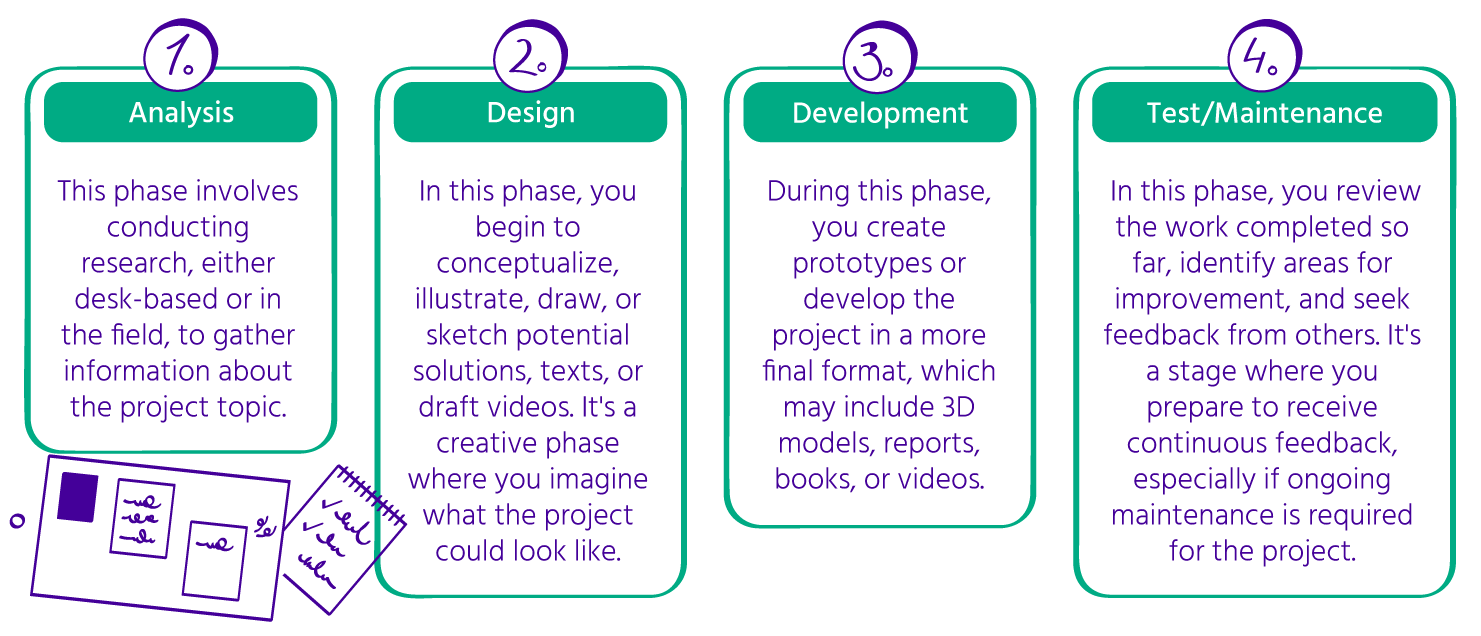
The primary goal of the planning meeting is to break down the project into smaller, manageable tasks. Most project backlogs consist of [four major phases](https://relevant.software/blog/Agile-software-development-lifecycle-phases-explained/): Analysis, Design, Development, and Test/Maintenance. Here's a brief overview of these phases:

&#x20;

<figure><img src="https://3286121452-files.gitbook.io/~/files/v0/b/gitbook-x-prod.appspot.com/o/spaces%2FYWzVX8R8T6klY40zIavG%2Fuploads%2FWhnqdLRNYqrjwA6schRh%2FAgileXR_GitBook_Visual%2023%402x.png?alt=media&amp;token=75eb7437-d147-4ebe-87bb-a842351a385a" alt=""><figcaption><p>Project backlog</p></figcaption></figure>

\
A project backlog typically consists of these major tasks, which can then be further broken down into smaller stories or individual executable tasks. You have the flexibility to adapt and customize your own Kanban boards based on your specific needs and project management approach. For example, Agile Learning Centers offer an example where older students who were enthusiastic about project work created their own ALC Challenges board. This board allows for visualizing and managing project tasks effectively.

<figure><img src="https://3286121452-files.gitbook.io/~/files/v0/b/gitbook-x-prod.appspot.com/o/spaces%2FYWzVX8R8T6klY40zIavG%2Fuploads%2F8YiKQySCFs0nueG9GWTP%2FAgileXR_GitBook_Visual%2024%402x.png?alt=media&amp;token=a8289d9c-9940-4ee7-82d7-82863f70eb6a" alt=""><figcaption></figcaption></figure>

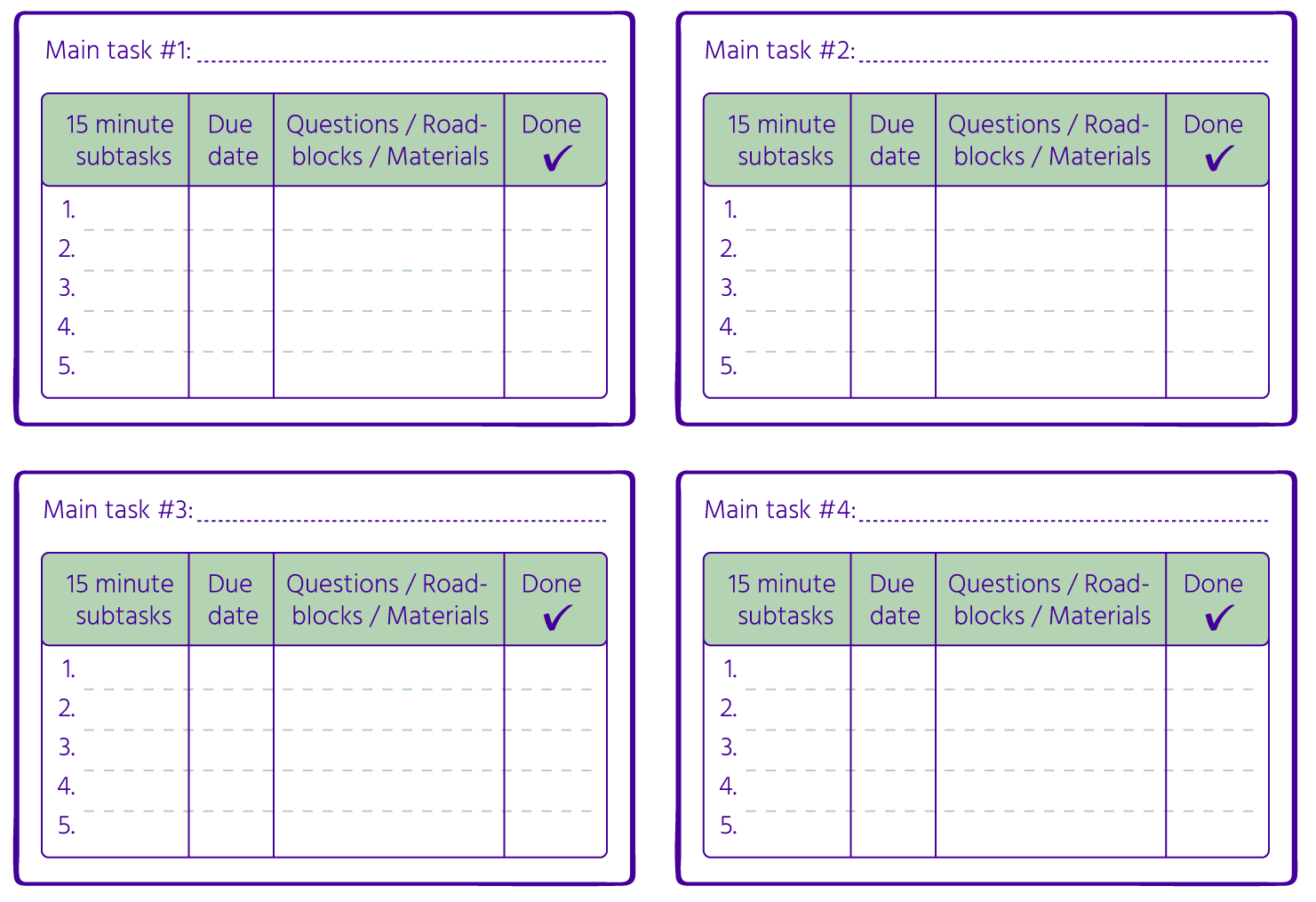
Project-based learning is not exclusive to Agile schools; it's also implemented in other types of educational institutions, each developing its own unique methods. One such example is Schoolhabits, which has designed a project management strategy template that breaks down projects into four main phases.&#x20;

On the [Schoolhabits website](https://schoolhabits.com/how-to-start-a-project-for-school-the-only-project-management-strategy-youll-ever-need/), you can find information about the four primary project phases along with some initial thoughts. Additionally, the project's name and due date are clearly defined. These four main phases can align with the typical phases found in software projects, such as analysis, design, development, and testing. However, they can also be customized to suit the specific requirements of each project. These main phases can be organized as items in a Kanban backlog, allowing for clear visualization and management of the project's progress.

<figure><img src="https://3286121452-files.gitbook.io/~/files/v0/b/gitbook-x-prod.appspot.com/o/spaces%2FYWzVX8R8T6klY40zIavG%2Fuploads%2Fi4rPFowvV7DUWRjgEYGK%2FAgileXR_GitBook_Visual%2025%402x.png?alt=media&amp;token=2017a8e7-5be1-409d-8c3f-aecd6706d3d0" alt=""><figcaption></figcaption></figure>

After your students have completed the initial template with the main project phases, the next step involves identifying the primary tasks associated with each phase and further breaking them down into smaller, more manageable tasks. This process allows for a more detailed and comprehensive plan for the project, ensuring that every aspect is thoroughly addressed and executed.

The breakdown from a Schoolhabits template can be used as stories or tasks in a Kanban board. You repeat the breakdown process for all phases and main tasks. See images below as illustration of the process.

<figure><img src="https://3286121452-files.gitbook.io/~/files/v0/b/gitbook-x-prod.appspot.com/o/spaces%2FYWzVX8R8T6klY40zIavG%2Fuploads%2Fc6poNHMfc350YKcDqw76%2FAgileXR_GitBook_Visual%2026%402x.png?alt=media&amp;token=0d6a8e26-2470-44b2-be56-bbb92ac30b46" alt=""><figcaption></figcaption></figure>

\
You can read more about the kanban board in the following sources:

* [ALCs Starter Kit ](https://starterkit.Agilelearningcenters.org/)
* [Handbook](https://www.Agileforcollaboration.eu/result1/) of the project result 1 for the Erasmus+ project Agile4Collaboration &#x20;
* Videos of the project result 1 for the Erasmus+ [project AgileXR](https://www.Agilexr.eu/result/pr1):&#x20;

<figure><img src="https://3286121452-files.gitbook.io/~/files/v0/b/gitbook-x-prod.appspot.com/o/spaces%2FYWzVX8R8T6klY40zIavG%2Fuploads%2F1jMjMDf9SVNZNYIHkTka%2Fyt_kanban.png?alt=media&amp;token=87f1df0d-c133-40f6-aaa0-5eed9484c33b" alt="" width="188"><figcaption><p><a href="https://www.youtube.com/watch?v=MV5gwksr3Mg"><mark style="color:purple;">The Kanban Board</mark></a></p></figcaption></figure>

<figure><img src="https://3286121452-files.gitbook.io/~/files/v0/b/gitbook-x-prod.appspot.com/o/spaces%2FYWzVX8R8T6klY40zIavG%2Fuploads%2FZ0S9F0JdaKnepp9npdaG%2Fyt_The%20Task%20Management%20Process.png?alt=media&amp;token=14344987-f712-4048-b42a-c4929e4b510f" alt="" width="188"><figcaption><p><a href="https://www.youtube.com/watch?v=ZHmKjWEYHwE&#x26;t=3s"><mark style="color:green;">The Task Management Process</mark></a></p></figcaption></figure>

<figure><img src="https://3286121452-files.gitbook.io/~/files/v0/b/gitbook-x-prod.appspot.com/o/spaces%2FYWzVX8R8T6klY40zIavG%2Fuploads%2FT7AVMwd4lcjhAQ63Tx08%2Fyt_The%20Kanban%20Board%20(Example).png?alt=media&amp;token=547e29af-402e-4866-a091-9dd0eb1fddcd" alt="" width="188"><figcaption><p><a href="https://www.youtube.com/watch?v=RGmL7tmSx08&#x26;t=1s"><mark style="color:blue;">The Kanban Board (Example)</mark></a></p></figcaption></figure>


# 3.3.3 Project execution

Now that you have an initial plan in place, and students have defined their tasks, you can actively engage in the Agile learning cycle, which involves the daily work conducted by students to advance their projects within a period referred to as a Sprint. A Sprint typically spans from 2 weeks to 1 month and aims to produce a deliverable. This deliverable can be either a version of the final product or project, or the end result itself, depending on the project's stage of execution.&#x20;

For instance, if you've planned a project to be completed in 2 months and decided to have biweekly sprints, at the end of the first sprint, which is after just 2 weeks, the student would have created and shared the first version of the result. After 4 weeks, version 2 is shared, after 6 weeks, version 3 is shared, and so on. This process continues until the second month when the student shares the final result of her project, which would be version 8 at sprint 8.&#x20;

To effectively visualize and monitor progress during the Sprints, it's crucial to have daily meetings at the beginning and end of each day. These meetings serve to track the Agile learning cycle, which involves:&#x20;

1. Setting intentions for the day.&#x20;
2. Engaging in the creation or completion of tasks.&#x20;
3. Reflecting, either individually or as a group, on what has been accomplished and how the process unfolded.&#x20;
4. Sharing the achievements and progress made during the day.&#x20;

These daily meetings help keep everyone aligned, informed, and on track throughout the project's development.<br>

<figure><img src="https://3286121452-files.gitbook.io/~/files/v0/b/gitbook-x-prod.appspot.com/o/spaces%2FYWzVX8R8T6klY40zIavG%2Fuploads%2Ffpx6P7mOjOszAy3Gz6ge%2FAgileXR_GitBook_Visual%208%402x.png?alt=media&amp;token=36d5a8d0-00dd-4078-9c29-5aa1955e951a" alt=""><figcaption></figcaption></figure>

The frequency and format of your meetings should be adaptable based on the type of school and the time allocated for projects. Your Agile learning cycle might be longer or shorter, which can necessitate adjustments to your meeting schedule. The nature of your school environment, whether it primarily focuses on project-based learning or offers limited project time, can also impact your meeting strategy.&#x20;

For example, if you work in a school where projects are the central mode of instruction, you might be able to have daily meetings with your students. In such cases, you can choose to hold a single morning meeting, such as a Stand-Up meeting similar to the software [Scrum framework](https://scrumguide.nl/daily-standup-meeting/) or [eduScrum framework](<https://eduscrum.org/how-eduscrum-works/ >) , to set intentions for the day. Alternatively, you can opt for two daily meetings, [like those used in Agile Learning Centers](https://Agilelearningcenters.org/item/set-the-week/): a morning scrum and stand-up meeting to set daily intentions and an afternoon meeting for reflections.&#x20;

However, if you're in a school where project-based learning occurs once a week for a limited duration, like a two-hour session, daily meetings might not be practical. In this scenario, a weekly meeting to track progress and offer guidance could be more suitable. The key is to customize your boards and meeting rituals to align with the specific context and needs of your school.&#x20;

Ultimately, the design of your daily cycle is a flexible choice, influenced by the group's needs, your personal preferences as a facilitator or teacher, and the school's specific requirements. Adaptability is a fundamental aspect of being Agile.

To keep these meetings short and focused, students should remain silent for most of the time and use hand signals to participate. Only one student should speak at a time. Hand signals can provide the group with instant feedback without interrupting the current speaker, helping maintain an efficient and structured meeting.

{% tabs %}
{% tab title="Twinkle fingers up" %}
Twinkle fingers up / “This friend speaks my mind” - this signal is done with wiggling fingers and demonstrates strong resonance with what is being spoken.

<figure><img src="https://3286121452-files.gitbook.io/~/files/v0/b/gitbook-x-prod.appspot.com/o/spaces%2FYWzVX8R8T6klY40zIavG%2Fuploads%2Fjublng7xQZTNpYMXx0SI%2FAgileXR_GitBook_Visual%2027%402x.png?alt=media&amp;token=2dd3604c-fc49-4ee8-b956-4da77fff56a8" alt=""><figcaption></figcaption></figure>
{% endtab %}

{% tab title="Twinkle fingers down" %}
Twinkle fingers down - this signal signifies disagreement or a negative response, without implying disapproval of the speaker. It enables real-time feedback on the conversation without confrontation, allowing individuals to express their perspective.

<figure><img src="https://3286121452-files.gitbook.io/~/files/v0/b/gitbook-x-prod.appspot.com/o/spaces%2FYWzVX8R8T6klY40zIavG%2Fuploads%2FRBuYL4lllcW1tddqo1LS%2FAgileXR_GitBook_Visual%2028%402x.png?alt=media&amp;token=aaae6666-8194-4b66-a56f-45d40b30798c" alt=""><figcaption></figcaption></figure>
{% endtab %}

{% tab title="Delta" %}
Delta / Change-up -  a call to attention that the group process may need to be GameShifted or that the current process agreements are not being honored. A person can give this hand signal so others can have a chance to wrap up what they’re saying before they say what change-up they see is needed.Sometimes the sign is enough to shift people’s awareness and behavior back on the intended track.

<figure><img src="https://3286121452-files.gitbook.io/~/files/v0/b/gitbook-x-prod.appspot.com/o/spaces%2FYWzVX8R8T6klY40zIavG%2Fuploads%2Fg958Q8vH2W4CPnoekl1q%2FAgileXR_GitBook_Visual%2029%402x.png?alt=media&amp;token=7d8d0506-f3fb-4e9b-8e98-6d631a5516cd" alt=""><figcaption></figcaption></figure>

<br>
{% endtab %}

{% tab title="Focus" %}
Focus - this signal serves as a reminder for the group to regain concentration when the conversation drifts away from its initial purpose. It's a means to prevent undesired tangents and enhance efficiency in discussions that have strayed from their original intent.

<figure><img src="https://3286121452-files.gitbook.io/~/files/v0/b/gitbook-x-prod.appspot.com/o/spaces%2FYWzVX8R8T6klY40zIavG%2Fuploads%2F3y1wpMe7xIxFNtMi2crR%2FAgileXR_GitBook_Visual%2030%402x.png?alt=media&amp;token=b6c2e622-d1c4-44a4-9345-8cd4ff71cede" alt=""><figcaption></figcaption></figure>
{% endtab %}

{% tab title="Clarity" %}
Clarity - this signal is a way for individuals to indicate their questions or express their confusion about certain aspects of the conversation. It is crucial for the group to maintain a shared understanding, and when this is lacking, the facilitator and team members need to be aware to address the issue effectively.

<figure><img src="https://3286121452-files.gitbook.io/~/files/v0/b/gitbook-x-prod.appspot.com/o/spaces%2FYWzVX8R8T6klY40zIavG%2Fuploads%2Fcvgp7SwZ7c5RGz8CkW5V%2FAgileXR_GitBook_Visual%2031%402x.png?alt=media&amp;token=7c2db86e-6576-459c-ba6f-dad2fc41963d" alt=""><figcaption></figcaption></figure>
{% endtab %}
{% endtabs %}

Feel free to introduce and use new signals for shifting and signaling dynamics as needed within your learning community. These signals can help maintain a productive and organized meeting. Signals such as "Stay on Focus," "Trust the Group," "Clarification Question," "Slow Down," or "Direct Response" can be introduced and displayed on your Gameshifting board or another visible place where they will be easily accessible to working groups.

You can read more about the hand signals in the following sources:

* [ALCs Starter Kit ](https://starterkit.Agilelearningcenters.org/)
* [Handbook](https://www.Agileforcollaboration.eu/result1/) of the project result 1 for the Erasmus+ project Agile4Collaboration &#x20;
* Videos of the project result 1 for the Erasmus+ [project AgileXR](https://www.Agilexr.eu/result/pr1):&#x20;

<figure><img src="https://3286121452-files.gitbook.io/~/files/v0/b/gitbook-x-prod.appspot.com/o/spaces%2FYWzVX8R8T6klY40zIavG%2Fuploads%2FkMIqvMycm4zqRApxCSoL%2Fyt_handsignals.png?alt=media&amp;token=ab9c0a00-c5a6-4a83-a45f-b564f09443bf" alt="" width="188"><figcaption><p><a href="https://www.youtube.com/watch?v=eXM2mj9oH-0"><mark style="color:purple;">Hand Signals</mark></a></p></figcaption></figure>

<br>


# 3.3.4 Project performance/monitoring

Various methods are available to track project progress and assess the performance of individuals or groups during project execution. In Agile software development, techniques like [Kanban boards](https://youtu.be/Bcid33tgq8A) are employed for daily task monitoring within sprints. These techniques are also utilized in schools, as explained in the preceding section. Additionally, performance assessment methods such as the [burn-down chart](https://www.youtube.com/watch?v=1PfI7zSzjbM) and its counterpart, the [burn-up chart](https://www.youtube.com/watch?v=o-DoeXeNjVE), are employed in software development. When using the eduScrum methodology in schools, a [run-up chart](<https://courses.workshopwednesday.co/courses/479177/lectures/8844152 >) is commonly utilized for similar purposes.

**Project monitoring**

Monitoring is an essential and recurring task that involves systematically gathering information from a project. It serves several important purposes, including documenting results, processes, and experiences, which can be used to guide decision-making and learning processes. Monitoring allows you to check the progress of your project against your plans and intentions, providing data that can be used for various purposes:

<figure><img src="https://3286121452-files.gitbook.io/~/files/v0/b/gitbook-x-prod.appspot.com/o/spaces%2FYWzVX8R8T6klY40zIavG%2Fuploads%2FafSnEsf4RY1OiDMCahRB%2FAgileXR_GitBook_Visual%2032%402x.png?alt=media&amp;token=ff82859b-e62e-4dbf-9098-637ebc25e733" alt=""><figcaption><p>Project monitoring</p></figcaption></figure>

In Agile project management, project monitoring is an ongoing and iterative process aimed at tracking project progress and making necessary adjustments. Its goal is to ensure the project stays on course and meets stakeholder requirements. This process involves monitoring progress against the project plan, identifying and addressing issues or risks, and taking corrective actions when needed. [Agile project management](<https://courses.workshopwednesday.co/courses/479177/lectures/8844152 >) uses various tools for monitoring, such as feedback loops, Gantt charts, work breakdown structures, issue logs, and sprint reviews.&#x20;

In some Agile learning centers, students are required to engage in [daily blogging](https://Agilelearningcenters.org/frequently-asked-questions/) as part of their learning experience. This information is collected systematically and used for reflective purposes rather than for performance measurement. These centers emphasize self-directed learning and individual learning pathways, with no comparisons made between students. In contrast, at [Freinet schools in Belgium](https://schoolsaroundtheworld.wordpress.com/freinet-secondary-and-high-school/), monitoring may not occur daily, and information is collected at specific times with deadlines for presenting work. Monitoring in Freinet schools includes activities like regular project presentations, group governance meetings, and written text assignments, which may involve performance assessments like exams or other types of evaluations.

The board below shows how eduScrum monitors project-based learning. You can find such a board in its web-based form implemented in Miro:&#x20;

<figure><img src="https://3286121452-files.gitbook.io/~/files/v0/b/gitbook-x-prod.appspot.com/o/spaces%2FYWzVX8R8T6klY40zIavG%2Fuploads%2FiF7lkLCWAxRctC3gQRRH%2Fmiro_eduscrum.png?alt=media&amp;token=8c1fbab0-d482-4c80-ad34-2c10e74fbae8" alt="" width="188"><figcaption><p><a href="https://miro.com/miroverse/flap-eduscrum-educational-board/ ">eduScrum Educational Board</a></p></figcaption></figure>

<figure><img src="https://3286121452-files.gitbook.io/~/files/v0/b/gitbook-x-prod.appspot.com/o/spaces%2FYWzVX8R8T6klY40zIavG%2Fuploads%2FTQn76KHxCSAuCm2VEZ9L%2F_img_edu_flap.png?alt=media&amp;token=62f45fb2-499d-467b-957d-52e8913e815e" alt=""><figcaption><p>eduScrum Educational Board</p></figcaption></figure>

We encourage you to search for [web-based Agile resources](https://miro.com/miroverse/personal-learning-backlog/) to support the Agile structures you want to build in your classroom, or for your own learning or the learning pathways of your students. &#x20;

**Project performance**

Agile project management has introduced a transformative approach to how teams plan and execute projects. It emphasizes flexibility, adaptability, and a strong commitment to delivering value. To ensure the success of Agile projects, it's essential to utilize effective tools and techniques, such as the [BurnUp chart](https://www.wrike.com/blog/what-is-a-burn-up-chart/) , the [BurnDown chart](https://www.coursera.org/articles/what-is-burndown-chart) and the [RunUp chart](https://eduscrum.com.ru/wp-content/uploads/2020/01/The_eduScrum-guide-English_2.0_update_21-12-2019.pdf).&#x20;

BurnDown and BurnUp charts serve as invaluable tools for tracking and managing progress in various academic projects and initiatives. These graphical representations allow educators and students to visualize the journey towards project completion.&#x20;

A BurnDown chart illustrates the remaining work over time, helping to ensure goals are met within set timeframes.

<figure><img src="https://3286121452-files.gitbook.io/~/files/v0/b/gitbook-x-prod.appspot.com/o/spaces%2FYWzVX8R8T6klY40zIavG%2Fuploads%2Ff0WaTvBuACR4CkF8yI1w%2FAgileXR_GitBook_Visual%2033%402x.png?alt=media&amp;token=c874c0ed-438e-4dd3-9179-750ed7ea3ad7" alt=""><figcaption><p>BurnDown chart</p></figcaption></figure>

Conversely, a BurnUp chart displays both completed work and additional requirements, offering a comprehensive view of project status and aiding in transparent communication and early issue detection. These tools are essential for effectively managing educational projects and fostering collaboration among stakeholders.

<figure><img src="https://3286121452-files.gitbook.io/~/files/v0/b/gitbook-x-prod.appspot.com/o/spaces%2FYWzVX8R8T6klY40zIavG%2Fuploads%2FYVnzfG7RbItNfAPvw4KS%2FAgileXR_GitBook_Visual%2034%402x.png?alt=media&amp;token=ab62cb37-1d54-418d-9e70-49088069bcfa" alt=""><figcaption><p>BurnUp chart</p></figcaption></figure>

In the context of BurnUp chart, RunUp chart serves as a valuable tool for monitoring work planning progress. This chart features a graphical representation, with the number of available lessons displayed along the horizontal axis and the quantity of work completed along the vertical axis.&#x20;

To estimate the overall volume of work, the team engages in a collaborative exercise known as "planning poker." In this process, each task is thoroughly discussed, and a specific number of points is assigned to each task, reflecting its scope and complexity. After tallying the points allocated to all tasks, the total workload becomes clear.&#x20;

Subsequently, the team proceeds to create the RunUp Chart. This chart showcases the total points achieved on the Y-axis, while the X-axis represents the available lessons, meetings, weeks, and similar time increments. A line is drawn, extending to the end of the designated sprint, signifying the completion of all work.&#x20;

&#x20;

<figure><img src="https://3286121452-files.gitbook.io/~/files/v0/b/gitbook-x-prod.appspot.com/o/spaces%2FYWzVX8R8T6klY40zIavG%2Fuploads%2Fdza7TtnTRHMkT9HPFaDF%2FAgileXR_GitBook_Visual%2035%402x.png?alt=media&amp;token=8d97ed9c-3d8d-4c8a-8f49-2bd51885a8ca" alt=""><figcaption><p>RunUp Chart</p></figcaption></figure>

By dividing the total points by the available lessons, the team gains insight into their work rate, referred to as "Velocity." This calculation offers a clear indication of the amount of work that needs to be accomplished in each lesson to ensure timely completion.&#x20;

During the initial phase of each lesson, typically within the context of a stand-up meeting, tasks are declared as "Done." This update is promptly reflected on the RunUp Chart. This real-time visualization allows both the team and the teacher to gauge whether the project's progress aligns with the intended course, ensuring transparency and facilitating effective project management.

<br>

<br>


# 3.3.5 Project closing

[**Closing a sprint**](https://www.mountaingoatsoftware.com/Agile/scrum/meetings/sprint-retrospective)

In the Agile educational framework, closing a sprint, or "educational iteration," is a crucial step to keep teaching and learning processes flexible and responsive. Here's how Agile principles apply to closing a sprint in schools.

**Sprint review**&#x20;

In the eduScrum framework, at the end of an educational iteration, teachers and students conduct a sprint review. During this review, they collectively evaluate the progress made during the learning cycle. Students reflect on their learning experiences, and together with the teachers assess whether the educational objectives were achieved. This review process is similar to inspecting the increment in Agile terms. &#x20;

Have a look at the [Mural template](https://www.mural.co/templates/sprint-review) for a sprint review and adapt it to your class needs.&#x20;

In the Agile Learning Centers, there is no formal sprint review neither a sprint retrospective as students follow a pure self-directed learning approach with no educational iterations.  But, there are daily opening and closing meetings that enable a close follow up of the learning experience; and there is a weekly change up meeting that uses a Community Mastery Board as a tool to foster a culture of change and incremental improvement, a type of sprint retrospective process.&#x20;

**Sprint retrospective**&#x20;

It is a different type of sprint review that focuses on the team and group interactions.&#x20;

In eduScrum, each educational sprint ends with a retrospective to evaluate what worked well for the team, what things could be improved in the group interactions and way of working.

Have a look at the [Mural template](https://www.mural.co/templates/retrospective) for a [sprint retrospective](https://www.mural.co/templates/start-stop-continue-retrospective) and adapt it to your class needs.

<figure><img src="https://3286121452-files.gitbook.io/~/files/v0/b/gitbook-x-prod.appspot.com/o/spaces%2FYWzVX8R8T6klY40zIavG%2Fuploads%2Fgo6vF7CYklDMr6xAPSjr%2FAgileXR_GitBook_Visual%2036%402x.png?alt=media&amp;token=bf0b7655-3f8e-421b-aaa2-a94897e35ef0" alt=""><figcaption><p>Sprint retrospective</p></figcaption></figure>

In the Agile Learning Centers, as mentioned before, there is no educational sprint, and therefore no official sprint retrospective, but the group spirit is not forgotten and a change up meeting is held every week to co-create the culture of the school and look together at the things that are working well or not and find solutions to the potential challenges.  The change up process is supported bye the Community Mastery Board, which is a tool that visually captures the thoughts, needs, and reflections of the community, promoting collaboration and problem-solving. It raises awareness, identifies needs, and encourages reflection, fostering a shared understanding of challenges and opportunities. By facilitating collective brainstorming and accountability, it generates solutions and ensures a responsive and inclusive learning environment.&#x20;

Have a look at the following articles for more information about the[ change up meeting](https://everett.agilelearningcenters.org/2015/03/19/alce-tools-change-up-meeting/) and use of the [community mastery board](https://drew.agilelearningcenters.org/community-mastery-board-alc-oahu/).

* Videos of the project result 1 for the Erasmus+ [project AgileXR](https://www.Agilexr.eu/result/pr1):&#x20;

<figure><img src="https://3286121452-files.gitbook.io/~/files/v0/b/gitbook-x-prod.appspot.com/o/spaces%2FYWzVX8R8T6klY40zIavG%2Fuploads%2FDahBNc94q59O6e5tKu1r%2Fyt_cms.png?alt=media&amp;token=476dc25e-382f-4d0e-9c78-185e349994de" alt="" width="188"><figcaption><p><a href="https://www.youtube.com/watch?v=jYIJYmBtOx8"><mark style="color:purple;">The Community Mastery Board</mark></a></p></figcaption></figure>

<figure><img src="https://3286121452-files.gitbook.io/~/files/v0/b/gitbook-x-prod.appspot.com/o/spaces%2FYWzVX8R8T6klY40zIavG%2Fuploads%2F0S5sxmM1qG8a7zmkeYgX%2Fyt_changeup.png?alt=media&amp;token=57da037d-06a1-4d9c-9929-8bb531d8481e" alt="" width="188"><figcaption><p><a href="https://www.youtube.com/watch?v=6ZyEno2m8tw&#x26;t=3s"><mark style="color:green;">The Change Up Process</mark></a></p></figcaption></figure>

<figure><img src="https://3286121452-files.gitbook.io/~/files/v0/b/gitbook-x-prod.appspot.com/o/spaces%2FYWzVX8R8T6klY40zIavG%2Fuploads%2Fpw25mRCKtBVxVkHKXp9p%2Fyt_cmsexample.png?alt=media&amp;token=4a100ab1-3241-4b64-b502-3dc156311dea" alt="" width="188"><figcaption><p><a href="https://www.youtube.com/watch?v=Q7AJRTMBY4Y&#x26;t=5s"><mark style="color:blue;">The Community Mastery Board (Example)</mark></a></p></figcaption></figure>

1. **Feedback gathering and adaptation**: Agile in education emphasizes the importance of feedback loops. Teachers actively gather feedback from students, parents, and colleagues to inform their teaching methods and curriculum choices. This feedback-driven approach allows educators to adapt their practices to better meet the evolving educational needs and preferences of their students, mirroring the Agile principle of customer collaboration.&#x20;
2. **Gratitude circles and recognition**: Closing an educational iteration provides an opportunity to express gratitude and recognition. Teachers acknowledge their students' dedication and hard work, while students appreciate their teachers' efforts in creating engaging and effective learning experiences. [Gratitude circles](https://www.funretrospectives.com/token-of-appreciation/) and [thank-you notes](https://www.scrumdesk.com/kudo-cards-tool-for-motivation-and-retrospective-in-one/) play a role in these expressions of appreciation, fostering the Agile value of individuals and interactions.&#x20;
3. **Goal setting for the next iteration**: As one educational iteration closes, educators and students collaboratively set goals for the next cycle of learning. These goals align with academic achievements, personal growth, or specific skills development, exemplifying the Agile principle of responding to change. Goal setting ensures that each iteration has a clear purpose and direction.

\
Have a look at the [Mural templates](https://www.mural.co/templates/weekly-kanban-and-retrospective) for weekly kanban and retrospective and adapt them to your classroom needs.\
\
[**Closing a project**](https://plan.io/blog/project-closure-checklist/)

Closing educational projects in Agile for schools involves several key actions inspired by Agile project management principles.

By incorporating Agile principles into education, schools and educators can enhance adaptability, responsiveness, and collaboration. This ensures that closing sprints or projects becomes an integral part of the educational journey toward continuous improvement and student success. Agile education fosters an environment where both students and teachers can thrive and adapt to the evolving needs of modern education.

<figure><img src="https://3286121452-files.gitbook.io/~/files/v0/b/gitbook-x-prod.appspot.com/o/spaces%2FYWzVX8R8T6klY40zIavG%2Fuploads%2FKk5k3HnClRw4oevkVoxX%2FAgileXR_GitBook_Visual%2037%402x.png?alt=media&amp;token=15d912e1-4283-4ea0-b770-fd0f4e384268" alt=""><figcaption><p>The project closure process</p></figcaption></figure>

And there we go, … the Agile learning cycle starts again, … until we have the result or deadline as agreed with the teacher and students. &#x20;


# 3.3.6 Agile rituals using Mural

In this section, we'll dive into the world of Mural, a powerful digital tool designed to facilitate collaborative work, brainstorming, and project management. Mural is a virtual whiteboard platform that promotes visual thinking, making it an excellent choice for educators and students exploring Agile learning practices. This introduction aims to familiarize you with Mural's interface and core features as well as showcase the creation of Mural board’s for the AgileXR project.

<mark style="background-color:purple;">Step 1: Create your Mural account</mark>

Begin by visiting the [Mural website](https://results.agilexr.eu/1-guide-agile-teamwork-in-web-based-learning/chapter-3-agile-practices-for-project-based-learning/3.3-collaborative-learning-and-projects/www.mural.co) and click on the "Sign Up" button. Walk through the [registration process](https://support.mural.co/s/article/sign-up-for-a-mural-account), providing your name, email address, and a secure password. &#x20;

Mural offers both free and paid plans, each tailored to specific needs. The free plan provides basic functionalities, while [paid plans](https://www.mural.co/pricing) offer advanced features.&#x20;

<mark style="background-color:purple;">Step 2: Navigating the</mark> [<mark style="background-color:purple;">Mural Dashboard</mark>](https://support.mural.co/s/article/introduction-to-the-mural-dashboard)

| **Dashboard**                                                                                                        | **Workspace**                                                                                                                                                              | **Notification Center**                                                                                    |
| -------------------------------------------------------------------------------------------------------------------- | -------------------------------------------------------------------------------------------------------------------------------------------------------------------------- | ---------------------------------------------------------------------------------------------------------- |
| The dashboard is your Mural home. It provides quick access to your canvases, shared projects, and recent activities. | Workspaces on the other hand are organizational units where you manage your projects. You can think of them as virtual office buildings with rooms for different purposes. | The notification center keeps you informed about changes, comments, and mentions related to your projects. |

Each Workspace, as mentioned above, can have multiple different rooms ( either open, private or confidential) as well as folders for [structuring](https://support.mural.co/s/article/introduction-to-mural-s-structure) a project or a team. <br>

<figure><img src="https://3286121452-files.gitbook.io/~/files/v0/b/gitbook-x-prod.appspot.com/o/spaces%2FYWzVX8R8T6klY40zIavG%2Fuploads%2F6uAlh0jJLi2dByaQQMOq%2Fmural-structure.gif?alt=media&amp;token=5fee1e83-67bf-47a8-8e78-686ed1822925" alt=""><figcaption><p>Mural's structure of a workspace, room, and folders</p></figcaption></figure>

<mark style="background-color:purple;">Step 3: Canvas Management, Tools and Widgets ( explore how to create, organize and manage various canvases for different projects and understand the tools available within Mural as sticky notes, shapes, connectors, etc</mark>

To begin, you'll want to create a canvas. This can be done by navigating to a workspace and clicking "Create a new canvas." Mural provides a [variety of templates](https://support.mural.co/s/article/create-a-mural) to choose from or lets you start with a blank canvas. &#x20;

As you work on multiple projects, it's important to keep your canvases organized. Mural allows you to group canvases within workspaces based on your needs.

Mural offers a versatile toolkit, including sticky notes, shapes, connectors, text boxes, and more. These tools can be used for brainstorming, planning, and visual storytelling.

In [this](https://youtu.be/yQ8AjY-npOQ) video you can find the description of the toolkit as well as some basic examples of the different components.

<mark style="background-color:purple;">Step 4: Collaboration and Communication ( using Mural’s real-time collaboration features, including commenting, mentions and live cursors</mark>

A super nice feature of Mural is that [multiple users can collaborate](https://testsupport.mural.co/s/article/collaborating-in-mural) on a canvas simultaneously which makes collaboration easier and faster.<br>

<figure><img src="https://lh7-us.googleusercontent.com/bFaQD0nZglB5YeDokDsgKTKWV1gtAaV2btTrgBmh9q6bhyW-lmIjDK2cCYnUPP-SIANz2ivMxbU-Vbm4d9skkzpHCx909Dl5-4CUjFTFha-uuMzOVkeB16tYbLKAtio-FYJXp4YIhuQT" alt=""><figcaption><p>Multiple users in Mural</p></figcaption></figure>

Mural allows users to [leave comments](https://learning.mural.co/lessons/tag-collaborators-with-comments-copy) on specific elements or sections of a canvas for instant communication or mental notes to not be forgotten.&#x20;

In order to mention a user or a team member you can use mentions (@username) and enhance real-time collaboration.&#x20;

<mark style="background-color:purple;">Step 5 : Mural for Agile Project Management</mark>&#x20;

Agile project management is all about flexibility and collaboration, and Mural is a fantastic platform to facilitate it. Here's how you can utilize Mural for Agile project management:&#x20;

* [Kanban Boards](https://www.mural.co/templates/kanban-board): Within Mural, you can create visual task boards. Each task can be represented as a sticky note or card on the board, which can be moved through different columns to signify their status, such as "To-Do," "In Progress," "Review," and "Done." This visual representation provides clarity and transparency on the project's progress. &#x20;
* [Sprint Planning](https://www.mural.co/templates/sprint-planning): Mural is an ideal tool for conducting sprint planning sessions. You can allocate tasks, set priorities, and collaborate with team members in real-time to plan your sprints effectively. This ensures that everyone is on the same page and has a clear understanding of their responsibilities.&#x20;
* [Sprint Reviews and Retrospectives](https://www.mural.co/templates/retrospective): Mural's collaborative features are invaluable during sprint reviews and retrospectives. Team members can share their insights, accomplishments, and areas for improvement within the same canvas. This fosters open communication and the continuous improvement that is at the heart of Agile methodologies.

Mural offers a [variety of templates](https://www.mural.co/blog/9-scrum-board-examples) that you can build up on them or fine tune them based on your needs.&#x20;

If you're eager to explore Mural's incredible capabilities and get hands-on guidance, look no further than Mural's official YouTube channel. It's a treasure trove of video tutorials, demonstrations, and expert insights. Whether you're new to Mural and want to start with the basics or you're seeking advanced tips and tricks,[ this](https://www.youtube.com/@MuralTV/videos) channel offers a wide range of resources to cater to your needs.

<mark style="background-color:purple;">Step 6: In the framework of this Erasmus+ project AgileXR, Mural templates have been created that you can use at your school.</mark>

<figure><img src="https://3286121452-files.gitbook.io/~/files/v0/b/gitbook-x-prod.appspot.com/o/spaces%2FYWzVX8R8T6klY40zIavG%2Fuploads%2FpcXsqO6F4LMwEWmJhe3B%2Fkanban%20AXR%20(2).png?alt=media&amp;token=7f8355c7-b157-440f-9f74-62194e4f3c63" alt=""><figcaption><p>Kanban board</p></figcaption></figure>

<figure><img src="https://3286121452-files.gitbook.io/~/files/v0/b/gitbook-x-prod.appspot.com/o/spaces%2FYWzVX8R8T6klY40zIavG%2Fuploads%2FWLeWthOsJ1dAyxTTw1xl%2Fgameshifting%20AXR.png?alt=media&amp;token=a61fc193-8864-4a52-869c-7acaed155626" alt=""><figcaption><p>Gameshifting board</p></figcaption></figure>

**Download the Agile Templates below** <br>

{% file src="/files/fhwrs7bcVaWrAQyaorJI" %}

{% file src="/files/yyouru1NJslbudvbuVo6" %}

{% file src="/files/ZcK9LyCLsHB7me17Ni7k" %}

{% file src="/files/7GuQQyWvCmZuaSUJ6Aqs" %}

{% file src="/files/QPtJnk25yjzRsx3V5Qom" %}


# Conclusions

In conclusion, implementing Agile methodologies in schools has the potential to be transformative for both teachers and students. By embracing Agile principles, educators can create a dynamic and adaptable learning environment that fosters collaboration, continuous improvement, and student engagement.

One of the most powerful takeaways from Agile methodologies in education is the flexibility it offers. The Agile mindset encourages educators to be Agile themselves, to think beyond traditional teaching methods, and to adapt to the ever-changing landscape of education. Embrace agility, and with the appropriate mindset, you have the flexibility to employ, modify, or devise rituals that are most suitable for your classroom and the diverse needs of your students.&#x20;

This principle underscores the importance of not adhering rigidly to a specific set of rituals or practices but rather embracing the spirit of agility. Teachers have the freedom to experiment with various Agile-inspired rituals, such as sprint reviews, gratitude circles, or hand rituals, and tailor them to suit the unique needs and dynamics of their classroom. It's about recognizing that every group of students is different, and what works exceptionally well for one may require modification for another.&#x20;

Furthermore, the Agile mindset encourages a growth-oriented approach to education. Teachers become facilitators of learning, guiding students as they take ownership of their educational journey. Students, in turn, learn to embrace change, take on challenges, and value feedback as an essential part of their growth.&#x20;

By fostering an Agile mindset, educators and students alike become lifelong learners, continuously adapting and evolving to meet the demands of an ever-changing world. Agile methodologies provide not just a set of practices but a philosophy that empowers teachers and students to co-create an educational experience that is both effective and enjoyable. In this dynamic and adaptable educational landscape, the potential for innovation and student success is boundless. Agile education offers a path to creating Agile, lifelong learners who are well-prepared for the challenges and opportunities of the 21st century.

<br>


# Bonus: Interviews with Agile Experts


# Interview with Yeremi Marín, ALC Facilitator at EduCambiando, Mexico

Navigating the Seas of Agile Learning: A Journey with Yeremi Marín (a Spanish audio interview)

In the realm of education, the Agile Learning movement has been gaining traction, offering a dynamic and transformative approach to learning. Recently, we had the privilege of connecting with Yeremi Marín who plays a pivotal role in the Agile Learning community in Mexico. Let's embark on a journey through Yeremi's experiences, challenges, and the innovative projects he's currently involved in.

> "My name is Yeremy Marín. Many know me as Arquiri. I collaborate in an agile learning center in Mexico located in the state of Veracruz, in the city of Xalapa. The center is called EduCambiando and is one of the first agile centers in all of Mexico."
>
> \--
>
> “Mi nombre es Yeremy Marín. Muchos me conocen como Arquiri.  Yo colaboro en un centro de aprendizaje ágil en México que se encuentra en el estado de Veracruz, en la ciudad de Xalapa.  El centro se llama Educambiando y es uno de los primeros centros ágiles de todo México.” &#x20;

<figure><img src="https://3286121452-files.gitbook.io/~/files/v0/b/gitbook-x-prod.appspot.com/o/spaces%2FYWzVX8R8T6klY40zIavG%2Fuploads%2FPVtiitkv5p9QBUc5DdT2%2FAXR-BlogpostCU-5.png?alt=media&amp;token=598851d9-d485-4869-93b5-b89e53420586" alt=""><figcaption><p>Photo Courtesy of Yeremy Marin</p></figcaption></figure>

## 1. Unveiling the Roots of Agile Learning

In the interview, Yeremi provides a glimpse into the inception of Educambiando, one of Mexico's earliest Agile Learning centers. Established in 2016, Educambiando has evolved into a thriving community committed to transforming paradigms in education. He delves into the challenges, successes, and the pivotal role of intentional culture creation, agile tools, self-directed development, and freedom in learning spaces.

## 2. Adapting and Evolving: Agile Learning's Ongoing Journey:

With almost eight years of existence, Educambiando has seen remarkable growth. Yeremi narrates how the center transitioned from a physical location to a beautiful ranch in the woods, emphasizing a shift from a service provider mindset to fostering a sense of community. He explores the ongoing modifications and restructuring undertaken due to perceived gaps in the Agile Learning model.

## 3. Creating Waves: Projects Shaping the Future:

Yeremi takes us on a tour of Educambiando's current projects, showcasing their commitment to pushing the boundaries of Agile Learning. From an extended nine-month facilitator training program, the first of its kind in Latin America, to collaborative initiatives with traveling families and the development of a community hub for adults, the projects are diverse and forward-thinking.

<figure><img src="https://lh7-us.googleusercontent.com/nELBkT1zDJ4MZha8nBE1UTV__uZczTWzswp8VORcOIwSxhsRWkNYx2kj77naByJq5aAJ9n4geUqebp2lDQZp1L-TB_TEuMNC8DNG_Wm3fKxoCJZhnO57RFu0wyS5QbbgUedrrELdH_Ik6XiycVlUOTQ" alt=""><figcaption><p>Photo Courtesy of Yeremi Marin</p></figcaption></figure>

## &#x20;4. A Memorable Tale: Agile Learning in Action during a Crisis:

In a poignant recollection, Yeremi shares a transformative experience during the 2017 earthquake in Mexico. Drawing on Agile Learning principles, he narrates how a group of Agile Learning enthusiasts organized themselves to provide effective aid to a devastated community, highlighting the power of participatory leadership and collaboration.

## 5. Navigating the Pandemic Seas: Digital Tools as a Lifeline:

In the interview, Yeremi also speaks about the pandemic and he walks us through their journey. Educambiando faced the challenge of adapting to the new normal, detailing the use of digital tools like Trello and Miro to organize virtual offerings. He reflects on the advantages and disadvantages of distance learning, emphasizing the unexpected shift where parents became active participants in virtual offerings.

## 6. Beyond the Pandemic: Tools That Endure:

Yeremi shares insights into the digital tools that continue to play a crucial role post-pandemic. While some tools were embraced temporarily, Trello remains a constant companion, proving its effectiveness in coordinating tasks, schedules, and information sharing within the community.<br>

## 7. The Dance of Hybrid Learning: A Glimpse into the Future:

With respect to hybrid learning activities, Yeremi envisions a future where Agile Learning seamlessly integrates physical and virtual experiences. He emphasizes the importance of offering diverse interaction formats, envisioning a space where participants choose between virtual and physical offerings based on their preferences.

> "There are people who attend certain meetings like today. In the treasure hunt meeting, there was someone on a video call while the rest of us were physically together. There are also physical offerings where people want to participate but can't be there, so we have a video call for them. So, I think the hybrid format is present at different levels, and I really envision it as what I have already experienced.  I think it works very well to have many ways to interact, not just thinking that the hybrid is about providing content while there are people present in person and others virtually."
>
> \--
>
> “Hay personas que asisten a ciertas reuniones como hoy.  En la reunión de la búsqueda del tesoro había alguien en videollamada mientras los demás estábamos físicamente juntos. También hay ofrecimientos físicos donde la gente quiere participar pero no pueden ir, entonces les tenemos una videollamada. Así que creo que el formato híbrido está presente en distintos niveles y realmente me lo imagino así como lo que ya he conocido.
>
> Creo que funciona muy bien tener muchas maneras de interactuar, no solamente pensar en que lo híbrido es ofrecer un contenido mientras hay personas presentes de forma presencial y personas de forma virtual.”

## 8. The Potential of Digital Tools in Agile Learning: A Vision for Tomorrow:

In a forward-looking perspective, Yeremi explores the potential of a comprehensive application tailored to Agile Learning communities. This envisioned app spans organizational coordination, individual learner support, and parental involvement, offering a unified platform for streamlined communication, documentation, and engagement.

## 9. Pondering the Future: The Global Landscape of Education:

Yeremi reflects on the multifaceted nature of predicting the future of education. While acknowledging the influence of global trends, he highlights the unique contexts shaping educational trajectories across different regions. The interview concludes with a nuanced understanding of the diverse factors influencing the future of learning.<br>

## Conclusion

Yeremi Marín's journey through Agile Learning at Educambiando paints a vivid picture of innovation, adaptability, and community building. As Agile Learning continues to evolve, Yeremi's experiences serve as a beacon, guiding educators, learners, and communities toward a future where education is dynamic, participatory, and truly transformative.

<figure><img src="https://lh7-us.googleusercontent.com/38ljUjt05pdWFjZp5BmXMMNc52IbPzqo-MJ3rcHUvublFPIVxZcEfMlj3fahtMCKVVlspq9c3OH3Rp8ckVzJWMPM0ulcSiul6N9L2q4ZolfswJGV6EFybXtalvUrA9XvckgVH3M7pvQd37WzU1EiZFk" alt=""><figcaption><p>Photo Courtesy of Yeremi Marin</p></figcaption></figure>

<br>


# Interview with Ryan Shollenberger, Co-director ALC NYC

Unveiling the Dynamic World of Agile Learning: Insights from ALC NYC's Co-Director

Photos courtesy of ALC NYCIn the dynamic landscape of education, the Agile Learning Center (ALC) model has emerged as a beacon of adaptability and resilience. In this exclusive interview, Ryan Shollenberger, co-founder and co-director of ALC NYC, shares his journey into Agile Learning and provides valuable insights into its application, response to the pandemic, and the potential of digital tools in distance and hybrid learning. As educators, Ryan's experiences offer a fresh perspective on fostering a self-directed and agile approach to education.\
\
Read the full transcript of Ryan's interview [here](https://docs.google.com/document/d/1rZlTPyn6b3k1jPNcIpiRNiCEEKhbGtidqzcghrLQcfA/edit).

<figure><img src="https://3286121452-files.gitbook.io/~/files/v0/b/gitbook-x-prod.appspot.com/o/spaces%2FYWzVX8R8T6klY40zIavG%2Fuploads%2Fr7cA8phu3YPL8MFWNbaT%2FAXR-BlogpostCU-6.png?alt=media&amp;token=51d28deb-e36e-464e-8042-c8f62e854617" alt=""><figcaption><p>Photo courtesy of Ryan Shollenberger</p></figcaption></figure>

## The Birth of Agile Learning:

Ryan's involvement in Agile Learning began with the co-founding of ALC NYC, initiated by Art Brock from the Manhattan Free School. This innovative approach, rooted in democratic education principles but infused with a 20th-century upgrade from the tech world's Agile and Lean Management, opened doors to a new realm of learning.

> I taught in a public school for a very short time and had kind of a not so nice experience there. But it was very important because it showed me that my path and my life in terms of education was not going to work in that system. And I was looking for something different.

<figure><img src="https://lh7-us.googleusercontent.com/YtwUQT0EYN6nSuuc2SYp8IQXB4iFxCNPgcHeNSSIx87YM0yyMb06ceRfef8ZiYAq72ry1attwqZSvpez79Vi6DSlswuKiRR06weYA_cvOI0xIWz4Es1hi0PNeH2ZvKvITlUL0mz6yquMNxJDAtUQ1kc" alt=""><figcaption><p>Photos courtesy of ALC NYC</p></figcaption></figure>

## Risky vs Dangerous Play

One poignant experience Ryan shares revolves around the concept of risky play. An incident in Central Park challenged conventional rules, allowing students to engage in climbing trees. The story highlights the balance between risk and learning, emphasizing the importance of experiences that, although risky, contribute significantly to personal growth.

> Children and people can learn through risky play. And the difference between risky and dangerous play is that dangerous indicates a level of risk, I would say, that outweighs the potential lesson involved, whereas risky play means you might get hurt, you might get banged up a little bit, but your potential to learn something through whatever activity it is outweighs whatever the risk is.

## Agile Learning in the Pandemic Era

The pandemic posed unique challenges, but ALC NYC's smaller size and students' genuine enthusiasm for the learning environment made the transition to remote learning smoother. Utilizing Zoom and other digital tools, the center continued its daily meetings and adapted physical offerings to an online format. Ryan also shares the challenges faced by both student and parent communities during this period.

> Even if we had decreased attendance and participation during that early time, but nowhere near the same level that most bigger schools did and certainly public schools here in New York City.

> I think the biggest challenges for us were not having that in-person community, that is so special about our ALC and all the ALCs I've been involved with.

## Continuing with Digital Tools

Even post-pandemic, ALC NYC maintains a hybrid learning model, offering flexibility for students to join activities remotely. The use of tools like Zoom and Slack has not only facilitated learning but also strengthened the sense of community within the Agile Learning framework.

> We continue to have an active school Zoom room that's open 24 hours a day, seven days a week, kids can connect there if they want. For example, if I'm running my math offering on a Tuesday morning and a kid wants to join, they know that they can text me or message me somehow and say ‘Hey, I'd like to join math remotely’ and they can do that.

<br>

<figure><img src="https://lh7-us.googleusercontent.com/P4Qxy6XeHRRHDgb4_gQLBWn6jsgU12cmYZloe9H-f_w59KDOJ04zzAnk7GW_i88MoNUPjsSaK4QRhK51yaPJpFYKoZF9o-vlYLoocYD1gkBe6PWxh6YExtjJPCeyiyNLcN1EwN7F9QihfbTj4xG2gPU" alt=""><figcaption><p>Photos courtesy of ALC NYC</p></figcaption></figure>

## Memorable Moments in Distance Learning:

Ryan reflects on the pre-pandemic initiation of a poker offering, blending math, psychology, and online gameplay. The 'Burrito Cup' tournament not only engaged students but showcased the potential for meaningful experiences through digital tools.

> This particular kid was really into board game design and games in general, and also pretty adept at math. And so I thought to myself: That's great! poker has a ton of math and also the type that I play is a lot about psychology and reading and understanding people, body language, these types of things… And so once we had to move to all-remote learning, we used a website called PokerNow\.Club, And we'd set up a weekly game there.

## Embracing Hybrid Learning

Ryan emphasizes the success of hybrid learning at ALC NYC, acknowledging the challenges but highlighting its benefits, particularly in supporting students' well-being during sickness. The flexibility provided by a hybrid system aligns with Agile Learning's core principles of adaptability.

> I know how \[hybrid learning] looks and honestly it worked pretty well. I won't say there were no issues with it, I mean, I think there's obviously a very different way of connecting with someone when they're physically in a room with you versus just hearing their voice.

> All this learning loss that happened during the pandemic, and I have to say I didn't have that experience with our students… They don't have that same sense of ‘I lost out on learning’ or ‘I wasn't learning during that time.

<figure><img src="https://lh7-us.googleusercontent.com/wHI3mczaThN-s7Xg7jAdYdWcYtezwr9ZEpV64FXKg5KQznF6gHZuLvQ-4elwJpQY_Eoe67AVh6y7E-MHVtRNwpp3j7Zk_D2vByKLhbwIioDe31RSTska_Q0weCbvw8gg5kX4H7TDUY33MF5h_jZlJf4" alt=""><figcaption><p>Photos courtesy of ALC NYC</p></figcaption></figure>

<figure><img src="https://lh7-us.googleusercontent.com/0EfH7pfQDdgWL1NoT7fU0FrHbJSpiwhp_tRXR6ggI2CBBJ-23LX0qagnua688A8P4oGFoBo9hUtrIR6Q8R3-caeVkXnbSR9iTVbbKBrvG7X2kAbjqpZ2DovmY5ztr_a0cmh-nRTdbq3XNdrbdOjvrMI" alt=""><figcaption><p>Photos courtesy of ALC NYC</p></figcaption></figure>

## Potential of Digital Tools in Agile Learning

From self-directed learning to the potential integration of cutting-edge technologies like Neuralink, Ryan envisions a future where digital tools empower individuals to seamlessly access information. The key lies in embracing these tools to enhance self-directed learning without losing the value of human perspective.

> There's faster and more efficient ways of learning these tools, which are beyond count now. To not encourage and show those to kids I think is foolish… as these new tools and ways of learning emerge, it's able to accept those and incorporate those and grow with them, rather than this sense of pushback, or that it's in opposition to a traditional way of learning.

<figure><img src="https://lh7-us.googleusercontent.com/-DbC72VZHdrJecJv1rE0HpIlibx1podBWso6f7MaCJk9XcASJUmSbZfIZ6yFDOktffS2Aqba3MqyoFyMzQ3uo_Fu2I_k1SP5u-FDSVbKbZB-ZkKDbD6821Vib5RN-4yi6HPJWAPfuBTaWPpk2FUAaxY" alt=""><figcaption><p>Photos courtesy of ALC NYC</p></figcaption></figure>

## The Future of Education:

In a profound conclusion, Ryan encourages educators to focus on the present needs of their communities rather than attempting to predict the future of education. The agility of Agile Learning lies in its ability to adapt and evolve based on the ever-changing needs of students and the community.

> Agile Learning is an adaptable thing, a thing that's not static or not set in stone.

> I think focusing on the present and what our present communities need, that should be our focus and everything else can emerge from there.

Ryan's journey with Agile Learning provides valuable insights into creating a dynamic, adaptive educational environment. As teachers, embracing the principles of Agile Learning can inspire a shift towards a more student-centered, flexible, and resilient approach to education, ensuring that learning remains a continuous, evolving journey.

\
\
\ <br>

<br>

\
\ <br>


# Interview with Willy Wijnands, Cofounder eduScrum

Revolutionizing Education: A Journey into Agile Learning with Willy Wijnands

In the dynamic landscape of education, innovation is key to fostering engagement and personal growth among students. Willy Wijnands, a seasoned chemistry teacher with over four decades of experience, shares his transformative journey with Agile Learning, particularly through the creation of eduScrum. In this interview, he sheds light on the impact of Agile methodologies in the classroom, the challenges and triumphs during the pandemic, and his vision for the future of education.

<figure><img src="https://lh7-us.googleusercontent.com/4mHuDaJEBzs1DMasQkzHpjxF3WK_RYCwH5ZnQmPpiRrTLwEUYMFLLP4JPG-430ZHqYKsSXAFRh75NsadkVg7YDzB-A6UZTND2CygzK2KpnzHDDNc1BYkC4i7OkTNZWxhGtfSAHloiyqyRJAjGg7t8R4" alt=""><figcaption><p>Photo courtesy of Willy Wijnands </p></figcaption></figure>

## 1. Willy Wijnands and Agile Learning: A Visionary Introduction

Willy introduces himself as a pioneer in Agile Learning, having discovered the potential of Scrum in education back in 2011. With the creation of eduScrum, a tailored version of the Scrum framework for schools, he embarked on a mission to revolutionize the way students collaborate, work in teams, and take ownership of their learning journey. His professional path unfolds as a tale of enlightenment and dynamic change within the classroom.

### CollectiveUP’s question:&#x20;

Can you briefly describe your work with Agile Learning? How has been your professional path and what are you currently working on?

### Willy’s answer:

I’m Willy Wijnands, a chemistry teacher with over 44 years of experience in the field. I was introduced to Scrum and Agile working in the summer of 2011. A friend of mine, who had recently undergone Scrum training with Jeff Sutherland, introduced me to the Scrum framework. I saw the potential to adapt it for education and thus created eduScrum. That was for me an enlightening moment, and I started to use Scrum in my classroom in August 2011. It was a direct, dynamical and energetic change, how students start to work in teams. So, I founded eduScrum, a modified version of the Scrum framework tailored for education. I’ve been training teachers and companies how to implement agile learning practices in schools across the Netherlands and all over the world, online and in person at location.

<figure><img src="https://lh7-us.googleusercontent.com/wFr9Ke1LOuWpX_kOV1lhyEqSsErtYmseoLJpnmDPoJ9BVY6gHSFU-35gyAIna0boSkWw655qLHT2IEy2N-wxLxj3Unalc5SygzEL4irR5wSSwoYvB1r5YcK3braOtySS2UTCeWuK_1LManJaXYnEJs4" alt=""><figcaption><p>Photo courtesy of Willy Wijnands</p></figcaption></figure>

## 2. A Student's Journey with eduScrum: Empowering Personal and Team Development

Willy shares a powerful testimonial from one of his students, highlighting the impact of eduScrum on personal development and collaborative success. The student emphasizes the importance of individual contributions to the team's overall success. The freedom and ownership granted to student teams and the positive influence on academic results resonate as key elements in the success story.

### CollectiveUP’s question:&#x20;

Please share one memorable story or experience from working with Agile Learning.

### Willy’s answer:

A story of one of my students’ experiences with eduScrum

> Everyone has their own contribution to success!

I think that I have used eduScrum correctly during the lessons, that I have adhered to the associated requirements and rules of the method and that I have always been actively involved with the method. eduScrum has strongly influenced my way of working in Chemistry class, but in a positive way. I think I have certainly benefited from eduScrum. The method produces better results and every individual experience, personal development. This development can only benefit the individual. I was able to learn from eduScrum. You get to know yourself and make social contacts. If better results have been achieved, it means that the method works, i.e. that the class and the individual groups have applied eduScrum properly (now this will differ per group and individual). I have committed myself to eduScrum through the activities I have carried out and through the qualities I have learned from others and the qualities I have taught to others. I would consider the certificate a nice and good reward for the work I have done. It motivates me even more to delve further into the qualities that I want to develop and to continue working in the same way as eduScrum.\
Personally, what I appreciate the most is the freedom and ownership it gives to student teams. Witnessing students working together in an enjoyable and transparent manner, and seeing their personal growth, brings me and the students great joy.

## 3. Navigating Lockdown: Agile Solutions for Unprecedented Challenges

As the pandemic forced a shift to online learning, Willy and his colleagues embraced digital tools like Zoom and Miro. Initially daunting, the experience turned into a positive exploration of new teaching methods. The unexpected outcome was a global expansion of connections, with eduScrum now reaching over 40 countries.

### CollectiveUP’s question:&#x20;

How did you and your colleagues deal with the lockdown during the pandemic? Did you use any digital tools for distance learning? If so, what challenges or benefits did you experience?

### Willy’s answer:

In March 2020, like everyone we must change to online teaching and training. I didn’t like it in the first place. But there was no choice. The positive side is that we discover new ways of teaching and training, with several good tools, like Zoom and Miro. Later more tools are discovered. The other positive part was that we connected to more people around the world.\
Before the pandemic we were in 15 countries. Nowadays we are in more than 40 countries.

### CollectiveUP’s question:&#x20;

Did you continue using any of those digital tools after the pandemic?

### Willy’s answer:

Yes, I use the Miro board in my classroom, when I teach in person. Also, when I give extra lessons outside the classroom, I use Zoom.<br>

<figure><img src="https://lh7-us.googleusercontent.com/XC2WBb1Y7_I5Ft-dQelVSDjozmWK3vKbWlDRWIOpwpHgOp_L2Op2HCZFci6HNsaw2CTKF6Uvr_YrrXifIlGvmSUl9ZrGnOJ_2mUZqhq0sbjS3WmH0x8Qauaat1iAY6xDMyg4-3gXXiNGkmNSRZABLVY" alt=""><figcaption><p>Photo courtesy of Willy Wijnands<br></p></figcaption></figure>

## 4. Digital Tools Beyond the Pandemic: Miro and Zoom in the Classroom

Willy continues to use Miro boards and Zoom even after returning to in-person teaching. The integration of these digital tools enhances collaboration and project execution in the classroom, providing a seamless transition from online to offline learning.

### CollectiveUP’s question:&#x20;

Can you share one memorable story or experience from working with digital tools and/or distance learning?

### Willy’s answer:

When we started with distance learning and training with digital tools, it was in the beginning overwhelming for us and the people we trained. But when we start doing and working with real-life projects in a digital environment, it becomes easy and comfortable and the participants realize their project in 5 times 20 minutes sprints. Afterwards they feel happy and comfortable.

## 5. Hybrid Learning: Bridging Gaps and Enhancing Effectiveness

\
Advocating for hybrid learning, Willy emphasizes its potential to address various challenges, including teacher shortages, traffic congestion, and environmental concerns. He shares how incorporating human contact through voluntary, in-person meetings fosters increased participation in online lessons.

### CollectiveUP’s question:&#x20;

Have you participated in hybrid teaching or hybrid learning activities where students and/or teachers interact in the same moment via an online tool but some people are online and some others physically in the campus? Can you imagine agile learning in a hybrid way, how would that look like?

### Willy’s answer:

I am in favor of hybrid learning and working. In this way of working, you can be more effective and efficient. What is of course important is human contact with each other, working in teams. I do it with my students as I offer them one or two times a week, where we meet. This is not mandatory, but voluntary. What happens in practice is that students are participating more and more in online lessons.

Hybrid working can solve a lot of problems, such as the shortage of teachers in education, traffic jams, climate problems and so on.

<figure><img src="https://lh7-us.googleusercontent.com/hrfTgyDKdYJGZIkmHSofsgVYZnwtgwoL5rcgc9mkhkWcVMx7979CJAJ9FneVv4Ni7C0J8kmBq695RfyIDyvCWZZotL4tOanVPNoehDnumi1S0SK5eU0-av6ELntxa6CCyuMYlcJFw5qoAeZovFBjzCo" alt=""><figcaption><p>Photo courtesy of Willy Wijnands<br></p></figcaption></figure>

## 6. Agile Learning in a Hybrid World: Fostering Efficiency and Collaboration

Willy envisions the future of education as agile and team-oriented, with a focus on student ownership and personal development. He believes that a hybrid approach can revolutionize education by providing flexibility, efficiency, and effective collaboration.<br>

## 7. Digital Tools in Agile Learning: A Solution to Educational Challenges

In Willy's perspective, Agile learning, coupled with digital tools, holds the key to solving numerous educational challenges. By providing freedom, ownership, and transparency, these methodologies contribute to continuous improvement and enhanced learning outcomes.

### CollectiveUP’s question:&#x20;

What do you think could be the potential of digital tools for distance and/or hybrid learning in the specific context of Agile Learning?

### Willy’s answer:

As I wrote before, Agile learning will solve a lot of problems. Agile learning, to me, is about giving freedom and ownership to student teams and allowing them to work transparently. It involves working in short cycles, focusing on learning outcomes, personal and team development, and continuously improving the learning process.

\
&#x20;

<figure><img src="https://lh7-us.googleusercontent.com/WZeLvE2G8qvFc9dRg0pBiXrf3WQRDRoQ5QJSU3BXESEmSDkJl87-yCUffx1AXwNvWT-Hp3rPMk3bYjQJ42bbaLdm-PXm5WqkMrU6ajODAjJ8nU8bE8LF8MmYcIxHvlO-XtxM50SfI4dEEWjK8ntFhao" alt=""><figcaption><p>Photo courtesy of Willy Wijnands</p></figcaption></figure>

<br>

## 8. The Future of Education: An Agile Approach

Willy concludes by expressing his belief in the agile future of education. A student-centric approach, combined with hybrid learning and collaborative working, stands at the forefront of his vision. For Willy Wijnands, the future is agile, empowering, and focused on the development of both individuals and teams.

In the ever-evolving world of education, Willy Wijnands' journey showcases the transformative potential of Agile Learning, proving that innovation and adaptability are essential for creating a brighter future for students worldwide.

### CollectiveUP’s question:&#x20;

In your personal perspective, how do you see the future of education and learning?

### Willy’s answer:

For me, the future of education and learning must be in an agile way of learning and working in teams. Give ownership to the students and ask the students also what they want to learn. Take care for the personal and team development in a hybrid teaching, learning and working.<br>


# 2 - Video Tutorials: Agile Teaching Techniques

The suite of videos presented here encompasses an array of essential topics in agile methodologies and collaborative learning practices. These concise yet comprehensive videos delve into the realm of agile concepts, exploring diverse tools and strategies that foster effective communication, streamline decision-making, and enhance group dynamics.&#x20;

From the utilization of hand signals to the intricate dynamics of Kanban boards, these videos offer practical insights and actionable techniques for optimizing team productivity, refining group interactions, and promoting agile principles in various settings. Whether it's employing visual aids like game shifting boards or harnessing the power of non-verbal cues, these videos serve as a valuable resource for those seeking to elevate their collaborative endeavors and navigate agile methodologies with finesse and efficiency.

## Agile Learning Rituals: The Change Up Process

The video introduces the concept of "change up process" where regular meetings are transformed into intentional gatherings focused on collective governance. These meetings, occurring weekly or less frequently, involve the whole community in shaping the culture based on shared values. They utilize a Community Mastery Board to address issues, brainstorm solutions, and test changes for a trial period to improve community well-being.

{% embed url="<https://www.youtube.com/watch?list=PL0tkzrNokpgVhEFBg7_osOotv5Gt9pNbC&v=6ZyEno2m8tw>" %}

## Agile Learning Rituals: The Community Mastery Board

The video introduces the Community Mastery Board, a visual tool for change meetings that helps groups shape their culture. It tracks progress, showcases issues, and displays solutions being tested. It's versatile for any group, highlighting awareness, problems, future goals, and implementation stages. The video suggests ways to streamline meetings and emphasizes manageable changes and making mastered agreements visible for new members' integration.

{% embed url="<https://www.youtube.com/watch?index=2&list=PL0tkzrNokpgVhEFBg7_osOotv5Gt9pNbC&v=jYIJYmBtOx8>" %}

## Agile Learning Rituals: The Community Mastery Board (Example)

The video demonstrates using the Community Mastery Board through four columns: awareness, solutions, practicing, and integrated practices. It illustrates an example where a team faces unequal work distribution. They shift the focus towards desired fairness, propose solutions, and test them for a week. If successful, the solutions move to the practicing column, then integrated as part of their culture. If not, they revisit the issue, propose new solutions, and repeat the process.&#x20;

{% embed url="<https://www.youtube.com/watch?index=3&list=PL0tkzrNokpgVhEFBg7_osOotv5Gt9pNbC&v=Q7AJRTMBY4Y>" %}

## Agile Learning Rituals: The Task Management Process

The video discusses the Agile task management process, which streamlines task management for individuals and groups, enabling efficient planning, adaptation, and reduced task dependency. It's applicable broadly, fostering productivity and decentralization. It also explains the Agile learning cycle's stages: intention creation, reflection, sharing, and creation, emphasizing goal-setting, learning assessment, and sharing experiences for feedback and value demonstration.

{% embed url="<https://www.youtube.com/watch?index=4&list=PL0tkzrNokpgVhEFBg7_osOotv5Gt9pNbC&v=ZHmKjWEYHwE>" %}

## Agile Learning Rituals: The Kanban Board

The video introduces Kanban boards, a tool for tracking intentions, progress, and achievements through columns like backlog, doing, and done using sticky notes or cards. It reduces the need for status meetings by visually conveying work status and improves collaboration. Teams prioritize and visualize daily intentions, fostering efficient work management and accountability. Kanban emphasizes visualizing and limiting work in progress, aiding focus and effective time management, whether used physically or digitally through platforms like Trello.&#x20;

{% embed url="<https://www.youtube.com/watch?index=5&list=PL0tkzrNokpgVhEFBg7_osOotv5Gt9pNbC&v=MV5gwksr3Mg>" %}

## Agile Learning Rituals: The Kanban Board (Example)

The video uses a digital Kanban board to plan a beach trip, with columns for backlog, ready, doing, and done. Tasks include creating a poll, van preparation, hotel research, food preparation, and reservations. Tasks move through stages based on readiness and dependencies. It demonstrates the board's role in collaborative project management, simplifying its principles while acknowledging that real projects can be more complex.

{% embed url="<https://www.youtube.com/watch?index=6&list=PL0tkzrNokpgVhEFBg7_osOotv5Gt9pNbC&v=RGmL7tmSx08>" %}

## Agile Learning Rituals: The Gameshifting Process

The video explores the game shifting process and board, focusing on intentionally changing group patterns to enable diverse engagement and outcomes. It addresses how these methods counteract default group dynamics, allowing for clearer communication, defined roles, and inclusive participation, fostering a sense of belonging and reducing frustration within the group.

{% embed url="<https://www.youtube.com/watch?index=7&list=PL0tkzrNokpgVhEFBg7_osOotv5Gt9pNbC&v=ot_vGZOYa3s>" %}

## Agile Learning Rituals: The Gameshifting Board

The Game Shifting board clarifies social rules and fosters adaptability in meetings. It helps diverse groups manage dynamics by offering customizable options across categories like time, intention, interaction style, room setup, and roles. It's especially helpful for individuals navigating social cues, like those with autism, reducing stress by providing flexible choices for different meeting scenarios.

{% embed url="<https://www.youtube.com/watch?index=8&list=PL0tkzrNokpgVhEFBg7_osOotv5Gt9pNbC&v=D0_ERsM-V5g>" %}

## Agile Learning Rituals: The Gameshifting Board (Example)

The video clarifies how a group utilized the Game Shifting board to adjust their meeting format based on their evolving intentions. It demonstrates how they transitioned from a free-flowing brainstorming session to a structured decision-making process within a limited timeframe for planning a field trip. The board allowed them to adapt their discussion style to meet their specific needs and intentions at different stages of the meeting.

{% embed url="<https://www.youtube.com/watch?index=9&list=PL0tkzrNokpgVhEFBg7_osOotv5Gt9pNbC&v=W3OKxIfOYWI>" %}

## Agile Learning Rituals: Hand Signals

The video explains hand signals used in agile learning and methodologies to improve group communication and decision-making. It covers signals like agreement, disagreement, proposing changes, regaining focus, seeking clarification, and expressing gratitude. These signals aid in smoother meetings, better understanding, and fostering a positive team environment. The video encourages creating new signals based on group needs.

{% embed url="<https://www.youtube.com/watch?index=10&list=PL0tkzrNokpgVhEFBg7_osOotv5Gt9pNbC&v=eXM2mj9oH-0>" %}

## IMPRINT&#x20;

\
We suggest citing this report as follows: Carrillo, L., Alvarado, R., C., Katrini, C., Fraile, J., Orgaz-Rincón, D., Esteban-Manrique, P., Van Cauwenberghe, J., & Lassenius, P. (2023). Video Tutorials: Agile Teaching Rituals. Augmented Agile teamwork for hybrid learning at Schools (AgileXR).[ https://agilexr.eu/](https://agilexr.eu/)

Editors/Partners: CollectiveUP (BE), Fundación Universidad Francisco de Vitoria (SP), RHIZO School (BE), Metropolia University of Applied Sciences (FI).

Authors: Liliana Carrillo (CollectiveUP), Ruben Alvarado (CollectiveUP), Chrysanthi Katrini (CollectiveUP), Juan Fraile (UFV), Daniel Orgaz-Rincón (UFV), Paula Esteban-Manrique (UFV), Joos Van Cauwenberghe (RHIZO), Petra Lassenius (Metropolia University).

Translation: Dutch version by Joos Van Cauwenberghe (RHIZO), Finnish version by Petra Lassenius (Metropolia University), and Spanish version by Juan Fraile (UFV), Daniel Orgaz-Rincón (UFV) & Paula Esteban-Manrique (UFV).<br>

This publication (in English, Finnish, Dutch and Spanish) and other publications and tools produced by the project can be downloaded free of charge from: <https://agilexr.eu/>

<figure><img src="https://3286121452-files.gitbook.io/~/files/v0/b/gitbook-x-prod.appspot.com/o/spaces%2FYWzVX8R8T6klY40zIavG%2Fuploads%2Fr3YmkRF1rmAB6lYpnxqb%2Flicencia%20CC.png?alt=media&amp;token=14b60a8b-6ba3-4f48-a5c2-6df52362c5d2" alt=""><figcaption></figcaption></figure>

This work is licensed under a Creative Commons Attribution-ShareAlike 4.0 International License. To view a copy of this license, visit [http://creativecommons.org/licenses/by-sa/4.0/](https://creativecommons.org/licenses/by-sa/4.0/)

<figure><img src="https://3286121452-files.gitbook.io/~/files/v0/b/gitbook-x-prod.appspot.com/o/spaces%2FYWzVX8R8T6klY40zIavG%2Fuploads%2F2E6bZOsMtji7ZE8V7XU8%2FEN%20Co-funded%20by%20the%20EU_BLACK%20Outline.jpg?alt=media&amp;token=0ff83611-7b4d-42a1-953f-a168ed5fe1d5" alt="" width="188"><figcaption></figcaption></figure>

The project "Augmented Agile teamwork for hybrid learning at Schools” (2021-1-BE02-KA220-SCH-000027889) is co-funded by the Erasmus+ Programme of the European Union. The views expressed in the working papers, deliverables and reports are those of the project consortium partners. These views have not been adopted or approved by the Commission and should not be relied upon as a statement of the Commission’s or its services’ views. The European Commission does not guarantee the accuracy of the data included in the working papers and reports, nor does it accept responsibility for any use made thereof.<br>


# 3 - Guide: Implementing VR/XR in Team-Based Education

Collaborative Learning Experiences in Virtual Environments

## Introduction

This guide supports teachers who would like to learn how to use XR technologies in distance learning lessons. It will give you an understanding of why to use VR as well as guide you in the onboarding process and in choosing what software and hardware to use. We provide our recommendation of how to use these technologies for educational purposes.The guide has been done in the Erasmus+ project Augmented Agile Teamwork for Hybrid Learning at Schools (Agile XR). By reading you will learn how to connect with and engage students in online teaching using the combined power of agile rituals and web/XR technology. We focus on supporting teachers and students from upper secondary schools in Europe.Our task is to provide teachers and students with digital tools and skills for distance learning. The COVID-19 pandemic made the social challenges of distance learning visible and students, especially those in a vulnerable position, were left without support.The study presented in this guidebook focuses on the potential of virtual learning environments: and how they can perform and support collaboration. The study is based on knowledge gained during the Agile XR project and was conducted by Metropolia UAS. Students and staff from the XR Design study program collaborated with Helsinki XR Center.A big part of the study was a testing phase of hardware and software, which we present here. The testing part of the project has been greatly beneficial. Thus we encourage teachers and students to have an open mind towards new equipment and start learning about it by using and testing it while developing their digital skills. Manual: Spatial.io for VR -Enhanced Teamworks includes step-by-step instructions on how to get started with XR hardware and software.

### Why use VR? <a href="#docs-internal-guid-8a81dca9-7fff-6c1f-4f28-116940fa6070" id="docs-internal-guid-8a81dca9-7fff-6c1f-4f28-116940fa6070"></a>

Distance learning has led to a state of polarisation where students of all ages are facing difficulties in learning due to a lack of support from teachers and fellow students. Communication in distance learning is missing elements that exist in physical interaction and our mission was to find out whether we can create a sense of community with the aid of technology and to strengthen students' capacity to learn.&#x20;

VR is a good tool to add value to and enrich school lessons. It is not a substitute for normal classroom teaching but more of an extra tool to support and improve learning engagement with the help of three-dimensional environments.&#x20;

Our experience and several studies show that 3D engagement in a distance learning improves students' motivation. These studies show that students can have a better understanding and ability to utilise the knowledge learned in a 3D environment. Utilisation of 3D models and objects and special virtual environments can support learning. As a learning experience, learning in VR is also more entertaining, and more complex tasks are noticeably easier to understand.\
&#x20;

Advantages of using VR in education

* immersive experience and focus, especially when using a headset&#x20;
* improvement of digital skills &#x20;
* global accessibility&#x20;
* ecological realisation
* ability to create environments to fit needs and purposes&#x20;
* verbal and non-verbal communication

&#x20;\
Disadvantages of using VR in education

* relying on virtual connections rather than real-life social interactions&#x20;
* harder to recognise empathy
* lack of emotional and facial expressions
* high price of devices
* motion sickness (VR can create a loss of spatial awareness, nausea, dizziness, disorientation, and nausea. This is also known as simulator sickness.)&#x20;
* time consuming onboarding process
* slower execution of tasks,  i.e. sharing ideas by placing sticky notes&#x20;
* simultaneous use of sight and headset needed when installing programs

##

## Imprint

We suggest citing this report as follows: Lassenius, P., Torkkel, A., Fraile, J., Orgaz-Rincón, D., Esteban-Manrique, P., Van Cauwenberghe, J., Carrillo, L., & Katrini, C. (2023). Implementing VR/XR in Team-Based Education. Augmented Agile teamwork for hybrid learning at Schools (AgileXR).[ https://agilexr.eu/](https://agilexr.eu/)

Editors/Partners: Metropolia University of Applied Sciences (FI), Fundación Universidad Francisco de Vitoria (SP), RHIZO School (BE), CollectiveUP (BE).

Authors: Petra Lassenius (Metropolia University), Ale Torkkel (Metropolia University), Juan Fraile (UFV), Daniel Orgaz-Rincón (UFV), Paula Esteban-Manrique (UFV), Joos Van Cauwenberghe (RHIZO), Liliana Carrillo (CollectiveUP), Chrysanthi Katrini (CollectiveUP).

Translation: Dutch version by Joos Van Cauwenberghe (RHIZO), Finnish version by Petra Lassenius (Metropolia University), and Spanish version by Juan Fraile (UFV), Daniel Orgaz-Rincón (UFV) & Paula Esteban-Manrique (UFV).

This publication (in English, Finnish, Dutch and Spanish) and other publications and tools produced by the project can be downloaded free of charge from: <https://agilexr.eu/>

<figure><img src="https://3286121452-files.gitbook.io/~/files/v0/b/gitbook-x-prod.appspot.com/o/spaces%2FYWzVX8R8T6klY40zIavG%2Fuploads%2Fr3YmkRF1rmAB6lYpnxqb%2Flicencia%20CC.png?alt=media&amp;token=14b60a8b-6ba3-4f48-a5c2-6df52362c5d2" alt=""><figcaption></figcaption></figure>

This work is licensed under a Creative Commons Attribution-ShareAlike 4.0 International License. To view a copy of this license, visit [http://creativecommons.org/licenses/by-sa/4.0/](https://creativecommons.org/licenses/by-sa/4.0/)

<figure><img src="https://3286121452-files.gitbook.io/~/files/v0/b/gitbook-x-prod.appspot.com/o/spaces%2FYWzVX8R8T6klY40zIavG%2Fuploads%2F2E6bZOsMtji7ZE8V7XU8%2FEN%20Co-funded%20by%20the%20EU_BLACK%20Outline.jpg?alt=media&amp;token=0ff83611-7b4d-42a1-953f-a168ed5fe1d5" alt="" width="188"><figcaption></figcaption></figure>

The project "Augmented Agile teamwork for hybrid learning at Schools” (2021-1-BE02-KA220-SCH-000027889) is co-funded by the Erasmus+ Programme of the European Union. The views expressed in the working papers, deliverables and reports are those of the project consortium partners. These views have not been adopted or approved by the Commission and should not be relied upon as a statement of the Commission’s or its services’ views. The European Commission does not guarantee the accuracy of the data included in the working papers and reports, nor does it accept responsibility for any use made thereof.

###

### &#x20;<a href="#docs-internal-guid-8a81dca9-7fff-6c1f-4f28-116940fa6070" id="docs-internal-guid-8a81dca9-7fff-6c1f-4f28-116940fa6070"></a>


# Our Approach: Design-Research

### Understanding the potential of XR technologies to facilitate teamwork <a href="#docs-internal-guid-63487f51-7fff-3753-f611-da8bc4e176fa" id="docs-internal-guid-63487f51-7fff-3753-f611-da8bc4e176fa"></a>

Metropolia UAS's task in the Agile XR project was to test new technologies to create an understanding if XR technologies are able to create a sense of community, increase collaboration and teamwork in distance learning.

We began our study by creating a list of different features of virtual platforms that support teamwork. This was followed by benchmarking twenty-three (23) different XR-based solutions, identifying and selecting those that foster teamwork and collaboration in distance learning and that are suitable for upper secondary level schools. We then selected four platforms for further testing and development. The testing was done with different groups of students and with other users as well.

## Double Diamond &#x20;

We used the Double Diamond process in this study. Double diamond is a tool for a design process where the design brief is explored through four stages; discover, define, develop and deliver.

\
In the following paragraphs we describe the activities included in each phase (discover, define, develop and deliver) of our study.

<br>

<figure><img src="https://3286121452-files.gitbook.io/~/files/v0/b/gitbook-x-prod.appspot.com/o/spaces%2FYWzVX8R8T6klY40zIavG%2Fuploads%2FKuO7Of3ONeY52f9gD7po%2FScreenshot%202023-12-19%20at%2013.19.54.png?alt=media&amp;token=cc11fcf0-5098-425f-95c7-01a713186bb2" alt=""><figcaption><p>Image 1. Double diamond process</p></figcaption></figure>

Image 1. Double diamond process

<br>

## Discover&#x20;

In the Discover phase our research and benchmarking focused on discovering and analysing the existing data and the current stage of distance learning. Our research included a mapping the material on distance learning and a of part where we analysed the needs and demands of virtual distance learning. We focused on how to improve interaction and what is lacking in the existing tools and equipment. Data was collected by observing existing situations in distant learning. From these experiences we were able to define the existing levels of interaction and clarify the need for further development.

## Define

The Define phase we first created a criteria to guide us on choosing software. Define phase also included testing and comparing the latest XR software and the latest XR related technologies for distance learning. Based on the outcome of the study we were able to focus on the existing and new software and technologies on the market and analyse the qualities and usability of different solutions with different teaching scenarios. We compared the platforms using XR equipment such as VR headsets and also using virtual environments with conventional desktop and mobile computers. Metropolia UAS has been collaborating with several software companies and the results of this study will give input on development of new software.

\
Develop
-------

In the Development phase

Current state of distance learning is lacking the elements of community. The development phase focuses on the possibilities of increasing the sense of community and creativity in distance learning. We gained a lot of information from our software testing phase. What was working and elements were missing. Towards the end of this project we were able to create our own spaces in Spatial platform with the qualities that support distance learning and enable student engagement.

## Deliver

This guide is one part of how we deliver our results. It includes short instructions to support new users. Furthermore, we will suggest a variety of improvements to existing XR learning environments and share our outcomes by using virtual tools to guide both teachers and students to use the XR solutions to improve distance learning.

<figure><img src="https://3286121452-files.gitbook.io/~/files/v0/b/gitbook-x-prod.appspot.com/o/spaces%2FYWzVX8R8T6klY40zIavG%2Fuploads%2FVfAccKZhUd9hF9Pkd1Em%2FScreenshot%202024-01-11%20at%209.03.53.png?alt=media&amp;token=740971cf-fcd8-4e4d-a10c-affdb8ec310d" alt=""><figcaption></figcaption></figure>


# State of VR for Education

## What is possible in VR?

Virtual environments  offer a computer simulated environment that can be joined globally by many users who have created an avatar at the same time.&#x20;

Virtual environments are well known in the gaming industry. However, there are a number of other social possibilities that VR can offer users, such as training, learning, conferencing, events, convenience and communication.&#x20;

\
Virtual learning environments can offer learner immersive engagements content, management, and assessment, that promote and support learning. In a virtual classroom learners and educators can connect allowing students and professionals to learn in a virtual environment that is professional, realistic and not just theoretical. Seeing how something looks before executing it creates trust and confidence while reducing cost of training as well as operational costs.

\
There are three main types of virtual learning environments. They differ in how learners and instructors interact with each other, at the same time, or studying independently or a combination of the previous.When both learners and instructors are online simultaneously they interact with each other in real-time through features like video conferencing, chatrooms, and virtual whiteboards, communicating in a virtual environment by avatars or virtual and simulation environments.

\
VR is also a safe environment for testing dangerous environments such as laboratories, fire elements and aeroplanes. It is safe to explore new places, observe objects and cities around the world, national parks, museums, and historical places.&#x20;

#### &#x20;Plenty of activities can take place in VR. Instead of viewing a 2D screen, users can interact with 3D worlds. You can

* use and share content like text, slides, Google documents, videos&#x20;
* use a whiteboard, notes, last pointer, browser, import and export files from your desktop, observe 3D objects&#x20;
* record or take pictures of your sessions.

&#x20;

&#x20;

## Pedagogical content <a href="#docs-internal-guid-db9a3cc5-7fff-4cbf-6123-e633b80b934a" id="docs-internal-guid-db9a3cc5-7fff-4cbf-6123-e633b80b934a"></a>

VR learning can be roughly divided into two types:&#x20;

1. for training-type VR learning, where the object of learning is various functionalities, e.g., using, assembling, working, and&#x20;
2. for community learning, where VR platforms offer the opportunity to learn more conceptual things.

<br>

An example of training type VR learning is Mandatory Trainings, a digital training platform for aviation and maritime compliance using VR, AR, adaptive learning and gamification in the Metaverse developed at Helsinki XR Center. The certifications would be International Air Transport Association (IATA) certified and can in the future be reused for multiple aviation companies.

<br>

Events and co-working in Metaverse are an example for community learning. Metaverse helps you connect with people when you aren’t physically in the same place it get us even closer to that feeling of being together in person.

<br>

Pedagogical theories are usually divided into behaviourist, cognitive constructivist and sociocultural theories. Behavioural learning means learning an activity, e.g., sports performance or the use/assembly of a device. Behavioural learning is already widely done with VR assistance.&#x20;

<br>

The other pedagogical theories mentioned refer more to linguistic communication and are based on concepts. To apply linguistic and conceptual communication in virtual realities, we need to look for metaverse platforms developed for community and cooperation.&#x20;

<br>

In our work we found new pedagogical tools and methods made possible by virtual reality:

<br>

Student activity:&#x20;

&#x20;

Passive&#x20;

* listening to a lecture&#x20;
* reading texts&#x20;
* watching a video&#x20;

<br>

Active&#x20;

* writing notes&#x20;
* drawing diagrams, mind maps&#x20;

<br>

&#x20;Collaboration&#x20;

* discussing with others&#x20;
* working together on assignments&#x20;
* using Mural, Figma and other coworking platforms&#x20;

&#x20;

Play&#x20;

* role play with drama&#x20;
* dance&#x20;
* exercise&#x20;

<br>

New VR abled&#x20;

* viewing 3D models&#x20;
* visiting virtual environments&#x20;
* using, modeling and editing 3D models&#x20;

&#x20;

Teacher activity:&#x20;

<br>

Active

* speaking&#x20;
* writing to whiteboard&#x20;
* showing pictures and videos&#x20;
* showing movements&#x20;

<br>

New VR abled&#x20;

* showing 3D models&#x20;
* modeling, editing 3D models&#x20;
* assembling, operating 3D models&#x20;
* showing virtual environments

\ <br>


# How To Choose VR Hardware and Software

## Choosing VR hardware

There were multiple types of headsets available when we were choosing VR hardware for our project in the spring of 2022.

\
3DOF (3 degrees of freedom) headsets track the orientation of your head but not your physical position or movement in space. They can sense when you turn your head left, right, up, or down, but they cannot detect movements like leaning forward, backward, or side-to-side. They are suitable for viewing 360 images and videos for example. Oculus Go, Samsung Gear VR and Google Cardboard are examples of 3DOF headsets available when we were choosing what hardware to use.

6DOF (6 degrees of freedom) headsets offer full tracking of your head's rotation as well as your physical position and movement in a 3D space. This means you can not only look around but also lean, crouch, and walk within the virtual environment. 6DOF headsets are often used in "room-scale" VR setups, where users can move freely within a defined physical space. This allows for more dynamic and immersive experiences. Pico Neo HTC Vive Focus and Oculus Quest 2 are examples that were available in spring 2022.

A standalone VR headset implies that it's basically a self-contained headset. It has a screen processor and battery inside, and it contains many viewfinders on its body that provide the necessary spatial orientation according to the objects around and its distance from them. It is found most commonly with controllers or one controller which can be moved in six directions, allowing maximum mobility.

VR headsets for using with a PC a capable graphic card is needed. Examples of such headsets are HTC Vive Pro and Oculus Rift S.

\
We chose to use the Oculus Quest 2 headset in our study because it´s most widely used, is a standalone headset and has 6 degrees of freedom properties and it’s reasonably priced.

We recommend using this headset in distance learning lessons at secondary schools when utilising XR technologies.

## Choosing  software through benchmarking

&#x20;The base for choosing what software to use was our benchmarking study that included twenty-three (23) different platforms that existed on the market at the time, and that fit our scope. We chose  software that is designed for collaboration and educational purposes. We excluded ready-made VR learning applications because they usually only offer behavioural skill-based learning. Our focus was on collaboration.&#x20;

&#x20;The software was divided into two categories:&#x20;

1. learning environments&#x20;
2. meeting and collaboration.

&#x20;Our criteria for selecting platforms:

* purpose of platform&#x20;
* key features&#x20;
* pricing and subscription options
* accessibility with VR headsets, desktop, mobile devices
* headset support&#x20;
* usability features such as wayfinding, object selection & manipulation, visual output, comfort, simulation-sickness, presence and immersion
* hardware requirements and technical specifications&#x20;
* platform requirements&#x20;
* ease of use&#x20;
* target, best for.&#x20;
* max users for simultaneous use
* customisation with 3D objects and environments
* broadcasting and recording features
* design&#x20;
* default or customisable avatars&#x20;
* game engine support&#x20;

All platforms that we benchmarked are  listed by their criteria features to guide us choosing platforms for further testing. The key findings of the benchmarking was that available platforms in the market are designed mainly to improve the qualities of remote meetings. They simulate office-like environments and platforms that are designed for educational purposes are designed for behavioural learning. &#x20;

<br>

{% file src="/files/YqmVCc8ndFFUzKJogd26" %}
\
The complete results of our benchmarking can be found in Appendix 1.
{% endfile %}

{% file src="/files/KhBCqlunlVf3oWXZC655" %}

## &#x20;<a href="#docs-internal-guid-f0e6d941-7fff-08a9-389c-e6b93cd7f98c" id="docs-internal-guid-f0e6d941-7fff-08a9-389c-e6b93cd7f98c"></a>


# Testing and Benchmarking VR Platforms

## Comparing and testing chosen platforms <a href="#docs-internal-guid-f0e6d941-7fff-08a9-389c-e6b93cd7f98c" id="docs-internal-guid-f0e6d941-7fff-08a9-389c-e6b93cd7f98c"></a>

Benchmarking led to a test phase based on criteria that fit our purposes; free of access, support for collaboration and teamwork, subscription type, headset support, minimum of ten users. AltspaceVR (discontinued), [Horizon Workrooms](https://forwork.meta.com/fi/horizon-workrooms/), [Glue](https://www.glue.work/) and later [Spatial.io](https://www.spatial.io/) were selected for further testing with students and staff. AltspaceVR was discontinued by Microsoft in March 2023.

&#x20;\
Most software allows test use to a certain number of participants. For example the maximum number of users to access a free session can be up to ten persons.

\
The platform testing phase that started in the spring of 2022 was first done among the Metropolia Agile XR project group to gain more knowledge of how user-friendly the platforms were. Students, teachers and other staff participated in the testing. <br>

Below are some example data fields from student ratings completed in Figma:

{% embed url="<https://www.figma.com/embed?embed_host=share&url=https://www.figma.com/file/z5xD7yirDrSo4ETxQOLAjr/AXR---Student-Ratings-of-XR-Collaborative-Platforms?type=design&node-id=0%3A1&mode=dev>" %}
Example student ratings of different XR Collaborative Platforms
{% endembed %}

Further testing was then done with bigger groups of students  and pilots were done with upper secondary school students. All testing sessions are listed in Table 1.&#x20;

\
4-15 persons were involved in each session. Sessions started with the onboarding process and included different activities, like sharing content, text, pictures or video, meeting, teamwork or just playing, on selected platforms.

Pilots with upper secondary school students included an organised learning experience and included learning material such as videos, instructions and teamwork among students. During a Learning, Training, Teaching Activities LTTA event staff from all of the Agile XR project partners participated in testing of chosen platforms. This allowed us to gain collective experience of the virtual environments themselves as well as activities in them

\
During a Learning, Training, Teaching Activities LTTA event staff from all of the Agile XR project partners participated in testing of chosen platforms. This allowed us to gain collective experience of the virtual environments themselves as well as activities in them.

<br>

Table 1. Comparing and testing chosen platforms

<figure><img src="https://3286121452-files.gitbook.io/~/files/v0/b/gitbook-x-prod.appspot.com/o/spaces%2FYWzVX8R8T6klY40zIavG%2Fuploads%2Fp3GGwmKrDESVng9aG91q%2FScreenshot%202023-11-20%20at%2013.21.54.png?alt=media&amp;token=4962bded-a303-4864-aefe-91b117a8e641" alt=""><figcaption><p>Image 4 Timetable of different events</p></figcaption></figure>

\
Testing different platforms gave us more understanding of the usability. We rated platforms with different features like how easy the signing in process was, user interface, or what kind of functionalities they offer, avatar qualities or the graphics of the environments.

<br>

## Registration&#x20;

Most software can be installed in both Mac and Windows environments and allow different ways to register and create an account / profile by using different and multiple user devices, desktop, VR-devices or mobile.&#x20;

\
Graphics&#x20;
--------------

Many of the platforms still have cartoon-like graphics. This is due to many reasons, one being the capacity to perform screen pictures. Cartoon like environments suit well in the game industry but for work purposes it might disturb the credibility.&#x20;

&#x20;

## Audio&#x20;

Virtual spaces people are able to hear in three dimensions. Within the virtual space it is also possible to control audio.

## &#x20;<a href="#docs-internal-guid-f0e6d941-7fff-08a9-389c-e6b93cd7f98c" id="docs-internal-guid-f0e6d941-7fff-08a9-389c-e6b93cd7f98c"></a>


# Designing Virtual Environments for VR Learning

Spatial perception in the VR world differs from the physical environment; space is no longer needed to protect, but to give a sense of feeling, security and scale. Likewise, one can think about whether the surfaces that define the space must resemble the real world or whether they can be made more abstract.

On the Metaverse platforms, the so-called polygon and texture budget largely determines the detail and number of 3D models and thus affects the visual outfit. In the instructions for several metaverse platforms, it is desired to limit the number of polygons to 500,000 and the textures to 2K size.

Factors affecting visual quality include lighting, materials and details. Especially indoors, Global Illumination lighting (simulating light´s physical behavior) should be used to achieve realism. Materials and details also add visual interest to 3D models and views.

\
At the start of the project a group of students were able to design their own spaces by using a 3D software such as Blender and further bring the objects and assets to the game engine platform to allow virtual experience. First virtual spaces did not have many functionalities.

Metaverse platforms are changing and evolving rapidly. During this project the evaluation and testing phase, the most potential platform changed and instead we started to use the spatial.io platform.

In Spatial platform we were able to create a functional space for distance learning that have visual and functional qualities and support learning. Design focuses on the size of the spaces, creating an interesting landing area and spaces for different purposes, like lecture space and spaces for team work or one to one discussions when the space audio can be controlled.

<br>

![](https://lh7-us.googleusercontent.com/eJWGM67oC-F_uPDQ_3bMH2jOQZlW9nRFhtUw0-SmRZYdDxPtHIMqhp7U4kqPctxr2Cu_PgtuVX8em_OEbn4GBUegSgW8c_v4QlcXvYTUwHw3TUt16qrK1_dkkxJMPypLmRskyB7aiELtJJ4Jwl4OOO0)

Image: Coralie Island has been created in Spatial by Pedcharat Cheremnykh     Coralie Island!!!!

<br>

![](https://lh7-us.googleusercontent.com/mdyF_0-USbYrzhM_IIpp5X_FExEX2cgIQ7nAi0RdAS-otc63HYag-b6_rcAZkn8C_oC9tPcoGnqi970LYQDx8GgV5-JZvNnODezhXI6OMhr8BSFZuFxHl_oV2FGGhWXzk-XYGzP7RBRh0EOzx1ka5N4)

Image: Saara Myllylä´s Early Dusk Gathering

<br>

![](https://lh7-us.googleusercontent.com/z7ZcEYPPp6pU-EGpAphoiLDkw2_ypax9NCkFLNFWt6kFXbrKJSQxBOdIcYJaO6aFeqWOJCYk3U4vDzAVr6xIkUg9rYbmpzjdjojtOcxcU7LLyLOBtwQ_3781oY91949eFf5_xh0dNnV1mTQ8sV8Cp3s)

image: Parinaz Mohammadi´s Frozen World


# 4 - Manual: Spatial.io for VR-Enhanced Teamwork

Manual will offer step by step guides on how to use VR devices, setting up your headset and how to install Spatial paltform for use and gives information for platforms;  Horizon Workroom and Glue.

## &#x20;VR headset <a href="#docs-internal-guid-e1022a70-7fff-ffc0-2dd9-070f6fbd40cf" id="docs-internal-guid-e1022a70-7fff-ffc0-2dd9-070f6fbd40cf"></a>

&#x20;VR headset allows users to have an immersive experience where user engagement is greater than using desktop or mobile device and when using a headset, the user is not disturbed by other engaging elements surrounded.&#x20;

The Agile XR project decided to purchase the same devices for all partners so that all material produced in the project can be equally compared. Agile XR project criteria to choose headset was accessibility, price, performance, and ability to cooperate with different software.&#x20;

Oculus / Meta 2 quest was selected.&#x20;

Some qualities listed that led us to purchase Oculus Quest 2.&#x20;

Oculus Quest 2 is wireless, it has a Usb-c cable, adjustable to your head size and lightweight, reasonable price and the quality of display resolution and processor.&#x20;

&#x20;VR devices are easier to use when personalised. Most software recognises user headset and device as a pair. &#x20;

Oculus headset requires a Facebook account to operate.&#x20;

When devices have multiple users or groups of students, it is easiest to create accounts and emails for the project. We created several Google accounts for multiple users.&#x20;

#### How to get started with your VR headset

You can use the [Oculus Quest 2 Unboxing, Setup and Review YouTube video](https://www.youtube.com/watch?v=ve2hbZdbO-I) when setting up your headsetSetting up the Meta Quest 2 (formerly known as the Oculus Quest 2) involves several steps to get your VR headset ready for use. Here's a step-by-step guide on how to set up the Meta Quest 2:

Note! Before starting the setup process, make sure you have a smartphone or tablet and a stable Wi-Fi connection.

<br>

1. Charge the Headset:
2. * Connect the included USB-C cable to the charging port on the Meta Quest 2 headset.
   * Plug the other end into a USB power source, such as a computer USB port or a USB wall adapter.
   * Let the headset charge until it's at least partially charged to ensure a smooth setup process.
3. Download the Meta Quest App:
4. * On your smartphone or tablet, go to the App Store (iOS) or Google Play Store (Android).
   * Search for and download the "Meta Quest" app (formerly Oculus app).
5. Turn On the Meta Quest 2:
6. * Press and hold the power button on the right side of the Meta Quest 2 headset until you see the Oculus logo.
7. Pair the Headset with the App:
8. * Open the Meta Quest app on your smartphone or tablet.
   * Follow the on-screen instructions to pair the headset with the app. Make sure your phone's Bluetooth is enabled.
9. Connect to Wi-Fi:
10. * In the Meta Quest app, you will be prompted to connect your headset to Wi-Fi. Choose your Wi-Fi network and enter the password if required.
11. Set Up Your Guardian Boundary:
12. * The Guardian system helps you define a safe play area. Follow the on-screen instructions in the app to draw your Guardian boundary by pointing the headset controller at the ground.
13. Adjust Your View:
14. * Put on the headset and adjust the straps to fit comfortably.
    * Follow the on-screen instructions to adjust your view by moving the headset up and down, left and right, until it's comfortable and clear.
15. Complete the Tutorial:
16. * The Meta Quest 2 will guide you through a tutorial to help you get familiar with the controllers and basic interactions.
17. Download VR Content:
18. * Using the Meta Quest app on your smartphone or directly on the headset, browse and download VR content, games, and apps from the Oculus Store.
19. Link or Enable Facebook Account (Optional):
20. * If prompted, you can link your Meta Quest 2 with your Facebook account or create a new one. This step is usually optional but might be required for certain features.
21. Explore VR:
22. * Once you've completed the setup and downloaded some VR content, you can start exploring and enjoying the virtual reality experiences on your Meta Quest 2.
23. Optional: Set Up a Virtual Desktop (PC Connection):
24. * If you want to connect your Meta Quest 2 to a PC for access to PC VR content, you can follow the instructions in the Oculus PC app to set up Oculus Link or use Air Link if your PC and headset support it.

.\
Factory reset Oculus Quest 2

You might need to reset your device if you need to change the user profile or sometimes the device is loaded with unwanted material for example. Once you successfully factory reset your Quest 2, it will be in the same state when you first took it out of the box. All of your previous data will be deleted.

<br>

Start you reset:&#x20;

Turn your headset off and put the headset on. Hold the power and volume-down button down until you see the boot screen. Please note that these are representations of the boot screen by Oculus. It may look a little different in your Quest, but the principle is the same.

\ <br>

![](https://lh7-us.googleusercontent.com/WOji4LmgkXXm0VQck2iqJhRH4FrWU-r8UXzpypvKFm4M9elfuDHSdcJz_7abkSu8NxD8QTBxM9OCGxah3onjXNykWlvSXBf_D1-N3FTy_sz-iCiciqNYzUgFIIYjjE4FgjO2qTKrXLvWuG_AmtmpIP4)

Picture of Oculus 2 Quest headset showing the location of the buttons.

\
\
Use the volume buttons to highlight "Factory Reset" and press the power button to select it.

Wait for the reset to complete.&#x20;

<br>

## Horizon Workroom

One of the first platforms we tested was Horizon Workroom,

It is a virtual reality (VR) collaboration software developed by Meta Platforms, Inc. (formerly Facebook). It was designed to facilitate remote work and collaboration in a virtual environment.&#x20;

\
Horizon Workroom creates a virtual office environment in VR. Users can join the workspace using Oculus VR headsets, such as the Oculus Quest 2, to meet and collaborate with others as avatars in a virtual room.

\
\
The platform employs spatial audio technology, which means that the sound of voices and other audio sources comes from the direction of the avatar, making conversations feel more natural.

Users can engage in real-time discussions, share screens, documents, and whiteboards, making it suitable for a range of collaborative activities, from business meetings to brainstorming sessions.

\
Horizon Workroom allows users to customise their virtual workspaces, including room layouts, furniture, and decorations. This customization can help create a personalised and comfortable atmosphere.

\
While Horizon Workroom primarily targets VR users, it also offers a desktop mode for participants who do not have VR headsets. This ensures that non-VR users can still participate in meetings.

\
\
They offer a workroom which is a space to chat, share files and meet with coworkers. Workrooms exist in both 2D and VR — so you can shift between the two environments without missing a beat. (Available on Meta Quest 2 and web)

\
To sign in you need to create a Meta account.&#x20;

&#x20;A host creates the workroom and sends out invitations on PC.&#x20;

Guests create a workroom account from invitation and pair it with their headset.&#x20;

Workroom account setup requires a computer only.&#x20;

Any email works. No singing in with a Facebook or Google account.&#x20;

\
Available features:

\- avatar setup

\- desk setup, no locomotion or teleport

\- whiteboard

\- image import

\- screen sharing

-chat with virtual replicas of office tools

-integrations with calendar apps

\ <br>

&#x20;\
&#x20;

## Glue

### Glue is a virtual collaboration platform designed for remote meetings and teamwork.

In the year 2023 Glue has developed more tools to customise avatars, making them more interactive, head and hand movements of VR users are tracked and perceived by other users.

Glue offers spatial audio and each user\`s voice realistically emanates from their avatar\`s position, Glue has a library of ready and customizable spaces for different kinds of meetings  and collaboration. Tools like sticky notes and whiteboards are available, they offer the ability to work with imported 3D models.

Glue allows free test use for up to 10 users.

<br>

Glue has VR and web signup.&#x20;

User has to create an account and install Glue and log in.  &#x20;

Signing up using invitation via email.&#x20;

<br>

Available  features:&#x20;

-Gloud file for users

-Speech-to-text capabilities

-3D drawing - pen to draw, colour selection, moveable assets, unable to erase or save&#x20;

-Laser pointer&#x20;

-Camera, screenshot&#x20;

-Clock&#x20;

-Whiteboard - brush/ colour selection, realistic eraser&#x20;

-Sticky notes&#x20;

-Visible username on top of avatars&#x20;

-Desktop view&#x20;

-Locations&#x20;

-Team files - images, 3D drawing, import/ export through Glue web.&#x20;

-Time duration - 30 minutes, 10 users max (free version)&#x20;

<br>

Other comments

Glue app cannot be found on Oculus store (desktop)&#x20;

Glue app did not show up in Oculus store at the beginning from the headset.

<br>

<https://glue.work/setup-quest/>

<https://glue.work/setup-desktop/>

<https://glue.work/setup-pc-vr/>

<br>

<https://www.immersivelearning.news/2021/02/18/glue-2-0-vr-tool-for-collaboration/>

#### <br>

#### Spatial platform for customizes spaces

<https://www.spatial.io/>

<br>

Towards the end of this project, we tested Spatial and found it useful for several reasons. It did not have many distractions and it was easy to access and register an account.

<br>

The main reason we chose Spatial.io for further testing and VR environment development platform was its Creator Toolkit (published during our testing phase) which enabled us to build custom environments and functionality using Unity game engine. So the customization possibilities were far better than with other platforms.

<br>

Spatial gives several options for registration. For creating an account, profile and avatar you need to choose your preference of signing in. You can do this with any device; tablet, desktop computer, VR headset or mobile phone. Once you access the platform you will get a variety of worlds to explore. You are also able to create your own spaces.

\
\ <br>

Spatial.io is a collaboration and communication platform that leverages augmented reality (AR) and virtual reality (VR) technologies to create immersive and interactive virtual workspaces. It allows users to meet, collaborate, and interact as avatars in a shared 3D space. Spatial.io is designed to enhance remote work, meetings, and collaboration by providing a more immersive and engaging experience.

<br>

Spatial.io provides virtual environments or workspaces where users can gather for meetings, presentations, discussions, and collaborative activities.

<br>

Users are represented as avatars within the virtual environment, enabling realistic interactions, movements, and expressions.

<br>

The platform supports real-time collaboration with features such as interactive whiteboards, document sharing, 3D object manipulation, and spatial audio for realistic sound positioning.

<br>

Spatial.io may integrate with various software and tools, making it possible to import content, access documents, and collaborate seamlessly within the virtual workspace.

<br>

While designed for immersive AR and VR experiences, Spatial.io may offer desktop and mobile versions, allowing users to join meetings and interact with the virtual environment without VR hardware.

<br>

Users may have the option to customise virtual environments, creating unique meeting spaces and layouts.

<br>

Spatial.io aims to bridge the gap between remote team members, enabling more engaging and effective collaboration regardless of geographical location.

<br>

<https://support.spatial.io/hc/en-us/articles/360060057511-New-to-Spatial-Start-here->

<https://support.spatial.io/hc/en-us/articles/360043031872-How-to-Create-or-Join-a-Spatial-Space>

<https://www.alpha3d.io/3d-to-ar-spatial-alpha3d/>

<br>

Spatial account setup (desktop)

That this manual is for a quick set up. Take a note, that this requires you to have a Google-account.

1. Open the browser and go to <https://www.spatial.io/>, but make sure you have signed in to you google-account before setting up the Spatial account.
2. Once you reach the landing page, select “Log In” on the top right corner of the page.&#x20;
3. This will open a pop-up window. Select “Google”.
4. A second pop-up window will open. Select the google account you have&#x20;

<br>

Spatial account setup (desktop)

<br>

5. signed in with. Remember that you need to have signed in before this step.
6. After selecting the google account you are taken into a new page. Agree to the terms to activate the account and finalizing the Spatial account setup.
7. Type in the name you want to have in Spatial. This can be changed later.
8. After confirming the name, you will be taken into you personal space where you can set up your avatar.

Avatar setup

1. First, you'll need to create an account on the Ready Player Me website. Go to <https://readyplayer.me/> and click the "Sign up" button at the top right corner of the page.
2. Next, you'll be prompted to enter your email address and create a password. Fill in the required fields and click the "Create Account" button.
3. Once you've created your account, you'll be directed to the Ready Player Me dashboard. From here, you can start creating your avatar by clicking the "Create Avatar" button.
4. You'll then be prompted to choose a base model for your avatar. There are several options to choose from, including male, female, and non-binary models. Select the one that best represents you and click "Next".
5. Next, you'll be taken to the customization screen where you can choose various features for your avatar, such as hairstyle, facial hair, eye color, skin tone, and clothing. You can use the sliders and color pickers to adjust the different features until you're happy with how your avatar looks.
6. Once you've customized your avatar, click the "Finish" button to save your changes.
7. You can then download your avatar as an image file, which you can use on various platforms such as social media, gaming, and virtual events.

<br>

Spatial desktop

8. Toolbar: Managing functions such as mike, emotes and screenshare
9. Chat function
10. Forgot the controls? The “?” Icon one the left corner opens a tips-tab
11. “Leave”-button lets you exiting the space

<br>

SketchFab integration

To easily create a SKetchfab account it is recommended to have a google account.

1. To access the Sketchfab-tab, press “Add content”-icon. You can find the icon at the bottom of the screen.
2. Select the Sketchfab tab.
3. Klick the “Connect your Sketchfab account” button
4. Select to log in with Google.
5. Select the account of you choice.
6. Choose the username and agree to the Terms of use and Privacy policy. Select “Create Account”.
7. Connect the accounts by selecting “Accept”.

Meta account setup

1. Navigate to [Meta's site](https://auth.meta.com/) and select Set up an account with email.
2. Enter your email address and select Next.
3. Enter your name and select Next.
4. Enter your birthday and select Next.
5. Create a password and select Next.
6. Verify the information you’ve entered, and select Create account.
7. Retrieve the verification code from your email, and select Continue.
8. Your account is now ready. You can use it to log into your Quest and the Meta Quest app.

Install Oculus app on phone

<br>

1. Open the app store on your phone. If you're using an iPhone, it's the [App Store](https://itunes.apple.com/us/app/oculus-vr/id1366478176). If you're using an Android device, it's [Google Play Store](https://play.google.com/store/apps/details?id=com.oculus.twilight).&#x20;
2. In the search bar, type "Oculus" and search for the Oculus app.
3. Once you find the Oculus app, tap on it to open its page.
4. On the Oculus app page, tap the "Install" or "Get" button to download and install the app on your phone.
5. Depending on your phone's settings, you may be prompted to enter your password or use Touch ID or Face ID to confirm the download.
6. Wait for the app to download and install on your phone. This may take a few minutes depending on your internet connection speed.
7. Once the Oculus app is installed, you can open it and sign in to your Oculus account to access your VR games and apps.

VR Headset setup (First time setup)

1. Turn on VR headset. You will see pairing code show up in the headset.&#x20;
2. In case the code does not show up, open the Toolbar by pressing the Oculus button on your right touch controller.
3. Select the quick launch menu (time, battery, Wi-Fi) or app library         then Setting > System > About > Pairing Code.
4. Turn on Meta Quest app. Log in with your Meta account or account of your choice.
5. To connect the device. Go to Menu         > Devices > Pair new headset or Connect new device.
6. Tap Quest 2 and add 5-digit code. Your Quest 2 will be paired with your phone.&#x20;

VR Headset setup (Reconnect headset with Meta account)

1. Turn on VR headset.
2. On the home screen it might ask you to reconnect with the your headset using the code provided.
3. Connect your headset using provided code by going to [www.meta.com/device](http://www.meta.com/device) on mobile or desktop.
4. Update to the latest version if it requires. The headset will be restarted after that.
5. Go to App Library         > Store > in the search bar type “Spatial” > Click Spatial app > Install.

Spatial VR setup

1. First time in Spatial app, you will be prompted with the tutorial on how to work with controllers and basic interaction with UI and objects in the space.
2. To complete your account, pair the code by visiting [www.spatial.io/pair](http://www.spatial.io/pair) or click on your profile picture from Spatial website on desktop > Pair headset and add the code.
3. You are now ready to explore the spaces on Spatial.&#x20;
4. To join AgileXR spaces, go to Team and select the space of your choice.

Spatial mobile setup

1. Download Spatial app from App Store or Google Play
2. To log in to your existing Spatial account, click on account button.
3. Log in to Spatial account the same email using on desktop version. You will be brought to Spatial homepage.
4. To access the space via the invitation link, open an invitation on email and click “JOIN SPACE”
5. Open the invitation with your choice of browser and click “open in app”. You will be brought to invited space.
6. Navigation tutorial will pop up the first time you access the app. But you can also find it from The Kebab menu         > Tutorials

## Imprint

We suggest citing this report as follows: Lassenius, P., Torkkel, A., Fraile, J., Orgaz-Rincón, D., Esteban-Manrique, P., Van Cauwenberghe, J., Carrillo, L., & Katrini, C.. (2023). Spatial.io for VR-Enhanced Teamwork. Augmented Agile teamwork for hybrid learning at Schools (AgileXR).[ https://agilexr.eu/](https://agilexr.eu/)

Editors/Partners: Metropolia University of Applied Sciences (FI), Fundación Universidad Francisco de Vitoria (SP), RHIZO School (BE), CollectiveUP (BE).

Authors: Petra Lassenius (Metropolia University), Ale Torkkel (Metropolia University), Juan Fraile (UFV), Daniel Orgaz-Rincón (UFV), Paula Esteban-Manrique (UFV), Joos Van Cauwenberghe (RHIZO), Liliana Carrillo (CollectiveUP), Chrysanthi Katrini (CollectiveUP).

Translation: Dutch versions by Joos Van Cauwenberghe (RHIZO), Finnish version by Petra Lassenius (Metropolia University), and Spanish version by Juan Fraile (UFV), Daniel Orgaz-Rincón (UFV) & Paula Esteban-Manrique (UFV).

This publication (in English, Finnish, Dutch and Spanish) and other publications and tools produced by the project can be downloaded free of charge from: <https://agilexr.eu/>

<figure><img src="https://3286121452-files.gitbook.io/~/files/v0/b/gitbook-x-prod.appspot.com/o/spaces%2FYWzVX8R8T6klY40zIavG%2Fuploads%2Fr3YmkRF1rmAB6lYpnxqb%2Flicencia%20CC.png?alt=media&amp;token=14b60a8b-6ba3-4f48-a5c2-6df52362c5d2" alt=""><figcaption></figcaption></figure>

This work is licensed under a Creative Commons Attribution-ShareAlike 4.0 International License. To view a copy of this license, visit [http://creativecommons.org/licenses/by-sa/4.0/](https://creativecommons.org/licenses/by-sa/4.0/)

<figure><img src="https://3286121452-files.gitbook.io/~/files/v0/b/gitbook-x-prod.appspot.com/o/spaces%2FYWzVX8R8T6klY40zIavG%2Fuploads%2F2E6bZOsMtji7ZE8V7XU8%2FEN%20Co-funded%20by%20the%20EU_BLACK%20Outline.jpg?alt=media&amp;token=0ff83611-7b4d-42a1-953f-a168ed5fe1d5" alt="" width="188"><figcaption></figcaption></figure>

The project "Augmented Agile teamwork for hybrid learning at Schools” (2021-1-BE02-KA220-SCH-000027889) is co-funded by the Erasmus+ Programme of the European Union. The views expressed in the working papers, deliverables and reports are those of the project consortium partners. These views have not been adopted or approved by the Commission and should not be relied upon as a statement of the Commission’s or its services’ views. The European Commission does not guarantee the accuracy of the data included in the working papers and reports, nor does it accept responsibility for any use made thereof.


# Terminology in XR

These terms encompass the key concepts and technologies within the realm of Extended Reality (XR) and its various immersive technologies.<br>

Extended Reality (XR) is an umbrella term that encompasses various immersive technologies, including Virtual Reality (VR), Augmented Reality (AR), and Mixed Reality (MR). Here's a glossary of key terms related to XR:

#### Virtual Reality (VR)

A technology that immerses users in a computer-generated, three-dimensional environment, typically through a headset or goggles. Users can interact with and navigate this virtual world.

#### Augmented Reality (AR)

AR overlays digital information or virtual objects onto the real world, often viewed through a smartphone or AR glasses. It enhances the user's perception of the physical environment.

#### Mixed Reality (MR)

MR blends aspects of both VR and AR, allowing virtual and real-world elements to coexist and interact in the same space. Users can interact with digital objects while still being aware of the physical environment.

#### Immersive Technology

A general term for technologies that create immersive experiences, including VR, AR, and MR.

#### Haptic Feedback

Technology that provides tactile sensations to the user, such as vibrations or force feedback, to enhance the sense of touch in virtual environments.

#### Headset

A wearable device, often in the form of goggles or glasses, used for viewing VR, AR, or MR content. It typically includes a display, sensors, and audio capabilities.

#### 3D Modeling

The process of creating digital representations of objects or environments in three dimensions. 3D models are commonly used in XR applications.

#### Teleportation

In VR, this refers to a method of moving the user from one location or viewpoint to another within the virtual environment, often to prevent motion sickness.

#### Field of View (FOV)

The extent of the observable world or digital content a user can see through an XR device, typically measured in degrees.

#### Motion Tracking

Technology that captures and records the movement of a user's body or XR device. It's crucial for tracking user movements in virtual or augmented environments.

#### Spatial Computing

The integration of digital content into the physical world, allowing users to interact with virtual objects as if they were real.

#### Hand Tracking

A form of motion tracking that specifically tracks the movement and gestures of a user's hands, enabling natural interaction with XR content.

#### Simulator Sickness

A phenomenon similar to motion sickness that some users may experience in VR due to a disconnect between visual and physical motion cues.

#### Avatar

A digital representation of a user in a virtual environment, often customizable to reflect the user's preferences.

#### Hologram

A 3D projection or image that appears to be suspended in space, commonly associated with AR and MR technologies.

#### Locomotion

Methods and techniques for moving within a virtual environment, such as walking, teleporting, or using hand gestures.

#### Latency

The delay between a user's actions or movements and the corresponding response in the XR environment. Low latency is crucial for a smooth and immersive experience.

#### XR Content

Digital assets, applications, or experiences designed for XR platforms, including VR, AR, and MR.

#### Gesture Recognition

Technology that identifies and interprets hand or body movements as input commands within XR applications.

#### Spatial Audio

Audio that is positioned and adjusted in real-time to match the user's location and orientation within a virtual environment.

#### Simultaneous Localization and Mapping (SLAM)

A technology used in AR and MR to map and track the user's physical environment while placing virtual objects within it.

#### Immersive Learning

The use of XR technologies to create educational and training experiences that offer a higher level of engagement and interactivity.

#### 360-Degree Video

Video content that captures a panoramic view of a real-world or virtual environment, allowing viewers to look in any direction within the video.

#### XR Development Kit

A set of tools, hardware, and software provided to developers for creating XR applications and experiences.

#### XR Interface

The user interface and interaction design principles specific to XR environments, considering gestures, gaze, and voice commands.


# 5 - Workshop: Designing Blended Learning Courses

Dear Educator,

Welcome to our **Distance Learning Course Plan Facilitation Guide**, crafted to assist you in enhancing blended learning environments. This guide is your comprehensive roadmap for designing and implementing effective blended-learning strategies.<br>

### **Purpose of the Distance Learning Course Plan**&#x20;

We aim to streamline the creation of student-centred blended learning experiences, combining online and in-person instruction. This guide provides a structured approach for teachers and teams, covering everything from initial **design to implementing innovative instructional models seamlessly merging online and in-person learning**.

### **Target Audience**&#x20;

This guide is intended for individual teachers looking to revitalize core subjects with blended learning. However, we advocate a collaborative approach at the teaching department level. Working together enhances support networks, ensures buy-in, and proactively includes more people in the change process.

### **Our Approach**&#x20;

We employ human-centred innovation and instructional design, influenced by our work with secondary school educators and expert partners in the Agile XR Project under the EU Erasmus+ programme. Our methodology focuses on student-centred learning, optimizing physical and digital spaces, leading to comprehensive instructional models and teaching strategies.\
\
ADD DOUBLE DIAMOND IMAGE

### **Guide Overview**&#x20;

This guide is structured to simplify the complex task of reimagining student-centred blended instructional practices. It breaks down the process into manageable workshop sessions, each focusing on different redesign aspects.<br>

<table><thead><tr><th width="145">Session 1</th><th width="606">Redesign Intentions Framing</th></tr></thead><tbody><tr><td>Purpose</td><td>To create team-wide awareness and select initiatives for continuous blended teaching and learning improvement.</td></tr><tr><td>Method</td><td>Focus on student achievement challenges to identify design opportunities.</td></tr><tr><td>Outcome</td><td>Project Cards for each initiative outlining challenges, goals, scope, and context. These cards help assess each project's readiness and communicate ideas to others.</td></tr><tr><td>Participants</td><td>Individual teachers, teacher teams, educational leaders, etc.</td></tr><tr><td>Duration</td><td>3 hours</td></tr></tbody></table>

{% hint style="info" %}
**Don't want to start from a blank slate?**

\
This guide is meant for complete course redesigns for blended learning. For those not seeking a total transformation, our 'Distance Learning Boost' offers a pathway to enhance existing courses gradually.\
\
Discover our 'Distance Learning Boost' facilitators guide
{% endhint %}

### **Using This Guide**&#x20;

Each session in this guide includes:

* Required participants.
* Step-by-step instructions.
* The rationale behind each step.
* Detailed exercise descriptions.
* Expected results.
* Recommended background information from other Agile XR project results.

\
Let’s embark on this journey to transform your teaching practices and create exceptional blended learning experiences!

## Imprint

We suggest citing this report as follows: Van Cauwenberghe, J., Fraile, J., Orgaz-Rincón, D., Esteban-Manrique, P., Carrillo, L., Katrini, C., & Lassenius, P. (2023). Workshop: Designing Blended Learning Courses. Augmented Agile teamwork for hybrid learning at Schools (AgileXR).[ https://agilexr.eu/](https://agilexr.eu/)

Editors/Partners: RHIZO School (BE), Fundación Universidad Francisco de Vitoria (SP), CollectiveUP (BE), Metropolia University of Applied Sciences (FI).

Authors: Joos Van Cauwenberghe (RHIZO), Juan Fraile (UFV), Daniel Orgaz-Rincón (UFV), Paula Esteban-Manrique (UFV), Liliana Carrillo (CollectiveUP), Chrysanthi Katrini (CollectiveUP), Petra Lassenius (Metropolia University).

Translation: Dutch versions by Joos Van Cauwenberghe (RHIZO), Finnish version by Petra Lassenius (Metropolia University), and Spanish version by Juan Fraile (UFV), Daniel Orgaz-Rincón (UFV) & Paula Esteban-Manrique (UFV).

This publication (in English, Finnish, Dutch and Spanish) and other publications and tools produced by the project can be downloaded free of charge from: <https://agilexr.eu/>

<figure><img src="https://3286121452-files.gitbook.io/~/files/v0/b/gitbook-x-prod.appspot.com/o/spaces%2FYWzVX8R8T6klY40zIavG%2Fuploads%2Fr3YmkRF1rmAB6lYpnxqb%2Flicencia%20CC.png?alt=media&amp;token=14b60a8b-6ba3-4f48-a5c2-6df52362c5d2" alt=""><figcaption></figcaption></figure>

This work is licensed under a Creative Commons Attribution-ShareAlike 4.0 International License. To view a copy of this license, visit [http://creativecommons.org/licenses/by-sa/4.0/](https://creativecommons.org/licenses/by-sa/4.0/)

<figure><img src="https://3286121452-files.gitbook.io/~/files/v0/b/gitbook-x-prod.appspot.com/o/spaces%2FYWzVX8R8T6klY40zIavG%2Fuploads%2F2E6bZOsMtji7ZE8V7XU8%2FEN%20Co-funded%20by%20the%20EU_BLACK%20Outline.jpg?alt=media&amp;token=0ff83611-7b4d-42a1-953f-a168ed5fe1d5" alt="" width="188"><figcaption></figcaption></figure>

The project "Augmented Agile teamwork for hybrid learning at Schools” (2021-1-BE02-KA220-SCH-000027889) is co-funded by the Erasmus+ Programme of the European Union. The views expressed in the working papers, deliverables and reports are those of the project consortium partners. These views have not been adopted or approved by the Commission and should not be relied upon as a statement of the Commission’s or its services’ views. The European Commission does not guarantee the accuracy of the data included in the working papers and reports, nor does it accept responsibility for any use made thereof.


# Session 1 - Redesign Project Framing

Generate and align on blended learning initiatives at your school.

### **Purpose**

To create team-wide awareness and select course redesign initiatives for continuous blended teaching and learning improvement.

### **Method**

Focus on sharing and mapping student achievement challenges to identify design opportunities in your course(s).

### **Outcome**

A completed Project Sheet template for each redesign initiative, outlining challenges, goals, scope, and context. These sheets help assess each project's readiness and communicate ideas to others before kicking off a project.&#x20;

### Before you start

This session is designed for individual teachers or, preferably, a collaboration of at least two teachers. It can be completed asynchronously, guiding you to precisely define the focus and boundaries for adapting your course to a blended learning format.<br>

#### **DOWNLOAD WORKSPACE TEMPLATE FOR SESSION 1**

You can upload this template in Mural or Miro.&#x20;

{% file src="/files/hYfyWzlP0kLHM0KRtq5q" %}

***

## A - School Achievement Challenges and Opportunities Discovery

**⌛ - 45 min**

<figure><img src="https://3286121452-files.gitbook.io/~/files/v0/b/gitbook-x-prod.appspot.com/o/spaces%2FYWzVX8R8T6klY40zIavG%2Fuploads%2F5Onkb6oaW5kOEHUC7SNG%2FAXR-S1-A-Discovery.png?alt=media&amp;token=bdee9175-0487-44d6-adb1-8f52965944e8" alt=""><figcaption><p>Session 1 - Step A - Discovery Canvas</p></figcaption></figure>

### WHY?

To detect a wide range of opportunities related to student achievement at your school that the team wants to tackle through a student-centred blended learning initiative.

### WHAT?

The group has the opportunity to approach the following perspectives individually:

* **Harbour:** Communicate and align on the final destination of this exercise, which is to improve student achievement. Make the destination tangible.
* **Wind:** Positive behaviour, actions, or elements the school already demonstrates towards achieving the goal (the harbour).
* **Anchors:** Negative behaviour, actions, or elements hindering increasing student achievement (the harbour).
* **Icebergs:** Negative behaviour, actions, or threats that could potentially slow you down in the future to support and improve student achievement.

### HOW?

\
**STEP 1 - HARBOUR**

* **Explain Student Achievement.** Clarify the definition of student achievement. **Action**: Discuss and expand upon the definition: "Student achievement refers to a student's academic progress and accomplishments, typically measured through grades, test scores, and academic milestones." Ensure everyone is on board with this exercise. 's goal is to map challenges and opportunities linked to boosting student achievement. - 1 min
* **Understanding the process rationale.** As a facilitator, explain this step in the design process. Instead of purely focusing on the technical aspects of blended learning, we aim to take a step back and reflect on what problems we want to solve with a blended approach. Without a clear vision of what challenges and opportunities we want to target, we risk decreasing our students' and teachers' learning experience instead of improving it. That's why we aim to determine key elements  (challenges and opportunities) that enhance or hinder student achievement in the current or future blended learning environment. To conclude, share with the team that we avoid redesigning without a clear focus, as this can lead to a poorer course experience and lower student achievement. - 2 min
* **Preview of Next Steps - Identifying Influencing Factors.** Prepare for the upcoming steps by walking the team quickly through the canvas. Explain that the canvas aims to surface and discuss the factors, challenges, and opportunities that impact student achievement in the targeted (courses). For example, some students may lack essential prior knowledge, affecting their learning base. Other challenges might include limitations in school resources, like insufficient WiFi for distance learning or the inability to provide retests due to manual grading constraints. - 2 min
* **Brainstorming and Mapping Challenges.** Define and understand the concept of student achievement as a group. **Action:** Note big themes or areas related to influencing 'student achievement', and the team wants to expand further in the next steps. Stay aligned with the definition of 'academic achievement,' but make it tangible by identifying specific areas that influence it. Document these areas or topics and place them in the 'harbour' area. - 3 min
* **Examples and Non-examples.** Please share some example and non-example areas to close this first step and further align on what opportunities and challenges are in and out of scope in the next steps.  - 3 min<br>

  **Examples**

  1. **Good Student-Teacher Relationship**: Positive interactions between students and teachers can enhance engagement and motivation.
  2. **Student Well-Being**: Focusing on mental health and emotional support can improve students' learning and achievement.
  3. **School Culture**: A supportive and inclusive school culture fosters a conducive learning environment.
  4. **High-Quality Teaching**: Effective teaching methods and well-prepared lessons directly impact student learning outcomes.

  **Non-Examples**

  1. **Extracurricular Activity Participation**: While beneficial for overall development, it doesn’t directly impact academic achievement.
  2. **Restaurant Infrastructure**: Although important, facilities like sports fields or cafeterias are not direct indicators of academic success.
  3. **Parental Occupation**: While possibly influential, parents' jobs are not direct factors in student academic performance.

**STEP 2 - WIND**

* Note down positive behaviors, actions, or elements your school is already doing and contribute to support or improve student achievement. - 2 min
* Each team member reads their wind ideas one by one. - 5 min

**STEP 3 - ANCHORS**

* Note the current challenges (behaviour, actions, structures, or other elements) that you now experience in the school and that hinder or slow you down in supporting or improving student achievement (the harbour). Focus in this step on the elements that currently slow down the organization related to student achievement. - 4 min
* Each team member reads their anchor ideas one by one. - 5 min
* The group clusters the post-its based on mutual relationships or connections between them. Stick duplicates together, but don't discard them. Duplicates indicate how many people think the same. Pause to clarify elements in the group. - 5 min
* Once the information is sorted, name each cluster in the group. Please write the title on a separate Post-it and stick it above each cluster. Don't spend much time naming the clusters. The facilitator can note one or more names per cluster. - 2 min

**STEP 4 - ICEBERGS**

* Note future or non-consumption challenges (behaviour, actions, structures, or other elements) that might arise, or that we want to explore on the way to the harbour. Future challenges mean: what future risks do we detect in your school that we need to consider? Non-consumption challenges mean: what things can't we provide now at school that would positively impact the learning experience? - 8 min
* Each team member reads their iceberg ideas one by one. - 5 min
* The group clusters the post-its based on mutual relationships or connections between them. Stick duplicates together, but don't discard them. Duplicates indicate how many people think the same. Pause to clarify elements in the group. - 5 min
* Once the information is sorted, name each cluster in the group. Please write the title on a separate Post-it and stick it above each cluster. Don't spend much time naming the clusters. The facilitator can note one or more names per cluster. - 2 min

### RESULT&#x20;

The team built a common understanding (perspective) on what influences student achievement, gained confidence based on past successes of the school, and aligned on the spectrum of current and future challenges and opportunities they want to investigate further.<br>

***

## B - Blended Learning Challenges and Opportunities  Identification

**⌛ - 30 min**

###

<figure><img src="https://3286121452-files.gitbook.io/~/files/v0/b/gitbook-x-prod.appspot.com/o/spaces%2FYWzVX8R8T6klY40zIavG%2Fuploads%2FPPGvDShKv4NiWtI7hVZu%2FAXR-S1-B-Identification.png?alt=media&amp;token=174eb06e-a389-4c3f-9eb2-0a2e503d60a7" alt=""><figcaption><p>Session 2 - Step B - Identification Canvas</p></figcaption></figure>

### **WHY?**&#x20;

This exercise identifies and prioritises challenges and opportunities in your educational context where blended learning can be most impactful. Understanding the specific issues blended learning can address ensures our efforts are targeted and effective.

### **WHAT?**

The group brainstorms to determine which challenges are best addressed through blended learning. We utilize a bullseye diagram to visually categorize the relevance and potential impact of blended learning on these challenges and opportunities, incorporating all stickies from the Wind, Anchors, and Icebergs.

### **HOW?**

#### **STEP 1  - Define Blended Learning**&#x20;

Before selecting challenges, it's crucial to understand what blended learning can and cannot address. For instance, blended learning may not be effective for issues related to physical infrastructure, like the acoustic quality of the building's impact on student achievement. On the other hand, it's highly suitable for challenges such as:

1. Enhancing student achievement and well-being through personalized learning.
2. Empowering student ownership to increase motivation and agency.
3. Freeing up teachers' time for personalized coaching.
4. Providing access to distant courses and resources.
5. Improving the financial sustainability of schools.

Discuss and align on the definition and potential of blended learning, using these five points as a guide. Introduce the bullseye diagram, explaining that it has three concentric circles: the center circle represents the most relevant challenges for blended learning, the middle for moderately relevant, and the outer for the least.

#### **STEP 2 - Transfer Previous Insights**&#x20;

Transfer all the Wind, Anchors, and Icebergs stickies from the previous exercise into the designated area within the purple box. Remember, Anchors and Icebergs represent challenges, while Wind elements signify opportunities.

#### **STEP 3 - Categorize Challenges and Opportunities**&#x20;

Each team member places one sticky note at a time (Wind, Anchors, Icebergs) onto the bullseye diagram, considering its relevance to solving it with blended learning.

#### **STEP 4 - Review and Reflect**&#x20;

The facilitator reads out all the sticky notes. Team members silently consider the placement, considering any questions or insights about each note.

#### **STEP 5 - Adjust and Finalize**&#x20;

Open the floor for team members to suggest adjustments to the placement of sticky notes. This step ensures consent and fine-tunes the categorization of challenges and opportunities.

### **RESULT**

The team has successfully identified all challenges and opportunities in the three sections of the bullseye diagram. The critical outcome is identifying the most pertinent issues that fit for blended learning, located in the centre circle. These selected items will be the focus of the next step, "Problem Categorization".&#x20;

***

##

## C - Challenge and Opportunities Prioritization

**⌛ - 30 min**

<figure><img src="https://3286121452-files.gitbook.io/~/files/v0/b/gitbook-x-prod.appspot.com/o/spaces%2FYWzVX8R8T6klY40zIavG%2Fuploads%2FswC6qP4C3V3XCzvM0vOC%2FAXR-S1-C-Categorization.png?alt=media&amp;token=8974bd6e-10bc-48d4-baa7-9857e3793d04" alt=""><figcaption><p>Session 1 - Step C - Categorization Canvas</p></figcaption></figure>

### **WHY?**&#x20;

This exercise is designed to determine which challenges and opportunities identified in Exercise B are most crucial and feasible to address from an educational perspective, focusing on their potential impact on student achievement and the effort required for resolution.

### **WHAT?**&#x20;

The group will evaluate and prioritize the challenges and opportunities from the centre circle of the bullseye of Exercise B. This is done using two criteria:

* **Impact**: The potential effect on student achievement.
* **Difficulty**: The relative effort needed to tackle the challenge or seize the opportunity.

### **HOW?**

#### **STEP 1 - Assessing Impact**

* Copy the problems and opportunities selected from Exercise B's centre bullseye below the 2x2 grid. - 1 min
* Start by placing the first sticky at the centre of the Impact axis. - 1 min
* For each subsequent sticky, the group decides if solving it would create more or less impact than those already placed, and the facilitator positions it accordingly on the grid. - 20 seconds per sticky.
* Continue until all problems are plotted along the Impact axis. - Total time varies

#### **STEP 2 - Evaluating Difficulty**

* From the second-highest problem on the Impact axis, compare its difficulty to the top problem/opportunity. Adjust their positions relative to each other along the Difficulty axis. - 1 min
* Proceed down the list, comparing and adjusting the difficulty positioning of each problem. - 1 min per problem
* Complete this process for all identified stickies. - Total time varies

#### **STEP 3 - Grid Overlay and Discussion**

* Adjust the 2x2 grid based on the stickies' positions (see visual example). - 3 min
* Allow time for the group to review and adjust the revised grid placements. - 3 min
* Open the floor for discussions about the placement of problems. - 3 min\
  \
  ADD GRID OVERLAY PICTURE

#### **STEP 4 - Decision Making**

* Each group member votes on the top problem they believe should be prioritized. - 1 min
* Reflect on the voting outcome and prepare to move forward with the top 2 chosen problems. - 3 min

### **RESULT**&#x20;

The group has distilled the top two challenges and opportunities to explore further from the many problems and opportunities identified in Exercise A. These prioritized items are chosen based on their potential impact on student achievement, setting the stage for framing a "Blended Learning Project Initiative" in the subsequent activity.

***

## D - Blended Learning Project Initiative Cards

**⌛ -** 60 min / project card

<figure><img src="https://3286121452-files.gitbook.io/~/files/v0/b/gitbook-x-prod.appspot.com/o/spaces%2FYWzVX8R8T6klY40zIavG%2Fuploads%2FWe2cdwFstSXh1WDzEqSS%2FAXR-S1-D-Card.png?alt=media&amp;token=b4a7f005-1670-4d3f-863f-c901e575c03f" alt=""><figcaption><p>Session 1 - Step D - Project Card Template</p></figcaption></figure>

### **WHY?**&#x20;

This exercise is designed to concretize and refine the chosen blended learning problems and opportunities. By creating a Project Initiative Card, teams clearly define a project initiative to address their challenge or opportunity, set clear goals, and outline project scope and boundaries. This structured approach helps identify potential risks, ensure the project aligns with student-centred learning principles, and prepare teams for successful design and later implementation.

### **WHAT?**&#x20;

Teams will use a structured format to articulate their project initiative, focusing on student-centred learning blended learning. The Project Initiative Card will clarify the problem statement, define the project's scope and constraints, and highlight its potential impact on student achievement. It also guides selecting appropriate team members and evaluates the project's readiness by mapping underlying assumptions and planning validation of these assumptions.

### **HOW?**&#x20;

A detailed Blended Learning Project Initiative Card outlining a clear problem statement, defined scope, team composition, and a plan for addressing assumptions. This card becomes a foundational document for confidently moving forward, ensuring the project is well-aligned with student-centred learning objectives and is feasibly structured for successful implementation.

#### **STEP 1 - Initial Problem Statement**

* Each group member completes the provided Madlib to create a clear and concise problem statement, trying to capture the discovered challenge and opportunity that hinders or promotes students' achievement.  - 5 min
* Each team member reads their initial problem statement ideas one by one.  - 4 min
* Each team member uses three dots to vote on their favourite line of each Madlib part. - 1 min&#x20;
* Open the floor for team members to suggest adjustments in the top-selected problem statement. This step ensures consent and fine-tunes the initial problem statement formulation. Complete the final initial problem statement in the dedicated box. - 5 min
* Following the Madlib, add context to the problem statement. Discuss what issues you've identified with the current instructional design or opportunities for progressing towards student-centered learning. This is a chance to elaborate on why this challenge or opportunity was chosen and its relevance to your educational setting. - 10 min

#### **STEP 2 - Defining Scope and Boundaries**

* **Level of Change**: Assess the extent of change your initiative will bring to the organization. Use a 1-5 scale, where 1 indicates minimal change, and 5 signifies extensive organizational transformation. Discuss and document the implications of your project on physical space, digital infrastructure, school rules, and organizational structure.
* **Short-Term Impact on Student Achievement**: Evaluate the immediate effects of your project on students' achievement using a 1-5 scale. Provide a rationale for your score.
* **Long-Term Impact on Student Achievement**: Consider the long-term outcomes of your project on students'' achievement. Again, use a 1-5 scale and explain your reasoning, focusing on how the project's objectives will evolve.
* **Time to Implementation**: Estimate the time required to implement your project. Provide context for your time indication.
* **Estimated Budget**: Evaluate the potential budget needed. We understand the challenge of estimating costs before a solution is completely known, but we try to provide a ballpark figure.

**STEP 3 - Team Selection Guidance**

* **Brainstorm Team Structure:** Complement the project card by an initial estimate on staffing for implementing the project. Take three team categories into account to complete the team bulls-eye diagram:&#x20;
  * **Core Team**: This innermost circle represents the Core Team. These are individuals directly involved in project execution and decision-making. They are responsible for the day-to-day management, coordination, and implementation of project activities. E.g., lead teachers, IT coordinator, pedagogical director, teacher team leader, etc.&#x20;
  * **Key Stakeholders**: The middle ring consists of Key Stakeholders. These are individuals or groups who, while not involved in the daily activities of the project, have a significant interest in its outcome. They may include teacher department heads, headmasters, board of directors or external partners whose input and support are crucial for the project's success.
  * **Critical Supporters**: The outer ring includes Critical Supporters. These individuals or entities provide essential support or resources for the project’s success but are not directly involved in its execution or decision-making. Examples include students, teacher teams, supportive administration staff, technology vendors, and community leaders.

**STEP 4 - Assumption Smash**

* **Fact and Assumption Identification**: List known facts about the problem statement. Move any uncertain items to an Assumption Quadrant.
* **Validation and Knowledge Gaps**: List and list which assumptions need validation. Also, note any knowledge gaps that need addressing.
* **Discussion and Prioritization**: Present, discuss, and, if necessary, vote on these items to prioritize validation and learning efforts.

**STEP 5 - Activities and Tools Planning**

* **Planning for Validation**: Based on the assumptions, questions, and knowledge gaps identified, plan activities required for validation.
* **Collaborative Discussion**: Present and discuss your ideas, clustering similar notes.
* **Divide and Conquer**: Assign tasks based on individual roles, skills, and availability, ensuring efficient progress towards assumption validation.

### RESULT&#x20;

You can detail a Blended Learning Project Initiative Card for each selected top opportunity or challenge, outlining a clear problem statement, defined scope, team composition, and a plan for addressing assumptions. This card becomes a foundational document for confidently moving forward, ensuring the project is well-aligned with student-centred learning objectives and a right fit for blended learning.


# Session 2 - Understanding the Student Experience

### **Purpose**&#x20;

Develop an in-depth understanding of student needs and motivations for tailored blended learning designs.

### **Method**

1. **Gather Insights**: Explore students' experiences and challenges.
2. **Identify Goals**: Use the 'jobs to be done' framework to define specific student learning goals.
3. **Plan Resources**: Determine the necessary resources and experiences for these goals.

### **Outcome**&#x20;

A clear set of student-focused objectives and initial ideas for an effective student-centred blended learning environment.

### Before you start

This session is crucial for enhancing student learning experiences. A redesigned blended learning course may not effectively improve student achievement without understanding their needs, pain points, and aspirations. Tailoring the learning journey to student needs is key to success. Allocate as much time as needed in this session to gain essential insights for your course design. Consider involving team members with insights into student motivation or experience in user research. While this session provides basic guidelines, feel free to adapt and use additional methods to deepen your understanding of student needs.

#### **DOWNLOAD THE WORKSPACE TEMPLATE FOR SESSION 2**

You can upload this template in Mural or Miro.&#x20;

{% file src="/files/kqgBnCEu7YwprikP35xl" %}

***

## **A - Gaining Empathy for Our Students**

**⌛ - 45  - X min**

<figure><img src="https://3286121452-files.gitbook.io/~/files/v0/b/gitbook-x-prod.appspot.com/o/spaces%2FYWzVX8R8T6klY40zIavG%2Fuploads%2FM5hvnbUiYM2GK6xm1x65%2FAXR-DistanceLearningCoursePlan-Session2-EmpathyForStudents.png?alt=media&amp;token=1982dd12-0c5a-4caf-8ccb-ceb51fc8e79f" alt=""><figcaption><p>Session 2 - Step A - Empathy for Students Canvas</p></figcaption></figure>

### **WHY?**&#x20;

Understanding students' experiences is key to creating a learning environment that aligns with their needs, motivations, and challenges. Educators can design more effective and engaging blended learning experiences by empathising with students.

### **WHAT?**&#x20;

The aim is to deeply understand students' daily experiences, frustrations, barriers, and motivations.

### **HOW?**

#### **STEP 1 - Gaining Deep Understanding**

* **Interview Students**: Conduct interviews focusing on their daily school experiences. Build rapport, then delve into detailed questions about their day-to-day activities, feelings, and moments of engagement or disengagement.
* **Observe Behavior**: Shadow students to observe their behaviours, particularly when they deviate from the norm, indicating unmet needs or motivations.
* **Seek Inspiration**: Recall instances where you successfully addressed a student's specific challenge, noting their reactions and the strategies used.

#### **STEP 2 - Plan Research Actions**

* **Clarify Problem Statement**: Revisit the initial problem statement to ensure alignment on the project's goals and scope.
* **Assign Research Tasks**: Plan and distribute research activities among team members, using a tool and activities table for organization.
* **Set Deadlines**: Agree on deadlines and work division to ensure focused and timely research.

#### **STEP 3 - Synthesizing Findings**

* **Share Insights**: Use a design charette board to share and discuss findings. Focus on capturing precise, visual insights on sticky notes.
* **Infer Meaning**: Look for patterns, contradictions, or surprises in the data to gain a deeper understanding.
* **Select Key Insights**: Identify and select the most valuable findings, marking them for further discussion.

### **RESULT**&#x20;

A comprehensive understanding of the student experience, with key insights and observations that will inform the next steps of the design process.

***

## **B - Framing Jobs to be Done**

**⌛ - 30 min**

<figure><img src="https://3286121452-files.gitbook.io/~/files/v0/b/gitbook-x-prod.appspot.com/o/spaces%2FYWzVX8R8T6klY40zIavG%2Fuploads%2FM63oTMTGjKOWeMumA3RS%2FAXR-DistanceLearningCoursePlan-Session2-Framing%20Jobs.png?alt=media&amp;token=12092a04-d883-406b-8a41-f5756f58ea3c" alt=""><figcaption><p>Session 2 - Step B - Framing Jobs</p></figcaption></figure>

### **WHY?**&#x20;

To translate student needs and challenges into actionable goals, we use the 'jobs to be done' framework, which helps identify specific tasks or progress points students strive to achieve.

### **WHAT?**&#x20;

Using the insights gathered, frame 'jobs to be done' that reflect the student's needs in learning, teaching, and school environment.

### **HOW?**

#### STEP 1 - Identify Jobs

* **Review Reflections**: Examine insights from step A, focusing on the columns 'I wonder if this means' and 'what stood out for us'. These reflections provide a starting point for understanding student needs and goals. Ensure team agreement on these insights. Consider grouping similar findings or rephrasing notes for clarity.
* **Frame the Jobs**: Based on these insights, formulate specific 'jobs to be done'. Use the format: "Help me \[specific job to be done], so that I can \[desired outcome or benefit]." Individually, write one job statement per post-it. (Time: 5 mins)

#### STEP 2 - Share Jobs

* **Present Jobs**: Each team member shares their 'jobs to be done' statements.
* **Group Jobs**: Cluster similar 'jobs to be done' statements together.

#### STEP 3 - List the Final Jobs

* **Prioritize Jobs**: Select and prioritize 'jobs to be done' validated by your research. Focus on ensuring accuracy and relevance.
* **Document Jobs**: Write down the 'jobs to be done' briefly, listing only the specific jobs without the outcomes or benefits.
* **Acknowledge Predefined Jobs**: Note two universal student jobs: "Help me feel successful" and "Help me have fun with friends," identified by prior research. Discuss how these integrate with or complement your findings.
* **Reflection and Read-Out**: Conclude with a team reflection and read aloud the final list of student 'jobs to be done'.

### **RESULT**

A clearly defined 'jobs to be done' list represents students' needs and goals within the blended learning context and is tailored to the challenge focus.

***

## **C - Brainstorming the Jobs to be Done**

**⌛ - 45 min**

<figure><img src="https://3286121452-files.gitbook.io/~/files/v0/b/gitbook-x-prod.appspot.com/o/spaces%2FYWzVX8R8T6klY40zIavG%2Fuploads%2FZeUU3DUBb2jPPeyvWNLY%2FAXR-DistanceLearningCoursePlan-Session2-BrainstormingJobs.png?alt=media&amp;token=989003f5-c75c-43b5-bdb2-3f1c8d4fbff4" alt=""><figcaption><p>Session 2 - Step C - Brainstorming Jobs</p></figcaption></figure>

### **WHY?**&#x20;

This step further develops the 'jobs to be done' by identifying the necessary experiences and resources to fulfil these jobs, ensuring a comprehensive and effective approach to meeting student needs.

### **WHAT?**&#x20;

Brainstorm and detail the experiences and resources required to accomplish the 'jobs to be done'.

### **HOW?**

#### STEP 1 - Understand the Job Architecture

* **Learn the Levels**: Recognize the three levels of a job: the job itself, the experiences provided to complete it, and how resources are integrated for its completion.
* **Exercise Goal**: Focus on brainstorming solutions for the second and third levels to foster effective, student-centered learning experiences. At this stage, set aside constraints like time, budget, or expertise to encourage a wide range of ideas.

#### STEP 2 - Brainstorm Experiences

* **List Needed Experiences**: For each 'job to be done', identify various required experiences. These might include mentoring, fostering student agency, or creating meaningful work experiences.

#### Step 3 - Define Resources

* **Determine Resources**: For each identified experience, list the necessary resources and how they should be integrated to deliver the learning experience effectively.
* **Time Management**: Allocate no more than 10 minutes per job for this task. Detailed resource planning can be expanded upon once a specific idea is chosen for the final learning journey.

### **RESULT**&#x20;

A comprehensive blueprint of experiences and resources required to fulfill the identified 'jobs to be done', forming the basis for designing a student-centered blended learning environment.


# Session 3 - Understanding the Teacher Experience

### **PURPOSE**&#x20;

This session aims to understand the evolving role of teachers in a blended learning environment. Recognizing how teachers' roles shift and identifying their key motivations are crucial in designing a blended learning plan that is both effective and satisfying for educators.

### **METHOD**&#x20;

The session employs a 'jobs to be done' framework, similar to the one used for understanding students, to map out teachers' core responsibilities, motivations, and challenges within a blended learning context.

### **OUTCOME**&#x20;

By the end of this session, we will clearly understand teachers' key motivators and essential roles in blended learning, which will inform the design of a supportive and effective blended learning plan.

### Before you start

This session is dedicated to defining the teacher experience. Involve all teachers currently or potentially impacted by your redesign initiative.

#### **DOWNLOAD THE WORKSPACE TEMPLATE FOR SESSION 3**

You can upload this template in Mural or Miro.&#x20;

{% file src="/files/lbS9KYtpfPw8VzjH2p5M" %}

***

## **A - Reflecting on the Teachers' Jobs to Be Done**

**⌛ - 30 min**

<figure><img src="https://3286121452-files.gitbook.io/~/files/v0/b/gitbook-x-prod.appspot.com/o/spaces%2FYWzVX8R8T6klY40zIavG%2Fuploads%2FDSR46fAhiDoB86ZTwogD%2FAXR-DistanceLearnignCOursePlan-Session3-TeacherJobs%402x.png?alt=media&amp;token=34227f47-51e6-4770-b97b-5762e96021b4" alt=""><figcaption><p>Session 3 - Step A - Teacher Jobs</p></figcaption></figure>

### WHY &#x20;

Understanding the 'jobs to be done' for teachers helps align the blended learning plan with their motivations and professional goals, ensuring teacher satisfaction and effectiveness in the new learning environment.

### **WHAT**&#x20;

We focus on identifying and prioritizing teachers' core jobs and motivations within the context of blended learning.

### **HOW**

#### **STEP 1 - Identifying Teachers' Jobs to Be Done**

* Please read the list of potential teachers' jobs to be done and discuss them in small groups, clarifying any questions.

| Teacher Job List                                                                                                                                                                                                                                                                                                                                                                                                                                                                                                                                                                                                                                                                                                                                                                                                                                                                                                                                                                                                                                                                                                                                                                                                                                                                                                                                                                                            |
| ----------------------------------------------------------------------------------------------------------------------------------------------------------------------------------------------------------------------------------------------------------------------------------------------------------------------------------------------------------------------------------------------------------------------------------------------------------------------------------------------------------------------------------------------------------------------------------------------------------------------------------------------------------------------------------------------------------------------------------------------------------------------------------------------------------------------------------------------------------------------------------------------------------------------------------------------------------------------------------------------------------------------------------------------------------------------------------------------------------------------------------------------------------------------------------------------------------------------------------------------------------------------------------------------------------------------------------------------------------------------------------------------------------- |
| <p></p><ol><li><p><strong>Extended Reach and Specialization</strong></p><p>"Help me find ways to amplify the impact of effective teaching practices and assign specialized roles to teachers in a blended learning setting. What are the best strategies for this?"</p></li><li><p><strong>Recognition and Achievement</strong></p><p>"Help me develop methods to recognize and reward skill mastery and engagement among teachers. How can this be effectively implemented?"</p></li><li><p><strong>Streamlined Workflows</strong></p><p>"Help me streamline lesson planning, grading, and student assessment processes. What tools or techniques can simplify these tasks while ensuring quality?"</p></li><li><p><strong>Professional Growth and Development</strong></p><p>"Help me identify professional growth and development opportunities in blended learning environments. What resources or programs are available?"</p></li><li><p><strong>Flexibility and Autonomy</strong></p><p>"Help me explore ways to achieve greater flexibility and autonomy in my teaching approach and lesson designs. What are some effective strategies for this?"</p></li><li><p><strong>Collaborative Teaching and Teamwork</strong></p><p>"Help me enhance collaborative teaching and teamwork among educators. How can we foster a more collaborative environment in a blended learning context?"</p></li></ol> |

* Revisit the initial project problem statement and project objectives for context.
* Reflect on three questions to generate additional job frameworks related to the project. Write insights on sticky notes, one job per note.
* Cluster and finalize the jobs-to-be-done list.

#### **STEP 2 - Prioritizing Teachers' Jobs to Be Done**

* Rate each job on a scale of 1-3 for importance, based on personal and professional context (1 being least important, 3 most important).
* Non-teachers skip this step.
* Summarize the scores and discuss to identify the top three key motivators for teachers.
* These top motivators will inform the teachers’ roles in the upcoming blended learning plan.

***

## **B - Brainstorming the Jobs to Be Done**

**⌛ - 30 min**

<figure><img src="https://3286121452-files.gitbook.io/~/files/v0/b/gitbook-x-prod.appspot.com/o/spaces%2FYWzVX8R8T6klY40zIavG%2Fuploads%2FBy6FpnKh47msmuTnVeXQ%2FAXR-DistanceLearningCoursePlan-Session3-BrainstormingJobs%402x.png?alt=media&amp;token=d3fcdd86-e46c-4ef2-bb0e-8f9969d9abc2" alt=""><figcaption><p>Session 3 - Step B - Brainstorming Jobs</p></figcaption></figure>

### **WHY**&#x20;

This part of the session aims to delve deeper into the architecture of a teacher's job, identifying the experiences and resources needed to perform these jobs effectively in a blended learning environment.

### **WHAT?**&#x20;

We explore the layers of a job: the foundational job itself, the experiences required to complete the job effectively, and the integration of necessary resources.

### **HOW?**

#### **STEP 1 - List Identified Jobs**:

* Write down the prioritized jobs from the previous step.

**STEP 2 - Brainstorm Experiences**:

* Identify experiences that are necessary for teachers to fulfil their jobs. Consider curriculum development, student engagement strategies, and technology utilization.
* Potential experiences to consider might include collaborative planning, professional development opportunities, and support systems for technology integration.

#### **STEP 3 - Defining Resources**:

* Determine the needed resources and how they must be integrated to support the identified experiences. This could include technological tools, administrative support, and professional learning communities.

### **RESULT**&#x20;

By the end of Session 3, we will have a comprehensive understanding of the teachers' roles and needs in a blended learning environment, outlined through a detailed job architecture. This understanding will be instrumental in designing a blended learning plan that aligns with teachers' motivations and enhances their ability to support student learning effectively.\ <br>


# Session 4 - Blended Course Plan

### **PURPOSE**&#x20;

This session aims to synthesize insights from previous sessions to ideate and map out an enhanced learning experience for both students and teachers. It focuses on aligning the blended learning plan with the needs, expectations, and contexts of students and the school, ensuring a cohesive and effective educational approach.

### **METHOD**&#x20;

The session adopts a two-phase approach:

1. **Ideation of Student Learning Experience**: Utilize insights from student-focused sessions to generate ideas for the student learning experience during the course. This ideation process should consider students' needs, motivations, and the 'jobs to be done' identified earlier.
2. **Mapping Against School Context**: Once the student learning experience is conceptualized, the next step is to map this experience within the school's context. This involves identifying potential pain points and areas where the school can effectively innovate to enhance the student experience. The mapping process will integrate knowledge from all previous sessions, including teacher perspectives and school infrastructure considerations.
3. **Integration of Teacher Experience**: Parallel to the student learning experience, integrate insights from the teacher-focused sessions. This includes aligning the blended learning plan with teachers' roles, needs, and motivations to ensure that they are equipped and supported in this new learning environment.

### **OUTCOME**&#x20;

By the end of this session, the group will have developed a comprehensive understanding of how the blended learning experience can be optimized for students and teachers alike. This understanding will be rooted in the needs and contexts of both groups, as identified in earlier sessions. The result will be a shared vision for a blended learning experience that aligns with the school's capabilities and addresses its unique challenges, setting the stage for detailed planning and implementation in subsequent sessions.

#### **DOWNLOAD THE WORKSPACE TEMPLATE FOR SESSION 3**

You can upload this template in Mural or Miro.&#x20;

***

## **A - Map the Current Course Learning Experience**

**⌛ - 30 min**

### **WHY?**&#x20;

Mapping the current learning experience helps to identify existing instructional methods and stages in the course. Understanding these stages is crucial for recognizing areas for improvement and innovation in the blended learning plan.

### **WHAT?**&#x20;

Visualize the 'as is' student learning journey in the course, focusing on key stages like instructional methods and evaluation processes.

### **HOW?**

#### **STEP 1 - Visualize Learning Journey Stages**

* Facilitators prepare an initial draft of the learning journey for efficiency.
* Define major stages in the current course learning journey. Start by asking, "What is the first stage of our students' learning journey?" Record responses on sticky notes.
* Continue identifying and plotting all stages, aiming for a high-level overview rather than detailing every interaction.
* Use examples and common stages to guide the team in defining clear, understandable stages.
* Emphasize making stages concrete and easily graspable for non-educators.

### **RESULT**&#x20;

A visual map of the current learning journey, highlighting key stages and methods used in the course. This map serves as a basis for identifying areas for improvement and innovation in the blended learning plan.<br>

***

## **B - Design the Future Course Learning Experience**

**⌛ - 90 min**

### **WHY?**&#x20;

This activity facilitates the co-creation of future learning experiences, addressing identified problems and aligning with student needs and expectations.

### **WHAT?**&#x20;

The group collaborates to envision and map potential future learning experiences, using current practices as a benchmark and integrating ideas from previous sessions.<br>

### **HOW?**

**STEP 1 - Copy/Paste Needs and Ideas from Session 2**

* Begin by transferring sticky notes from Session 2, explaining their origins to new team members.
* Recap the jobs to be done, necessary experiences, and resources from Session 2.

#### **STEP 2 - First Draft of Future Learning Experience**

* Choose a scope for the draft (year, semester, or a week in the course).
* Individually draft a learning journey using ideas from Session 2, referencing the 'as is' journey for comparison.
* Share each team member's 'ideal' learning experience.

#### **STEP 3 - Alternate Timeframe Draft**

* Switch to the opposite timeframe (year/semester or specific week) and repeat the drafting process.
* Share and discuss each team member's revised learning journey.

#### **STEP 4 - Group Voting**

* Vote on the most impactful stages that address the project problem statement.

### **RESULT**&#x20;

A visionary and coherent concept for the future student learning experience, addressing the project's problem statement and incorporating insights from previous sessions. This concept provides a foundation for the detailed planning and implementation of the blended learning plan.<br>

<br>

***

## **C - Design the Teacher Experience**

**⌛ - 60 min**

### **WHY?**&#x20;

Understanding and redesigning the teacher's role in a blended learning environment is crucial. Teachers in effective blended-learning programs often shift from traditional instruction to more active engagement with students, such as coaching and mentoring. This exercise aims to align the teacher's experience with the ideal student learning experience, ensuring both are feasible and complementary.

### **WHAT?**&#x20;

This activity focuses on creating an ideal teaching experience that complements the ideal student experience. It involves reimagining teacher roles to support and enhance the learning journey, considering the motivations and ideas gathered in Session 3.

### **HOW?**

\
**STEP 1 - Transfer Insights from Session 3**

* Copy and explain sticky notes from Session 3 to new team members.
* Review key teacher motivations, roles, and experiences identified in Session 3.

#### **STEP 2 - Match Teaching Experience with School Design**

* Individually draft a teacher journey that incorporates strategies from Session 3 into the learning experience.
* Adopt a 'blue sky' mindset to explore ideal teacher roles and behaviors.
* Add corresponding teacher activities to each stage of the student learning journey on the map.
* Share each team member's envisioned teaching experience.

**STEP 3 - Group Voting**

* Vote on teacher stages with three colors representing impact, ease of implementation, and current feasibility challenges.
* Allocate votes based on the number of stages (e.g., 3 votes per category for 20 stages).

#### **STEP 4 - Review and Debate Teacher Stages**

* Discuss high-impact yet challenging stages (red and yellow dots) to identify feasible alternatives.
* Explore ways to enhance the impact of easy-to-implement activities (blue dots).
* Confirm that stages with both high impact and easy implementation (red and blue dots) are foundational.

#### **STEP 5 - Synthesize Ideal Learning Journeys**

* Focus on the core team for detailed collaboration.
* Update the ideal learning journeys, incorporating the teacher experience.
* Start with high-impact, easy-to-implement teacher activities, aligning them with the student journey.
* Include high-impact strategies, avoiding those with implementation challenges.
* Address any gaps or conflicts, optimizing for student achievement.

### **RESULTS**&#x20;

A harmonized vision of the ideal student and teacher learning experiences, where teacher roles and activities effectively support and enhance student learning outcomes. This comprehensive journey map serves as a blueprint for implementing a blended learning environment that is both innovative and achievable, aligning with the needs and motivations of both students and teachers.

***

## **D - Mapping Requirements for the Virtual and Physical Environments**

**⌛ - 60 min**

### **WHY?**&#x20;

To effectively implement a blended learning program, it's crucial to anticipate and plan for the changes it will necessitate in both physical spaces and digital tools. This ensures the environment is conducive to the new learning and teaching methods.

### **WHAT?**&#x20;

Complete the learning experience blueprint by adding two crucial layers: physical space requirements and technology requirements. This step will align the ideal learning experiences with realistic and feasible environmental and technological needs.

### **HOW?**

#### **STEP 1 - Transfer Previous Input**

* Introduce new members to the input from Activity C, explaining the context and previous steps.
* Copy/paste the input from Activity C into a new swimlane map, outlining the project problem statement.

#### **STEP 2 - Define Digital Requirements**

* For each stage, identify the necessary technology support or tools.
* Focus on high-level digital requirements, such as platform needs, connectivity, and device requirements.
* Split the workload among participants, assigning 2-5 stages to each for individual completion.

**STEP 3 - Define Physical Requirements**

* Repeat the process for physical space requirements, considering factors like classroom layout, furniture, connectivity, and safety.
* Use the provided list as a guide to ensure comprehensive coverage of physical needs.

**STEP 4 - Group Voting**

* Conduct a voting session to identify high-impact, easy-to-implement, and challenging requirements in both digital and physical domains.

**STEP 5 - Review and Debate**

* Discuss and find feasible alternatives for high-impact yet challenging stages.
* Look for ways to enhance easy-to-implement activities.
* Confirm foundational stages that are both impactful and easy to implement.

**STEP 6 - Draft Three School Plans**

* Plan A: Develop a consensus plan that balances innovation and feasibility.
* Plan B: Outline a stretch scenario with fewer budget and time constraints.
* Plan C: Create a minimum viable design for quick implementation and learning.
* Review and revise the plans based on team feedback.

### **RESULTS**&#x20;

Three distinct school plans will be formulated:

1. **Plan A - Balanced Approach**: A realistic and innovative design that fits within current constraints.
2. **Plan B - Stretch Scenario**: An ambitious plan maximizing the potential of the blended learning design.
3. **Plan C - Minimum Viable Design**: A streamlined approach for rapid implementation and iteration.

These plans offer actionable pathways to transform the current learning environment into one that supports the envisioned blended learning experience for students and teachers.

***

## **E - Blended Course Design Plan**

**⌛ - 120 min**

### **WHY?**&#x20;

Creating a comprehensive, visually appealing course design plan is essential for effective communication and gaining buy-in for implementation. It consolidates all the session's work into a clear, actionable format.

### **WHAT?**&#x20;

This final step involves compiling all the session's outputs into a cohesive course design plan. It includes selecting an appropriate blended-learning model, detailing technical and physical requirements, listing content-related tasks, budgeting, and outlining an implementation roadmap.

### **HOW?**

#### **STEP 1 - Consolidate Input**

* Copy the three-course design plans from Activity D.
* Include the project problem statement for context.

**STEP 2 - Select Blended-Learning Model**

* Complete a six-question quiz to identify the most suitable blended-learning model for your course design.

#### **STEP 3 - Visualize Environments**

* Utilize canvases to arrange elements representing the physical and virtual environments, showing how they will be organized and integrated.

#### **STEP 4 - Complete Requirements and Task Table**

* For technical space: Outline actions needed (buy, update, facility adjustments, etc.).
* For physical environment: Summarize necessary changes or enhancements.
* For content level: List tasks such as content creation, digitization, and outsourcing.
* Use a Kanban board format for clarity and organization.

#### **STEP 5 - Budget the Project**:

* Fill in a table with estimated costs for one or all three of the selected plans.
* Ensure the budget is detailed and covers all aspects of the plan.

#### **Step 6 - Implementation Plan**:

* Create a basic GANTT chart, marking key deadlines and milestones for executing, testing, and implementing the outlined tasks.

### **RESULT**&#x20;

A comprehensive Blended Course Design Plan that:

1. **Blended-Learning Model**: Identifies the chosen blended-learning model tailored to your specific needs.
2. **Environment Visualizations**: Visual representations of the planned physical and virtual learning environments.
3. **Requirements and Tasks**: Outlines all necessary tasks and requirements in an organized Kanban board, making it easy to track and manage.
4. **Detailed Budget**: Includes a well-structured budget plan, allowing for informed financial decisions and planning.
5. **Implementation Roadmap**: Features a GANTT chart with important milestones, offering a clear project rollout timeline.

This plan serves as a vital tool for communicating the project's scope and details, facilitating buy-in, and guiding the implementation of the blended learning course.<br>


# 6 - Workshop: Enhancing Existing Lessons for Blended Learning

## **Introduction**

Welcome to our workshop guide focused on enhancing existing lessons for distance learning. Recognizing that educators often face time and financial constraints, this guide provides a structured approach to modify existing teaching materials for effective and engaging online instruction.

While starting from scratch can be ideal, it's not always feasible. Therefore, we aim to offer a practical and streamlined method to adapt your existing lessons for distance learning. This workshop is designed as a realistic and actionable tool, not a miracle solution. It aims to help teachers pivot and experiment with distance learning pedagogies and digital tools in a structured yet experimental manner. Through this process, students and teachers evolve as learners, striving to achieve digital proficiency and collaboratively grow in hybrid or distance learning experiences.

Our approach in this workshop involves a two-step process:

1. **Quick Scan: Collaboration x Engagement Matrix**

In this initial stage, teachers will evaluate their current lesson activities, mapping them based on perceived levels of student engagement and collaboration. This reflective exercise is coupled with a practical overlay, guiding teachers to explore specific web-based educational technology applications. These tools are selected to enhance collaboration and engagement in distance learning settings, offering immediate improvements with moderate impact.

1. **Deep Scan: SAMR Model**

This stage involves a more in-depth analysis using the SAMR Model (Substitution, Augmentation, Modification, and Redefinition) for teachers with interest and additional time. This model enables teachers to assess, reflect, and brainstorm both incremental and radical shifts in how technology can transform their lesson delivery. It's a pathway that encourages a thoughtful redesign of current lessons, setting the foundation for our comprehensive workshop on blended learning redesign.

Both workshops in this toolkit are complementary and have been field-tested. They were developed in response to real-world feedback from teachers who often encounter significant barriers when transitioning to blended or hybrid teaching models. Many educators feel the pressure to perfect their lessons on the first attempt, which can be overwhelming and unrealistic.

This workshop facilitates a different approach, allowing experimentation within a clear framework. It helps teachers balance the quest for perfection with the practicalities of teaching, providing structured yet adaptable steps for redesigning existing lesson materials. This process is supported by a clear rationale, helping teachers communicate their intentions and reasoning behind each redesign choice.

We hope these exercises, both quick and insightful, will empower many educators to embark on or further their journey in blended or distance learning, or any other instructional mode. This guide is not just about adapting to new technologies or methodologies; it's about embracing a journey of continuous improvement and adaptation in the ever-evolving landscape of education.

## Imprint

We suggest citing this report as follows: Van Cauwenberghe, J., Fraile, J., Orgaz-Rincón, D., Esteban-Manrique, P., Carrillo, L., Katrini, C., & Lassenius, P. (2023). Workshop: Enhancing Existing Lessons for Blended Learning. Augmented Agile teamwork for hybrid learning at Schools (AgileXR).[ https://agilexr.eu/](https://agilexr.eu/)

Editors/Partners: RHIZO School (BE), Fundación Universidad Francisco de Vitoria (SP), CollectiveUP (BE), Metropolia University of Applied Sciences (FI).

Authors: Joos Van Cauwenberghe (RHIZO), Juan Fraile (UFV), Daniel Orgaz-Rincón (UFV), Paula Esteban-Manrique (UFV), Liliana Carrillo (CollectiveUP), Chrysanthi Katrini (CollectiveUP), Petra Lassenius (Metropolia University).

Translation: Dutch version by Joos Van Cauwenberghe (RHIZO), Finnish version by Petra Lassenius (Metropolia University), and Spanish version by Juan Fraile (UFV), Daniel Orgaz-Rincón (UFV) & Paula Esteban-Manrique (UFV).

This publication (in English, Finnish, Dutch and Spanish) and other publications and tools produced by the project can be downloaded free of charge from: <https://agilexr.eu/>

<figure><img src="https://3286121452-files.gitbook.io/~/files/v0/b/gitbook-x-prod.appspot.com/o/spaces%2FYWzVX8R8T6klY40zIavG%2Fuploads%2Fr3YmkRF1rmAB6lYpnxqb%2Flicencia%20CC.png?alt=media&amp;token=14b60a8b-6ba3-4f48-a5c2-6df52362c5d2" alt=""><figcaption></figcaption></figure>

This work is licensed under a Creative Commons Attribution-ShareAlike 4.0 International License. To view a copy of this license, visit [http://creativecommons.org/licenses/by-sa/4.0/](https://creativecommons.org/licenses/by-sa/4.0/)


# Session 1 - Quick Scan

## **WHY**

This exercise aims to enable teachers to take a reflective and analytical look at their existing lesson plans from the perspectives of student engagement and collaboration. Often, educators may have a general sense of which parts of their lessons work well and which do not, but this activity encourages a more structured and detailed examination. By identifying areas with lower engagement and collaboration, teachers can focus on redesigning these specific aspects of their lessons. The goal is to enhance the overall learning experience in a blended or distance learning environment by leveraging technology in a targeted way. This aims to improve student learning outcomes and supports teachers in transitioning smoothly to more dynamic and interactive teaching methods.

## **WHAT**

Teachers will create an Engagement x Collaboration Matrix for their current lesson plans in this exercise. The matrix is a visual tool to map each lesson activity based on its current student engagement and collaboration levels. By doing so, teachers can identify which parts of their lessons are most and least interactive and participative. This understanding is crucial for pinpointing the specific lesson components that could be significantly improved by integrating digital tools and collaborative strategies.

## HOW

#### **STEP 1 - List Lesson Flow**

* Choose a specific lesson to focus on and list out its activities. This can be a particularly memorable, effective, or challenging lesson.
* Write down each activity on a separate sticky note. Be clear and descriptive, yet concise. Aim for 5-10 activities for a typical lesson.
* Optionally, add notes about resources or tools currently used in each activity. Place these notes in a second column next to the activities. This additional information can be helpful for further analysis in Workshop 2 (Deep Scan).

#### **STEP 2 - Assessing Engagement**

* Make duplicates of the activity sticky notes from Step 1.
* Begin by placing the first activity at the center of the Engagement axis.
* For each subsequent activity, evaluate whether it had more or less student engagement compared to those already placed, and position it accordingly on the Engagement axis.
* Continue until all activities have been assessed and plotted for engagement.

#### **STEP 3 - Assessing Collaboration**

* Starting from the second-highest engagement activity, assess its level of student collaboration compared to the top activity and adjust their positions along the Collaboration axis.
* Continue down the list, adjusting each activity's position based on its level of student collaboration.
* Complete this process for all activities to create a comprehensive Engagement x Collaboration matrix.

#### **Step 4 - Grid Overlay and Discussion**

* Adjust the 2x2 grid according to the placement of the sticky notes.
* Review and, if necessary, readjust the grid to ensure accurate representation of engagement and collaboration levels.
* Discuss any patterns or insights that emerge from the grid.

#### **STEP 5 - Decision Making**

* Vote on the most suitable activities for redesign, aiming to increase engagement and/or collaboration.
* Reflect on the voting results and prepare to explore educational technology tools that could enhance these selected activities for distance or blended learning.

### **RESULT**&#x20;

This process leads to a clear identification of activities within the lesson that have the greatest potential for enhancement through technology. It provides a targeted approach for teachers to experiment with new tools and methods, focusing on areas that will most effectively improve student engagement and collaboration in a distance or blended learning environment. This structured yet flexible approach encourages thoughtful experimentation and innovation in lesson design.


# Session 2 - Deep Scan

## **WHY**

This stage uses the SAMR Model as a tool for teachers to deeply analyze and envision how technology can elevate their current lesson plans. By categorizing each activity within the SAMR framework (Substitution, Augmentation, Modification, and Redefinition), teachers can identify opportunities for both subtle and significant technological enhancements in their teaching methods. This process fosters an innovative approach to lesson delivery and sets the stage for a more comprehensive blended learning redesign.

## **WHAT**

The Deep Scan exercise guides teachers through evaluating their current lesson activities against the SAMR model. This involves identifying how technology is used in each activity and exploring how it can be enhanced or transformed to improve student learning experiences. The goal is to move from simply substituting traditional methods with technology to redefining educational tasks in ways that were previously inconceivable without technology, thereby creating more dynamic, interactive, and effective learning environments.

## **HOW**

#### **STEP 1 - Transfer Input from Quick Scan**

* Begin by copying your lesson activities from the Quick Scan exercise.
* If new to this process, review the Quick Scan guide for preparation.

#### **STEP 2 - Map the Current Lesson Plan**

* Familiarize yourself with each SAMR level. An understanding of these categories is crucial for effective mapping.
* Analyze each activity: If technology is currently used, place it in the SAMR category.
* For activities not using technology, leave them at the bottom as candidates for potential technological integration.
* Reflect on how technology could enhance each activity. Use guiding questions to consider improvements in mentoring, collaboration, and engagement.
* For activities that could benefit from higher SAMR levels, move them to the 'To Be' column and note how technology could transform these tasks.

#### **STEP 3 - Voting**

* Review your ideas in the 'To Be' column. Finalize or add additional thoughts.
* Vote using green dots for high impact on student achievement and blue dots for low effort to implement.
* Distribute your votes across the activities.

#### **STEP 4 - Decision Making and Action Plan**

* Identify activities with both high impact (green dots) and low effort (blue dots). These are your priority areas for implementation.
* If no activity has both, focus on the ones with high impact and consider their feasibility.
* Commit to an action plan detailing steps for implementing your chosen activities. Include deadlines and consider sharing your plan with a colleague for accountability.

## **RESULT**

You will have a strategic plan for integrating technology into your lessons in meaningful ways that align with the SAMR model. This plan should detail specific activities to be enhanced or transformed, along with a practical roadmap for implementation. The goal is to create a more engaging, collaborative, and effective student learning experience by thoughtfully incorporating technology into your teaching practices.


# 7 - Lesson Plan Templates for Online and Hybrid Learning

\ <br>

## Imprint

We suggest citing this report as follows: Van Cauwenberghe, J., Fraile, J., Orgaz-Rincón, D., Esteban-Manrique, P., Carrillo, L., Katrini, C., & Lassenius, P. (2023). Templates: Lesson Plans For Online and Hybrid Learning. Augmented Agile teamwork for hybrid learning at Schools (AgileXR).[ https://agilexr.eu/](https://agilexr.eu/)

Editors/Partners: RHIZO School (BE), Fundación Universidad Francisco de Vitoria (SP), CollectiveUP (BE), Metropolia University of Applied Sciences (FI).

Authors: Joos Van Cauwenberghe (RHIZO), Juan Fraile (UFV), Daniel Orgaz-Rincón (UFV), Paula Esteban-Manrique (UFV), Liliana Carrillo (CollectiveUP), Chrysanthi Katrini (CollectiveUP), Petra Lassenius (Metropolia University).

Translation: Dutch version by Joos Van Cauwenberghe (RHIZO), Finnish version by Petra Lassenius (Metropolia University), and Spanish version by Juan Fraile (UFV), Daniel Orgaz-Rincón (UFV) & Paula Esteban-Manrique (UFV).

This publication (in English, Finnish, Dutch and Spanish) and other publications and tools produced by the project can be downloaded free of charge from: <https://agilexr.eu/>

<figure><img src="https://3286121452-files.gitbook.io/~/files/v0/b/gitbook-x-prod.appspot.com/o/spaces%2FYWzVX8R8T6klY40zIavG%2Fuploads%2Fr3YmkRF1rmAB6lYpnxqb%2Flicencia%20CC.png?alt=media&amp;token=14b60a8b-6ba3-4f48-a5c2-6df52362c5d2" alt=""><figcaption></figcaption></figure>

This work is licensed under a Creative Commons Attribution-ShareAlike 4.0 International License. To view a copy of this license, visit [http://creativecommons.org/licenses/by-sa/4.0/](https://creativecommons.org/licenses/by-sa/4.0/)


# LP1 - Intro to AI - Elementary School

Lesson: First steps in AI land.

### **Audience & Context**

<table data-header-hidden><thead><tr><th width="162"></th><th></th></tr></thead><tbody><tr><td><strong>Class/Course</strong></td><td>Social Skills , IT</td></tr><tr><td><strong>Teacher Name</strong></td><td>Created by Niels Dillen (VBS OLV) &#x26; Joos Van Cauwenberghe (RHIZO 1)</td></tr><tr><td><strong>Audience</strong></td><td>Elementary school, 6th year (students are 10 - 11 old)</td></tr></tbody></table>

<table data-header-hidden><thead><tr><th width="161"></th><th></th></tr></thead><tbody><tr><td><strong>Lessons Topics</strong></td><td><p></p><ol><li>Explore how AI works in the background. (MEge1) </li><li>Test out the possibilities of AI. (MEge1, MEge5, MEmw1, IVoc5)</li><li>Express in their own words how they can use the possibilities of AI responsibly. (MEmw1, MEmw3, MEge5, MEva3, IKwn2)</li></ol></td></tr><tr><td><strong>Learning Objectives</strong></td><td>IKwn2 - Act conscientiously and responsibly <br>IVoc5 - Handle information sources <br>MEva3 - Develop digital information skills <br>MEmw1 - Use media enthusiastically and positively <br>MEmw2 - Critically evaluate one's own and others' media content and media use in terms of form and content <br>MEmw3 - Use media thoughtfully and carefully <br>MEge1 - Discover and understand the uniqueness and possibilities of various media tools and their applications <br>MEge5 - Experience and illustrate the function and value of media in one's own world.</td></tr></tbody></table>

### Online Teaching Experience Storyboard

<table><thead><tr><th width="134">Flow</th><th width="90">Timing</th><th width="392">Description</th><th width="175">Support Tools &#x26; Resources</th></tr></thead><tbody><tr><td>OPEN</td><td></td><td></td><td></td></tr><tr><td>Hook/ Icebreaker/ Recap</td><td>5 min</td><td><ul><li>Discuss with the students what they already know about AI, have them articulate what AI stands for, and ask them to provide examples of AI applications they are familiar with. Use Google Slides to add their answers collaboratively. </li><li>Then, explain what AI is capable of doing.</li></ul></td><td><ul><li>Video Conferencing (loom, zoom, meet, etc.)</li><li>Google Slides  in student workspace (or share link upfront, use this google slide presentation as guide throughout the whole lesson.</li></ul></td></tr><tr><td>Agenda</td><td>2 min</td><td><ul><li>Review what you will explore together with them during this lesson (2nd slide)</li></ul></td><td>Google slides</td></tr><tr><td>PROCESS</td><td></td><td></td><td></td></tr><tr><td>Activate</td><td>5 min</td><td><ul><li>On slide 3, allow students to note ideas they want to create using AI.</li><li>Log in to Canva</li></ul></td><td><ul><li>Google</li><li>Slides<br>Canva</li></ul></td></tr><tr><td></td><td></td><td></td><td></td></tr><tr><td>Content</td><td>15 min</td><td><ul><li><p>Demo some  AI applications in Canva </p><ul><li>Magic Write</li><li>Magic Edit</li><li>AI-generated images</li></ul></li></ul></td><td></td></tr><tr><td>Practice &#x26; Evaluate</td><td>30 min</td><td><ul><li>Let students test this application themselves. </li><li>If in doubt, allow students to watch pre-recorded demos of each application.</li><li>Application 1: magic write</li><li>This tool helps students enhance, formalize, or complete a text, aiding in writing. Ask them about the right way to use it. Remind them to verify the text's information and rephrase it in their own words.</li><li>Application 2: Magic Edit</li><li>This feature allows students to add or modify elements in a photo. Discuss appropriate usage. Caution them against using it harmfully, like altering someone's photo without consent. Emphasize AI's purpose is to assist, not harm, and highlight the need for permission to use or share someone’s photo.</li><li>AI-generated Images: </li><li>In Canva, students can describe what they want in an image, and AI will create it. Note that this requires significant computing power, limiting users to 500 monthly images.</li></ul></td><td><ul><li>Loom prerecorded videos</li><li>Google Slides</li></ul></td></tr><tr><td>CLOSE</td><td></td><td></td><td></td></tr><tr><td>Summary</td><td>5 min</td><td><p>True/false statements</p><ul><li>Review the key takeaways from the lesson using the true/false statements with the students. Students can use loom/teams/Meet functions or chat to vote.</li><li>Emphasize that AI can be extremely useful, but we must carefully consider when and how to use AI daily. AI can assist in writing, but we should always verify the accuracy of AI-generated content. Additionally, it's best to rewrite the text in our own words, using AI's output as a reference.</li><li>Also, ask the students if they can provide other examples of proper AI usage.</li></ul></td><td></td></tr><tr><td>Closing nugget</td><td>5 min</td><td><ul><li>Inform the students that a new law called the 'AI Act' has been passed in Europe. This law sets out regulations for the development and use of AI.</li><li>Mention that the school has also adopted a similar AI Act, outlining guidelines for AI usage. Review these guidelines with the students and relate them to the examples discussed.</li><li>Place the poster about the AI Act in the classroom.</li></ul><p><br></p></td><td></td></tr></tbody></table>


# LP2 - Planning Skills - Lower Secondary Level

Lesson: Make your digital study plan schedule for the exams

### **Audience & Context**

<table data-header-hidden><thead><tr><th width="162"></th><th></th></tr></thead><tbody><tr><td><strong>Class/Course</strong></td><td>Learning how to Learn , IT</td></tr><tr><td><strong>Teacher Name</strong></td><td>Created by Dennis Tarnaud (Sint-Ludgardisschool) &#x26; Joos Van Cauwenberghe (RHIZO 1)</td></tr><tr><td><strong>Audience</strong></td><td>Secondary school, first year (students are 11 - 13 old)</td></tr></tbody></table>

<table data-header-hidden><thead><tr><th width="161"></th><th></th></tr></thead><tbody><tr><td><strong>Lessons Topics</strong></td><td>The goal of this workshop is for students to learn planning skills, during this online lesson. First, they will learn the benefits of planning. Then, they will create a paper-based weekly plan. Next, they will convert this paper plan into a digital plan using the 'smartschool' (a Flemish LMS) planner. If you don't have a smartschool account, you can use google sheets to make the digital plan. Finally, students will learn how to use this weekly plan for scheduling their exams.</td></tr><tr><td><strong>Learning Objectives</strong></td><td>Cross-curricular final objectives<br>- Learn to manage and plan study workload</td></tr></tbody></table>

### Online Teaching Experience Storyboard

<table><thead><tr><th width="134">Flow</th><th width="90">Timing</th><th width="392">Description</th><th width="175">Support Tools &#x26; Resources</th></tr></thead><tbody><tr><td><strong>OPEN</strong></td><td></td><td></td><td></td></tr><tr><td>Hook/ Icebreaker/ Recap</td><td>5 min</td><td><ul><li>Do a proper onboarding in you video conferencing tool, we're using zoom. We allow students to say hi, use some emoji's to say how they feel today and use the chat to score how they slept last-night (score between 1 - 5).</li><li>Ask students: what's the most stressful moment in your school career until now?</li><li>Then begin the workshop with a welcome speech and explain the goal of the workshop. Do not reveal the benefits of planning, as this will be covered in the first part of the workshop.</li></ul></td><td><ul><li>Video Conferencing (loom, zoom, meet, etc.)</li><li>Share google slide presentation.</li></ul></td></tr><tr><td>Agenda</td><td>2 min</td><td><ul><li>Outline the 5 parts of the workshop (split the workshop in two lessons if needed)</li></ul></td><td>Google slides</td></tr><tr><td><strong>Part 1</strong></td><td></td><td></td><td></td></tr><tr><td>Activate</td><td>5 min</td><td><ul><li>Brainstorm </li><li>Brainstorm with students on the benefits of planning. Write 'Benefits of Planning' in large letters in the center of the slide. Let students think about the advantages of planning and have some of them write their ideas in the zoom chat.</li></ul></td><td><ul><li>Google Slides</li><li>Chat in Zoom</li><li>Gather blank weekly planning templates.</li></ul></td></tr><tr><td><strong>Part 2</strong></td><td></td><td></td><td></td></tr><tr><td>Content</td><td>5 min</td><td><ul><li>Paper Weekly planning</li><li>Step-by-Step Explanation (5 minutes): Explain how to create the paper weekly plan. Go through the steps with the students and project Step 8, an example of a completed weekly plan, which can be enlarged and shown in full screen with F11.</li></ul></td><td></td></tr><tr><td>Individual Work</td><td>30 min</td><td><ul><li>Distribute blank weekly planning templates. Let students individually fill out their paper weekly plans.</li><li>Set up music in the background.</li><li>Keep students in the main zoom room, muting their microphones. </li><li>set up two breakout rooms in advance: one called 'ready' and one called 'Q&#x26;A'. </li><li>Explain to students when ready, to go the breakout room ready. When questions, go to the Q&#x26;A room (use the chat to post questions). </li><li>Give clear instructions on their tasks and behavior in the breakout rooms. Display 2 slides showing the gameshifting board to communicate expectations. </li></ul></td><td><ul><li>Two breakout rooms in zoom: ready and Q&#x26;A.</li><li>Google Slides with Agile Gameshifting boards for ready room and Q&#x26;A.</li></ul></td></tr><tr><td>Group Discussion</td><td>5 min</td><td><ul><li>Discuss challenges and questions that arose while filling out the paper plan. Review chat in the Q&#x26; room for that.</li></ul></td><td></td></tr><tr><td><strong>Part 3</strong></td><td></td><td></td><td></td></tr><tr><td>Content</td><td>25 min</td><td><ul><li>Smartschool Planner</li><li>Step-by-Step Explanation (5 minutes): Students are already familiar with the smartschool planner but not with creating appointments in it. Go through the steps with the students and show how to scroll in certain steps like Step 2 and 7. Project Step 6 as an example of a completed weekly plan in the smartschool planner.</li></ul></td><td><ul><li>Smartschool LMS</li></ul></td></tr><tr><td>Individual Work</td><td>10 min</td><td><p></p><ul><li>Have students convert their paper plans to their digital agenda. Assist with questions.  Use the same two breakout rooms as in part 1. Students who haven't completed their paper plans should enter what they have in the smartschool planner.</li><li>Allow students to support each other in the Q&#x26;A room.</li><li>The goal here is for students to learn how to convert their weekly plan into a digital format, not to complete the entire week's planning in class as it would be too time-consuming.</li></ul></td><td><ul><li>Smartschool LMS</li></ul></td></tr><tr><td>Group Reflection</td><td></td><td><p></p><p>Opinion Game with Zoom Chat(10 minutes): Prepare some poll questionnaires in advance and share them with the participants: </p><ol><li>I plan to use what I learned about planning in my daily life.</li><li>Converting my weekly paper plan to the smart school planner was easier than I expected. Ask students at 'false' what they found challenging and how they would prefer it to be.</li><li>I think a well-planned week will help me have less stress.</li><li>Keeping track of my planned activities in a digital calendar seems useful.</li><li>I think setting realistic goals in my exam planning will be difficult. Refer to buffer moments for when goals aren't met during study time.</li></ol></td><td><ul><li>Poll in Zoom</li></ul></td></tr><tr><td>Part 4</td><td></td><td></td><td></td></tr><tr><td>Content</td><td>20 min</td><td><ul><li>Exam Planning</li><li>Students need to study many topics for their exams. The weekly plan can be used as an exam schedule. In this part, students learn how to do this.</li><li>Class Explanation (5 minutes): In the webquest, there are two step-by-step guides on how students can make an exam schedule using either the paper weekly plan or the smartschool planner. Review both plans.</li></ul></td><td><ul><li>Smartschool LMS</li></ul></td></tr><tr><td>Individual Work</td><td>15 min</td><td><ul><li>List of Study Topics (15 minutes): Students perform the first step of the plan by creating a list of study topics they should study in advance, using the 'Results' module in smartschool.</li></ul></td><td><ul><li>Smartschool LMS</li></ul></td></tr><tr><td><strong>CLOSE</strong></td><td></td><td></td><td></td></tr><tr><td>Closing &#x26; Reflection</td><td>15 min</td><td><ol><li>Feedback (5 minutes): Discuss the students' experiences during the workshop. Ask what they found interesting and what they learned. Have students think for 30 seconds about what score out of 10 they would give the workshop and have each student briefly state their score.</li><li>Reflection (5 minutes): Have students fill out the exit ticket.</li><li>Closing (1 minute): Conclude the workshop with a summary of the key points and thank the students for participating.</li></ol></td><td></td></tr></tbody></table>


# LP3 - Intro Radioactivity - Higher Secondary Level

Lesson: Physics, Radioactivity and Radiation introduction

### **Audience & Context**

<table data-header-hidden><thead><tr><th width="162"></th><th></th></tr></thead><tbody><tr><td><strong>Class/Course</strong></td><td>Physics</td></tr><tr><td><strong>Teacher Name</strong></td><td>Created by Tom Beyen (RHIZO 1) &#x26; Joos Van Cauwenberghe (RHIZO 1)</td></tr><tr><td><strong>Audience</strong></td><td>Secondary school, fith year (students are 16 - 17 old)</td></tr></tbody></table>

<table data-header-hidden><thead><tr><th width="161"></th><th></th></tr></thead><tbody><tr><td><strong>Lessons Topics</strong></td><td><ul><li><strong>Basic Concepts of Radioactivity:</strong> Understanding radioactivity and its types - alpha, beta+, beta-, and gamma radiation.</li><li><strong>Historical Insights:</strong> Exploring the discovery of radioactivity with a focus on Marie Curie's contributions.</li><li><strong>Radiation Types in Detail:</strong> Examining the properties and effects of alpha, beta+, beta-, and gamma radiation.</li></ul></td></tr><tr><td><strong>Learning Objectives</strong></td><td><ol><li><strong>Define Radioactivity:</strong> Explain the concept of radioactivity and differentiate between its various radiation types (alpha, beta, gamma).</li><li><strong>Recognize Historical Contributions:</strong> Understand the historical development of radioactivity research, emphasizing Marie Curie's role.</li><li><strong>Identify Radiation Characteristics:</strong> Describe the distinct properties and effects of alpha, beta+, beta-, and gamma radiation.</li><li><strong>Apply Knowledge Practically:</strong> Demonstrate understanding of radiation through interactive Phet Colorado simulations and handbook exercises. </li></ol></td></tr></tbody></table>

### Online Teaching Experience Storyboard

<table><thead><tr><th width="134">Flow</th><th width="90">Timing</th><th width="392">Description</th><th width="175">Support Tools &#x26; Resources</th></tr></thead><tbody><tr><td><strong>OPEN</strong></td><td></td><td></td><td></td></tr><tr><td>Hook/ Icebreaker/ Recap</td><td>5 min</td><td><ul><li><p>Share a trivia question about radioactivity to engage students. Ask, "Who discovered radioactivity?" (Anticipated answer: Henri Becquerel, but leading to Marie Curie).</p><p><br></p></li></ul></td><td><ul><li>Poll via Zoom</li></ul></td></tr><tr><td>Agenda</td><td>2 min</td><td><ul><li><p>Outline the lesson's agenda: </p><ul><li>History of the scientific field of radioactivity.</li><li>Different radiation types, </li><li>interactive demo, </li><li>individual Kanban exercises,</li><li>closing with a Kahoot quiz.</li></ul></li></ul></td><td>Google slides</td></tr><tr><td><strong>PROCESS</strong></td><td></td><td></td><td></td></tr><tr><td>Activate</td><td>5 min</td><td><ul><li>Internet search</li><li>Ask students to briefly research and share one fact about Marie Curie in the chat.</li></ul></td><td><ul><li>Zoom chat</li></ul></td></tr><tr><td>Content</td><td>10 min</td><td><ul><li>Field of radioactivity</li><li>Presentation of a brief history of radioactivity. </li><li>Introduce the different types of radiation: alpha, beta+, beta-, and gamma using online Phet Colorado animation.</li></ul></td><td><ul><li>Google Slides </li><li>Phet Colorado animations.</li><li>Youtube video (from min 1 - min 3): <a href="https://www.youtube.com/watch?v=M0uw4ZNpqcI">https://www.youtube.com/watch?v=M0uw4ZNpqcI</a> </li></ul></td></tr><tr><td>Individual Work</td><td>15 min</td><td><ul><li>Guide students to use Phet Colorado interactive demos to explore different radiation types. Encourage them to experiment with variables and observe effects.</li><li>Conduct exercises 1 - 5, p 168. Link solutions (pre-recorded videos in chat). Link to the mural with individual Kanban boards.</li><li>Students update their individual Kanban boards (To Do, Doing, Stuck, Done) based on their progress and learning. Facilitate peer Q&#x26;A in breakout rooms for those 'stuck'.</li></ul></td><td><ul><li>Phet Colorado</li><li>Handbook</li><li>Loom: Pre-recorded solution videos.</li><li>Mural with Kanban board (to do, doing, stuck, done).</li><li>One breakout room 'peer Q&#x26;A'.</li></ul></td></tr><tr><td><strong>CLOSE</strong></td><td></td><td></td><td></td></tr><tr><td>Summary</td><td>3 min</td><td><ul><li>Summarize key points of the lesson: Marie Curie's role in discovering radioactivity, types of radiation, and findings from the Phet simulations.</li></ul></td><td><ul><li>Recap Google Slides</li></ul></td></tr><tr><td>Next Steps</td><td>1 min</td><td><p></p><ul><li>Inform students about the next lesson's focus and any preparatory work or reading required.</li></ul></td><td><ul><li>Google Slides</li></ul></td></tr><tr><td>Exit Ticket</td><td></td><td><ul><li>Conclude with a short Kahoot quiz to assess understanding of the day's topics.</li></ul></td><td><ul><li>Kahoot link in zoom chat</li></ul></td></tr></tbody></table>

**Additional Notes:**

* Ensure to regularly engage with students via Zoom, encouraging questions and discussions.
* Monitor Miro/Mural Kanban boards to track student progress and intervene when necessary.
* Use the breakout room feature effectively for peer learning and to address specific queries.
* Follow up with a summary email including key points and resources from the lesson.


# LP4 - Berlin Wall - Upper Secondary Level

Lesson: History, Berlin Wall

### **Audience & Context**

<table data-header-hidden><thead><tr><th width="162"></th><th></th></tr></thead><tbody><tr><td><strong>Class/Course</strong></td><td>History</td></tr><tr><td><strong>Teacher Name</strong></td><td>Created by Wim Houpline (RHIZO 1) &#x26; Joos Van Cauwenberghe (RHIZO 1)</td></tr><tr><td><strong>Audience</strong></td><td>Secondary school, fith year (students are 16 - 17 old)</td></tr></tbody></table>

<table data-header-hidden><thead><tr><th width="161"></th><th></th></tr></thead><tbody><tr><td><strong>Lessons Topics</strong></td><td>Exploring the history and impact of the Berlin Wall within the context of the Cold War.</td></tr><tr><td><strong>Learning Objectives</strong></td><td><ul><li>Identify and explain the reasons behind the construction of the Berlin Wall and its subsequent effects.</li><li>Apply the 5W2H method to collaboratively create a comprehensive presentation on the Berlin Wall's historical significance.</li></ul></td></tr></tbody></table>

### Online Teaching Experience Storyboard

<table><thead><tr><th width="134">Flow</th><th width="90">Timing</th><th width="392">Description</th><th width="175">Support Tools &#x26; Resources</th></tr></thead><tbody><tr><td><strong>OPEN</strong></td><td></td><td></td><td></td></tr><tr><td>Hook/ Icebreaker/ Recap</td><td>3 min</td><td><ul><li><p>Start with a brief overview of the Cold War era to set the context. Ask students to share one fact they know about the Berlin Wall in the chat.</p><p><br></p></li></ul></td><td><ul><li>Zoom Chat</li></ul></td></tr><tr><td>Agenda</td><td>2 min</td><td><ul><li>Outline the lesson’s objectives: understanding the reasons behind the construction of the Berlin Wall and its consequences. Introduce the use of the 5W2H method for the presentation.</li></ul></td><td><ul><li>Google slides</li></ul></td></tr><tr><td><strong>PROCESS</strong></td><td></td><td></td><td></td></tr><tr><td>Activate</td><td>2 min</td><td><ul><li>Introduce the Agile GameShifting board to clarify the behaviour and intent of the lesson. Explain the rules and how they will guide the lesson's flow.</li></ul></td><td><ul><li>Google Slide</li></ul></td></tr><tr><td>Individual Work</td><td>23 min</td><td><ul><li>Divide the class into groups, assigning each a specific aspect of the 5W2H method (Who, What, Where, When, Why, How, How Much/Many) related to the Berlin Wall. Students research and gather information in breakout rooms using a shared Google Slides document.</li><li></li></ul></td><td><ul><li>Breakout rooms in Zoom</li><li>Google slide (with 5W2H structure set up)</li><li>Add resources to check out for students in each 5W2H section, to facilitate information gathering (starting point)</li><li>link zoom docu:  <a href="https://vimeo.com/294570611">https://vimeo.com/294570611</a></li></ul></td></tr><tr><td>Content</td><td>12 min</td><td><ul><li>Students present their findings to the class, completing the 5W2H analysis.</li><li>The teachers reflect on their presentation and correct it if needed so students have the correct historical background on the Berlin Wall. The teacher can do that by adding notes to each slide (enlarge the note section and increase the font so students can read it while listening to the presentation).</li></ul></td><td><ul><li>Google Slides &#x26; Notes in slides</li></ul></td></tr><tr><td><strong>CLOSE</strong></td><td></td><td></td><td></td></tr><tr><td>Summary</td><td>1 min</td><td><ul><li>Summarize the key points about the Berlin Wall, emphasizing its role in the Cold War.</li></ul></td><td></td></tr><tr><td>Exit Ticket</td><td>7 min</td><td><ul><li>Conclude with a Kahoot quiz to assess understanding of the Berlin Wall and its historical context.</li></ul></td><td><ul><li>Kahoot link in zoom chat</li></ul></td></tr></tbody></table>

**Additional Notes:**

* Ensure active facilitation during group work, guiding students to relevant information based on their assigned 5W2H aspect.
* Encourage critical thinking and collaboration among students as they develop their presentations.
* Follow up with additional resources or a summary email to further explore the topic.


# LP 5-10 - Lifelab Project - Upper Secondary Level

Project: Design Your Life

### **Audience & Context**

<table data-header-hidden><thead><tr><th width="162"></th><th></th></tr></thead><tbody><tr><td><strong>Class/Course</strong></td><td>Religion</td></tr><tr><td><strong>Teacher Name</strong></td><td>Created by Joren (RHIZO 1) &#x26; Joos Van Cauwenberghe (RHIZO 1)</td></tr><tr><td><strong>Audience</strong></td><td>Secondary school, sixth year (students are 17 - 18 old)</td></tr></tbody></table>

<table data-header-hidden><thead><tr><th width="161"></th><th></th></tr></thead><tbody><tr><td><strong>Project Title</strong></td><td>Design Your Life Remote Workshop Project</td></tr><tr><td><strong>Project Description</strong></td><td>This project integrates design thinking methodologies to empower students to architect meaningful and purpose-driven lives. It's tailored for distance learning environments, enabling students to reflect on, experiment with, and make informed decisions about their future career paths, enhancing their career development self-efficacy.</td></tr><tr><td><strong>Learning Objectives</strong></td><td><ol><li>Utilize design thinking principles to craft a life with purpose.</li><li>Reflect on personal definitions of a meaningful life.</li><li>Develop and set up life experiments (prototypes) to inform future career choices.</li></ol></td></tr></tbody></table>

### Online Teaching Experience Storyboard

<table><thead><tr><th width="104">Lesson</th><th width="190">Lesson Topic + Objectives</th><th width="392">Activity</th><th width="175">Support Tools &#x26; Resources</th></tr></thead><tbody><tr><td>1</td><td><p><strong>Introduction to Designing Your Life</strong><br></p><p><strong>Objectives:</strong></p><ul><li>Get to know the group.</li><li>Understand the Design Your Life Concept.</li><li>Identify and challenge assumptions and limiting beliefs about career development.</li></ul></td><td><p><strong>Preparation Activities:</strong></p><ul><li>Watch "Design Your Life" TEDx talk by Dave Evans.</li><li>Complete a pre-lesson reflection via a provided Google Form.</li><li>Review Zoom, Loom, and Miro onboarding materials.</li></ul><p><strong>Agenda:</strong> </p><ul><li><p><strong>Onboarding (10 minutes):</strong> </p><ul><li>Outline online meeting etiquette and introduce the project topic.</li></ul></li><li><p><strong>Introduction Round: Get to know each other (20 minutes):</strong></p><ul><li>Demonstrate Miro board use with a live demo.</li><li>Conduct an onboarding exercise on Miro, allowing students to express their thoughts through drawing and sharing. Let them show the drawing in front of their web camera.</li></ul></li><li><p><strong>Career Path Guessing Game (15 minutes):</strong></p><ul><li>Display teacher team photos and describe three hypothetical career paths.</li><li>Divide into breakout groups to discuss the most likely, surprising, and humorous career trajectories.</li><li>Group discussion and reflection in the main room.</li></ul></li><li><p><strong>Closure and Homework Assignment (5 minutes):</strong></p><ul><li>Assign a "Life Check-in" exercise on a Miro worksheet, evaluating life satisfaction across various aspects (career, play, hobbies, feelings) and identifying key career beliefs.</li></ul></li></ul></td><td><ul><li>Onboarding email</li><li>Google form: expactation mapping</li><li>Zoom and Miro onboarding videos and slidedeck</li><li>Miro template</li></ul></td></tr><tr><td>2</td><td><p></p><p><strong>Life Balance and Current Life Path</strong></p><p></p><p><strong>Objectives:</strong></p><ul><li>Identify and challenge limiting beliefs related to career development.</li><li>Reflect on past experiences and their impact on personal development.</li></ul></td><td><p></p><ul><li><p><strong>Preparation Activities:</strong></p><ul><li>Create a collaborative space on Mural or Miro with 10 shared workspaces for pairs of students, including templates for Life Path, Strengths Map, Fun Map, and Care Map.</li><li>Prepare Mentimeter with reflection questions for the Life Path exercise.</li><li>Distribute a resource document via the LMS containing all necessary links and resources for Lesson 2.</li></ul></li><li><p><strong>Agenda:</strong></p><ul><li><p><strong>Open Activity (15 minutes):</strong></p><ul><li>Review previous lesson's Miro workspace responses.</li><li>Discuss the concept of dysfunctional beliefs and the importance of acknowledging current life status as a foundation for improvement.</li><li>Conduct a reflection on the difficulty of the life quality scoring exercise, using a 1-3 scale.</li><li>Conclude with John Legend's growth mindset video.</li></ul></li><li><p><strong>Instruction: Life Path Map (5 minutes):</strong></p><ul><li>Show an example Life Path canvas on Miro.</li><li>Outline exercise objectives, steps, and the mentorship role in pairs.</li><li>Explain the individual kanban board use in pair work.</li><li>Share workspace links for Miro boards in the chat.</li></ul></li><li><p><strong>Exercise Execution (20 minutes):</strong></p><ul><li>Facilitate pair work in breakout rooms using the Miro canvas.</li><li>Remain in the main room for questions.</li></ul></li><li><p><strong>Debrief and Reflection (10 minutes):</strong></p><ul><li>Use Mentimeter's word cloud feature for anonymous reflection responses.</li><li>Introduce the Community Mastery Board for future session improvements, assigning observation sharing as homework.</li></ul></li></ul></li></ul></td><td><ul><li>Central Resource Document on LMS (containing all links to workspaces, zoom, and docs per lesson)</li><li>Mural workspaces (1 canvas per 2 students)</li><li>Mentimeter questionnaire</li></ul></td></tr><tr><td><strong>3</strong></td><td><p></p><p><strong>What Gives You Energy? Fun map</strong></p><p></p><p><strong>Objectives:</strong></p><ul><li>Utilize the Community Mastery Board to establish life and course co-existence rules.</li><li>Identify activities that energize or drain energy under various circumstances.</li></ul></td><td><p></p><ul><li><p><strong>Preparation Activities:</strong></p><ul><li>Organize observations on the Community Mastery Board in Miro.</li><li>Update the LMS with resources and links for Lesson 3.</li></ul></li><li><p><strong>Agenda:</strong></p><ul><li><p><strong>Welcome and Community Mastery Board Warm-Up (10 minutes):</strong></p><ul><li>Pose two check-in questions for chat responses.</li><li>Summarize input on the Community Mastery Board.</li><li>Facilitate a prioritization exercise for action on observed improvements.</li><li>Solicit and cluster implementation ideas, selecting one for practice with team consent.</li></ul></li><li><p><strong>Introduction to the Fun Map (5 minutes):</strong></p><ul><li>Present the Fun Map canvas on Miro, explaining objectives and the focus on activities that bring joy under different circumstances, emphasizing verb usage.</li></ul></li><li><p><strong>Exercise Execution (20 minutes):</strong></p><ul><li>Guide students in breakout rooms to work in pairs on their Fun Map canvas.</li><li>Stay available in the main room for assistance.</li></ul></li><li><p><strong>Debrief and Reflection (10 minutes):</strong></p><ul><li>Use Mentimeter for anonymous reflection, facilitating a discussion on energy-giving and energy-draining activities.</li></ul></li></ul></li></ul></td><td><p></p><ul><li>Central Resource Document on LMS (containing all links to workspaces, zoom, and docs per lesson)</li><li>Mural workspaces (1 canvas per 2 students)</li><li>Mentimeter questionnaire</li></ul></td></tr><tr><td>4</td><td><p></p><p><strong>Care Map</strong></p><p></p><p><strong>Objectives:</strong></p><ul><li>Reflect on activities that provide energy and care about various aspects of life.</li></ul></td><td><p></p><ul><li><p><strong>Preparation Activities:</strong></p><ul><li>Update the Learning Management System (LMS) with resources and links pertinent to Lesson 4.</li></ul></li><li><p><strong>Agenda:</strong></p><ul><li><p><strong>Warm-Up (10 minutes):</strong></p><ul><li>Play a YouTube video discussing the Sustainable Development Goals (SDGs) and global challenges.</li><li>Use Mentimeter to let students share which global challenges resonate with them personally.</li></ul></li><li><p><strong>Exercise Execution (20 minutes):</strong></p><ul><li>In breakout rooms, guide pairs of students to work on their Care Map canvas, addressing care aspects at home, school, neighborhood, country, and the world.</li><li>Remain accessible in the main room for questions.</li></ul></li><li><p><strong>Debrief and Reflection (10 minutes):</strong></p><ul><li>Employ Mentimeter for anonymous reflections to prompt a discussion on activities that energize or deplete energy.</li><li>Introduce the preparation activity for the Strengths Map, requesting students to fill out a Google Doc with reflection questions before the next lesson.</li></ul></li></ul></li></ul></td><td><p></p><ul><li>Central Resource Document on LMS (containing all links to workspaces, zoom, and docs per lesson)</li><li>Mural workspaces (1 canvas per 2 students)</li><li>Mentimeter questionnaire</li></ul></td></tr><tr><td>5</td><td><p></p><p><strong>Strengths Map</strong></p><p></p><p><strong>Objectives:</strong></p><ul><li>Reflect on current strengths and those they wish to develop, based on prior reflection.</li></ul></td><td><p></p><ul><li><p><strong>Preparation Activities:</strong></p><ul><li>Organize observations on the Community Mastery Board in Miro.</li><li>Refresh the LMS with resources and links for Lesson 5.</li></ul></li><li><p><strong>Agenda:</strong></p><ul><li><p><strong>Warm-Up (10 minutes):</strong></p><ul><li>Share a YouTube video on "backward biking" to introduce concepts of neuroplasticity.</li><li>Conduct a "fishbowl" reflection moment, inviting students to share their thoughts on neuroplasticity, ensuring engagement by sharing a reflection question in the chat.</li></ul></li><li><p><strong>Introduction to the Strengths Map (5 minutes):</strong></p><ul><li>Present the Strengths Map canvas on Miro, outlining the exercise's objectives. Clarify which areas of the canvas should contain their current strengths and future development areas.</li></ul></li><li><p><strong>Exercise Execution (20 minutes):</strong></p><ul><li>In breakout rooms, facilitate pairs of students working on their Strengths Map canvas.</li><li>Stay available in the main room to assist.</li></ul></li><li><p><strong>Debrief and Reflection (10 minutes):</strong></p><ul><li>Utilize Mentimeter for anonymous reflections to encourage a discussion on the exercise, focusing on the ease or difficulty of identifying strengths and the belief in the potential to develop mentioned strengths.</li></ul></li></ul></li></ul></td><td><p></p><ul><li>Central Resource Document on LMS (containing all links to workspaces, zoom, and docs per lesson)</li><li>Mural workspaces (1 canvas per 2 students)</li><li>Mentimeter questionnaire</li></ul></td></tr><tr><td>6</td><td><p></p><p><strong>Purpose Compass</strong></p><p><br><strong>Objectives:</strong></p><ul><li>Experiment with the Purpose Compass for the first time.</li><li>Understand that exploring a variety of experiences is the most effective way to discover new life paths.</li></ul></td><td><p></p><ul><li><strong>Agenda:</strong></li><li><p><strong>Warm-Up (5 minutes):</strong></p><ul><li>Share an image of an object via screen sharing and initiate a creative description activity where the first student describes the object literally. Subsequent students add imaginative uses or identities for the object, saying, "Yes, and..." to build on the previous idea.</li><li>Reflect on the most inventive ideas proposed by the group.</li></ul></li><li><p><strong>Introduce the Purpose Compass (5 minutes):</strong></p><ul><li>Overview the session's goal: to use self-knowledge for ideating purposeful projects. Introduce the Purpose Compass as a tool for generating a wide range of project ideas based on personal strengths, passions, and perceived needs in the world.</li></ul></li><li><p><strong>Identifying Strengths, Needs, and Loves (15 minutes):</strong></p><ul><li>Instruct students to review their previous works (Strengths Map, Fun Map, Care Map) to identify their personal strengths, passions, and the needs they feel drawn to address.</li><li>Ask students to note these elements on the Purpose Compass canvas in their Miro workspace, using different colored sticky notes for each category (e.g., loves in pink, strengths in blue, needs in green).</li></ul></li><li><p><strong>Brainstorming (25 minutes):</strong></p><ul><li>Pair students in breakout rooms and instruct them to mix and match their partner’s notes to form unexpected combinations of needs, loves, and strengths.</li><li>Encourage brainstorming of project ideas that integrate these elements, recording ideas on a new sticky note.</li></ul></li><li><p><strong>Capturing + Discussion (5 minutes):</strong></p><ul><li>Reconvene in the main room to share project ideas via chat.</li><li>Highlight a selection of the proposed projects to the whole group.</li></ul></li><li><p><strong>Wrap-Up (5 minutes):</strong></p><ul><li>Emphasize the importance of applying self-knowledge to undertake purposeful projects.</li><li>Conclude by reinforcing the idea that experimenting with diverse projects can enhance understanding of one’s purpose and foster personal growth.</li></ul></li></ul></td><td><p></p><ul><li>Central Resource Document on LMS (containing all links to workspaces, zoom, and docs per lesson)</li><li>Mural workspaces (1 canvas per 2 students)</li><li>Mentimeter questionnaire</li></ul></td></tr></tbody></table>

## **Additional Notes**

#### General Preparation:

* **Familiarize Yourself with the Tools:** Before starting the course, ensure you're comfortable using the digital platforms (Miro, Mentimeter, Zoom, etc.). Conduct trial runs to anticipate any technical issues.
* **Resource Accessibility:** Confirm all students can access the necessary technology and platforms. Provide tutorials or onboarding sessions for any tools they're unfamiliar with.
* **Cultivate an Inclusive Environment:** Establish ground rules for respectful and supportive student interaction. Encourage openness and validate all contributions to foster a safe learning environment.

#### Lesson-Specific Tips:

1. **Lesson 1 - Introduction to Design Thinking:**
   * Encourage creativity and openness during the onboarding exercise. The more comfortable students feel with the technology and each other, the more engaged they'll be.
2. **Lesson 2 - Life Balance and Current Life Path:**
   * Highlight the importance of self-reflection. Encourage students to be honest with themselves during the exercises to gain the most from the lesson.
3. **Lesson 3 - What Gives You Energy?:**
   * Ensure every student's voice is heard during the Community Mastery Board activity. This may involve actively inviting quieter students to share their thoughts.
4. **Lesson 4 - Care Map:**
   * Emphasize the global perspective during discussions on the SDGs. Encourage students to think about how their personal interests and cares can align with broader world issues.
5. **Lesson 5 - Strengths Map:**
   * Address the challenge some students may have in recognizing their strengths. Offer encouragement and provide examples to help them identify and articulate their abilities.
6. **Lesson 6 - Purpose Compass:**
   * Stress the value of experimentation. Remind students that failure is a learning opportunity essential to finding one's purpose.

#### Cross-Lesson Strategies:

* **Reflection and Adaptation:** After each lesson, reflect on what worked well and what could be improved. Be prepared to adapt your teaching strategies based on student feedback and engagement levels.
* **Engage in Active Listening:** During discussions and debriefs, practice active listening. This not only models good communication skills but also helps understand student perspectives and adapt the course content accordingly.
* **Foster Peer Learning:** Encourage students to learn from each other through group discussions, peer feedback, and collaborative exercises. Peer learning can enhance understanding and retention of the material.
* **Incorporate Mindfulness and Well-being:** Acknowledge the emotional aspects of self-reflection and personal growth. Incorporate brief mindfulness exercises or well-being check-ins at the beginning or end of sessions to support students' emotional health.

#### After the Project:

* **Provide a Closure Session:** Offer a session to wrap up the project, allowing students to reflect on their journey, share their projects, and discuss their learnings.
* **Solicit Feedback:** Gather feedback on the course's content, delivery, and impact. This can inform future iterations of the project and help refine the curriculum.
* **Encourage Continued Exploration:** Recommend resources for students interested in further exploring design thinking, career development, and personal growth. Encourage them to continue experimenting and learning beyond the classroom.


# 8 - Guide: Mastering Effective Distance Learning

Welcome to our eBook, a comprehensive guide tailored for European secondary school teachers navigating the expanding realm of distance learning and a vital component of the Agile XR project under Project Result 4. This book is designed to provide you with practical insights and methods to implement and manage distance learning effectively.

Our content is structured into six key modules:

1. An Introduction to distance learning and its rapid growth, including online learning.
2. Various Methods of implementing distance learning include synchronous and asynchronous online learning, blended learning and flipped classrooms.
3. Classroom Management strategies specific to online learning, focusing on student engagement.
4. Techniques for Promoting Collaborative Learning in a distance learning environment, including problem-based and project-based learning.
5. Strategies to foster Social Interactions in distance learning settings.
6. A comprehensive overview of Educational Technology Tools suitable for distance learning.

Each module is crafted to enhance your understanding and skills in delivering quality education remotely. It is an excellent companion for redesigning courses for distance or blended learning formats, complementing the "[Workshop: Designing Blended Learning Courses](/project-result-3/5-workshop-designing-blended-learning-courses)" and "[Workshop: Enhancing Existing Lessons for Blended Learning](/project-result-3/6-workshop-enhancing-existing-lessons-for-blended-learning)." We hope this resource empowers you to create engaging and effective online learning experiences for your students.

## Imprint

We suggest citing this report as follows: Fraile, J., Orgaz-Rincón, D., Esteban-Manrique, P., Van Cauwenberghe, J., Carrillo, L., Katrini, C., & Lassenius, P. (2023). Mastering effective distance learning guide. Augmented Agile teamwork for hybrid learning at Schools (AgileXR).[ https://agilexr.eu/](https://agilexr.eu/)

Editors/Partners: Fundación Universidad Francisco de Vitoria (SP), RHIZO School (BE), CollectiveUP (BE), Metropolia University of Applied Sciences (FI).

Authors: Juan Fraile (UFV), Daniel Orgaz-Rincón (UFV), Paula Esteban-Manrique (UFV), Joos Van Cauwenberghe (RHIZO), Liliana Carrillo (CollectiveUP), Chrysanthi Katrini (CollectiveUP), Petra Lassenius (Metropolia University).

Translation: Dutch version by Joos Van Cauwenberghe (RHIZO), Finnish version by Petra Lassenius (Metropolia University), and Spanish version by Juan Fraile (UFV), Daniel Orgaz-Rincón (UFV) & Paula Esteban-Manrique (UFV).

This publication (in English, Finnish, Dutch and Spanish) and other publications and tools produced by the project can be downloaded free of charge from: <https://agilexr.eu/>

<figure><img src="https://3286121452-files.gitbook.io/~/files/v0/b/gitbook-x-prod.appspot.com/o/spaces%2FYWzVX8R8T6klY40zIavG%2Fuploads%2Fr3YmkRF1rmAB6lYpnxqb%2Flicencia%20CC.png?alt=media&amp;token=14b60a8b-6ba3-4f48-a5c2-6df52362c5d2" alt=""><figcaption></figcaption></figure>

This work is licensed under a Creative Commons Attribution-ShareAlike 4.0 International License. To view a copy of this license, visit [http://creativecommons.org/licenses/by-sa/4.0/](https://creativecommons.org/licenses/by-sa/4.0/)

<figure><img src="https://3286121452-files.gitbook.io/~/files/v0/b/gitbook-x-prod.appspot.com/o/spaces%2FYWzVX8R8T6klY40zIavG%2Fuploads%2F2E6bZOsMtji7ZE8V7XU8%2FEN%20Co-funded%20by%20the%20EU_BLACK%20Outline.jpg?alt=media&amp;token=0ff83611-7b4d-42a1-953f-a168ed5fe1d5" alt="" width="188"><figcaption></figcaption></figure>

The project "Augmented Agile teamwork for hybrid learning at Schools” (2021-1-BE02-KA220-SCH-000027889) is co-funded by the Erasmus+ Programme of the European Union. The views expressed in the working papers, deliverables and reports are those of the project consortium partners. These views have not been adopted or approved by the Commission and should not be relied upon as a statement of the Commission’s or its services’ views. The European Commission does not guarantee the accuracy of the data included in the working papers and reports, nor does it accept responsibility for any use made thereof.

<br>

&#x20;


# Module 1: Introduction

Before we start, we suggest you brainstorm/reflect on what is meant by distance learning and its associated terms by trying to answer the following questions:

* What is distance learning?
* Are there other similar terms, which ones?
* Is it a new term?
* What are its advantages and disadvantages?
* How has distance learning been implemented?


# What is distance learning and is it expanding so fast?

Distance learning is one of the best-known terms used to refer to **learning that takes place between people who are not physically in the exact geographical location**. In this way, it usually entails an effort for teachers and educational institutions to provide access and facilities for learners who are not physically present in the classroom.

A quick overview of the term shows that a common element is that the form of instruction is between two parties (a learner and a teacher) and that it takes place at different times and/or places. In addition, different means, materials, and instructional tools are used (Moore et al., 2011), such as computers, tablets, or different **technological support equipment that allows linking people who are in the classroom with those who are not**.

Distance learning may appear to be a relatively new educational approach, but it has been a part of the educational landscape for decades. It's not a future prospect for higher education to brace for; rather, it's a current reality that presents both fresh opportunities and challenges for educational institutions. **This reality provides students with greater flexibility regarding where, when, how, and from whom they receive instruction. It also extends educational accessibility to an ever-expanding audience.**

These are some of the main advantages of distance learning and online education, which will be discussed in the next section. Other benefits can be found in the flexibility that educational centres can provide when developing and offering learning, as well as in the use and implementation of new technologies. It is worth mentioning the different and multiple interdisciplinary approaches that can be used using these methodologies (Mahlangu, 2018), whether between subjects contexts, or content. **Another feature that reinforces this type of learning is that interactions between students and teachers take place frequently and could serve to increase engagement with students** (Brinthaupt et al., 2011; Martin & Bolliger, 2018).

As previously mentioned, these types of methodologies are not new, but in recent years there has indeed been an exponential increase in the number of schools, universities, and other institutions offering distance learning courses, workshops, and programs. This increase in distance learning has not only had to do with the rapid irruption of the world of technology in educational centres; **the use of this type of methodology has multiplied due to the global pandemic caused by COVID-19** (e.g., Danchikov et al., 2021; Schneider & Council, 2021), which has forced the vast majority of centres worldwide to adapt to this type of teaching almost immediately.

This has not only led to **a change in many schools' conception** of how, when, and how to teach classes and subject content but also the quality and quantity of pedagogical and institutional support received has varied in quantity and quality depending on the families and their socio-economic backgrounds (United Nations, 2020).

For this reason, **different digital, cultural, and structural gaps cause barriers to this type of methodologies**, this not only impacts the economic dimension but also crucial elements of learning, including students' self-efficacy and metacognition. These factors, which can produce inequality, can be divided into three main areas: **the digital divide or access to technology, the socioeconomic and infrastructural gap, and the different cultural gaps that can hinder access to or implementation of these methodologies**. Subsequent sections of this guide will endeavour to offer strategies for addressing the challenges linked to both distance and online learning.

This first section is intended to highlight that, **compared to traditional face-to-face learning, distance learning is neither an accelerator of learning nor is it a master tool** that will solve the challenges of teachers and students. **Nor is it a tool that should be discarded because it is imperfect**, but rather, by analysing its risks and multiple benefits, it can be very useful for teachers to have one more tool to try to promote learning among students (Fisher et al., 2021).


# Online learning

Online learning refers to the teaching or courses or subjects primarily or entirely over the Internet. This differs from traditional distance learning, which was conducted through mail, DVD, telephone, or television. Over time, this method has evolved, leading to entire courses or subjects being offered via the Internet for formal education.

Due to the complexity of the term and the different emerging terms that arise from the concept of online learning, below are a series of definitions that will help us understand this term (Singh & Thurman, 2019, p.302):

| Online learning is defined as a learning experience through the internet/online computers in a synchronous classroom where students interact with instructors and other students and are not dependent on their physical location for participating in this online learning experience.                                                                                                                                                              |
| ---------------------------------------------------------------------------------------------------------------------------------------------------------------------------------------------------------------------------------------------------------------------------------------------------------------------------------------------------------------------------------------------------------------------------------------------------- |
| Online learning is defined as a learning experience through the internet in an asynchronous environment where students engage with instructors and fellow students at a time of their convenience and do not need to be co-present online or in a physical space.                                                                                                                                                                                    |
| Online education is defined as education being delivered in an online environment through the use of the Internet for teaching and learning. This includes online learning on the part of the students who are not dependent on their physical or virtual co-location. The teaching content is delivered online and the instructors develop teaching modules that enhance learning and interactivity in the synchronous or asynchronous environment. |

**Online learning does not imply isolation of the learner in using the course materials.** Although isolation may occasionally occur, there are numerous methods for students to actively participate in their online learning experience. In the next section, we will delve deeper into distance learning, providing recommendations for a more effective approach. We will delve into the following:

* Establish clear and strong lines of communication
* Prioritize clarity in communication about what learners need to do.
* Combine synchronous and asynchronous teaching.
* Give clarity and put a voice and face to learning activities through a teacher.


# Module 2: Methods of implementing distance learning

As seen in Module 1, distance learning presents unique challenges for which teachers need to be prepared. These challenges can become major challenges, as distance learning is a completely different environment from face-to-face teaching. Here we will explore the different possible scenarios and combinations of distance learning.

Before starting this module we suggest that you reflect on the following:

* What scenarios are possible in an online class?
* Can an online class be combined with a face-to-face class?
* Can students do both contexts (face-to-face and online) at the same time and in different sessions?

To try to answer these questions we ask ourselves as teachers to better understand online learning and distance learning. The first step is to have a clear understanding of the concepts and educational scenarios.Presented below is an outline outlining distinct scenarios for enhanced clarity, subsequently followed by an in-depth elaboration of each of these scenarios.

First of all, education delivery methods can be categorized into two main approaches: face-to-face, which involves in-person interactions between instructors and students, and non-face-to-face, which encompasses distance or partially distant learning. Non-face-to-face education traditionally took the form of correspondence courses with physical study materials, but in contemporary contexts, it often refers to online learning. This mode allows students to engage with educational content and interact with instructors remotely, providing flexibility in scheduling and location. Within non-face-to-face education, we find several approaches:

{% hint style="info" %}

* **Synchronous Learning**: Real-time interaction between instructors and students using tools like video conferencing. *Example: Live virtual lectures with interactive discussions.* Additionally, a synchronous scenario where some of the students of a group attend face-to-face and some attend online is called **Hybrid Learning**. *Example 1: Due to COVID-19, in some countries there were restrictions on the number of students who could attend face-to-face classes. So, for example, half of the students in a class attended face-to-face and the other half attended online via a camera and microphone in the classroom. In the following session or week, the students alternated. Example 2: Learners attend a lecture synchronously, either in person or online from anywhere in the world thanks to technology.*
* **Asynchronous Learning**: Self-paced learning where students access pre-recorded materials and complete assignments on their schedule. *Example: Watching recorded lectures and submitting assignments within a given timeframe.*
* **Blended Learning** (sometimes called **Hybrid Learning**): Combination of traditional face-to-face instruction and online elements to create a balanced learning experience. *Example: Attending in-person classes supplemented by online discussions and activities.* A particular and well-known approach of Blended Learning is the **Flipped Learning/Classroom**: Pre-recorded content is consumed outside of class, and face-to-face class time is devoted to interactive activities and discussions. *Example: Watching video lectures at home and participating in group discussions and problem-solving during face-to-face class sessions.*
  {% endhint %}


# Synchronous online learning

> **Synchronous learning requires the presence of both learners and teachers at the same time, while they are in different geographical locations** (Chen et al., 2005).

In addition, **there is the possibility of hybrid teaching**. This type of teaching occurs when part of the students are in the same classroom as the teacher and physically present, and the other part of the students are connected to the class online. In other words, it is a synchronous modality with a mixture in the way of being present in the class. This form of teaching is common in conferences or short courses. It has also been common during the COVID-19 pandemic to reduce the number of students in a face-to-face class.

Thus, **the challenge of synchronous learning is the active participation of students** and teachers who are simultaneously in the classroom, usually behind a screen, and these sessions are usually agreed upon by both parties and occur live on electronic devices.

One of the great advantages of synchronous learning is that everything that happens in the classroom can be recorded so that students and teachers can go back to what happened to share, analyze, and grow in learning.

It should be noted that this type of learning requires a capacity of means and facilities to be fulfilled by the students, the center, and the teaching staff, as well as a mastery of digital tools, not only to access and maintain the classroom itself  but also to create tasks as formative as possible (e.g. create different chat rooms (break out rooms) to promote collaborative learning, carry out online tools to promote student engagement, etc.). For these reasons, both institutions, students, and teachers have to do their part to try to reduce the digital divide (and the additional problems associated with online learning such as the socioeconomic, infrastructural, and cultural gaps) as much as possible (Fisher et al., 2021).

Some resources to carry out synchronous distance learning efficiently are:

<details>

<summary>For teachers:</summary>

* Be prepared before the students for the online class.
* Make sure you have completed the pre-class preparation activity so that you are ready to learn.
* Think about your learning objectives for today - what do you want to achieve?
* Find a quiet space that does not disturb other people.
* Make sure you have an uncluttered workspace for writing and storing your materials.
* If there are objects containing personal information that you would not want other people to see, move them out of camera range.
* Check the lighting so that your colleagues/students can see you.
* Check that your name and surname appear on the screen.

</details>

<details>

<summary>At the beginning of the class:</summary>

* Welcome the students.
* Check the number of students and ask them for those who are missing.
* Record the session.
* Ask them to turn on their camera.
* Icebreaker starter activity.

</details>

<details>

<summary>During the class:</summary>

* Ask clarifying questions to fully understand the learning intentions and success criteria of the lesson.
* Listen carefully to others and ask good questions.
* Use the feedback buttons to let your classmates/peers know when you agree or disagree and give them a thumbs up or a round of applause to encourage them.
* The raise your hand button helps us all know when a student has something important to say.
* When you're not talking, mute your microphone.
* Turn off notifications from other electronic devices.

</details>

<details>

<summary>At the end of the class:</summary>

* Review the learning objectives you have set for the session.
* Ask clarifying questions so that you fully understand the learning intentions and success criteria for the lesson.
* Make sure you know that students know how to access the tasks.

</details>


# Asynchronous online learning

> **Asynchronous learning allows the sequence of teaching and learning between teachers and students to take place at different times** (Chen et al., 2005).

Asynchronous learning model is characterized by allowing students to complete the content at the time that suits them best outside the classroom, thus placing more weight on the organization and self-efficacy of the learner.

There are entirely asynchronous methods of learning where students don't need to attend class (whether online or in-person) at a specific day and time. Instead, they utilize study materials issued by their teacher, which might include the teacher's own recorded lectures or video tutorials, as well as other provided videos, documents, and reading materials. As we will discover in the following section on blended learning, this asynchronous aspect can also be mixed with synchronous sessions (whether online or in-person).                      &#x20;

​​Therefore, in a fully asynchronous context, learners work at their own pace (within the set deadlines) and typically on an individual basis. Students have access to the materials provided by the teacher and are aware of the tasks to be carried out. However, this can lead to a lack of interaction from students, resulting only in comments within forums (Fisher et al., 2021).

**It is, therefore, the teacher's responsibility to ensure that these social interactions take place outside the classroom as well as in the classroom, providing activities to encourage feedback in the forums, and generating activities in which students have to interact both inside and outside the classroom.** Some recommendations for implementing asynchronous learning are ( Budhai & Skipwith, 2022):

* Organize and outline the meetings or tasks that are going to take place online, to favor the good organization of the students.
* Show continuity and schematization in the sequencing of videos.
* Promote feedback and dialogue between learning forums.
* Provide concise and well-organized digital elements, such as rubrics, prompts, checklists, etc., to facilitate the students' self-efficacy and organization in learning.


# Blended learning and flipped learning/classroom

**Blended learning involves the combination of face-to-face and technology-mediated learning** (Porter et al., 2014). Garrison and Kanuka (2004, p.96) defined blended learning as "a thoughtful integration of face-to-face classroom learning experiences with online experiences". Since the early 2000s, educational institutions have adopted different ways of blending online and traditional face-to-face teaching; commonly referred to as blended, hybrid, flipped, or inverted - which are categorized according to the sequence of integration of face-to-face and online sessions (Rasheed et al., 2020).

In this way, the didactics or the more theoretical parts and even tasks that the teacher believes may be useful for the students are seen in a personal way at different times than in class. This does not only have to occur individually in the students but can be done in the form of a video conference, with other students, etc. to then use the time spent in the classroom to work on the content that has been done previously so that the **students can receive feedback from the teaching staff with the previous content that has already been seen or establish more complex tasks with other classmates in a face-to-face manner** (Young et al., 2014).

One of the most common and fashionable methodologies in asynchronous learning is the **flipped classroom**.

In a flipped classroom, **the knowledge transfer component takes place outside the classroom and is brought into the online format. Instead, within the classroom, active and collaborative tasks are carried out to work on the content that has been given by the teacher online**. Importantly, this content can also be student-generated.

In this way, students prepare for the face-to-face class using the resources they have worked on online and then consolidate this knowledge in class and build on it (Abeysekera & Dawson, 2015).

It is for this reason that the most widely used methodology for blended learning is this one, as well as different benefits that have been highlighted in the scientific literature (e.g., Hall & DuFrene, 2016):

* Use of class time for activities and problem-solving.
* Promote classroom discussion more easily because of the work done outside the classroom.
* More information and content can be covered without detracting from the quality of the content.
* The ability for students to refer back to the material whenever they need to.
* More active learning is promoted within the classroom.
* Improved planning and achievement of learning objectives and content.
* The reuse of content and its improvement is easier for teachers.

However, there are several guidelines to try to promote good practice in flipped classrooms (Hall & DuFrene, 2016):

* General explicit, concise, and direct online material for students.
* Plan and prepare well for the face-to-face class, paying special attention to the activities to be done during this time.
* Use face-to-face class time for demonstrations and group activities, as well as for assessment and monitoring.
* Consider establishing an input, either in the grading or verbally... to those students who perform the materials outside the classroom.
* Establish an online space for learners to comment on the material they have been given online, to improve it and learners' interests.


# Module 3: Classroom management in online learning

As developed in the previous modules, different strategies can be chosen to carry out online learning. Even within distance learning, there are different strategies that teachers can select.

However, as we have seen, there are problems common to this type of teaching, from problems regarding facilities and means to the commitment shown by students in this type of practice.

Before we begin, we invite you to reflect on the latter:

* Who is on the other side of the screen when we are teaching an online class?
* How can I engage learners in distance learning?
* And how do I know that the student was engaged?
* What practices do I implement to do this, are they sufficient, and can I improve them?


# Class management in distance learning and how to engage students in distance learning

**One of the main challenges is classroom management in distance learning, being student engagement one of the main challenges** (Chiu et al., 2021). Students' engagement with their learning, study, and assignments is of great importance, as it is one of the key aspects of academic performance.

To make this classroom management as effective as possible, as welconcerningnt's engagement in learning as optimal as possible, one must start by **adjusting the learning criteria and the objectives that both students and teachers are expected to achieve in online learning** (Masoumi & Lindström, 2012).

These objectives must be related to the official curriculum/syllabus that students must follow, in such a way that they can be presented, disseminated, and shared as a guide in decision-making for both teachers and students. It is always easier to achieve what we set out to do when we are clear about the steps we have to take to do so, and this makes us commit ourselves to what we want to achieve, and this is essential in e-learning.

To do this, teachers need to know the standards and learning objectives for their subject and make informed decisions about learning expectations and assessments to share with students.

A practical way for teachers to analyze these standards that the law proposes through reading by analyzing key nouns and verbs is to check the depth of these objectives and to transfer them to students.

In addition, to sharing and selecting the objectives to be achieved. Another premise is an organization, creating a flowchart or a timetable of lessons where it is clear: what concepts or skills come first, what comes next, what we have achieved, what we have set out to achieve, promoting spaced practice between the content at a distance. In addition, **setting small quizzes to make students feel obliged to recall knowledge is key to engaging students in their learning in an online environment** (Dirkx et al., 2019).

When this priority has already been established in the learning objectives, as well as having seen which tasks will come before which tasks will come after, and at what times the spaced practice will be carried out. Another aspect of learner engagement is the tasks.

The choice of tasks in relation to the point of learning at which they are at is fundamental to ensuring student engagement in their learning. That is why, **in a synchronous environment, involving them in the class through live monitoring tools is essential** for student engagement and the smooth running of the class (Herrinton et al., 2003).

In addition, one of the problems we face is that **when we design an assignment, we do not know what is happening on the other side of the screen**, as many students either do not connect their cameras because they do not have the means or because they do not want to. Some tips on **how to try to engage with assignments in a distance learning environment in a synchronous way are the following**:

* Establish times in the assignment where (usually at the end) the students have to present the work they have done.
* Use live tools (e.g., shared documents) where the teacher can check what the students are doing after what they have been asked to do on the other side of the screen.
* Generate spaces for debate, either in other video conference sessions or in the chat.
* Create high points in the task, where all the students have to go through that point in order to complete it.


# Module 4: Promoting collaborative learning in distance learning

What is collaborative learning and why is it important?

The development of learning in small groups occurred, in part, because of strong evidence indicating that students working in small groups outperform their counterparts in a number of key areas. **These include knowledge development, thinking skills, social skills, and course satisfaction** (Barkley et al., 2014).

The benefit of the wide range of approaches is that teachers have multiple forms of group  learning from which to choose. The challenge is that there are so many approaches that making a choice can be daunting, and, at times, it can be difficult to make distinctions  between the myriad variations of specific group-learning approaches. For those reasons, (the benefits and the challenges) in the last decades, the scientific literature has increased (Davidson & Major, 2014).

Regrettably, the terminology related to group-learning strategies has become intricately intertwined to the point where distinguishing between them has become challenging. The literature on this subject is riddled with unclear and often confusing messages. These approaches overlap to such an extent that their terminology is frequently conflated, interchanged, or perceived as closely related variations. **This document aims to provide clarity by categorizing and refining various group work methods within a classroom context and offering guidance for working effectively with students**. Our approach aligns with the framework outlined in Davison and Major´s (2014) work .

In the exploration of learner collaboration in online education, understanding the varying degrees of structuring within collaborative learning environments is pivotal. T**hese authors distinguished three primary approaches: Collaborative learning, representing the least structured form** where learners engage in open-ended discussions and knowledge sharing; **Problem-based learning (and we also include in this approach Project-based learning), offering a moderate level of structuring** by directing learners to solve specific real-world challenges together; and **Cooperative learning, the most structured approach** that organizes learners into formal teams with defined roles and objectives. In the subsequent sections, we delve deeper into each of these collaborative paradigms, shedding light on their unique characteristics, benefits, and best practices in the online learning landscape.


# Collaborative learning in distance learning

Collaborative Learning (CL), as defined by Le (2018), **encompasses a range of teaching and learning strategies that foster student collaboration within small groups, typically composed of two to five students, with the aim of optimizing individual and collective learning** (Johnson & Johnson, 1999). In essence, collaborative learning represents an educational approach wherein groups of learners collaborate to collectively tackle problems, complete tasks, or generate innovative products. Within this framework, CL signifies an instructional method where learners of varying performance levels come together in small cohorts, united by a shared objective (Universidad & Casos, 2018). **It is essential to underscore the significant role of social interaction inherent in well-designed collaborative learning experiences**. Several scholars emphasize that collaborative learning is rooted in the notion that learning is inherently social, where participants engage in meaningful discourse to facilitate learning (Gerlach, 1994). Accordingly, Golub (1988) highlight that CL prominently features a structure that encourages student dialogue, recognizing that much of the learning process occurs during these interactions.

As Matthews (1995) aptly puts it, **collaborative learning occurs when students and faculty work together to create knowledge**. This pedagogical approach centers on the premise that knowledge is constructed collectively, enriching and expanding the understanding of all participants. It provides a social context where students engage in conversations valued by educators at the college level (Bruffee, 1984). **Unlike cooperative learning, which emphasizes working together with a high degree of interdependence, collaborative learning primarily emphasizes working with each other, not necessarily interdependently but in a concerted effort to explore, comprehend, or produce knowledge** (Panitz, 1999).

In the context of collaborative learning, **the role of student discourse within proficient groups holds paramount importance**. To facilitate these discussions effectively, Barnes (2008) offers valuable insights:

* Encouraging students to contribute examples, draw connections from their own experiences, and address areas where new material challenges their prior beliefs can foster productive discussions.
* Emphasizing student-driven discussion and explanation as integral components of lessons, encompassing the production and evaluation of supporting evidence.
* Cultivating an environment where students are not only expected to provide answers but also encouraged to ask questions. Their inquiries not only stimulate critical thinking but also serve as invaluable indicators of their comprehension level.

Expanding on the significance of dialogue, Pierce and Gilles (2008) categorize talk within collaborative learning into distinct forms: **social talk, exploratory talk, presentational talk, meta-talk (making their discourse visible), and critical talk**.

In a practical sense, Brubaker et al. (1990) delineate five stages comprising the collaborative learning process, favoring open-ended questions over closed ones:

* Engagement (or Input): This initial stage involves students encountering and engaging with information, which can be delivered through various means, such as lectures, readings, or multimedia.
* Exploration: Here, students have the opportunity to explore the presented information. They can make tentative judgments while drawing upon their past experiences and existing knowledge to grapple with new information. This phase allows for free expression of thoughts, the potential for making mistakes, and not fully comprehending the material.
* Transformation: Students are tasked with actively working with the information to enhance their understanding. The teacher plays a crucial role in monitoring students' progress, addressing any misconceptions, and providing additional clarification when needed.
* Presentation: This stage requires students to present their findings to an interested and discerning audience. Group presentations can take various forms, such as presenting to the entire class or combining two groups of four into a larger group of eight.
* Reflection: By looking back at their learning journey and the process they have traversed, students can attain a deeper comprehension of both the subject matter and the learning process itself. This reflective phase encourages metacognition and fosters a holistic understanding of the content.


# Problem-based learning and project-based learning in distance learning

Problem-based Learning (ProbBL) and Project-based Learning (ProjBL) share a common thread in that they both offer student-centered, inquiry-driven approaches to education. **Learners actively engage in tackling real-world challenges** (Buck Institute for Education, 2015). **Both methodologies encourage students to take on more active roles in their education, promoting deeper understanding and critical thinking skills**.

**In essence, while ProbBL and ProjBL share a common ethos of student-centered, authentic learning experiences, their distinctions lie in the nature of the challenge and the orientation toward problem-solving versus project creation**. Here is a brief description of their similarities and differences:

​​Similarities:

* Real-World Relevance: Both ProbBL and ProjBL anchor learning in authentic, real-world contexts. Students are confronted with complex problems or projects that mirror scenarios they may encounter in their future careers, promoting the application of theoretical knowledge to practical situations (Thomas, 2000).
* Student Engagement: In both approaches, students assume greater responsibility for their learning. They actively explore, analyze, and synthesize information, fostering a sense of ownership over their education (Blumenfeld et al., 1991).
* Collaboration: Collaboration is integral to both PBL and PrBL. Students often work in groups, leveraging collective expertise and diverse perspectives to tackle challenges or projects (Johnson et al., 1991).

Differences:

* Nature of the Challenge: In Problem-based learning, the primary focus is on **solving a specific problem or addressing a complex issue**. Students engage in in-depth exploration, analysis, and problem-solving, with the goal of arriving at a solution or resolution (Barrows & Tamblyn, 1980). **Project-based learning, on the other hand, centers around the creation of a tangible product or project**. While problem-solving is an essential component, the emphasis extends beyond finding solutions to encompass the development and presentation of a project that demonstrates their understanding (Thomas, 2000).
* Outcome Orientation: PBL often culminates in a solution to a problem, where the process of arriving at the solution is as important as the solution itself (Hmelo-Silver et al., 2007). PrBL places a greater emphasis on the final product or project, which serves as evidence of the students' mastery of the subject matter and their ability to apply knowledge and skills in a creative and practical manner (Blumenfeld et al., 1991).
* Structure: PBL scenarios typically present learners with ill-structured problems, where the path to a solution may be ambiguous or not clearly defined, encouraging students to navigate uncertainty (Barrows, 1996). PrBL projects often have well-defined goals and criteria for success, providing students with a clearer roadmap for achieving the desired outcomes (Thomas, 2000).

**In the ever-evolving landscape of distance education, the convergence of problem-based and project-based learning methodologies presents a compelling and dynamic approach to engage learners**. Drawing inspiration from Barron and Darling Hammond's (2008) insights, which include ideas such as empowering learners with autonomy, fostering collaboration within virtual teams, and equipping them with multifaceted skills, this fusion creates a rich tapestry of learning experiences. It prepares students to thrive in the complex, interconnected, and digitally-driven world of the 21st century. Let's delve into these key principles and how they shape the blended pedagogical approach in the realm of distance education:

* **Real-World Relevance**: Both methodologies emphasize the application of knowledge to real-world challenges. Whether students are engaged in solving complex problems or undertaking comprehensive projects, the focus remains on addressing authentic issues that extend beyond the classroom.
* **Student-Centered Autonomy**: In the realm of distance learning, the autonomy of learners is a key advantage. Combining project-based and problem-based learning places even greater responsibility on students for their educational journey. They set goals, manage their time, conduct research, and make informed decisions, developing essential self-directed learning skills.
* **Teacher as a Guide**: Educators in this blended approach transition into the role of facilitators and guides. They provide support, offer guidance, and create a structured framework for students to navigate complex challenges or projects. This shift empowers students to take ownership of their learning while benefiting from the expertise and guidance of their instructors.
* **Collaboration in Virtual Teams**: Collaborative learning remains central, whether students are tackling problems or working on projects. Distance education technologies enable seamless communication and teamwork, fostering collaboration within virtual teams. This mirrors the collaborative nature of real-world workplaces, where remote cooperation is increasingly common.
* **Multimodal Learning Resources**: To cater to diverse learning preferences, a blend of multimedia resources is employed. Videos, simulations, interactive presentations, and multimedia reports offer students various avenues to engage with content. These resources enhance comprehension and cater to the needs of a technologically diverse generation of learners.
* **Global Perspectives**: The global nature of distance education opens doors to diverse perspectives. Students can collaborate with peers from different cultures and backgrounds, gaining valuable insights and intercultural competencies. This global perspective enriches their learning journey and prepares them for a multicultural, interconnected world.
* **Assessment of Complex Skills**: Assessment in this blended approach goes beyond traditional testing. Evaluation criteria encompass critical thinking, problem-solving, effective communication, collaboration, and the quality of the final project or solution. The multifaceted assessment aligns with the demands of a 21st-century workforce that values holistic skill sets.


# Cooperative learning in distance learning

While collaborative learning, problem-based learning, and project-based learning have their place in distance education, **cooperative learning stands out as the most structured and organized approach, offering unique benefits**. This structured method, as outlined by Johnson and Johnson (1999), is especially valuable when creating a controlled and organized learning environment in virtual settings. Let's delve into the key principles of cooperative learning, as advocated by Johnson et al. (1999, 2014), and explore how it aligns with the structured nature of distance education:

* **Structured Groups and Roles**: Cooperative learning in distance education involves forming structured groups with clear roles and responsibilities. Students work together within these predefined teams, ensuring a highly organized and coordinated approach to learning. This structured setup promotes efficiency and accountability.
* **Goal-Oriented Learning**: The cooperative learning model emphasizes well-defined learning goals and outcomes. In structured distance education, this goal-oriented approach is particularly valuable for ensuring that all participants are on the same page and working toward specific educational objectives.
* **Teacher-Led Facilitation**: In structured cooperative learning, the teacher takes on a more active role as a facilitator of knowledge and group processes. In distance education, this guidance is essential for maintaining order and ensuring that the learning process remains focused and organized.
* **Clear Guidelines and Procedures**: Cooperative learning in structured distance education relies on clear guidelines and procedures to govern group interactions and tasks. These predefined rules create a controlled and systematic learning environment, which can be particularly effective in virtual settings where self-regulation is crucial.
* **Assessment Alignment**: Assessments are aligned with the structured cooperative learning process, ensuring that both individual and group contributions are evaluated systematically. This approach promotes fairness and transparency in assessing student performance.
* **Sequential Learning Activities**: Structured cooperative learning often involves carefully sequenced learning activities. This step-by-step progression ensures that students build upon their knowledge and skills in a systematic manner, mirroring the structured nature of distance education.
* **Feedback and Monitoring**: Continuous feedback and monitoring are integral to structured cooperative learning. In distance education, digital tools and platforms facilitate ongoing assessment and feedback, allowing teachers to track progress and provide timely guidance.
* **Individual and Group Accountability**: Both individual and group accountability are emphasized in structured cooperative learning. Students are responsible for their contributions, ensuring that everyone actively participates and contributes to the overall group success.
* **Skill Development**: This structured approach fosters skill development, including effective communication, teamwork, and problem-solving. In distance education, these skills are vital for students to navigate virtual group dynamics and work cohesively toward shared objectives.

One of the most popular methods within problem-based methodology and one of the most beneficial in terms of learning is the Jigsaw (Saputra et al., 2019; Sulfemi & Kamalia, 2020). In essence, **Jigsaw is an approach in which students are members of two different groups**:

* A group of "base" learners or a group of learners, who are not specialized in a particular content.
* A group of "expert" learners: Those who through working on certain content acquire certain skills and certain content that lead them to become experts on that subject.

In this manner, each time students convene as a group, they are presented with distinct objectives and assignments that contribute to collective learning advancement. **Within the context of the Jigsaw approach, students not only enhance their comprehension of the text but also have the opportunity to hone and apply their cognitive and communicative abilities**.

A brief explanation of the methodology will be given in order to go more deeply into the methodology:

1. **Base group formation**: Students are divided into small groups, usually four to six people, and are given a specific topic or content to study.
2. **Topic experts**: Within each base group, each student is assigned a particular subtopic or aspect of the overall topic. Each student becomes an "expert" in his or her subtopic and is responsible for acquiring in-depth knowledge about it.
3. **Expert groups**: After studying their subtopics in core groups, the "experts" in each subtopic are grouped into new groups called "expert groups". In these groups, each student shares his or her knowledge of his or her subtopic with the others, so that all group members become proficient in all aspects of the overall topic.
4. **Evaluation and presentation**: Once the expert groups have acquired knowledge on all subtopics, students return to their original home groups. Each student shares the knowledge they acquired in the expert group with their base group peers. This may involve creating a joint report, a presentation, or any other activity that allows information sharing (Cult of Pedagogy, 2015).

This methodology was indeed designed and intended for face-to-face learning, but **how can it be adapted to the online environment?** A number of recommendations for doing so are given below:

**Firstly, set the same task for all learners and through questions establish which learners are likely to be more or less expert in the different topics of the same task**, These questions could be:

* What don't you understand or are you confused about?
* What do you want to know more about?
* What makes sense to you?

Once the questions have been asked, they are shared with the class, and then the groups are designed **(we recommend that the teacher creates the groups for greater learning)**.

The second step, is to **separate each expert group according to subject matter into individual chat rooms to work on and deepen the specific content of the expert group**.

The third step is to **mix these groups of experts in different private rooms so that each "expert" person can explain to the other experts about his or her topic**.

Finally, **all the initial experts are brought together again and set up a presentation on the common topic**, not only on what they were experts on. For this, it is proposed to use interactive presentations (as Nearpod) to encourage discussion and student engagement during the presentation.


# Module 5: How to promote social interactions in distance learning

As we have seen in the previous module, the practice of collaborative learning can have many benefits and can also be implemented through various methods, **but what happens when we are dealing with collaborative learning in an online environment?**

When we think of collaborative learning, it comes to mind that learners have the opportunity to interact with the content and help each other to solve problems and thus generate new content that helps them to progress.

In addition, **the socio-cultural environment of the learners means that this interpersonal communication generates the growth that teachers seek for learners, thus providing the basis for learners to transfer the knowledge they learn in the classroom to the real world**.

In this context, how can we effectively promote social interactions within the context of online collaborative learning?

Well, one of the keys to trying to achieve this goal is **student interaction**. **This is precisely one of the risks of online learning that teachers establish a monologue in their class**, cutting off interactions between teachers and students. The idea is to encourage discussion among students.

To do this, we must bear in mind that **the choice of task is key**. Knowing where the students are, **where we want to get to, how they are going to be monitored, and what is expected of them is fundamental to generating these interactions**.

Based on this, we must adapt our digital resources so that this objective is achieved. One of the main objectives will be to **generate spaces for debate so that students can interact and be involved in learning**.

We can do this in the following way:

1. Establish a joint meeting with the students to discuss and share the learning objectives to be achieved in the session.
2. Establish timeframes for what is to be done and scaffold this task (using rubrics, prompts, checklists, etc.).
3. Establish different meeting rooms (break-out rooms) where students will go with their group or pair to work.
4. The teacher will frequently pass by these rooms where the students are to resolve doubts, monitor progress, etc.
5. Finally, they will return to the group meeting to discuss what has been done and where each pair is at, thus giving visibility to what each one has done and sharing learning ideas.

**This is a way of establishing or generating spaces for discussion within an online context that can foster social relations.**

Other recommendations to promote these interactions are (Haythornthwaite, 2019):

* Moderate group norms, setting some and allowing others to emerge.
* Encourage and emphasize good communication behaviors.
* Establish social and technical means of synchronous or asynchronous (as in the example above).
* Provide means for faster feedback. For example, have students critique each other's work in private rooms at set times.
* Create a public discussion space for students to get to know each other and share their likes and dislikes (e.g. free discussion forums that are not necessarily related to class content).
* Combine public and private discussion spaces. Establish a balance between formal and informal.


# Module 6: Educational technology tools for distance learning

In this module, we will show **different examples of how to use different educational tools according to the context and the learning moment required in distance learning**.

{% hint style="info" %}
For this purpose, the authors of this resource have created the following Symbaloo (see also Figure 1), a collection of some of the most versatile and useful educational technology tools used in education. You can access to it here:

[https://www.symbaloo.com/shared/AAAAB0HPC-EAA42ASImSXg== ](<https://www.symbaloo.com/shared/AAAAB0HPC-EAA42ASImSXg== >)
{% endhint %}

<figure><img src="https://3286121452-files.gitbook.io/~/files/v0/b/gitbook-x-prod.appspot.com/o/spaces%2FYWzVX8R8T6klY40zIavG%2Fuploads%2FWOszlf7wEYJN5GB5mJQ7%2FImagenSimbalo.png?alt=media&amp;token=93095832-e6e1-45d0-9b1a-a2e5bd552183" alt=""><figcaption><p>Figure 1. <em>Symbaloo created by the authors of this resource</em></p></figcaption></figure>

As can be seen in the image, the Symbaloo is divided into different parts or blocks, these parts correspond to the thematization and categorization of the applications.

**In the upper left corner, we can see all those tools that can be used for monitoring and evaluation of the students**, as well as to increase the commitment of the students during the online sessions. For example: While the online session is taking place, we can create a quiz through the Socrative application, making the students should connect to it so that at the same time that the online class is taking place, we can see the results of the questions that have been asked in the quiz and discuss what the students have answered.

In the bottom left corner, we have set up those applications that can be used to **do online work and documents**. An example of this is the Google Docs app, where several students can work on the same document so that students can be organized in individual rooms to produce a document on the topic they want to work on in the same online document.

Continuing to the top center of the image, there are tools that can be used to **encourage discussion in the online environment**. An example of this is Nearpod, an application that allows us to make interactive presentations so that students can participate in them while they are on their devices. In this way, questions or activities can be generated so that students can interact.

In the lower central part of the board, different applications are shown to **make presentations more interactive**. An example of which is Genially, which not only allows presentations to be made but also a wide variety of infographics and gamification that can be used in both online and face-to-face contexts.

On the top right are different applications for **online meetings**, something that will be essential to carry out distance learning properly. This has already been discussed in the document, but one idea offered to increase student engagement is to hold several sessions (break-out rooms) parallel to the main class session where students can work in groups or pairs and teachers can stop by to answer questions and monitor learning.

Finally, at the bottom left, different applications are proposed that can be of great help to us in order to **make the class more interactive**. One notable example is Edpuzzle, which allows us to embed both closed and open questions into videos, such as those from YouTube, tailored to the content we wish to explore with our students.


# References

Abeysekera, L., & Dawson, P. (2015). Motivation and cognitive load  in the flipped classroom: definition, rationale and a call for research. *Higher Education Research and Development, 34*(1), 1–14.[ https://doi.org/10.1080/07294360.2014.934336](https://doi.org/10.1080/07294360.2014.934336)

Barkley, E. F., Cross, K. P., & Major, C. H. (2014). *Collaborative    learning techniques: A handbook for college faculty*. John Wiley & Sons.

Barnes, D. (2008). The value of exploratory talk. In N. Mercer, & S. Hodgkinson (Eds.), *Exploring talk in school* (pp. 1-15). Sage.

Barron, B., & Darling-Hammond, L. (2008). *Teaching for Meaningful Learning: A Review of Research on Inquiry-Based and Cooperative Learning*. Book Excerpt. George Lucas Educational Foundation. <https://eric.ed.gov/?id=ED539399>

Barrows, H. S. (1996). Problem-based learning in medicine and beyond: A brief overview. In L. Wilkerson, & W. H. Gijselaers (Eds.), *Bringing problem-based learning to higher education: Theory and practice* (pp. 3-12). Jossey-Bass.

Barrows, H. S., & Tamblyn, R. M. (1980). *Problem-based learning: An approach to medical education*. Springer.

Blumenfeld, P. C., Soloway, E., Marx, R. W., Krajcik, J. S., Guzdial, M., & Palincsar, A. (1991). Motivating project-based learning: Sustaining the doing, supporting the learning. *Educational psychologist, 26*(3-4), 369-398. <https://doi.org/10.1080/00461520.1991.9653139>

Brinthaupt, T. M., Fisher, L. S., Gardner, J. G., Raffo, D. M., & Woodward, J. B. (2011). What the best online teachers should do. *MERLOT Journal of Online Learning and Teaching, 7*(4), 515-524.

Bruffee, K. (1984). Collaborative learning and the “Conversation of Mankind.” *College English, 46*(7), 635-652.

Budhai, S. S., & Skipwith, K. B. (2021). *Best practices in engaging online learners through active and experiential learning strategies*. Routledge.

Chen, N. S., Ko, H. C., Kinshuk, & Lin, T. (2005). A model for synchronous learning using the Internet. *Innovations in Education and Teaching International, 42*(2), 181–194. [https://doi.org/10.1080/](https://doi.org/10.1080/14703290500062599)[14703290500062599](https://doi.org/10.1080/14703290500062599)

Chiu, T. K., Lin, T. J., & Lonka, K. (2021). Motivating online learning: The challenges of COVID-19 and beyond. *The Asia-Pacific Education Researcher, 30*(3), 187-190. <https://doi.org/10.1007/s40299-021-00566-w>

Cult of Pedagogy (2015, April 15). *The Jigsaw Method* \[Video]. YouTube. <https://www.youtube.com/watch?v=euhtXUgBEts>

Danchikov, E. A., Prodanova, N. A., Kovalenko, Y. N., & Bondarenko, T. G. (2021). The potential of online learning in modern conditions and its use at different levels of education. *Linguistics and Culture Review, 5*(S1), 578-586. <https://doi.org/10.21744/lingcure.v5nS1.1442>

Davidson, N., & Major, C. H. (2014). Boundary crossings: Cooperative learning, collaborative learning, and problem-based learning. *Journal on Excellence in College Teaching, 25*(3&4), 7–55.

Dirkx, K. J. H., Camp, G., Kester, L., & Kirschner, P. A. (2019). Do secondary school students make use of effective study strategies when they study on their own?. *Applied Cognitive Psychology, 33*(5), 952-957. <https://doi.org/10.1002/acp.3584>

Fisher, W. W., Piazza, C. C., & Roane, H. S. (2021). *Handbook of applied behavior analysis.* Guilford Publications.

Garrison, D. R., & Kanuka, H. (2004). Blended learning: Uncovering its transformative potential in higher education. *The Internet and Higher Education, 7*(2), 95-105.

Gerlach, J. M. (1994). Is this collaboration? *New Directions for Teaching and Learning, 59*, 5-14.

Golub, J. (1988). *Focus on collaborative learning. Classroom practices in teaching English, 1988.* National Council of Teachers of English (NCTE)

Hall, A. A., & DuFrene, D. D. (2016). Best practices for launching a flipped classroom. *Business and Professional Communication Quarterly, 79*(2), 234-242. <https://doi.org/10.1177/2329490615606733>&#x20;

Haythornthwaite, C. (2019). Learning, connectivity, and networks. *Information and Learning Sciences, 120*(1/2), 19-38. <https://doi.org/10.1108/ILS-06-2018-0052>

Hmelo-Silver, C. E., Duncan, R. G., & Chinn, C. A. (2007). Scaffolding and achievement in problem-based and inquiry learning: a response to Kirschner, Sweller, and Clark. *Educational psychologist, 42*(2), 99-107. <https://doi.org/10.1080/00461520701263368>

Johnson, D. W., & Johnson, R. T. (1999). Making cooperative learning work. *Theory into practice, 38*(2), 67-73. <https://doi.org/10.1080/00405849909543834>

Johnson, D. W., Johnson, R. T., & Smith, K. A. (1991). *Active learning: Cooperation in the college classroom*. Interaction Book Company.

Johnson, D. W., Johnson, R. T., & Smith, K. A. (2014). Cooperative learning: Improving university instruction by basing practice on validated theory. *Journal on Excellence in University Teaching, 25*(3-4), 85-118.

Le, H., Janssen, J., & Wubbels, T. (2018). Collaborative learning practices: teacher and student perceived obstacles to effective student collaboration. *Cambridge Journal of Education, 48*(1), 103–122.[ https://doi.org/10.1080/0305764X.2016.1259389](https://doi.org/10.1080/0305764X.2016.1259389)

Mahlangu, V. P. (2018). The good, the bad, and the ugly of distance learning in higher education. *Trends in E-learning, 10*, 17-29. <https://doi.org/10.5772/intechopen.75702>

Matthews, R. S., Cooper, J. L., Davidson, N., & Hawkes, P. (1995). Building bridges between cooperative and collaborative learning. *Change: The magazine of higher learning, 27*(4), 35-40. <https://doi.org/10.1080/00091383.1995.9936435>

Masoumi, D., & Lindström, B. (2012). Quality in e‐learning: a framework for promoting and assuring quality in virtual institutions. *Journal of Computer Assisted Learning*, 28(1), 27-41. <https://doi.org/10.1111/j.1365-2729.2011.00440.x>

Moore, J. L., Dickson-Deane, C., & Galyen, K. (2011). e-Learning, online learning, and distance learning environments: Are they the same?. *The Internet and higher education, 14*(2), 129-135. <https://doi.org/10.1016/j.iheduc.2010.10.001>

Panitz, T. (1999). Collaborative versus cooperative learning: A comparison of the two concepts which will help us understand the underlying nature of interactive learning.

Pierce, K. M., & Gilles, C. (2008). From exploratory talk to critical conversations. Exploring talk in school. In N. Mercer & S. Hodgkinson (Eds.), *Exploring talk in school: Inspired by the work of Douglas Barnes* (37-53). SAGE Publications Ltd. <https://doi.org/10.4135/9781446279526.n3>

Porter, W. W., Graham, C. R., Spring, K. A., & Welch, K. R. (2014). Blended learning in higher education: Institutional adoption and implementation. *Computers & Education, 75*, 185-195. <https://doi.org/10.1016/j.compedu.2014.02.011>

Rasheed, R. A., Kamsin, A., & Abdullah, N. A. (2020). Challenges in the online component of blended learning: A systematic review. *Computers & Education, 144*, 103701.[ https://doi.org/10.1016/j.compedu.2019.103701](https://doi.org/10.1016/j.compedu.2019.103701)

Saputra, M. D., Joyoatmojo, S., Wardani, D. K., & Sangka, K. B. (2019). Developing critical-thinking skills through the collaboration of Jigsaw model with problem-based learning model. *International Journal of Instruction, 12*(1), 1077-1094.

Schneider, S. L., & Council, M. L. (2021). Distance learning in the era of COVID-19. *Archives of Dermatological Research, 313*(5), 389-390. <https://doi.org/10.1007/s00403-020-02088-9>

Singh, V., & Thurman, A. (2019). How many ways can we define online learning? A systematic literature review of definitions of online learning (1988-2018). *American Journal of Distance Education, 33*(4), 289–306.[ https://doi.org/10.1080/08923647.2019.1663082](https://doi.org/10.1080/08923647.2019.1663082)

Sulfemi, W. B., & Kamalia, Y. (2020). Jigsaw cooperative learning model using audiovisual media to improve learning outcomes. *Jurnal Pendidikan Sekolah Dasar, 6*(1), 30-42. <https://doi.org/10.30870/JPSD.V6I1.4919>

Thomas, J. W. (2000). *A review of research on project-based learning*. Autodesk Foundation.

United Nations (2020). *World Social Report 2020. Inequality in a rapidly changing world.* Department of Economic and Social Affairs. <https://doi.org/10.18356/7f5d0efc-en>

Universidad, L. A., & Casos, E. D. E. (2018). Gestión y desarrollo de planes de acción tutorial en la universidad. Estudios de casos. *REOP - Revista Española de Orientación y Psicopedagogía, 29*(1), 125–143.  <https://doi.org/10.5944/reop.vol.29.num.1.2018.23298>

Young, T. P., Bailey, C. J., Guptill, M., Thorp, A. W., & Thomas, T. L. (2014). The flipped classroom: A modality for mixed asynchronous and synchronous learning in a residency program. *Western Journal of Emergency Medicine, 15*(7), 938–944.[ https://doi.org/10.5811/westjem.2014.10.23515](https://doi.org/10.5811/westjem.2014.10.23515)


# 9 - Reference Guide: EdTech Tools for Interactive Teaching

## Welcome

Welcome to the "Reference Guide: EdTech Tools for Interactive Teaching," an essential resource for European secondary teachers. As part of the larger Erasmus+ co-funded Agile XR project, this guide focuses on the evolving landscape of educational technology and its practical application in the classroom.

This guide is thoughtfully structured into six modules:

1. Introduction: We provide an overview of the current EdTech landscape, emphasizing its relevance and utility in modern teaching.
2. EdPuzzle: Explore how this tool can make learning through videos more interactive and engaging.
3. Socrative: Learn to leverage this tool for real-time classroom assessment and increase student participation.
4. Trello: Discover the benefits of this project management tool in organizing educational activities and enhancing collaboration.
5. Nearpod: See how this platform can create immersive and interactive lessons to captivate students.
6. Google Drive, Microsoft OneDrive, etc.: Understand the importance of shared document tools in fostering collaborative learning environments.

Aimed primarily at secondary school teachers, this guide comprehensively introduces five key software tools that can significantly enhance teaching effectiveness. Each module is designed to provide practical insights, helping educators to integrate these tools into their teaching repertoire seamlessly. Embrace the potential of EdTech with this guide, and transform your teaching into a more interactive and impactful experience.

## Imprint

We suggest citing this report as follows: Orgaz-Rincón, D., Fraile, J., Van Cauwenberghe, J., Carrillo, L., Katrini, C., & Lassenius, P. (2023). Enhancing classroom engagement: Exploring educational technology tools for interactive and collaborative teaching. Augmented Agile teamwork for hybrid learning at Schools (AgileXR).[ https://agilexr.eu/](https://agilexr.eu/)

Editors/Partners: Fundación Universidad Francisco de Vitoria (SP), RHIZO School (BE), CollectiveUP (BE), Metropolia University of Applied Sciences (FI).

Authors: Daniel Orgaz-Rincón (UFV), Juan Fraile (UFV), Joos Van Cauwenberghe (RHIZO), Liliana Carrillo (CollectiveUP), Chrysanthi Katrini (CollectiveUP), Petra Lassenius (Metropolia University).

Translation: Dutch version by Joos Van Cauwenberghe (RHIZO), Finnish version by Petra Lassenius (Metropolia University), and Spanish version by Juan Fraile (UFV) & Daniel Orgaz-Rincón (UFV).

This publication (in English, Finnish, Dutch and Spanish) and other publications and tools produced by the project can be downloaded free of charge from: <https://agilexr.eu/>

<figure><img src="https://3286121452-files.gitbook.io/~/files/v0/b/gitbook-x-prod.appspot.com/o/spaces%2FYWzVX8R8T6klY40zIavG%2Fuploads%2Fr3YmkRF1rmAB6lYpnxqb%2Flicencia%20CC.png?alt=media&amp;token=14b60a8b-6ba3-4f48-a5c2-6df52362c5d2" alt="" width="136"><figcaption></figcaption></figure>

This work is licensed under a Creative Commons Attribution-ShareAlike 4.0 International License. To view a copy of this license, visit [http://creativecommons.org/licenses/by-sa/4.0/](https://creativecommons.org/licenses/by-sa/4.0/)

<figure><img src="https://3286121452-files.gitbook.io/~/files/v0/b/gitbook-x-prod.appspot.com/o/spaces%2FYWzVX8R8T6klY40zIavG%2Fuploads%2F2E6bZOsMtji7ZE8V7XU8%2FEN%20Co-funded%20by%20the%20EU_BLACK%20Outline.jpg?alt=media&amp;token=0ff83611-7b4d-42a1-953f-a168ed5fe1d5" alt="" width="188"><figcaption></figcaption></figure>

The project "Augmented Agile teamwork for hybrid learning at Schools” (2021-1-BE02-KA220-SCH-000027889) is co-funded by the Erasmus+ Programme of the European Union. The views expressed in the working papers, deliverables and reports are those of the project consortium partners. These views have not been adopted or approved by the Commission and should not be relied upon as a statement of the Commission’s or its services’ views. The European Commission does not guarantee the accuracy of the data included in the working papers and reports, nor does it accept responsibility for any use made thereof.

<br>


# Module 1: Introduction

In this resource, you will find out which educational technology tools can make your usual teaching activities (presentations to deliver content, collaborative activities, or providing feedback) easier and different, with increasingly active student participation: more engaged, more collaborative, or with less or no direct teacher support.

From the list below, we have highlighted those that are our favorite technology tools! These are the ones that have given us the best results in our teaching experience and that we use regularly.  After the table, for each of our favorite tools, you will find a summary, a practical example, and tips on how to use them effectively.


# How to get more student engagement?

### Presentations (deliver content)

<table data-view="cards"><thead><tr><th></th><th></th><th></th></tr></thead><tbody><tr><td><p></p><p>Interactive presentation:</p><ul><li>Nearpod (live participation mode)</li><li>Mentimeter</li><li>Wooclap</li></ul></td><td></td><td></td></tr><tr><td></td><td><p>Interactive whiteboard:</p><ul><li>Mural</li><li>Miro</li><li>Pich</li></ul></td><td></td></tr></tbody></table>

### Cooperative assignments

<table data-view="cards"><thead><tr><th></th><th></th><th></th></tr></thead><tbody><tr><td><ul><li>Kanban board</li><li>To-do list</li><li>Meister task</li><li>Brainstorming</li><li>Mentimeter</li></ul></td><td></td><td></td></tr></tbody></table>

### Assessment – retrieval practice – preparation for exams

<table data-view="cards"><thead><tr><th></th><th></th><th></th></tr></thead><tbody><tr><td><ul><li>Kahoot</li><li>Socrative</li><li>Quizzes</li><li>Gimkit</li><li>Flashcard</li><li>High frequency</li></ul></td><td></td><td></td></tr></tbody></table>

### Feedback

<table data-view="cards"><thead><tr><th></th><th></th><th></th></tr></thead><tbody><tr><td><ul><li>Dissociated feedback from grade</li><li>Limited words (From less to more)</li><li>Kaizena App</li><li>Flippgrid</li></ul></td><td></td><td></td></tr></tbody></table>


# How can we make it more collaborative?

### Presentations (deliver content)

<table data-view="cards"><thead><tr><th></th><th></th><th></th></tr></thead><tbody><tr><td><p>Content preparation by students:</p><ul><li>Jigsaw</li><li>Students prepare a presentation (Google Slides)</li><li>Genially (Collaborative way)</li><li>PBl</li></ul></td><td></td><td></td></tr></tbody></table>

### Cooperative assignments

<table data-view="cards"><thead><tr><th></th><th></th><th></th></tr></thead><tbody><tr><td><ul><li>Shared documents (e.g., Google Docs, OneDrive - Word)</li><li>Trello</li><li>Google candelar</li><li>Meister task</li></ul></td><td></td><td></td></tr></tbody></table>

### Assessment – retrieval practice – preparation for exams

<table data-view="cards"><thead><tr><th></th><th></th><th></th></tr></thead><tbody><tr><td><ul><li>Prompts</li><li>Cue cards</li><li>Cheat sheets</li><li>Create videos (Self-assessment. Peer assessment)</li></ul></td><td></td><td></td></tr></tbody></table>

### Feedback

<table data-view="cards"><thead><tr><th></th><th></th><th></th></tr></thead><tbody><tr><td><ul><li>Google Calendar</li><li>Prompts</li><li>Peer critique</li><li>Kaizena App</li><li>Flippgrid</li></ul></td><td></td><td></td></tr></tbody></table>


# What can be done with less or no teacher support? (e.g. for flipped classrooms)

### Presentations (deliver content)

<table data-view="cards"><thead><tr><th></th><th></th><th></th></tr></thead><tbody><tr><td><p>Scaffolding tools:</p><ul><li>EdPuzzle</li><li>Nearpod (student-paced mode)</li><li>Rubrics</li><li>Genially</li><li>Checklist for not to forget (About essential contents)</li></ul></td><td></td><td></td></tr></tbody></table>

### Cooperative assignments

<table data-view="cards"><thead><tr><th></th><th></th><th></th></tr></thead><tbody><tr><td><ul><li>Trello</li><li>Meister task</li></ul></td><td></td><td></td></tr></tbody></table>

### Assessment – retrieval practice – preparation for exams

<table data-view="cards"><thead><tr><th></th><th></th><th></th></tr></thead><tbody><tr><td><ul><li>Edpuzzle</li><li>Self-checking with essential contents</li><li>To-do-list</li><li>Closing the book and thinking for themselves</li></ul></td><td></td><td></td></tr></tbody></table>

### Feedback

<table data-view="cards"><thead><tr><th></th><th></th><th></th></tr></thead><tbody><tr><td><ul><li>Five “R” techniques: Redraft, rehearse, revise and respond, relearn and retest, research and record.</li><li>Gallery critique</li></ul></td><td></td><td></td></tr></tbody></table>


# Module 2: EdPuzzle

Edpuzzle is an online educational tool that allows you to edit videos. It is not an ordinary editor, Edpuzzle allows us to make cuts in the video, insert images, and voice notes, make stops at the moments of the video that we want to give emphasis, and insert questions of various types (open, closed, half-closed). In addition, it prevents the student from advancing the video at will and not watching all the content.

**Let's take a practical example of how to use Edpuzzle:**

First, we must select a video about the content we are going to deal with. Edpuzzle allows us to select videos already created by other teachers, select videos from YouTube, or generate our videos, either by recording ourselves or by having the students generate their videos.

Once we have selected the video we want to use, it must be edited. As we have already mentioned, Edpuzzle allows us to trim the video, and insert images, audio, or questions.

The next step will be to insert questions in the moments of the video that we want. Then we must activate the prevention mode to prevent students from skipping the video and questions. In this way we will select where we want to insert the questions and in what form and type we want them to be. Edpuzzle offers different types of questions: Multiple choice, open, and Notes.

Once the questions have been designed, we must decide how to give feedback to the students. The tool allows us to do this in several ways:

Firstly, through a numerical grade where no feedback is given on the questions.

Secondly, using a numerical grade, with feedback associated with the question. Thus, when the student answers, he/she will not only see the grade but also the correct answer to the question or the comments on the question that the teacher wants to provide.

Also, we can dissociate the grade, so that the grade is not shown automatically. Showing the student the correct answer without a grade.

Finally, the feedback is provided in the classroom and dissociated from grades.

&#x20;**Edpuzzle - Practical recommendations:**

One of the great advantages we consider of this tool is the simplicity it gives us to reverse the class (flipped learning). In such a way, we can work on key content in face-to-face classes, while other content can be worked on outside the classroom, either as a review or as new content.

It also allows us to encourage spaced practice. Since the content is recorded, students can divide the knowledge or skills they need to learn into smaller learning moments to prevent cognitive overload, thus making more decisions about their learning.

In addition, puzzles can be a very powerful tool to enhance collaborative work, allowing students to design a project. For example, generating as a final product a video through which questions are asked and the teacher monitors the activity through the tool.


# Module 3: Socrative

Socrative is an educational formative assessment tool. It is based on the prior development of questions, either by students or teachers, and offers three types of questions: short answer questions (open-ended), multiple choice, or true/false answers. To use it, students only have to use a device (computer, tablet, or mobile phone) and the code provided by the teacher to access the task, without the need to log in.

The great feature of Socrative is that the teacher can enter written feedback that will appear when answering the question, whether it is a success or a failure. This automatically provides immediate feedback to students, which can help them understand why their answer was wrong, for example.

This tool offers several ways of introducing the tool in the classroom:

* "**Test**" or "**Quiz**": this is the best mode for learning (in our view). It is the simplest.
* "**Space race**": this is the same as the quiz with the only difference being that it has a more competitive connotation and is related to gamification. Each student or team (each device) has a color associated with it and the teacher can project a race that is won by those who get the most questions right.
* "**Exit tickets**" are an effective way to gather end-of-class feedback, allowing students to demonstrate what they've learned and for teachers to be sure that all teaching objectives were met.

**Let's take a practical example, with pedagogical recommendations, of how to use Socrative:**

The first thing to do is to think about the activity and the questions to be included (short answer, multiple choice, or true/false questions). Once the activity has been designed, we must specify how we want it to be developed when it is launched in the classroom, the app offers us three possible ways:

* Student-guided: immediate results (and feedback if included by the teacher) are provided when answering each question (recommended option). The student does the activity at his/her own pace.
* Student-guided (student navigation): Students will answer all questions and see the answers at the end (not so recommended). The student does the activity at their own pace.
* Teacher-led: Where the teacher chooses which question they will answer.

In all these modes, the teacher can choose to randomize the order in which the questions appear to each student (or group of students). If the questions are in a particular order, it is best not to tick this option. On the other hand, if there is no problem in having them answered in a random order, this is a great option so that students are not attentive to listening to other pairs, for example, while debating which answer is correct.

Once designed and decided how we want to use the app, students or test participants must access the link "student login" and insert the code automatically assigned to that room. They can then start answering.

While they are answering, the teacher can see in real-time how many questions they have answered and whether they have got them right or not. This makes it possible to check if a student needs to be working or, on the contrary, if another student has answered too quickly without paying attention to the questions. Also, the report can be obtained at any time afterward (even days or weeks after the activity).

**Practical recommendations from Socrative:**

Socrative is a tool with many possibilities for formative assessment because through it we can dissociate grading from assessment, trying to analyze and monitor where our students are in their learning process, to emphasize the skills or content that we believe they need to improve or review. Socrative increases its formative power when students receive instant feedback on the questions, they are asked so that they can observe their mistakes in a clear way that is not distanced in time.

A pedagogical action that can be useful for both academic performance and learning is to perform different tests spaced over time to make students evoke content they have already seen and link it to the new content being taught. This is what we refer to as retrieval practice. This method is very effective when teachers propose different tests that involve small grades, promoting academic performance, and learning and serving to identify where the learning needs are and what needs to be reviewed. For further information visit [*https://www.kirschnered.nl/2022/01/17/the-6-benefits-of-retrieval-practice-a-visual-guide/*](https://www.kirschnered.nl/2022/01/17/the-6-benefits-of-retrieval-practice-a-visual-guide/)


# Module 4: Trello

Trello is an organizational tool that can be used both to manage projects and organize students' studies. It is an online platform that synchronizes the organization of a project automatically between one or more participants. Trello also has a mobile/tablet app to keep the organization of projects within reach.

**Let's take an example of how to use Trello:**

First, you must register with Trello. Once registered, Trello comprises boards, lists, and cards. The dashboard is essentially a web page where you display the lists you create horizontally to see at a glance everything that needs to be done and what the project is made up of. In this case, Trello allows you to create as many boards as projects you want to carry out. Within this dashboard, we find the task lists. These task lists are configured in the form of cards, and these can be configured to be categorized by color, due dates, comments from other team members, specific mentions of other team members, etc. In this way, an allocation of tasks within the project can be made.

**Practical recommendations from Trello:**&#x20;

One way to use Trello is to create a Kanban board in it. A Kanban board is an agile project management tool designed to visualize work, limit work in progress, and maximize efficiency. It is done using three columns, the lists we can make in Trello. These are (1) tasks to do, (2) tasks in progress, and (3) completed tasks. We propose to make some more columns to encourage reflection in the student once the tasks are done, for example: "What have I done well during this task?" "What can I improve?" "How can I help other colleagues?

In addition, an exciting practical tool is to encourage students to use Trello to organize their subjects and tasks, sequencing and prioritizing what they have to do to work on the organization and self-management of learning.

Of course, something exciting would be to have students develop their project with this tool so that, with practice, they can manage the projects proposed in class in a collaborative way where they make decisions about what is most important to do and when to do it, as well as monitor themselves and make decisions about the project.

<figure><img src="https://3286121452-files.gitbook.io/~/files/v0/b/gitbook-x-prod.appspot.com/o/spaces%2FYWzVX8R8T6klY40zIavG%2Fuploads%2FfyThapU2KB4vLqIP3xcP%2FImagentrello.png?alt=media&amp;token=be5fb2a0-3f5b-4ca2-b9c2-60e0538aa325" alt=""><figcaption></figcaption></figure>


# Module 5: Nearpod

Nearpod is a web tool that allows you to create interactive presentations in a guided way, allowing students to interact with them. Don't worry if you have PowerPoint presentations, for example, as you can easily export them to Nearpod. The main objective is to involve students through interaction elements (activities, open questions, closed questions, surveys, gamified tasks...) that teachers can incorporate into the presentation itself.

**Let's take an example of how to use Nearpod:**

First of all, we must access the Nearpod website and register. Once we are registered we can create a new presentation through the menu "my library" or "create" and then design our presentation. Nearpod offers the possibility of creating a presentation from scratch or importing files, even PowerPoint presentations already created.

As we have already mentioned, the differential factor of Nearpod is that it can create interactive slides, allowing us to insert videos, voice clips, images, or other web content. In addition, it allows us to create activities within the tool itself to carry them out when the teacher thinks it is convenient while he/she is giving a presentation. The activities that it allows us to design are: open questions, questionnaires, surveys, filling in spaces, generating moments of debate through blank slides where the students' opinions can be seen as the teacher gives the presentation, drawing, matching pairs of images and, finally, the time to climb mode. This mode allows us to gamify the presentation by creating questions about the content of the presentation and making the students compete with each other to see who can get to the top of the mountain first.

With the use of Nearpod, for example, all students have to answer the teacher's questions/quizzes of any kind. It also encourages feedback and feedback based on their answers.

A great thing is that the teacher can see in real-time the number of connected students and their names. Also, after each activity, the teacher can see how many (and even who) have participated. This encourages interaction. At the end of each activity, the results are displayed and at the end of the presentation, you can also get a report with the participation and answers of each student.

**Nearpod's pedagogical recommendations:**

One of the great challenges that teachers face when giving a presentation (especially when the session is online), is to know if their students are paying attention, are understanding, and also to encourage their participation. In some cases, it is obvious, as some of the students are likely to participate with valuable contributions that enrich the class. However, at other times we do not know if they are paying attention and absorbing what we want to transmit. These situations of uncertainty on the part of the teaching staff are multiplied when the learning takes place at a distance and the classes are given in a non-face-to-face format. On many occasions, we do not know who is on the other side of the screen. This is where Nearpod offers us a great advantage, as we can guide the students to interact with the class through the activities integrated with the presentation, thus providing spaces for all the students to show their opinions, establish judgments, and have their voices within the presentation.

This tool can also help us to encourage the practice of "retrieval practice". Through questions, quizzes, or small activities, previous knowledge can be linked to what is being taught at that moment.


# Module 6: Google Drive, Microsoft OneDrive, etc. (Shared document tools)

Shared documents allow collaborative editing. This tool allows working online with other collaborators on the same document, allowing everyone in the group to see what is being done on the document in real time and with the ability to make decisions on the document at the same time as other colleagues.

**Let's take an example of how to use shared documents:**

First, with our account, we must access the documents section and create a new document or pre-designed template. Depending on the company we use (Google, Microsoft...), we can share the documents without students needing to log in. A positive aspect of logging in to access the document is to know who has edited it and what they have edited. Some useful functionalities are:

* Create documents.
* Templates.
* Adding text.
* Changing fonts, size, color...
* Inserting hyperlinks.
* Adding images.
* Footers.
* Chat in shared documents.
* Assign tasks or quote people in the comments.
* Share document (with editing, commenting, or viewing role).

**Pedagogical recommendations on Google Docs:**

As we have already mentioned, one of the great virtues offered by this tool is the possibility of working online on the same document with other people. This is very useful when we want to carry out group work as the students have to work online on the same document, and the teacher can check the status of the work at any time.

One of the main problems that teachers face when a group of students hand in work is to know who has done what. In this sense, monitoring is critical, not only to establish a grade but also to try to ensure learning. Google Docs, through its Latest Modifications system, allows us to know which parts have been written by which students, thus trying to keep track and monitor the work to identify gaps and strengths in learning. In addition, this monitoring work can be most useful when the teacher owns the document and observes what the students are doing, and can even modify it to provide instant feedback.

As teachers we can scaffold the task according to what each person needs to do and record it in the document, thus setting clear and achievable goals for the whole group to achieve. This is essential, as a key point of collaborative learning is positive interdependence. Positive interdependence occurs when one member of the group perceives that they are linked to the others so that they cannot achieve success until all members achieve success as well. They must therefore coordinate their efforts to achieve the task.

Google Docs, in short, is a very powerful tool that can be used beyond a text editor. It can help in the achievement and monitoring of collaborative learning, as well as visualizing what each student does, encouraging the feeling of belonging to a group so that group successes are achieved, and scaffolding tasks better by allowing the teacher to be in the student's work document, encouraging feedback and feedforward.


# 10 - Digital Tool: EdTech Decision-Maker

Introducing Edu App Matcher - https\://agilexr.eu/findapp

Technology has become an integral part of the modern classroom, with teachers using various digital tools to engage and educate students. However, with so many educational apps available, it can be overwhelming for teachers to find the right one to fit their teaching style and class needs. Edu App Matcher is here to help. Our app is designed to make it easy for teachers to find the best educational apps to suit their needs in just a few clicks. In this blog post, we will explain how Edu App Matcher can help you find the perfect companion for teaching, and how it can be used to improve student engagement and learning outcomes.

##

## **The Challenge of Finding the Right App for Teaching**

Finding the right app for teaching can be a daunting task with so many options available. According to a recent study, teachers spend an average of 14% of their time preparing, planning and searching for educational apps (Bettini et al., 2015). This time and effort can be a barrier to effective teaching, as teachers may not know if an app suits their needs. Edu App Matcher solves this problem by doing the testing for you.

## Find your app in a snap here:  <https://agilexr.eu/findapp>&#x20;

##

## **How Edu App Matcher Works**

Edu App Matcher is designed to be user-friendly and easy to use. The app uses a small, two or three-step structured conversation with prompts that teachers can select. This will deliver a clear need statement. Based on the teacher's question, according to our research, a grid of educational applications will appear that are suitable to solve that need. The first step is to choose the primary purpose: to deliver content, to perform a cooperative task, or to evaluate and/or give feedback. In the second step, three new options appear after the previous intent. You can choose between promoting greater student engagement, fostering more collaboration between students, or with less or no direct support from the teacher.\
\
Our team curated these answers, benchmarking 14 popular educational applications, originally using a tree-like decision model using Mural (see below), and later coding a more user-friendly version. Using Edu App Matcher is as simple as selecting your specific need and finding the right app in just a few clicks.

{% embed url="<https://app.mural.co/t/designtools1457/m/designtools1457/1665127045142/4f8f3002847f4634f325201391236ba46f13028c?sender=ub841b383deae63e6a7606231>" %}

## **Examples of apps and resources available through Edu App Matcher**

Edu App Matcher provides a wide range of apps and resources for teachers to choose from. Some of the apps that are available in Edu App Matcher include Mural, Nearpod, Jigsaw Puzzle, Genial.ly, Google Slides, Edpuzzle, Google Docs, Trello, Meister task, Kahoot, Plickers, Socrative, Quizlet, and CoRubrics. These apps can be used to support various teaching goals and class needs, such as creating interactive presentations, quizzes, and assessments, and managing projects and assignments.

##

## **Conclusion**

In conclusion, Edu App Matcher is a tool that makes it easy for teachers to find the perfect educational app for their needs in just a few clicks. With the abundance of educational apps available, it can be overwhelming for teachers to find the right one to meet their specific needs. Edu App Matcher eliminates this problem by providing a curated selection of apps and resources that are suitable to solve a specific need. This tool is designed as a part of Project Result 3, a guide/toolkit that supports teachers to redesign their lessons for high-engaging online teaching.\
\
If you're looking for an app that can help you find the perfect companion for teaching, Edu App Matcher is definitely worth checking out. You can find more information and try it out for yourself at our website [www.agilexr.eu/appfinder](http://www.agilexr.eu/appfinder). Give it a try and see how it can help you find the right educational apps for your teaching needs.

> ## Find your app in a snap here:  <https://agilexr.eu/findapp>&#x20;

## **Disclaimer**

Edu App Matcher is based on our own team's research and experiences and not affiliated with any of the apps featured. We aim to promote the use of educational applications in general and make it easier for teachers to find the one to try. If you find it useful or you miss something, please do not hesitate to give us feedback or request for our team to review a specific app by contacting us at [joos.vancauwenberghe@rhizo.be.](mailto:joos.vancauwenberghe@rhizo.be?subject=Agile%20XR%20-%20Edu%20App%20Matcher)

## Imprint

We suggest citing this report as follows: Fraile, J., Orgaz-Rincón, D., Esteban-Manrique, P., Van Cauwenberghe, J., Carrillo, L., Katrini, C., & Lassenius, P. (2023). Effective distance learning guide. Augmented Agile teamwork for hybrid learning at Schools (AgileXR).[ https://agilexr.eu/](https://agilexr.eu/)

Editors/Partners: Fundación Universidad Francisco de Vitoria (SP), RHIZO School (BE), CollectiveUP (BE), Metropolia University of Applied Sciences (FI).

Authors: Juan Fraile (UFV), Daniel Orgaz-Rincón (UFV), Paula Esteban-Manrique (UFV), Joos Van Cauwenberghe (RHIZO), Liliana Carrillo (CollectiveUP), Chrysanthi Katrini (CollectiveUP), Petra Lassenius (Metropolia University).

Translation: Dutch version by Joos Van Cauwenberghe (RHIZO), Finnish version by Petra Lassenius (Metropolia University), and Spanish version by Juan Fraile (UFV), Daniel Orgaz-Rincón (UFV) & Paula Esteban-Manrique (UFV).

This publication (in English, Finnish, Dutch and Spanish) and other publications and tools produced by the project can be downloaded free of charge from: <https://agilexr.eu/>

<figure><img src="https://3286121452-files.gitbook.io/~/files/v0/b/gitbook-x-prod.appspot.com/o/spaces%2FYWzVX8R8T6klY40zIavG%2Fuploads%2Fr3YmkRF1rmAB6lYpnxqb%2Flicencia%20CC.png?alt=media&amp;token=14b60a8b-6ba3-4f48-a5c2-6df52362c5d2" alt=""><figcaption></figcaption></figure>

This work is licensed under a Creative Commons Attribution-ShareAlike 4.0 International License. To view a copy of this license, visit [http://creativecommons.org/licenses/by-sa/4.0/](https://creativecommons.org/licenses/by-sa/4.0/)

<figure><img src="https://3286121452-files.gitbook.io/~/files/v0/b/gitbook-x-prod.appspot.com/o/spaces%2FYWzVX8R8T6klY40zIavG%2Fuploads%2F2E6bZOsMtji7ZE8V7XU8%2FEN%20Co-funded%20by%20the%20EU_BLACK%20Outline.jpg?alt=media&amp;token=0ff83611-7b4d-42a1-953f-a168ed5fe1d5" alt="" width="188"><figcaption></figcaption></figure>

The project "Augmented Agile teamwork for hybrid learning at Schools” (2021-1-BE02-KA220-SCH-000027889) is co-funded by the Erasmus+ Programme of the European Union. The views expressed in the working papers, deliverables and reports are those of the project consortium partners. These views have not been adopted or approved by the Commission and should not be relied upon as a statement of the Commission’s or its services’ views. The European Commission does not guarantee the accuracy of the data included in the working papers and reports, nor does it accept responsibility for any use made thereof.


# 11 - Report: Evaluating Agile and VR/XR Teaching Pilots

Welcome to the "Report: Evaluating Agile and VR/XR Teaching Pilots," a comprehensive assessment of the innovative "Augmented Agile Teamwork for Hybrid Learning at Schools” (AgileXR) project. Funded by Erasmus+ and aimed at European secondary schools, this report delves into the project's fourth result - the pilot and impact evaluation.

Key overview of the report:

* **Project Introduction** AgileXR’s mission, its duration, and funding details.
* **Target Audience**: Focus on European secondary schools.
* **Objective of Project Result 4**: To evaluate the impact and glean lessons from AgileXR’s pilot teaching experiences.
* **Theoretical Framework**: Insight into agile learning and XR technology in education, their applications, benefits, and challenges.
* **Pilot Teaching Experiences**: Detailed analysis from various European institutions including RHIZO (Belgium), CollectiveUp (Belgium), Metropolia University (Finland), and Universidad Francisco de Vitoria (Spain).

The report presents a methodical approach, involving participants, materials, data analysis, and procedures used in the study. It offers a comprehensive view of both student and teacher perspectives, focusing on engagement, motivation, teamwork, the use of technology in learning, and the agile mindset. Teachers’ insights on these variables are also thoroughly discussed.

Finally, the report concludes with educational implications, guiding future applications of Agile and VR/XR in teaching. Appendices provide additional resources, including pilot evaluation questionnaires for students and teachers.

## Imprint

We suggest citing this report as follows: Fraile, J., Orgaz-Rincón, D., Esteban-Manrique, P., Van Cauwenberghe, J., Carrillo, L., Katrini, C., & Lassenius, P. (2023). Report on remote teaching pilot innovations for enhanced student engagement with agile practices and extended reality technology. Augmented Agile teamwork for hybrid learning at Schools (AgileXR).[ https://agilexr.eu/](https://agilexr.eu/)

Editors/Partners: Fundación Universidad Francisco de Vitoria (SP), RHIZO School (BE), CollectiveUP (BE), Metropolia University of Applied Sciences (FI).

Authors: Juan Fraile (UFV), Daniel Orgaz-Rincón (UFV), Paula Esteban-Manrique (UFV), Joos Van Cauwenberghe (RHIZO), Liliana Carrillo (CollectiveUP), Chrysanthi Katrini (CollectiveUP), Petra Lassenius (Metropolia University).

Translation: Dutch version by Joos Van Cauwenberghe (RHIZO), Finnish version by Petra Lassenius (Metropolia University), and Spanish version by Juan Fraile (UFV), Daniel Orgaz-Rincón (UFV) & Paula Esteban-Manrique (UFV).

&#x20;This publication (in English, Finnish, Dutch and Spanish) and other publications and tools produced by the project can be downloaded free of charge from: <https://agilexr.eu/>

<figure><img src="https://3286121452-files.gitbook.io/~/files/v0/b/gitbook-x-prod.appspot.com/o/spaces%2FYWzVX8R8T6klY40zIavG%2Fuploads%2Fr3YmkRF1rmAB6lYpnxqb%2Flicencia%20CC.png?alt=media&amp;token=14b60a8b-6ba3-4f48-a5c2-6df52362c5d2" alt="" width="203"><figcaption></figcaption></figure>

This work is licensed under a Creative Commons Attribution-ShareAlike 4.0 International License. To view a copy of this license, visit[ http://creativecommons.org/licenses/by-sa/4.0/](https://creativecommons.org/licenses/by-sa/4.0/)

<figure><img src="https://3286121452-files.gitbook.io/~/files/v0/b/gitbook-x-prod.appspot.com/o/spaces%2FYWzVX8R8T6klY40zIavG%2Fuploads%2F2E6bZOsMtji7ZE8V7XU8%2FEN%20Co-funded%20by%20the%20EU_BLACK%20Outline.jpg?alt=media&amp;token=0ff83611-7b4d-42a1-953f-a168ed5fe1d5" alt="" width="375"><figcaption></figcaption></figure>

The project "Augmented Agile teamwork for hybrid learning at Schools” (2021-1-BE02-KA220-SCH-000027889) is co-funded by the Erasmus+ Programme of the European Union. The views expressed in the working papers, deliverables and reports are those of the project consortium partners. These views have not been adopted or approved by the Commission and should not be relied upon as a statement of the Commission’s or its services’ views. The European Commission does not guarantee the accuracy of the data included in the working papers and reports, nor does it accept responsibility for any use made thereof.


# Introduction


# The project "Augmented Agile teamwork for hybrid learning at Schools” (AgileXR)

1. **Project Overview**

&#x20;The "Augmented Agile Teamwork for Hybrid Learning at Schools" project, commonly referred to as AgileXR, represents a dynamic and innovative initiative designed to bridge the gap between traditional teaching and the ever-evolving digital landscape. AgileXR is a 2-year Erasmus+ project that envisions a transformative approach to education, one that harnesses the combined power of agile methodologies and cutting-edge web and extended reality (XR) technologies. With a primary focus on supporting teachers and students from upper secondary schools across Europe, AgileXR is committed to empowering educators and learners in adapting to the challenges posed by distance and hybrid learning environments.

2. **Project Duration and Funding (Erasmus+)**

&#x20;AgileXR is set to unfold over a period of two years, during which it will leverage the resources and opportunities provided by the Erasmus+ program. This European Union-funded initiative embodies a forward-thinking commitment to address the educational needs and opportunities of the digital age, particularly in light of the global challenges brought about by the COVID-19 pandemic. The Erasmus+ program offers a vital foundation for AgileXR to explore and implement groundbreaking strategies that foster innovation, collaboration, and inclusivity in education.

3. **Target Audience: Secondary Schools in Europe**

&#x20;The project's primary focus is on upper secondary schools throughout Europe. These institutions play a crucial role in shaping the educational experiences and outcomes of young students, making them an ideal target for the AgileXR initiative. The project recognizes the diverse needs and backgrounds of both teachers and students in these schools and is tailored to address the specific challenges faced by this demographic. By targeting upper secondary schools, AgileXR aims to build a resilient, adaptable, and innovative educational system that equips students with the skills and mindset necessary for success in a rapidly evolving digital landscape.

AgileXR is a dynamic response to the evolving landscape of education in the digital age. In the following sections, we will delve into the specific objectives and anticipated impacts of this groundbreaking initiative, shedding light on how it seeks to enhance digital skills, improve well-being, and pioneer new approaches to distance and hybrid learning environments.


# Project Result 4: Pilot and Impact Evaluation and Lessons Learned

1. **Objective of Project Result 4**

Within the AgileXR project, the fourth result stands as a critical component designed to assess the ability of the new tools and methodologies implemented to foster teamwork and collaboration. The primary goal of this result is to gauge their effectiveness in improving the well-being of students engaged in distance and hybrid learning scenarios. This result's specific focus on impact evaluation and lessons learned is essential in understanding the project's real-world outcomes and the implications for the future of education.

2. **Expected Impact**

The main impact anticipated from Project Result 4 is the enhancement of hybrid education's effectiveness. By evaluating the success of the new digital tools, teaching methods, and collaborative approaches, AgileXR aims to provide valuable insights that empower teachers and educational institutions to adapt to a rapidly changing educational landscape. It aspires to facilitate the creation of a comprehensive report that conveys the main quality criteria for designing learning activities in hybrid scenarios.

3. **Outcomes**

The unique elements of AgileXR's approach include identifying the most effective ways of delivering distance learning and teaching, all without compromising the quality of education.

The outcomes of Project Result 4 encompass a robust set of quality criteria for designing learning activities in hybrid scenarios. These criteria serve as a blueprint for educators and institutions striving to optimize the benefits of digital tools, web, and extended reality in education. They encapsulate the best practices and lessons learned from the AgileXR project, enabling other educators and institutions to follow suit, thus contributing to the broader advancement of educational practices in a digital age.

Three sources have been developed for this purpose. This document, with the evaluation of the pilot teaching practices implemented on the basis of this project. Thanks to this and to the scientific evidence, the development of a guide with the keys to collaborative and engaging learning in distance education. Finally, a small guide with the most useful educational technological tools to comply with these guiding principles for specific purposes, such as the promotion of formative assessment, more collaborative learning and, above all, greater active participation of all students.


# Brief Theoretical Framework

1. **Agile Learning in Education**

Agile learning methodology, initially developed for software development, has gained prominence in educational contexts as a flexible and adaptive approach to teaching and learning. In the realm of distance education, the principles of agility offer educators valuable strategies to enhance the effectiveness and responsiveness of online learning environments. Agile practices, with their emphasis on collaboration, iterative development, and customer-centricity, present a promising avenue for addressing the dynamic challenges faced in the digital education landscape.

**Agile Learning and Its Relevance in Distance Learning**

Agile methodology is rooted in the Agile Manifesto, which prioritizes values such as individual interactions, collaboration, responding to change, and delivering working solutions. In the context of distance education, these principles align well with the need for adaptive learning environments that respond to the evolving demands and preferences of students and teachers (Beck et al., 2001). Agile practices in education share similarities with blended learning models, where the integration of online and in-person instruction allows for a more dynamic educational experience (Twigg, 2003).

Agile principles, such as frequent feedback loops and iterative development, are particularly valuable in addressing the ongoing challenges of online teaching. These practices can enhance adaptability in course design and content delivery (Chen et al., 2021). Instructors can continuously assess student needs, adjusting their teaching methods and materials accordingly. Moreover, Agile methodologies promote a student-centered approach, fostering a sense of ownership over the learning process (Salza et al., 2019).

Incorporating Agile methodologies in distance education can also address the issue of student engagement and motivation, which are paramount concerns for educators (Ferdig et al., 2020). Agile emphasizes collaboration and interactive learning experiences, which can enhance student participation and create a sense of community in the virtual classroom.

**Challenges and Considerations**

However, it is essential to acknowledge the potential challenges in adopting Agile methodologies in education. The educational system, particularly in the context of distance learning, requires a paradigm shift towards flexibility, adaptability, and a more holistic view of learning outcomes. Educators may need training and support to implement Agile practices effectively (Salza et al., 2019).

Moreover, as distance education often relies on digital tools and platforms, ensuring that these technologies align with Agile principles and facilitate seamless collaboration is crucial (Al-Sholi et al., 2021).

2. **Extended Reality (XR) Technology in Education**

&#x20;Extended Reality (XR) technology, encompassing Virtual Reality (VR), Augmented Reality (AR), and Mixed Reality (MR), has emerged as a transformative force in the field of education. With its ability to create immersive and interactive experiences, XR technology holds significant potential for enhancing distance learning by bridging the physical gap between instructors and students. This section explores the applications, benefits, and challenges of XR technology in the context of remote education.

**Applications of XR Technology in Distance Learning**

XR technology offers a diverse range of applications in education. In the realm of distance learning, XR can recreate real-world scenarios and provide students with hands-on experiences, thereby mitigating the limitations of purely digital instruction. For instance, XR can simulate virtual laboratories for science subjects, historical reenactments, or virtual field trips to historical sites (Dalgarno & Lee, 2010). This immersion fosters engagement and deepens students' understanding of subject matter.

Furthermore, XR technology can facilitate collaborative learning, even in remote settings. Students can participate in group projects, conduct experiments, and interact with peers and instructors in virtual environments (Chiang et al., 2014). This collaborative aspect of XR can help address feelings of isolation and detachment that are common in distance education.

**Benefits of XR in Distance Learning**

Several key benefits are associated with the integration of XR technology in distance education (Alnagrat et al., 2021). First and foremost, XR offers a high degree of interactivity and engagement. Learners are not passive recipients of information; they actively participate in the learning process, which is vital for knowledge retention and skill acquisition.

Additionally, XR technology can enhance student motivation and interest in learning. The immersive nature of XR environments sparks curiosity and creativity, making the learning experience more enjoyable (Cárdenas-Sainz et al., 2023). This is particularly crucial in distance education, where maintaining learner engagement is often a challenge.

Moreover, XR has the potential to address the issue of accessibility in remote learning, providing opportunities for learners with disabilities to engage in educational experiences that may have been previously inaccessible (Maran et al., 2022).

**Challenges and Considerations**

While the potential of XR in distance learning is promising, several challenges and considerations must be addressed. One major hurdle is the cost and access to XR devices and software (Barteit et al., 2021). Not all students may have access to XR equipment, and institutions need to consider equity in providing such resources.

Another challenge is the need for appropriate content and pedagogical strategies that align with XR technology. Educators must be trained in creating XR content and integrating it into their curriculum effectively (Meccawy, 2022).

Furthermore, issues related to motion sickness and prolonged use of XR technology need to be considered, especially when designing XR experiences for extended periods of learning (Burov & Pinchuk, 2021).

3. **Augmented Reality**

Augmented Reality (AR) is increasingly recognized for its efficacy in educational processes. Garzón et al. (2020) conducted a meta-analysis synthesizing 46 empirical studies, focusing on how pedagogical approaches influence AR's impact on education. They concluded that AR has a medium impact on learning gains (ES = .72), emphasizing that this impact is not solely due to AR technology but also depends on various moderating factors such as the pedagogical approach, learning environment, and intervention duration.

The study found that collaborative learning (CL) significantly benefits AR interventions, being the only approach to exhibit a large effect on learning outcomes. This supports findings by Turan et al. (2018), who noted AR's effectiveness in collaborative settings, especially in science learning. Other approaches like Cognitive Theory of Multimedia Learning (CTML), Problem-Based Learning (PBL), and Inquiry-Based Learning (IBL) showed medium to high effectiveness. CTML's versatility across educational fields and levels is notable (Mayer, 2017), as is PBL’s emphasis on values such as collaboration and self-motivation (Fidan & Tuncel, 2019). IBL, mainly applied in natural sciences, leverages AR for realistic inquiry activities (Hwang & Chen, 2017; Ucar & Trundle, 2011).

The study also highlighted the importance of learning environments and intervention duration. Informal Settings (IS) and Formal Settings (FS) showed no significant differences in effectiveness, though PBL in IS and CL in FS were particularly effective. Intervention durations between a week and a month had the highest impact, aligning with Dillenbourg’s (1999) views on CL requiring time for effective interactions.

In a related systematic review, Garzón et al. (2019) analyzed 61 studies, confirming AR's medium effect on learning effectiveness (*d* = .64). This review underlined the rapid adoption of AR in education, correlating with the spread of mobile devices. Primary education and bachelor level were identified as the most common target groups, with AR proving especially beneficial for abstract concepts in natural sciences, mathematics, and statistics.

Despite its benefits, AR faces challenges like technical complexity and resistance from educators. The need for development focused on inclusivity and accessibility in AR systems was emphasized, as only one study included features for users with disabilities. Future work should focus on overcoming these challenges and exploring AR's potential in underrepresented fields.

In conclusion, AR's impact on education is multifaceted, depending heavily on pedagogical approaches, learning environments, and intervention durations. While it presents significant benefits, particularly in collaborative and inquiry-based settings, challenges remain in terms of technical complexity and inclusivity. The findings from Garzón et al. (2019, 2020) provide a valuable framework for educators and researchers to optimize AR interventions in various educational contexts.

**Agile Learning Methodologies with Augmented Reality**

Incorporating agile learning methodologies with Augmented Reality (AR) in educational settings presents a promising avenue for enhancing student engagement and learning outcomes. Agile learning methodologies, characterized by their adaptability, iterative processes, and emphasis on collaboration, complement AR's strengths in providing interactive and immersive learning experiences.

The agile approach, with its roots in software development, focuses on rapid, iterative learning cycles and close collaboration among team members (Conboy, 2009). This mirrors the collaborative learning (CL) approach in AR interventions, which has been identified as highly effective (Garzón et al., 2020). The flexibility inherent in agile methodologies allows for quick adaptation to learner needs and preferences, which aligns well with the dynamic nature of AR environments. For instance, in AR settings, learners can interact with virtual elements overlaid in the real world, offering immediate feedback and opportunities for iterative learning, akin to agile practices.

Moreover, agile methodologies emphasize the importance of regular reflection and adaptation, principles which can be beneficially integrated into AR-based learning. For example, incorporating feedback loops within AR applications can enable educators to tailor learning experiences to individual student needs, enhancing personalization and effectiveness (Dörnenburg, 2018). Additionally, the project-based nature of many AR interventions resonates with agile methodologies' project-centric focus. This synergy could be particularly potent in disciplines like science and engineering education, where AR can provide practical, hands-on experiences in a controlled environment, further enriched by agile's iterative approach (Garzón et al., 2019).

In conclusion, the integration of agile learning methodologies with AR in educational contexts offers a compelling blend of flexibility, collaboration, and hands-on learning. This approach aligns with modern pedagogical trends that prioritize student-centered, adaptive learning environments, and could significantly enhance learning outcomes across various educational settings.

4. **Virtual Reality**

The advent of immersive virtual reality (VR) has opened new frontiers in higher education, offering unique opportunities for experiential and situated learning. As highlighted in recent systematic reviews (Radianti et al., 2020; Di Natale et al., 2020; Luo et al., 2021; Pellas et al., 2021), the application of VR in this domain has been marked by both promising advancements and notable challenges. This synthesis explores these aspects, providing a comprehensive overview of the current state, challenges, and potential future directions of VR in higher education.

The integration of VR into higher education is gaining momentum, driven by its potential to create engaging and effective learning experiences (Radianti et al., 2020). VR technologies, particularly head-mounted displays (HMDs), have been employed across various disciplines, including science, engineering, and the arts, to facilitate active learning and enhance students' understanding of complex concepts. For example, applications in surgery, astronomy, and environmental studies have shown VR's capability to provide immersive simulations, allowing students to interact with high-fidelity representations of real-world scenarios (Pellas et al., 2021). These experiences support deeper learning and the development of cognitive skills like problem-solving and critical thinking.

However, the application of VR in higher education is not without its challenges. One major hurdle is the ambiguity and inconsistency in the use of terms like 'immersion' and 'realism,' which often leads to a misunderstanding of what constitutes immersive technology (Radianti et al., 2020). This confusion hampers the development and evaluation of VR applications. Moreover, most current VR applications in higher education remain experimental, focusing more on usability rather than on learning outcomes (Radianti et al., 2020). There's also a noted lack of comprehensive frameworks integrating learning theories and technological considerations in VR development, which impedes the creation of generalized and impactful educational VR applications (Radianti et al., 2020).

Di Natale et al. (2020) highlight VR's capability to elicit learning behaviors and improve knowledge retention and motivation. However, they caution against methodological flaws in existing studies, such as small sample sizes and non-randomized trials, which limit the generalizability of findings. The need for further research to establish a causal link between VR usage and enhanced learning is evident. Additionally, cybersickness, a notable adverse effect experienced by some users, poses a significant challenge to the wider adoption of VR in educational settings.

Luo et al. (2021) emphasize the importance of aligning VR technologies with instructional contexts and learning tasks. They advocate for a balanced approach where VR is integrated as a part of the learning process, supplemented by other instructional strategies. The review also points out the current limitations of VR technologies, such as the lack of embedded functions for assessment and collaboration, and the challenges posed by physical discomfort and high costs.

Looking ahead, there is a clear need for a concerted effort to overcome these challenges and fully harness VR's potential in higher education. This includes developing a common understanding of key terms and concepts in VR, creating more robust and methodologically sound research, and improving VR technologies to enhance immersion, reduce discomfort, and increase affordability (Pellas et al., 2021). Future research should also focus on creating comprehensive frameworks that integrate learning theories and technological considerations, facilitating the development of VR applications that can be seamlessly integrated into higher education curricula.

**Agile Learning Methodologies with Virtual Reality**

Agile learning methodologies, which prioritize adaptability, iterative development, and continuous feedback, align closely with the evolving landscape of virtual reality (VR) in education as highlighted in the recent scholarly literature. For instance, Radianti et al. (2020) emphasized the experimental nature and iterative development of VR applications in higher education, a process akin to agile principles. These VR developments often involve rapid prototyping and testing with students, mirroring agile's iterative approach to creating educational content that is responsive to learner needs and technological advancements.

Similarly, the study by Pellas et al. (2021) underlines the importance of flexible and adaptive instructional design in VR settings, where the choice of technology and pedagogical approach can significantly influence learning outcomes. This flexibility is a cornerstone of agile methodologies, which advocate for adaptive planning and evolutionary development, especially in complex and rapidly changing environments like VR-supported education. Agile learning methodologies encourage educators to continually assess and adjust their teaching strategies, a practice that can be particularly beneficial in VR contexts where student engagement and interaction with VR content are crucial for effective learning.

Furthermore, the concept of agile learning is reinforced by the findings of Luo et al. (2021), who suggest that the adoption of VR technology in education should be based on the careful assessment of learning domains and tasks. This approach resonates with the agile principle of responding to change over following a fixed plan, allowing educators to tailor VR experiences to specific educational needs and contexts. The emphasis on continuous evaluation and improvement, as advocated in agile methodologies, is crucial in the context of VR, where the technology is rapidly evolving and the pedagogical applications are still being explored and understood.

In summary, the integration of agile learning methodologies with VR in education, as suggested by these studies, offers a promising pathway for enhancing educational experiences. By embracing the principles of adaptability, iterative development, and responsive design, educators can leverage VR technologies more effectively to meet the dynamic needs of learners in both K-12 and higher education settings.

5. **Challenges in Online and Hybrid Learning**

Online and hybrid learning have become increasingly prevalent in the educational landscape, with distance learning emerging as a crucial mode of instruction. This section explores the multifaceted challenges encountered in the context of distance education, shedding light on the obstacles that educators, students, and institutions face as they adapt to these evolving modes of learning.

**Digital Divide and Access Challenges**

One of the primary challenges in distance learning is the digital divide, which pertains to inequities in access to technology and the internet. Disparities in technology access can hinder students' ability to engage effectively in online learning (Azionya & Nhedzi, 2021). Additionally, the availability of reliable internet connections varies, especially in remote or underserved areas, leading to connectivity issues that disrupt the learning process (Hodges et al., 2020).

**Engagement and Motivation**

Engaging students in an online or hybrid environment presents a considerable challenge. The absence of physical presence and face-to-face interaction can result in decreased student motivation and participation (Kuo et al., 2014). Maintaining a sense of community and fostering engagement are critical for a successful distance education experience (Oliphant & Branch-Mueller, 2016).

**Assessment and Evaluation**

Effective assessment and evaluation of student learning are challenging in remote learning environments. Traditional assessment methods may need to be adapted to fit online or hybrid contexts (Gikandi et al., 2011). Ensuring the integrity of assessments and preventing cheating is also a concern in digital learning (Dawson, 2020).

**Teacher Preparedness**

Teacher preparedness and professional development are crucial aspects of successful online and hybrid learning. Educators may require training in online pedagogy, instructional design, and the effective use of educational technology (Bates & Sangrà, 2011). The lack of experience in online teaching can lead to challenges in delivering high-quality instruction (Means et al., 2013).

**Support for Diverse Student Populations**

Meeting the diverse needs of students in distance learning is a complex challenge. Special attention must be given to accommodating students with disabilities and those with varying levels of digital literacy (White et al., 2020). Providing support services and accessible content is essential (Alsalem, 2016).


# Pilot Teaching Experiences in the AgileXR Project

The project involved the implementation of a repository of pilot cases (Project Result 3) that demonstrated the facilitation of hybrid teamwork in real-life teaching practice. These pilot cases were co-created and performed with teachers to showcase how to set up hybrid collaborative learning using agile methods combined with web-based and XR-based technologies.

The primary goals of these pilots were to increase teachers' understanding of designing learning experiences in hybrid learning environments using web/XR technologies and agile methods and to support the well-being of students in online and hybrid learning environments, particularly those in vulnerable positions due to disabilities or challenging home backgrounds.

Two types of pilots were conducted: project-based lessons (Context A) or single lessons (Context B). Each partner executed a total of four local pilots, which included the following contexts:

1. **Pilot in Belgium by RHIZO**

* Fourteen pilots were performed in the context of project-based learning, ranging from 4 to 12 lesson times.
* These pilots implemented 2 to 4 agile methods during the project-based learning experiences.
* Some of the pilots focused on the use of XR-technologies, while some others focused on web-technologies.

2. **Pilot in Belgium by CollectiveUp**

* Two pilots were performed in the context of single lessons, using XR-technologies and web-technologies.
* The students belonged to a school specialized in specific learning difficulties and disabilities.

3. **Pilot in Finland by Metropolia University**

* Four pilots were conducted in the context of single lessons for different subjects.
* These pilots implemented 1 or 2 agile methods during each lesson.
* All pilots in this context utilized XR-technologies.
* The participating students were from two high schools in the City of Espoo, specifically Leppävaara Upper Secondary School and Espoo Yhteislyseo Upper Secondary School, which had lower entry requirements compared to the average in the city of Espoo. The high school rectors committed to participating in the pilot testing.

4. **Pilot in Spain by Universidad Francisco de Vitoria**

* Four pilots were conducted (the second pilot was implemented twice, with two classes from the same year) in the context of single lessons for different subjects.
* All pilots used agile methodologies in combination with web technologies.
* As the target audience of the project is secondary school teachers, the pilots were carried out in a secondary school in the city of Madrid (Spain).


# Aim of the report

The main aim of the report analyzing the data collected from the pilots is to provide a comprehensive and insightful assessment of the impact of these innovative teaching practices with the use of agile methodologies and technologies (extended reality and web-based EdTech) on student and teacher experiences within a distance or hybrid education context.

The overall objective was:

1. Evaluate the Perceived Effectiveness from Students and Teachers: Assess the extent to which the implementation of agile methodologies, extended reality technology (XR), and web-based edtech tools have contributed to achieving the intended learning outcomes and objectives in terms of engagement, interest, motivation towards learning, team collaboration, feeling of connectedness, self-regulation, interaction with the teacher, learning, how to use technology, and agile mindset.

Additionally, the report seeks to:

2. Gather feedback: Summarize the feedback and opinions provided by both students and teachers regarding their experiences with the pilot programs. This includes their perceptions of the benefits, challenges, and overall satisfaction with the new teaching and learning approaches.
3. Analyze student and teacher perspectives: Analyze the data to gain insights into how students and teachers have adapted to and embraced these innovative methods and technologies. Understand the factors that have influenced their acceptance and effectiveness in enhancing the teaching and learning processes.
4. Identify best practices: Identify best practices and successful strategies that emerged from the pilot programs, highlighting the specific elements, tools, or methodologies that contributed most to increased interaction, collaboration, and engagement.
5. Address challenges and areas for improvement: Recognize challenges and areas where improvements are needed in the implementation of these new methods and technologies. Explore solutions and recommendations for addressing these challenges effectively.
6. Inform future educational initiatives: Provide insights that can inform future educational initiatives, helping to shape policies and practices that aim to create more dynamic and engaging learning environments, particularly in distance and hybrid education settings.
7. Contribute to educational research: Contribute to the body of educational research by sharing findings and observations about the integration of agile methodologies, XR technology, and web-based edtech tools in teaching practices and their implications for the future of education.


# Method


# Participants

303 students who participated in the pilots completed the questionnaire. Of these, after reading the informed consent form, 9 participants chose not to participate and therefore did not respond to the questionnaire This resulted in 303 participants. Descriptives and characteristics of the sample are shown in detail in Table 1. It should be noted that of the total number of students who participated in the pilots, approximately 80% completed the form after the pilot, as students were asked to participate voluntarily, and the form was anonymous. Consequently, a much larger number of students than the 303 who responded to the questionnaire was reached with the implementation of the pilots in the different countries.

<figure><img src="https://3286121452-files.gitbook.io/~/files/v0/b/gitbook-x-prod.appspot.com/o/spaces%2FYWzVX8R8T6klY40zIavG%2Fuploads%2FBU7SnXvVNqrwajLFFhs0%2FTable%201.jpeg?alt=media&amp;token=46c8e068-48e8-416a-a9b8-e5f85c821f07" alt=""><figcaption></figcaption></figure>

Additionally, we have 21 responses to the teacher questionnaire, since not all teachers who implemented pilots answered the questionnaire, from those teachers who implemented the pilots with the help and collaboration of the members of the AgileXR project. 81% were men, 57% implemented type A pilots, 29% of the pilots used virtual reality, 24% were carried out with learning with great specific learning difficulties and disabilities, and 43% were carried out with students of low socioeconomic level. All teachers who responded implemented the pilots in secondary education.


# Materials

The student and teacher questionnaires (Appendix 1 & 2), forming a crucial component of our research methodology, was meticulously developed to gauge the perceptions of students and teachers regarding the AgileXR project's pilots in classroom practice. This instrument was primarily adapted from the frameworks established by Chatterjee & Correia (2020) and Kreijns et al. (2007), ensuring a robust foundation for our inquiry. To align with the unique objectives of our study, additional items were integrated, capturing a broader spectrum of variables pertinent to our research interests, including agile methodologies and technological tools for student collaboration.

The questionnaire is structured into multiple sections, each targeting a distinct aspect of the student experience and perception. The initial segment collects demographic information and context about the pilot experience, including birth year, gender, and the responsible entity for the pilot in their country. Subsequent sections delve into various thematic areas: Engagement and Motivation for Learning, Sense of Social Connection and Community, Self-Regulation, Relationships with the Teacher, Perception of Learning and Acquired Skills, and the Agile Mindset. Each question within these sections is twofold, assessing both the degree of agreement or disagreement with a statement and a comparative analysis with usual teacher-led activities.

In addition, the teacher questionnaire included three additional questions about the pilot's contribution to improving their own teaching skills in the use of technology, their teaching skills in general, and their contribution to students with difficulties (e.g. due to learning difficulties or low socio-economic status).

The questionnaire comprises both quantitative and qualitative elements. The quantitative questions employ a Likert scale, ranging from 'Strongly disagree' to 'Strongly agree' and comparative scales like 'Less than usual' to 'More than usual.' This approach allows for nuanced insight into the students' experiences compared to their regular educational settings. The qualitative aspects are encapsulated in open-ended questions, inviting expansive, subjective responses, thereby enriching our understanding with personal perspectives and detailed feedback.

Prior to participating, respondents are presented with an informed consent form, aligning with the principles of the Declaration of Helsinki and standards of good research practice. This form details the study's nature, purpose, confidentiality assurances, and the voluntary basis of participation. The confidentiality and protection of participants' information are paramount, adhering to GDPR and Spanish Organic Law 3/2018, ensuring the ethical integrity of the study.


# Data Analysis

The data collected from the student and teacher questionnaire were subjected to a comprehensive analysis, aimed at elucidating the perceptions and experiences of students and teachers involved in the AgileXR project's pilot implementation. The analysis was twofold: descriptive and inferential, each serving a specific purpose in our understanding of the data.

Initially, descriptive statistical methods were employed to provide a foundational understanding of the data. This analysis focused on summarizing and organizing the data in a manner that facilitated a clear and concise presentation of the respondents' characteristics and responses. Key descriptive statistics, such as means, standard deviations, and percentages, were calculated. These statistics offered a preliminary insight into the central tendencies and variability within our dataset, particularly regarding students' engagement, motivation, sense of community, self-regulation, relationships with teachers, perception of learning, acquired skills, and their understanding of the agile mindset.

To further probe the data, Student t-tests were conducted. These tests are particularly useful for comparing the means of two groups and are instrumental in our study for exploring differences between various variables. For instance, the t-tests allowed us to examine whether there were statistically significant differences in students' perceptions and experiences based on different demographic variables (such as gender) or other relevant factors like the type of pilot or the teaching tools.

A significant component of our analysis involved comparing students' responses to the dual-aspect questions in the questionnaire. Each question required students to rate their agreement with a statement and to compare their experience in the pilot with their usual educational settings. This comparative approach enabled us to gauge the relative effectiveness and impact of the AgileXR project's methodologies and tools against traditional educational practices.

The data were analyzed using Jamovi 2.3.28, which provided robust tools for both descriptive and inferential statistical analysis. This software facilitated accurate and efficient processing of the data, ensuring the reliability of our findings.


# Procedure

The foundation of our research procedure began with establishing contact with various educational institutions. This initial phase was crucial in identifying and securing collaboration with schools that were conducive to implementing the AgileXR project's pilots. Engaging with these institutions, we then proceeded to liaise with teachers who would be directly involved in the pilot activities. Their insights and expertise were instrumental in tailoring the pilot to suit the educational context of each institution.

Concurrent with establishing these partnerships, we dedicated efforts to the preparation of the research instrument - the student questionnaire. This questionnaire, as mentioned in the 'Materials' section, was developed by adapting existing frameworks and integrating additional items specific to our study's objectives. The meticulous construction of this questionnaire was pivotal to ensure its effectiveness in capturing the nuanced perceptions and experiences of students.

Prior to the commencement of data collection, it was imperative to obtain consent from the families of the students involved. This step was crucial in adhering to ethical research practices and regulations concerning data protection and minors’ participation in research. Consent forms were distributed to families, detailing the nature, purpose, and confidentiality measures of the study, thereby ensuring informed consent was obtained.

An integral part of the procedure was the training of teachers. This training encompassed familiarizing them with the AgileXR project's methodologies and technological tools, enabling them to effectively facilitate the pilot activities. Collaboratively, we worked with the teachers to design and tailor these activities, ensuring they were aligned with the educational goals of each institution and the broader objectives of our study.

Once the groundwork was laid, the pilot activities were rolled out in the participating schools. These activities were designed to integrate agile methodologies and technological tools into the classroom setting, providing a practical context for the study.

Following the implementation of the pilot activities, the primary phase of data collection commenced. Both students and teachers were requested to fill out the questionnaire, which was designed to capture their perceptions and experiences related to the pilot. The data gathered through these questionnaires formed the bedrock of our research, providing valuable insights into the impact and efficacy of the AgileXR project in the educational setting.

The final stage in our procedure involved the analysis of the collected data, as outlined in the 'Data Analysis' section, followed by the synthesis and reporting of our findings. This comprehensive process ensured that the insights gained from the pilot implementation were thoroughly examined and accurately conveyed.


# Results and discussion


# Students' perspectives

1. **Engagement**

This section of the report presents the comprehensive findings from our investigation into student engagement in the pilot teaching activities. We aimed to discern how various variables such as gender, educational level, pilot type, technological tools, special educational needs, and socio-economic background influence student engagement. To offer a structured and clear presentation of our findings, all results have been meticulously compiled in Table 2.

<figure><img src="https://3286121452-files.gitbook.io/~/files/v0/b/gitbook-x-prod.appspot.com/o/spaces%2FYWzVX8R8T6klY40zIavG%2Fuploads%2FvxBjFgjPiDBSq0IqdcyO%2FTable%202%20Engagement.jpeg?alt=media&amp;token=ed63edbb-23d7-4bcc-8a86-a9b967d3f96b" alt=""><figcaption></figcaption></figure>

In the study, analysis of the impact of gender and educational level on student engagement in a pilot teaching activity revealed no significant differences for either factor. This suggests a uniform level of engagement across genders and educational stages, indicating that the pilot was effectively accessible and appealing to a diverse demographic. Such findings align with the view that intrinsic characteristics like gender and age may not be the primary determinants of engagement in structured educational settings. This perspective is supported by research indicating that the design and delivery of teaching activities play a more pivotal role than the intrinsic characteristics of students (Lowe & El Hakim, 2020; Zepke, 2015). Therefore, the design of the pilot teaching activity, which transcended gender and educational level differences, could be considered a key factor in achieving consistent engagement among students.

A significant difference was observed in student engagement between pilot activities conducted in a single session versus those extended over several sessions (project format). Specifically, students participating in single-session activities reported higher levels of engagement, both in 'Perception' and 'Comparison' metrics. This finding suggests that the concise and focused nature of shorter activities might be more effective in capturing and maintaining student attention, as opposed to multi-session projects. This aligns with educational research suggesting that focused, well-structured activities are better suited for sustaining student engagement in classroom settings (Myers, 2019). The implication here is that while multi-session projects offer depth and continuity, the intensity and concentrated experience of single-session activities may be more engaging for students, potentially due to their direct and immediate nature, which can foster a sense of accomplishment and interest.

In the examination of student engagement with different technological tools, specifically Virtual Reality (VR) and Web-based technologies, our study found no significant differences in terms of student engagement. This result was consistent in both the 'Perception' and 'Comparison' measures of engagement. This suggests that the type of technology used, whether VR or Web-based, does not inherently influence student engagement levels. The absence of significant differences highlights a pivotal point: it may not be the technological medium per se that drives engagement, but rather how it is integrated into the teaching activity. As posited by Bond et al. (2020), the effective pedagogical use of technology, irrespective of its novelty or sophistication, is crucial in fostering student engagement. This finding emphasizes the importance of the educational approach and method of technology implementation over the specific type of technology employed in the educational setting.

A significant finding emerged regarding students with special educational needs (SEN). The analysis revealed that students with high SEN reported substantially higher levels of engagement in the pilot activity compared to their usual classroom experiences. This was assessed through the 'Comparison' metric, indicating that the pilot was particularly effective for students requiring special educational support. This finding can be interpreted in the light of existing research, suggesting that the increased engagement among students with SEN may be attributed to the pilot's inclusive and differentiated instructional approach. Educational interventions that are tailored to meet diverse learning needs, as suggested by Ebede (2018), are known to be more effective for students with SEN. Therefore, our pilot activity's design, which likely emphasized responsiveness to these students' unique requirements, could explain the heightened engagement observed in this group. This highlights the importance of developing educational strategies that are not only inclusive but also specifically attuned to the needs of students with SEN, underscoring the value of personalized and adaptive teaching methods in enhancing educational experiences for all learners.

The investigation into the influence of socio-economic background revealed no significant differences in engagement levels between students from low and non-low socio-economic backgrounds. This finding suggests that the pilot teaching activity was designed and delivered in a manner equitable to all students, effectively engaging individuals irrespective of their socio-economic status. Such results align with the notion that educational interventions, when inclusively and thoughtfully implemented, can bridge the engagement gap often observed across socio-economic divides. This is supported by Nguyen (2019), who emphasized the potential of well-designed educational practices to engage a diverse student body, and by Bond et al. (2020), who highlighted the role of equitable educational approaches in fostering inclusive learning environments. Thus, the study's outcome underscores the importance of developing educational strategies that are accessible and appealing to a wide spectrum of students, thereby promoting equal opportunities for engagement and learning.

2. **Interest**

This section presents the findings on student interest in the pilot teaching activity, as quantified through two distinct measures: "Perception" and "Comparison." These results shed light on how various factors, including gender, educational level, pilot type, use of technological tools, special educational needs, and socio-economic background, influence student interest in innovative teaching methods. Notably, the study found significant variations in interest levels based on pilot type, educational level, special educational needs, and socio-economic background, while gender and the type of technological tools used did not show a significant impact. The detailed outcomes of these analyses are comprehensively presented in Table 3, which serves as an organized compilation of the results, facilitating a clearer understanding of the factors that drive student interest in educational settings.

<figure><img src="https://3286121452-files.gitbook.io/~/files/v0/b/gitbook-x-prod.appspot.com/o/spaces%2FYWzVX8R8T6klY40zIavG%2Fuploads%2FiTu0zwm34MxuJeougGOh%2FTable%203%20Interest.jpeg?alt=media&amp;token=ff7044cd-8def-4603-8bca-dfd389b9ed78" alt=""><figcaption></figcaption></figure>

The absence of gender differences aligns with studies suggesting that while gender can influence learning preferences, it may not significantly impact interest levels in specific teaching activities (DeVito, 2016). Educational level differences, particularly in the "Comparison" aspect, may be attributed to the developmental and cognitive differences between secondary and university students. University students' greater interest could be linked to their more matured learning approach and readiness for diverse teaching methods (Halawah, 2011).

The finding that students preferred single-session activities over multi-session projects is intriguing. This could be due to the novelty and focused engagement offered by single sessions, which aligns with research emphasizing the importance of novelty and immediate engagement in capturing student interest (Kahu, Nelson, & Picton, 2017). The non-significant impact of technological tools (virtual reality vs. web-based technologies) on interest suggests that while technology enhances learning, its type may not be a primary driver of interest (Pebriantika, Vidianti, & Wijaya, 2020).

Students without high special educational needs displaying significantly higher interest can be understood in the context of the unique challenges faced by students with special needs. These challenges may affect their engagement and interest levels in general classroom activities (Ciani, Ferguson, Bergin, & Hilpert, 2010). Similarly, the socio-economic background's influence might be related to the access and exposure to diverse educational resources, where students from higher socio-economic backgrounds might have more familiarity and thus interest in innovative teaching methods (Athanasou & Cooksey, 2001).

3. **Motivation towards learning**

This section presents the findings of our study aimed at assessing the impact of a pilot teaching activity on students' motivation towards learning. The results, which are comprehensively compiled in Table 4, reveal intriguing insights into how different variables affect students' motivation and their engagement with the teaching activity. This detailed examination offers a nuanced understanding of the factors that can enhance or impede motivation in educational settings.

<figure><img src="https://3286121452-files.gitbook.io/~/files/v0/b/gitbook-x-prod.appspot.com/o/spaces%2FYWzVX8R8T6klY40zIavG%2Fuploads%2FXqrcE4XFm4VQGXLvvQGn%2FTable%204%20Motivation.jpeg?alt=media&amp;token=d1b52580-9729-49a9-a894-e308213c273f" alt=""><figcaption></figcaption></figure>

In terms of gender, the data indicated no significant difference in the students' perception of the pilot activity's effectiveness (measured on a Likert scale of interest). However, a notable difference emerged in the comparison aspect, with male students showing a higher motivation towards learning than female students. The lack of significant differences in perception but notable differences in comparison between genders may reflect inherent motivational variances. According to Vecchione et al. (2014), gender differences in academic motivation are evident and can influence educational outcomes. This aligns with our finding where male students showed higher motivation in the comparative aspect of the pilot teaching activity.

A significant variance was observed when comparing secondary and university students. University students reported higher levels of interest and motivation in both the perception and comparison aspects of the study. The higher motivation among university students might be related to developmental stages. University students, being older, may possess more intrinsic motivation and cognitive maturity, enhancing their responsiveness to innovative teaching methods. The research by Spinath et al. (2014) supports this, indicating that motivational factors evolve with age and educational advancement.

The format of the teaching activity had a substantial impact. Students exposed to the activity in a single session exhibited greater interest compared to those who experienced it over several sessions (project format). The preference for single-session activities could be due to their concise and focused nature. Meece et al. (2006) discuss how the structure and delivery of educational content significantly impact student engagement and motivation.

The study found no significant differences in student motivation when comparing the use of virtual reality and web-based technologies in the teaching activities. The absence of significant differences in motivation based on the technology used suggests that the nature of technological integration is more crucial than the technology itself. This is supported by Winn (2002), who emphasizes that the effectiveness of technology in education depends on its relevance and application within the learning context.

Students without high special educational needs expressed significantly higher interest in the pilot teaching activity compared to their usual learning experiences, suggesting an increased motivation towards learning. The greater interest shown by students without high special educational needs might highlight a gap in how the pilot activity catered to diverse learning requirements. Research by Vergara et al. (2022) indicates that educational tools and activities often fail to address the unique needs of students with special educational requirements, leading to varied levels of engagement.

Students from low socio-economic backgrounds reported a significantly higher motivation in the perception measure of the pilot activity, indicating a greater engagement and interest compared to their peers from higher socio-economic backgrounds. The higher motivation observed in students from low socio-economic backgrounds in the perception measure could be attributed to their potentially limited exposure to innovative educational experiences. Studies like those by Krčelić (2017) suggest that students from lower socio-economic backgrounds may show increased appreciation and motivation when exposed to novel educational methods they don't commonly encounter.

4. **Teamwork, Communication and Collaboration**

We present a comprehensive analysis of the impact of a pilot teaching activity designed to enhance Teamwork, Communication, and Collaboration among students. The findings, which are meticulously compiled in Table 5, reveal intriguing patterns.

<figure><img src="https://3286121452-files.gitbook.io/~/files/v0/b/gitbook-x-prod.appspot.com/o/spaces%2FYWzVX8R8T6klY40zIavG%2Fuploads%2FnkGvZxBAuJs1KnbsND8A%2FTable%205%20Teamwork.jpeg?alt=media&amp;token=f9839118-e591-47b3-b9ed-29bbae4618ff" alt=""><figcaption></figcaption></figure>

Notably, the absence of significant differences based on gender, educational level, pilot type, and socio-economic background suggests a universal applicability of the pilot teaching activity across these variables. This aligns with McKay and Sridharan (2023), who noted that collaborative group work in higher education is perceived similarly across different student demographics.

The significant differences observed in the use of technological tools, favoring web-based technologies over virtual reality, can be attributed to the accessibility and familiarity of web-based platforms. This is supported by the findings of Maican et al. (2021), who highlighted the critical role of user-friendliness and accessibility in the effective use of communication and collaboration tools in educational settings.

Interestingly, students without high special educational needs reported significantly higher values in both "Perception" and "Comparison". This could be due to the unique challenges faced by students with special educational needs in collaborative settings, as discussed by Schmalzried and Harvey (2014).

5. **Feeling of Connectedness among Students**

We present the findings of our study aimed at assessing the Feeling of Connectedness among Students in response to a pilot teaching activity. The results, which are comprehensively compiled in Table 6, offer insightful revelations about the impact of various factors such as gender, educational level, pilot type, use of technological tools, special educational needs, and socioeconomic status on students' sense of connectedness in the educational setting.

<figure><img src="https://3286121452-files.gitbook.io/~/files/v0/b/gitbook-x-prod.appspot.com/o/spaces%2FYWzVX8R8T6klY40zIavG%2Fuploads%2FYbId5GZRmS5siKeg4Veh%2FTable%206%20Connectedness.jpeg?alt=media&amp;token=07d6ac25-c998-47ed-a22f-46e6816f4483" alt=""><figcaption></figcaption></figure>

The significant gender differences observed in "Perception," with male students reporting higher levels, may be attributed to gender-specific attitudes and approaches to learning. Research indicates that gender can influence how students interact with and perceive their learning environment. This suggests that teaching strategies might need to be tailored to address these differences.

The higher interest in Feeling of Connectedness among university students compared to secondary students in "Comparison" aligns with findings that older students often have more developed social and cognitive skills, impacting their engagement (Permanyer & Boertien, 2019).

The preference for single-session activities over multi-session projects may be related to the immediate and focused nature of shorter interventions, which can be more engaging for students (Freund, 2011).

The lack of significant differences based on the technological tools used suggests that the type of technology may be less important than how it is integrated into the teaching activity (Buchmann et al., 2008).

Students without high special educational needs reporting higher connectedness could reflect the challenges faced by students with special needs in traditional educational settings, underscoring the need for inclusive teaching strategies (Smith, 2015).

The absence of significant differences based on socioeconomic status suggests that the pilot teaching activity was equally effective across diverse economic backgrounds, highlighting its potential for wide applicability (Virtanen et al., 2015).

6. **Self-Regulated Learning**

This section presents the findings of our study aimed at assessing the impact of the pilot teaching activities on students' self-regulated learning. The results are comprehensively compiled in Table 7.

<figure><img src="https://3286121452-files.gitbook.io/~/files/v0/b/gitbook-x-prod.appspot.com/o/spaces%2FYWzVX8R8T6klY40zIavG%2Fuploads%2F4X87tmFZzSqH4A1sS0lk%2FTable%207%20Self-regulation.jpeg?alt=media&amp;token=7b8362cd-6e46-4aab-beca-32ed130a4098" alt=""><figcaption></figcaption></figure>

The absence of significant gender differences in both "Perception" and "Comparison" is consistent with research suggesting that gender may not be a predominant factor influencing self-regulated learning (SRL) outcomes. For instance, Bidjerano (2005) found minimal gender differences in SRL strategies, aligning with our findings that both male and female students similarly perceived the pilot teaching activity.

The significant differences noted between secondary and university students in "Comparison" could be attributed to the developmental stage and academic maturity. University students are often more exposed to self-directed learning approaches, which might explain their greater interest in SRL as found by Virtanen and Nevgi (2010).

The greater perceived benefit of single-session pilots in enhancing SRL can be linked to the focused and intensive nature of such sessions, which may align more with the immediate learning goals of students, as suggested by research on SRL strategies in different learning environments (Guo et al., 2021).

The lack of significant differences in SRL perceptions based on technology type (virtual reality vs. web-based) may indicate that the nature of the technology itself is less influential than how it is used pedagogically, as noted in studies on technology-enhanced learning (Liu et al., 2021).

The higher SRL reported by students without high special educational needs might be due to the additional challenges faced by students with special needs in regulating their learning, as highlighted in the literature (Paz-Baruch & Hazema, 2023).

Students from lower socioeconomic backgrounds reporting higher SRL could be reflecting a compensatory mechanism, where students from challenging backgrounds develop stronger self-regulatory skills to cope with their circumstances, as seen in studies on SRL among diverse socioeconomic groups (Paz-Baruch & Hazema, 2023).

7. **Communication and Interaction with the Teacher**

In this section, we present the comprehensive analysis of our study focused on evaluating the factors influencing student-teacher communication and interaction. The results are systematically compiled in Table 8, providing a clear and organized presentation of our data analysis.

<figure><img src="https://3286121452-files.gitbook.io/~/files/v0/b/gitbook-x-prod.appspot.com/o/spaces%2FYWzVX8R8T6klY40zIavG%2Fuploads%2FIEs50SHSOOhxpxc0O9KU%2FTable%208%20Communicate%20with%20the%20teacher.jpeg?alt=media&amp;token=271f7e81-0cb4-498a-8bc3-1a9574a74702" alt=""><figcaption></figcaption></figure>

Consistent with the findings of previous research, our study did not observe significant gender differences in perceptions of teacher-student communication (Çakmak & Aktan, 2016). This suggests that communication strategies may be broadly effective across genders.

The significant difference in communication and interaction between secondary and university students can be attributed to developmental and cognitive factors. University students, being older and more mature, may have better communication skills and higher expectations for interaction with teachers (Peng, 2022).

The preference for single-session activities over multiple sessions could be related to focused engagement and concise content delivery, which may foster clearer and more effective communication (Priadi, 2020).

The higher effectiveness of web-based technologies over virtual reality might be due to the former's familiarity and ease of use, facilitating better communication.

Students without high special educational needs reporting higher levels of interaction may be due to these students having fewer barriers in communication and understanding the teaching material (Han, 2017).

Students from low socio-economic backgrounds reporting higher values in comparison may reflect their greater appreciation for educational opportunities, leading to more engagement and interaction (Krahe et al., 2021).

8. **Perceived Learning**

This section presents the findings related to students' Perceived Learning from the pilot teaching activity. All detailed results and comparative analyses have been meticulously compiled in Table 9, providing a comprehensive overview of how different factors affected students' perceptions of learning in the pilot teaching activity.

<figure><img src="https://3286121452-files.gitbook.io/~/files/v0/b/gitbook-x-prod.appspot.com/o/spaces%2FYWzVX8R8T6klY40zIavG%2Fuploads%2FkqlXjTCsa2ZBNLpZsdaA%2FTable%209%20Learning.jpeg?alt=media&amp;token=e593ee4f-5fde-49d5-8d85-89e641cade0d" alt=""><figcaption></figcaption></figure>

The lack of significant differences in perceived learning between male and female students aligns with the study by Tanti et al. (2022), which suggests that gender may not play a critical role in students' perception of learning effectiveness, especially in modern educational settings that aim for gender neutrality.

The absence of significant differences between secondary and university students might be attributed to the universality of teaching methods across educational levels, as supported by research indicating similar perceptions of learning effectiveness regardless of educational stage.

The significant difference favoring single-session activities can be related to Wilson's (2022) findings, which indicate that concise, focused learning experiences might enhance immediate perception of learning, as they often require less cognitive load compared to extended projects.

The non-significant difference suggests a potential uniformity in the effectiveness of different technological tools in enhancing learning perception, which might be due to the increasing integration and familiarity of students with various digital platforms.

The lower perceived learning among students with high special educational needs could be due to the general teaching methods not being tailored to their specific learning requirements. This is consistent with the work of Hernández-Lara et al. (2019), who emphasized the importance of adapting teaching methods to individual needs.

The significantly higher perceived learning in students from low socio-economic backgrounds might be attributed to the novel nature of the pilot teaching activities, which could be more engaging or relevant than their usual educational experiences. This observation echoes the findings of Desai (2022), who noted the positive impact of active learning methods on students' learning outcomes, especially in diverse socio-economic settings.

9. **How to Use Technology to Learn**

This section presents the key findings of our research focused on understanding how students perceive learning to use technology. Our analysis, employing the Student's t-test, revealed insightful trends and patterns, which are essential for understanding the efficacy of technology in learning environments. For a detailed breakdown of the results across different variables, readers are referred to Table 10.

<figure><img src="https://3286121452-files.gitbook.io/~/files/v0/b/gitbook-x-prod.appspot.com/o/spaces%2FYWzVX8R8T6klY40zIavG%2Fuploads%2FKUMj0mOV2RbiRayZskCK%2FTable%2010%20Use%20of%20technology.jpeg?alt=media&amp;token=ad19b81c-17c3-4067-97be-0e3e44d78c44" alt=""><figcaption></figcaption></figure>

The absence of significant gender differences in technology learning aligns with research by Qazi et al. (2021), indicating a narrowing gender gap in technology use and skills. This suggests that gender may not play a critical role in learning technology in modern educational settings.

The difference between high school and university students’ perception can be attributed to the maturity and self-directed learning capabilities. University students might have more advanced cognitive skills, enabling them to better understand and utilize technology for learning.

The finding that single-session activities were more effective than project-based ones contradicts the general advocacy for project-based learning Agatep & Villalobos (2020). This could suggest that the intensity and focus of single sessions might be more conducive to immediate technology learning than extended projects.

The superiority of virtual reality over web-based technologies in enhancing learning is supported by Van Der Werf et al. (2023). VR's immersive experience may provide a more engaging and interactive learning environment, leading to higher perceived learning efficacy.

The findings that students without specific educational needs reported higher levels of learning in comparison might reflect the challenges in adapting technology for diverse learning needs. This is consistent with the challenges in technology integration for students with special needs noted by Rutkiene & Greenspon (2018).

The lack of significant differences based on socioeconomic levels could indicate an equitable access to and impact of the pilot teaching activity. This suggests that when given equal opportunities, students from varying backgrounds can benefit similarly from technological educational interventions.

10. **Agile mindset**

In this section, we present the results of a thorough analysis of these responses. Through a careful examination, we have identified key insights and discerned notable patterns within the students' feedback. This analysis sheds light on the students' perspectives regarding the extent to which the teaching activity influenced their mindset and adaptability.

Here is the quantitative analysis of the responses categorized as positive, negative, and neutral:

* Positive Responses: There are a total of 106 positive responses, indicating that a majority of the students had a positive perception of the teaching activity's impact on their agile mindset and adaptability. These responses often included expressions of improvement, increased motivation, and the development of agile skills.
* Neutral Responses: There are a total of 3 neutral responses. These responses did not strongly indicate a positive or negative sentiment. They were either brief or non-committal in assessing the impact of the teaching activity on the agile mindset.
* Negative Responses: There were no strongly negative responses among the provided answers. While there were a few responses that mentioned challenges or aspects that could be improved, none of them expressed a strongly negative sentiment.

It's important to note that the overwhelming majority of responses were positive, which suggests that the teaching activity had a generally positive impact on the students' perception of their agile mindset and adaptability.

Additionally, the students' responses revealed a range of perspectives. Many students expressed positive sentiments, highlighting the benefits they perceived from the activity. They mentioned improvements in their adaptability, time management, and communication skills. Some indicated that it helped them recognize and rectify their mistakes, fostering personal growth. Others appreciated the use of technology, although a few noted challenges related to technology use.

On the other hand, some students provided neutral responses, neither strongly endorsing nor criticizing the activity's impact. These responses often lacked specific details or were brief in nature, suggesting a level of ambivalence or uncertainty about the extent of the impact on their agile mindset.

Notably, there were no strongly negative responses among the provided answers. While a few students mentioned challenges, such as the need for a learning curve or concerns about the safety of the technology platform, these challenges did not overshadow the overall positive sentiment expressed by the majority of students.

Several students also acknowledged the potential of agile learning methodologies but emphasized the importance of time and experience in fully adapting to these new approaches. This recognition of a learning curve highlights the significance of ongoing support and training for both students and teachers in adopting agile methodologies effectively.

11. **Additional information about these topics and variables**

Many students shared their thoughts on the level of engagement and interest during the teaching activity. Some found it to be engaging and interesting, while others expressed less enthusiasm. For example, one student mentioned, "It was very nice," while another remarked, "It was good, but it was stressful."

A significant portion of the responses touched upon the use of VR glasses and digital tools. Some students found these technologies useful and expressed positive sentiments. One student said, "The VR was very cool." However, there were also concerns and challenges raised, as reflected in comments like, "There were way too many problems."

A few students highlighted collaboration with their peers and the importance of active learning. One student mentioned, "Collaborating with other members on brainstorming ideas," while another suggested, "I think it would be best to teach them in a more active way."

Some students found the question or topics unclear, which led to varying responses. One student admitted, "I don’t know if I was necessarily more motivated to learn compared to usual," and another expressed, "I'm not sure I understand this question clearly."

Several students reflected on changes in their motivation and alertness during the teaching activity. Some mentioned feeling more motivated and alert, while others had mixed feelings. One student stated, "I learned to think about what I like to do," while another said, "I didn't find these themes so interesting."

A few responses contained specific feedback related to individual subjects or themes. For example, one student mentioned, "Space design is important," while another stated, "I teach 2 different topics and it was difficult to answer the questions thinking of the 2 topics at the same time."

Overall, there was a range of satisfaction levels expressed by students. Some were satisfied with the teaching activity, while others were more neutral or non-committal. One student simply said, "it was fun," while another expressed, "I think I can't tell much that it was just one lesson."

12. **Mentioned Highlights**

The use of virtual reality (VR) technology generated mixed feedback. While some students appreciated the engagement and creativity facilitated by VR, others had reservations. A student noted, "The VR glasses ... It did not work." However, another mentioned, "It was somehow soothing and stimulating at the same time." The use of VR for self-expression through avatars was also highlighted, with a student stating, "For some reason expressing my inner self through the avatar gave me more courage to be myself, speak out, and be more active."

Students valued the opportunity to work in groups and collaborate with peers. They appreciated the support and teamwork that emerged during the activities. One student noted, "Teamwork and others helping each other." The freedom to choose group members was also seen as a positive aspect, as expressed by a student: "You could choose who you worked with."

Many students had positive remarks about the teaching methods employed during the activity. They found the class dynamic and engaging. One student expressed, "It has been very dynamic and undoubtedly more fun than a theoretical class." Students also appreciated the videos and explanations provided by the teacher, which enhanced their learning experience.

The integration of new technologies into education received positive feedback. Students appreciated the use of technology and its impact on their engagement and energy levels. A student mentioned, "Use of new technologies in teaching." The use of VR glasses and digital media within the virtual world was seen as an innovative approach.

Some students reflected on personal growth, self-awareness, and self-expression during the activity. They noted that the experience allowed them to express themselves in ways they might not have in a traditional classroom setting. A student shared, "I like the way you can express yourself with your avatar the way you wouldn’t have the courage to express yourself in real life."

13. **Aspects for improvement mentioned**

A recurring theme among the students' feedback was the issue of time constraints. Some students felt that the classes could have been longer or that they needed more time for certain activities. One student stated, "We had too little time for making exercises," highlighting the perceived lack of time for practical tasks within the teaching activity.

Technical challenges were a common concern. Students mentioned issues related to VR glasses, internet connectivity, and the use of QR codes. One student noted, "The Internet was slow, and scanning QR codes took a long time," reflecting the frustration caused by technical limitations.

Some students pointed out the need for better communication. They mentioned that instructions or guidance could have been clearer. One student suggested, "Better communication is essential," emphasizing the importance of effective communication during the activity.

A few students expressed a desire for more engaging and motivating classes. This suggests that they were seeking a more dynamic and stimulating learning experience. One student commented, "The classes could be more motivating," indicating a desire for increased engagement.

Several students suggested that prior training or familiarization with the technology, especially VR, would be beneficial. One student mentioned, "A pre-session to familiarize with the technology is needed," highlighting the importance of preparatory training.

Technical support emerged as an important aspect. Students mentioned the need for assistance with VR technology and resolving technical issues. One student said, "Technical support for VR is necessary," emphasizing the need for timely assistance.

A few students raised concerns about the distribution of groups, suggesting that group composition could be improved for a more balanced experience. One student remarked, "Group distribution should be fair," indicating a desire for equitable groupings.

Some students found the questionnaire too long and suggested that it could be shorter for a more efficient experience. This feedback underscores the importance of survey design. One student stated, "The questionnaire was too lengthy," highlighting the need for concise surveys.

Students mentioned challenges related to social interaction within the virtual environment, such as difficulty reading facial expressions and feeling distant from others. One student shared, "Social interaction in the virtual space was challenging," revealing the complexities of virtual social dynamics.

A few students commented on issues related to the organization of the virtual classroom. This feedback may indicate the need for better structuring of the virtual learning environment. One student stated, "Classroom organization could be improved," pointing to organizational challenges.

Some students mentioned distractions within the virtual space, such as excessive gamification and the potential for participants to engage in unrelated activities. One student noted, "Excessive gamification can be distracting," highlighting the need for a balanced approach.

14. **Additional comments**

Some students mentioned experiencing technical difficulties or issues while participating in the teaching activity. This theme reflects potential challenges associated with the use of technology in education. One student expressed frustration, saying, "I don't see any real benefit for using this tool in an academic environment, especially when compared to traditional remote meeting tools."

Several students provided responses with mixed sentiments. They acknowledged both positive and negative aspects of the teaching activity. For example, a student mentioned, "It is fun to learn in VR," indicating a positive aspect, but also acknowledged, "I found it very overwhelming to concentrate on the lesson in the interactive 3D-environment," highlighting a drawback.

A minority of students expressed gratitude and positivity in their responses. They appreciated the effort put into the teaching activity. One student remarked, "Thank you for this fascinating lesson," while another said, "It was a nice lesson."

Some students shared their thoughts on the potential of virtual reality (VR) in education. They discussed the importance of clear pedagogical objectives and the potential for VR in specific contexts. One student commented, "For usages, I consider the potential to be something. However, it is difficult for me to find utility for the majority of teachers." Another student mentioned, "I think it will be part of the future of hybrid learning."

A few students mentioned the potential utility of VR, particularly in situations like the COVID-19 pandemic. They highlighted how VR could facilitate student interaction and a sense of belonging in remote or socially distant learning environments.

A couple of students mentioned experiencing physical discomfort while using VR. This includes feelings of sickness or discomfort related to the immersive VR experience. One student noted, "I get physically sick while using VR."


# Teachers’ perspectives

1. **Teachers' responses to the questionnaire on several variables**

The pilot teaching activity was evaluated by teachers through a survey, focusing on various teacher-perceived variables. These variables included Engagement, Interest, Motivation towards Learning, Teamwork Communication and Collaboration, Feeling of Connectedness among Students, Self-regulation, Communication and Interaction with the Teacher, Learning Perception, Use of Technology to Learn, Teaching Skills to Use Technology, Improvement of Teaching Skills, and Impact on Students with Difficulties or Low Socio-economic Background (LSEB).

In terms of "Perception" (measured on a Likert scale of 1 to 5), the results indicated a positive teacher response (see Table 11). The highest mean score was observed in the domain of 'Use of Technology to Learn' (*M*=4.29, *SD*=0.64), followed closely by 'Improvement of Teaching Skills' (*M*=3.95, *SD*=0.74), and 'Learning Perception' (*M*=3.86, *SD*=0.48). The lowest scores were noted in 'Feeling of Connectedness among Students' (*M*=2.76, *SD*=0.90) and 'Communication and Interaction with the Teacher' (*M*=2.76, *SD*=0.83), suggesting these areas may require further attention in future iterations of the pilot.

In the "Comparison" aspect (measured on a Likert scale of 1 to 3), the pilot activity generally rated higher than usual teaching practices. Notably, 'Use of Technology to Learn' scored the highest (*M*=2.90, *SD*=0.30), indicating a significant enhancement compared to usual practices. However, 'Feeling of Connectedness among Students' (*M*=1.67, *SD*=0.80) and 'Communication and Interaction with the Teacher' (*M*=1.71, *SD*=0.78) scored lower, suggesting that the pilot activity was less effective in these areas compared to traditional methods.

<figure><img src="https://3286121452-files.gitbook.io/~/files/v0/b/gitbook-x-prod.appspot.com/o/spaces%2FYWzVX8R8T6klY40zIavG%2Fuploads%2FFYGrxGqKIKrpv860MLfO%2FTable%2011%20Teachers.jpeg?alt=media&amp;token=ca641f58-517d-45d7-9ca9-dcb88227b3c4" alt=""><figcaption></figcaption></figure>

Overall, the pilot teaching activity demonstrated a positive impact on several key educational variables, particularly in incorporating technology into learning and enhancing teaching skills. However, areas related to student connectedness and teacher-student interaction require improvement.

2. **Agile mindset**

In the feedback provided by the secondary education teachers who implemented the pilot teaching activity, we observe a diverse range of responses regarding the impact on the "agile mindset." Some teachers expressed concerns that the activity was too challenging for students with autism and low IQ, suggesting potential difficulties in adapting to change for this specific group. On the contrary, others shared positive experiences, noting that the activity had a beneficial effect on student participation, organization, and goal-setting, thus contributing to the development of an agile mindset.

A prevalent theme in the responses was improved organization. Several teachers reported that the activity helped them and their students become more organized and efficient in managing tasks. This aligns well with the core principles of an agile mindset, which emphasizes adaptability and the ability to respond effectively to changing circumstances. Teachers' recognition of enhanced organization may indicate a positive step toward nurturing agile thinking in the classroom.

Additionally, some teachers pointed out aspects related to patience and flexibility. They mentioned that using tools like Mural and waiting for VR setup encouraged students to exercise patience and be more flexible in their approach to learning. These attributes are essential components of adaptability and resilience, suggesting that the activity had a positive impact in these areas.

Furthermore, an increase in independent work was a common observation among the teachers. Many noted that the activity prompted students to work more independently, affording them the freedom to choose their tasks and collaborate with peers. This shift toward independent work can be seen as a significant step toward developing an agile mindset, which emphasizes individual and collaborative problem-solving.

However, it's important to acknowledge that not all teachers felt the activity contributed to fostering an agile mindset. Some provided more neutral responses, while a few outright stated that they did not perceive any significant impact in this regard. These varied responses underscore the complexity of instilling agile thinking in the educational context and highlight the need for further exploration of teaching methods that effectively promote adaptability and resilience among students.

3. **Additional information about these topics and variables**

Several teachers expressed concerns about the technical aspects of the VR experience. They mentioned that students had to wait for extended periods to start the VR game, which proved to be a significant challenge. Despite these technical glitches, these educators held a positive view of VR as a valuable tool for learning. Their feedback underscores the potential of VR in education but highlights the need for smoother technical execution to maximize its benefits.

A recurring sentiment among the teachers was a positive perception of VR as an effective and engaging learning tool. Despite the technical hiccups, many educators believed that VR offered a unique and beneficial way for students to learn. This suggests that teachers see value in incorporating immersive technology into their teaching practices to enhance student engagement and learning outcomes.

Some teachers raised concerns about the use of Mural, particularly when dealing with larger groups of students. They found the open-ended canvas feature less useful in this context. This feedback highlights the importance of considering the scalability and practicality of digital tools like Mural in the classroom, especially when working with diverse student populations.

Teachers noted variations in student engagement when comparing VR and Mural. Some found that students were more engaged with VR, while others reported similar engagement levels between the two tools. This divergence in experiences suggests that the impact of technology on student engagement may vary depending on the specific educational context and individual student preferences.

A subset of teachers explicitly stated their preference for VR over Mural due to higher levels of engagement and the sense of awe it generated among students. This preference underscores the potential of VR to create immersive and captivating learning experiences. Understanding why some educators favor VR over other digital tools can provide valuable insights into the adoption of technology in education.

In summary, the teachers' responses reflect a range of perspectives on the use of VR and digital tools like Mural in secondary education. While there are technical challenges associated with VR, educators generally view it as a promising educational tool. The choice between VR and other digital platforms like Mural may depend on factors such as class size and individual teaching styles, highlighting the need for tailored approaches to technology integration in the classroom.

4. **Mentioned Highlights**

One prominent theme that emerges from these responses is the effectiveness of technology in supporting students with special needs, such as autism and learning problems. Teachers appreciate how technology, possibly in the form of a digital kanban board or interactive tools like Mural, can facilitate faster learning and understanding among these students. This observation underscores the potential of technology to cater to diverse learning needs and promote inclusivity in the classroom.

Furthermore, the teachers express satisfaction with the flexibility that technology affords them in their teaching practices. They highlight the ability to tailor their support to individual students and the freedom to choose how and when to offer one-on-one assistance. This newfound flexibility not only enhances their productivity but also empowers students to make choices in their learning journey, as seen with the personal kanban board and exercise sequencing. This shift towards more student autonomy is seen as a positive development in the educational process.

The introduction of new technology to students is another aspect that teachers appreciate. They recognize the value of familiarizing students with digital tools and the potential for these tools to streamline documentation and collaborative work. This aligns with the evolving landscape of education, where digital literacy and adaptability to technological advancements are increasingly important skills for students to acquire.

The mention of an "Amazing VR environment" highlights the teachers' interest in immersive technology as a potentially engaging educational tool. However, it's worth noting that one teacher expressed reservations about the level of collaboration in a virtual reality setting. This suggests that while immersive technology has the potential to enhance certain aspects of education, its effectiveness in promoting collaboration and meaningful interactions may require further exploration and refinement.

5. **Aspects for improvement mentioned**

One recurring theme that emerged from the responses was the challenges related to technology and its integration into the teaching process. Another notable issue raised by several teachers was the complexity and potential distractions associated with the use of the Mural platform. Teachers noted that students often found it confusing, leading to excessive mouse movement and disruptions in the learning process. To address this, some teachers found that prerecorded solution videos were helpful in promoting independent student work. However, it was also highlighted that students may require earplugs to listen to these videos without disturbing their peers.

Furthermore, there were concerns about the visibility of student progress within the shared canvas on Mural. While it was seen as beneficial for teachers to monitor student progress, some teachers felt that students didn't necessarily need to see each other's progress, as it could be distracting. Additionally, teachers noted that students generally lacked the habit of tracking their own progress, suggesting a potential area for improvement in student engagement and self-assessment.

In terms of technology, teachers mentioned the challenges of setting up VR devices, which consumed a significant amount of time and hindered the interactive possibilities within the virtual reality environment. Students expressed a desire for more interaction within the VR world, but the logistical difficulties of setting up the devices limited this potential. It was also noted that onboarding in both Spatial and VR was challenging for students who had never used this technology before, with some students experiencing discomfort or dizziness after VR usage.

Lastly, some teachers expressed concerns about student behavior, such as playing too much, moving or removing post-its from the collaborative platforms, which disrupted the learning process. This suggests the importance of clear guidelines and expectations for student conduct during such activities.

6. **Additional comments**

These responses highlight both positive aspects and areas for improvement, shedding light on the effectiveness and accessibility of the tools and methods employed.

One teacher noted that the tool used in the activity was challenging for their students. This observation suggests that additional practice opportunities or the incorporation of different subjects might enhance the tool's effectiveness. This feedback underscores the importance of adaptability and customization in educational tools to cater to diverse student needs. Moreover, it underscores the significance of evaluating the tool's suitability for specific subjects and grade levels.

Another teacher expressed enthusiasm for Loom videos as a valuable tool for recording solution videos, emphasizing its potential for future use. This positive feedback indicates that certain components of the teaching activity were well-received and can be considered for continued integration into the teaching approach. It also reflects the importance of providing teachers with resources and tools that they find effective and user-friendly.

On the flip side, some teachers highlighted challenges they encountered. One teacher noted that one lesson was insufficient to fully understand and utilize a tool called "Mural." This feedback suggests that the introduction of new educational technologies or platforms should be accompanied by comprehensive training and support to ensure their effective implementation. Adequate training can empower teachers to make the most of these tools.

Additionally, a teacher expressed concerns about the tool's accessibility for people with disabilities, indicating that it may present obstacles for this group of learners. This feedback underscores the need for educators to consider the inclusivity of their teaching methods and tools, ensuring that they are accessible to all students, regardless of their abilities.

Lastly, a teacher commented positively on the concept of building a virtual classroom for a religion course, suggesting that it makes sense. This response highlights the potential for innovative teaching methods, such as virtual classrooms, to be applied successfully to specific subjects, even those with unique requirements or objectives. It showcases how thoughtful pedagogical decisions can align with the subject matter, enhancing the overall learning experience.


# Educational implications

The findings underscore the importance of engagement and the role of technology in education. The lack of significant differences in student engagement across gender, educational level, and socio-economic background suggests that well-designed educational activities can transcend these demographic factors, fostering an inclusive learning environment. The preference for single-session activities indicates the effectiveness of focused, concise teaching approaches in sustaining student interest and motivation. Notably, the similar levels of engagement with different technological tools - VR and web-based technologies - highlight that the key to effective technology integration in education is not the tool itself, but how it is utilized pedagogically. This insight is critical for educators and curriculum designers, emphasizing the need to focus on the method of delivery and integration of technology rather than the novelty of the tools used.

The study’s findings regarding students with special educational needs (SEN) and those from different socio-economic backgrounds offer significant insights for educational practices. The heightened engagement among students with SEN in the pilot activity suggests that tailored, inclusive teaching strategies can substantially improve their educational experiences. This calls for educators to adopt more personalized and adaptive teaching methods that cater to the diverse learning needs of students. Additionally, the absence of engagement differences across socio-economic backgrounds indicates the potential of equitable teaching practices to bridge gaps in educational experiences. This implies a need for educational policies and practices that ensure equal access to quality education for students regardless of their socio-economic status, thereby promoting a more inclusive and fair educational landscape.

The research highlights significant aspects of motivation, teamwork, and self-regulated learning in educational settings. The variance in motivation levels between genders and educational levels suggests that teaching strategies might need to be tailored to address these differences effectively. The findings also emphasize the importance of collaborative work and communication in enhancing the learning experience, with a notable preference for web-based technologies due to their accessibility and familiarity. Moreover, the pilot activity’s positive impact on students' self-regulated learning, especially among university students and those from lower socio-economic backgrounds, underscores the value of teaching methods that promote autonomy and self-directed learning. Educators should consider these factors in developing curriculum and instructional strategies to foster a more engaged, collaborative, and self-motivated student body.


# Conclusions

Based on the comprehensive findings of this research and report, we can draw several key conclusions that have significant implications for the field of education, particularly in the context of distance and hybrid teaching environments.

Firstly, our report illustrates that student engagement in educational activities is not significantly influenced by gender, educational level, or socio-economic background. This universality suggests that well-designed teaching activities can effectively cater to a diverse student population. The preference for single-session activities over multi-session projects indicates a higher engagement in focused, concise educational interventions. Such insights are crucial for educators aiming to design effective and inclusive learning experiences.

Secondly, the similar levels of engagement with different technological tools, like Virtual Reality (VR) and Web-based technologies, point to an essential aspect of educational technology integration. It's not the type of technology that matters most, but how it is implemented within the educational context. Effective pedagogical use of technology, integrated thoughtfully into the curriculum, can enhance student engagement and learning outcomes.

Thirdly, the findings highlight the importance of addressing diverse learning needs, especially for students with special educational needs (SEN) and those from varying socio-economic backgrounds. Tailored teaching strategies that are inclusive and responsive to these diverse needs can significantly improve educational experiences, underscoring the need for personalized and adaptive teaching methods.

Furthermore, the report sheds light on factors influencing motivation, teamwork, and self-regulated learning. The variance in motivation levels across different genders and educational levels suggests the need for differentiated teaching strategies. The emphasis on collaborative work and effective communication, particularly using web-based technologies, highlights the importance of these skills in modern educational settings. Also, the positive impact on self-regulated learning points towards the benefits of teaching methods that encourage autonomy and self-directed learning.

To support educators in implementing these findings, the AgileXR project website serves as a valuable resource. It offers additional materials with concrete keys to implement active methodologies in distance and hybrid teaching. Educators can find a tool to select appropriate web-based technological tools to enhance engagement, collaboration, and formative assessment in online or hybrid classes. The website not only suggests the best technological tools, in our opinion, but also provides guidance on their pedagogical use. It includes ideas and specific generic examples that teachers can incorporate into their practices, regardless of their subject or educational level.

For instance, an educator looking to enhance collaborative learning in a virtual environment might find strategies on the AgileXR website for using web-based platforms to facilitate group projects or discussions. The site could offer a generic example, such as using a specific collaborative tool for a group research project, complete with step-by-step instructions on setting up the project, guidelines for student collaboration, and methods for providing formative feedback.

In conclusion, this research offers valuable insights into enhancing student engagement, motivation, and learning in diverse educational settings, particularly in the context of distance and hybrid teaching. The AgileXR project website stands as a comprehensive resource for educators seeking to apply these insights, offering practical tools and pedagogical strategies to effectively integrate technology and active learning methodologies into their teaching practices.


# Bibliographical references

Agatep, J. L. E., & Villalobos, R. N. (2020). Project-Based Learning Approach in Teaching Information and Communications Technology. *Science Insights, 35*(2), 216-221. <https://doi.org/10.15354/si.20.or030>

Al-Sholi, H. Y., Shadid, O. R., Alshare, K. A., & Lane, M. (2021). An agile educational framework: A response for the Covid-19 pandemic. *Cogent Education, 8*(1), 1980939. <https://doi.org/10.1080/2331186X.2021.1980939>

Alnagrat, A., Ismail, R. C., Idrus, S. Z. S., & Alfaqi, R. M. A. (2022). A review of extended reality (XR) technologies in the future of human education: Current trend and future opportunity. *Journal of Human Centered Technology, 1*(2), 81-96. <https://doi.org/10.11113/humentech.v1n2.27>

Alsalem, M. A. (2016). Redefining literacy: The realities of digital literacy for students with disabilities in K-12. *Journal of Education and Practice, 7*(32), 205-215.

Athanasou, J. A., & Cooksey, R. W. (2001). Judgment of factors influencing interest: An Australian study. *Journal of Vocational Education Research, 26*(1), 77-98. <https://doi.org/10.5328/JVER26.1.77>

Azionya, C. M., & Nhedzi, A. (2021). The digital divide and higher education challenge with emergency online learning: Analysis of tweets in the wake of the COVID-19 lockdown. *Turkish Online Journal of Distance Education, 22*(4), 164-182. <https://doi.org/10.17718/tojde.1002822>

Barteit, S., Lanfermann, L., Bärnighausen, T., Neuhann, F., & Beiersmann, C. (2021). Augmented, mixed, and virtual reality-based head-mounted devices for medical education: systematic review. *JMIR serious games, 9*(3), e29080. <https://doi.org/10.2196/29080>

Bates, A. T., & Sangra, A. (2011). *Managing technology in higher education: Strategies for transforming teaching and learning.* John Wiley & Sons.

Beck, K., Beedle, M., Van Bennekum, A., Cockburn, A., Cunningham, W., Fowler, M., ... & Kern, J. (2001). *Manifesto for agile software development*. Agile Alliance. <https://agilemanifesto.org/>

Bergdahl, N., Knutsson, O., & Fors, U. (2018, July). ‘So, you think it’s good’ - reasons students engage when learning with technologies – a student perspective. In *Proceedings of EDULEARN18 Conference* (pp. 9230-9237). <https://dialnet.unirioja.es/servlet/articulo?codigo=7362735>

Bidjerano, T. (2005, October). Gender differences in self-regulated learning. In *36th Annual Meeting of the Northeastern Educational Research Association*.  <https://files.eric.ed.gov/fulltext/ED490777.pdf>

Bond, M., & Bedenlier, S. (2019). Facilitating student engagement through educational technology: Towards a conceptual framework. *Journal of Interactive Media in Education*, *2019*(1), 1-14. <https://doi.org/10.5334/JIME.528>

Bond, M., Buntins, K., Bedenlier, S., Zawacki-Richter, O., & Kerres, M. (2020). Mapping research in student engagement and educational technology in higher education: a systematic evidence map. *International Journal of Educational Technology in Higher Education, 17*, 2. <https://doi.org/10.1186/S41239-019-0176-8>

Buchmann, C., DiPrete, T. A., & McDaniel, A. (2008). Gender inequalities in education. *Annual Review of Sociology, 34*(1), 319-337. <https://doi.org/10.1146/annurev.soc.34.040507.134719>

Burov, O., & Pinchuk, O. (2021). Extended reality in digital learning: influence, opportunities and risks’ mitigation. *Educational Dimension, 5*, 144-160. <https://doi.org/10.31812/educdim.4723>

Çakmak, V., & Aktan, E. (2016). Review of the communication between teachers and students according to various variants. *Electronic Journal of Social Sciences, 15*(56), 83-97.

Callingham, M. (2019). *Student Engagement and Democratic Justice in Education: For One and for All?* \[Doctoral dissertation, Victoria University]. Victoria University Institutional Repository. <https://vuir.vu.edu.au/39523/>

Cárdenas-Sainz, B. A., Barrón-Estrada, M. L., Zatarain-Cabada, R., & Chavez-Echeagaray, M. E. (2023). Evaluation of eXtended reality (XR) technology on motivation for learning physics among students in mexican schools. *Computers & Education: X Reality*, 3, 100036. <https://doi.org/10.1016/j.cexr.2023.100036>

Chatterjee, R., & Correia, A. P. (2020). Online students’ attitudes toward collaborative learning and sense of community. *American Journal of Distance Education, 34*(1), 53-68. <https://doi.org/10.1080/08923647.2020.1703479>

Chen, C., Landa, S., Padilla, A., & Yur-Austin, J. (2021). Learners' experience and needs in online environments: adopting agility in teaching. *Journal of Research in Innovative Teaching & Learning, 14*(1), 18-31. <https://doi.org/10.1108/JRIT-11-2020-0073>

Chiang, T. H., Yang, S. J., & Hwang, G. J. (2014). An augmented reality-based mobile learning system to improve students’ learning achievements and motivations in natural science inquiry activities. *Journal of Educational Technology & Society, 17*(4), 352-365.

Ciani, K. D., Ferguson, Y. L., Bergin, D. A., & Hilpert, J. C. (2010). Motivational influences on school‐prompted interest. *Educational Psychology, 30*(3), 425-442. <https://doi.org/10.1080/01443411003660232>

Conboy, K. (2009). Agility from first principles: Reconstructing the concept of agility in information systems development. *Information Systems Research, 20*(3), 329-354. <https://doi.org/10.1287/isre.1090.0246>

Dalgarno, B., & Lee, M. J. (2010). What are the learning affordances of 3‐D virtual environments?. *British Journal of Educational Technology, 41*(1), 10-32. <https://doi.org/10.1111/j.1467-8535.2009.01038.x>

Dawson, P. (2020). *Defending assessment security in a digital world: preventing e-cheating and supporting academic integrity in higher education.* Routledge.

Desai, S. R. (2022). Impact of active learning methods on students' learning and course results. *Journal of Engineering Education Transformations, 35*(3), 133-142.

DeVito, M. (2016). *Factors influencing student engagement.* \[Unpublished Certificate of Advanced Study Thesis, Sacred Heart University, Fairfield, CT]. <https://digitalcommons.sacredheart.edu/cgi/viewcontent.cgi?article=1010&context=edl>

Di Natale, A. F., Repetto, C., Riva, G., & Villani, D. (2020). Immersive virtual reality in K‐12 and higher education: A 10‐year systematic review of empirical research. *British Journal of Educational Technology, 51*(6), 2006-2033. <https://doi.org/10.1111/bjet.13030>

Dillenbourg, P. (1999). What do you mean by collaborative learning? In P. Dillenbourg (Ed.), *Collaborative-learning: Cognitive and Computational Approaches*. (pp. 1–19). Elsevier.

Dörnenburg, E. (2018). The path to devops. *IEEE software, 35*(5), 71-75. <https://doi.org/10.1109/MS.2018.290110337>

Ebede, S. S. (2018). *Student engagement in higher education: Measuring the differences in community engagement* \[Master's thesis, University of Northern Iowa]. UNI ScholarWorks. <https://scholarworks.uni.edu/etd/935/>

Ferdig, R. E., Baumgartner, E., Hartshorne, R., Kaplan-Rakowski, R., & Mouza, C. (Eds.). (2020). *Teaching, technology, and teacher education during the COVID-19 pandemic: Stories from the field*. Association for the Advancement of Computing in Education.

Fidan, M., & Tuncel, M. (2019). Integrating augmented reality into problem based learning: The effects on learning achievement and attitude in physics education. *Computers & Education, 142*, 103635.

Freund, A. M. (2011). Introduction to the special section: The role of gender in school-related transitions and beyond. *International Journal of Behavioral Development, 35*(3), 19&#x33;*.* <https://doi.org/10.1177/0165025411400805>

Garzón, J., Baldiris, S., Gutiérrez, J., & Pavón, J. (2020). How do pedagogical approaches affect the impact of augmented reality on education? A meta-analysis and research synthesis. *Educational Research Review, 31*, 100334. <https://doi.org/10.1016/j.edurev.2020.100334>

Garzón, J., Pavón, J., & Baldiris, S. (2019). Systematic review and meta-analysis of augmented reality in educational settings. *Virtual Reality, 23*(4), 447-459. <https://doi.org/10.1007/s10055-019-00379-9>

Gikandi, J. W., Morrow, D., & Davis, N. E. (2011). Online formative assessment in higher education: A review of the literature. *Computers & Education, 57*(4), 2333-2351. <https://doi.org/10.1016/j.compedu.2011.06.004>

Guo, W., Lau, K. L., Wei, J., & Bai, B. (2021). Academic subject and gender differences in high school students’ self-regulated learning of language and mathematics. *Current Psychology, 42,* 7965–7980. <https://doi.org/10.1007/s12144-021-02120-9>

Han, B., & Tosten, R. (2016). In-class teacher-student communication according to high school students’ perceptions. *New Trends and Issues Proceedings on Humanities and Social Sciences, Nicosia, 11*, 190-198.

Halawah, I. (2011). Factors influencing college students' motivation to learn from students' perspective. *Education, 132*(2)*,* 379-390.

Hernández-Lara, A. B., Serradell-López, E., & Fitó-Bertran, À. (2019). Students’ perception of the impact of competences on learning: An analysis with business simulations. *Computers in Human behavior, 101*, 311-319. <https://doi.org/10.1016/j.chb.2019.07.023>

Hodges, C. B., Moore, S., Lockee, B. B., Trust, T., & Bond, M. A. (2020). *The difference between emergency remote teaching and online learning.* <http://hdl.handle.net/10919/104648>

Hwang, G. J., & Chen, C. H. (2017). Influences of an inquiry-based ubiquitous gaming design on students’ learning achievements, motivation, behavioral patterns, and tendency towards critical thinking and problem solving. *British Journal of Educational Technology, 48*(4), 950–971.

Kahu, E. R., Nelson, K. J., & Picton, C. (2017). Student interest as a key driver of engagement for first year students. *Student Success, 8*(2), 55-66.

Krahe, C., Escamilla-Fajardo, P., & López-Carril, S. (2021). The influence of teacher-student communication on the importance of physical education. *Facta Universitatis, Series: Physical Education and Sport, 19*(1), 117-131. <http://doi.org/10.22190/FUPES200916061E>

Krčelić, P. (2017). Why (not) learn English: Gender differences in learners' motivation and demotivation. *In EDULEARN17 Proceedings, 9th International Conference on Education and New Learning Technologies*. <https://doi.org/10.21125/EDULEARN.2017.1028>

Kreijns, K., Kirschner, P. A., Jochems, W., & Van Buuren, H. (2007). Measuring perceived sociability of computer-supported collaborative learning environments. *Computers & Education, 49*(2), 176-192. <https://doi.org/10.1016/j.compedu.2005.05.004>

Kuo, Y. C., Walker, A. E., Schroder, K. E., & Belland, B. R. (2014). Interaction, Internet self-efficacy, and self-regulated learning as predictors of student satisfaction in online education courses. *The Internet and Higher Education, 20*, 35-50. <https://doi.org/10.1016/j.iheduc.2013.10.001>

Liu, X., He, W., Zhao, L., & Hong, J. C. (2021). Gender differences in self-regulated online learning during the COVID-19 lockdown. *Frontiers in Psychology, 12*, 752131. <https://doi.org/10.3389/fpsyg.2021.752131>

Lowe, T., & El Hakim, Y. (2020). An introduction to student engagement in higher education.  In T. Lowe, & Y. El Hakim (Eds.), *A Handbook for Student Engagement in Higher Education* (pp. 3-26). Routledge. <https://doi.org/10.4324/9780429023033-2>

Luo, H., Li, G., Feng, Q., Yang, Y., & Zuo, M. (2021). Virtual reality in K‐12 and higher education: A systematic review of the literature from 2000 to 2019. *Journal of Computer Assisted Learning, 37*(3), 887-901. <https://doi.org/10.1111/jcal.12538>

Maican, C., Cazan, A.-M., Lixandroiu, R., Dovleac, L., & Maican, M. A. (2021). Exploring the factors influencing the use of communication and collaboration applications. *Journal of Organizational and End User Computing, 33*(4). 94-124. <https://doi.org/10.4018/JOEUC.20210701.OA5>

Mayer, R. (2017). Using multimedia for e‐learning. *Journal of Computer Assisted Learning, 33*(5), 403–423. <https://doi.org/10.1111/jcal.12197>

Maran, P. L., Daniëls, R., & Slegers, K. (2022). The use of extended reality (XR) for people with moderate to severe intellectual disabilities (ID): A scoping review. *Technology and Disability, 34*(2), 53-67. <https://doi.org/10.3233/TAD-210363>

McKay, J., & Sridharan, B. (2023). Student perceptions of collaborative group work (CGW) in higher education. *Studies in Higher Education*. <https://doi.org/10.1080/03075079.2023.2227677>

Means, B., Bakia, M., & Murphy, R. (2014). *Learning online: What research tells us about whether, when and how.* Routledge.

Meccawy, M. (2022). Creating an immersive XR learning experience: A roadmap for educators. *Electronics, 11*(21), 3547. <https://doi.org/10.3390/electronics11213547>

Meece, J. L., Glienke, B. B., & Burg, S. (2006). Gender and motivation. *Journal of School Psychology, 44*(5), 351-373. <https://doi.org/10.1016/j.jsp.2006.04.004>

Myers, K. D. (2019). *Student participation in school sponsored extra-curricular activities at the elementary school level and the impact of student engagement* \[Doctoral dissertation, Philadelphia College of Osteopathic Medicine]. PCOM Psychology Dissertations. <https://digitalcommons.pcom.edu/psychology_dissertations/494/>

Nguyen, H. C. (2019, July). Factors influencing student engagement in higher education context. In *Proceedings of EDULEARN19 Conference* (pp. 1329-1334). <https://doi.org/10.21125/edulearn.2019.0345>

Oliphant, T., & Branch-Mueller, J. (2016). Developing a sense of community and the online student experience. *Education for Information, 32*(4), 307-321. <https://doi.org/10.3233/EFI-160979>

Paz-Baruch, N., & Hazema, H. (2023). Self-regulated learning and motivation among gifted and high-achieving students in science, technology, engineering, and mathematics disciplines: Examining differences between students from diverse socioeconomic levels. *Journal for the Education of the Gifted, 46*(1), 34-76. <https://doi.org/10.1177/01623532221143825>

Pebriantika, L., Vidianti, A., & Wijaya, J. E. (2020). Factors affecting student interest in web-based learning in higher education. *Advances in Pedagogical Sciences, 6*(1), 57-60. <https://doi.org/10.31580/APSS.V6I1.1246>

Pellas, N., Mystakidis, S., & Kazanidis, I. (2021). Immersive Virtual Reality in K-12 and Higher Education: A systematic review of the last decade scientific literature. *Virtual Reality, 25*(3), 835-861. <https://doi.org/10.1007/s10055-020-00450-8>

Peng, G. (2022). Analysis on the influencing factors of teacher-student relationship in postgraduate education. *International Journal of Education and Humanities, 4*(2), 100-102. <https://doi.org/10.54097/ijeh.v4i2.1525>

Permanyer, I., & Boertien, D. (2019). A century of change in global education variability and gender differences in education. *PLOS ONE, 14*(2), e0212692. <https://doi.org/10.1371/journal.pone.0212692>

Priadi, R. (2020). Teacher communication effectiveness in the learning process. *Budapest International Research and Critics Institute (BIRCI-Journal): Humanities and Social Sciences, 3*(4), 3433-3444. <https://doi.org/10.33258/birci.v3i4.1378>

Qazi, A., Hasan, N., Abayomi-Alli, O., Hardaker, G., Scherer, R., Sarker, Y., ... & Maitama, J. Z. (2022). Gender differences in information and communication technology use & skills: a systematic review and meta-analysis. *Education and Information Technologies, 27*(3), 4225-4258. <https://doi.org/10.1007/s10639-021-10775-x>

Radianti, J., Majchrzak, T. A., Fromm, J., & Wohlgenannt, I. (2020). A systematic review of immersive virtual reality applications for higher education: Design elements, lessons learned, and research agenda. *Computers & Education, 147*, 103778. <https://doi.org/10.1016/j.compedu.2019.103778>

Rutkiene, A., & Greenspon, R. (2018, May). Contribution of technology enhanced learning to the inclusion of students with special education needs. In *SOCIETY. INTEGRATION. EDUCATION. Proceedings of the International Scientific Conference* (Vol. 5, pp. 436-444).

Sá, M. J. (2023). Student Academic and Social Engagement in the Life of the Academy—A Lever for Retention and Persistence in Higher Education. *Education Sciences, 13*(3), 269. <https://doi.org/10.3390/educsci13030269>

Salza, P., Musmarra, P., & Ferrucci, F. (2019). Agile methodologies in education: A review. In D. Parsons & K. MacCallum (Eds.), *Agile and lean concepts for teaching and learning: Bringing methodologies from industry to the classroom* (pp. 25-45). Springer. <https://doi.org/10.1007/978-981-13-2751-3_2>

Schmalzried, J. E., & Harvey, M. W. (2014). Perceptions of special education and career and technical education collaboration and communication. *Career Development and Transition for Exceptional Individuals, 37*(2), 84–95. <https://doi.org/10.1177/2165143412467666>

Sharp, H., Robinson, H., & Petre, M. (2016). The role of physical artefacts in agile software development: Two complementary perspectives. *Interacting with Computers, 28*(6), 720-734. <https://doi.org/10.1016/j.intcom.2008.10.006>

Smith, L. D. (2015). *Male gender disparity gap: does gender impact education.* \[Unpublished Certificate of Advanced Study Thesis, Sacred Heart University, Fairfield, CT]. <http://digitalcommons.sacredheart.edu/edl/7>

Spinath, B., Eckert, C., & Steinmayr, R. (2014). Gender differences in school success: What are the roles of students' intelligence, personality and motivation?. *Educational Research, 56*(2), 230-243. <https://doi.org/10.1080/00131881.2014.898917>

Tanti, T., Astalini, A., Darmaji, D., Kurniawan, D. A., & Fitriani, R. (2022). Student perception review from gender: Electronic moduls of Mathematical Physics. *Jurnal Pendidikan Indonesia, 11*(1), 125-132. <https://doi.org/10.23887/jpiundiksha.v11i1.35107>

Twigg, C. A. (2003). Improving learning and reducing costs: New models for online learning. *Educause Review, 38*(5), 28-38.

Turan, Z., Meral, E., & Sahin, I. F. (2018). The impact of mobile augmented reality in geography education: achievements, cognitive loads and views of university students. *Journal of Geography in Higher Education, 42*(3), 427–441. <https://doi.org/10.1080/03098265.2018.1455174>

Ucar, S., & Trundle, K. C. (2011). Conducting guided inquiry in science classes using authentic, archived, web-based data. *Computers & Education, 57*(2), 1571–1582. <https://doi.org/10.1016/j.compedu.2011.02.007>

van der Meer, N., van der Werf, V., Brinkman, W. P., & Specht, M. (2023). Virtual reality and collaborative learning: A systematic literature review. *Frontiers in Virtual Reality, 4*, 1159905. <https://doi.org/10.3389/frvir.2023.1159905>

Vecchione, M., Alessandri, G., & Marsicano, G. (2014). Academic motivation predicts educational attainment: Does gender make a difference? *Learning and Individual Differences, 32*, 124–131. <https://doi.org/10.1016/J.LINDIF.2014.01.003>

Vergara, K. C., Herskovic, V., & Guerrero, P. (2022). Understanding gender bias: Differences in tech stereotypes according to the socio-economic background of girls. In *International Computing Education Research Workshop*. ACM. <https://doi.org/10.1145/3501709.3544289>

Virtanen, P., & Nevgi, A. (2010). Disciplinary and gender differences among higher education students in self‐regulated learning strategies. *Educational Psychology, 30*(3), 323-347. <https://doi.org/10.1080/01443411003606391>

Virtanen, S., Räikkönen, E., & Ikonen, P. (2015). Gender-based motivational differences in technology education. *International Journal of Technology and Design Education, 25,* 197-211. <https://doi.org/10.1007/S10798-014-9278-8>

White, E. H., Pavlovic, M., & Poed, S. (2020). Understanding and mapping digital literacy for students with disability. In P. Griffin, & K. Woods (Eds.), *Understanding Students with Additional Needs as Learners*. Springer. <https://doi.org/10.1007/978-3-030-56596-1_10>

Wilson, S. (2022). Student perception of learning versus performance in project management education. *Journal of Management and Business Education, 5*(1), 48-62. <https://doi.org/10.35564/jmbe.2022.0004>

Winn, S. (2002). Student Motivation: A socio-economic perspective. *Studies in Higher Education, 27*(4), 445-457. <https://doi.org/10.1080/0307507022000011552>

Zepke, N. (2015). Student Engagement Research: Thinking beyond the Mainstream. *Higher Education Research & Development, 34*(6), 1311-1323. <https://doi.org/10.1080/07294360.2015.1024635>


# Appendix


# Appendix 1. Pilot evaluation student questionnaire

### Informed Consent

<figure><img src="https://3286121452-files.gitbook.io/~/files/v0/b/gitbook-x-prod.appspot.com/o/spaces%2FYWzVX8R8T6klY40zIavG%2Fuploads%2FG1sFenq9vGcgDpEHrEXW%2FEN_Co-fundedbytheEU_RGB_POS.png?alt=media&amp;token=b4fd2211-fff8-4f1e-85cc-8bd452236ff8" alt="" width="375"><figcaption></figcaption></figure>

The project "Augmented Agile teamwork for hybrid learning at schools" (2021-1-BE02-KA220-SCH-000027889) is co-funded by the Erasmus+ programme of the European Union. The content of this event is the sole responsibility of RHIZO, CollectiveUP, Metropolia and Universidad Francisco de Vitoria, and neither the European Commission nor EPOS vzw are responsible for any use that may be made of the information contained therein.

**Purpose of data collection:**

The purpose of this study is to explore students' and teachers' perceptions of the AgileXR project's pilots in classroom practice, in relation to agile methodologies and technological tools for student collaboration.

**Privacy Information:**

The purpose of this document is to inform you about the research in which you are invited to participate. The study has been reviewed and will be conducted in accordance with the principles of the Declaration of Helsinki and standards of good research practice.

If you decide to agree to participate in the study, you should receive personalised information from the researcher, read this document beforehand, and ask any questions you need to understand the details of the study. You can discuss this document with other people and take as much time as you need to decide whether or not you agree to participate. Participation in this study is completely voluntary. You may decide not to participate or, if you agree to participate, you may change your mind by withdrawing your consent at any time without explanation.

Participation in this study is entirely voluntary.

Your participation is anonymous and you do not have to provide any personal information.

**How will the confidentiality of my information be protected?**

The processing, communication and transfer of your data will be carried out in accordance with Regulation (EU) 2016/679 of the European Parliament and of the Council of 27 April 2016 on the protection of individuals with regard to the processing of personal data and on the free movement of such data (GDPR) and Spanish Organic Law 3/2018, of 5 December, on the Protection of Personal Data and Guarantee of Digital Rights (LOPDGDDD). You may access, oppose, rectify or cancel your data at any time by contacting the researcher.

Only the project team, which is bound by confidentiality, will have access to all the data collected in the study, although non-identifiable information - for example, for project reports or publications - may be shared with third parties. In the event that information is transferred to other countries, it will be done with a level of data protection at least equivalent to that required by Spanish and European legislation.

The data controller is Juan Fraile Ruiz, coordinator of one of the participating partners: Universidad Francisco de Vitoria. If you have any questions, please contact <juan.fraile@ufv.es>.

Thank you for taking the time to answer these questions. We cannot move forward without your input.

**Consent form for participation:**

* I declare that I have read the Participant Information Sheet about the study and agree to participate in the study.
* The nature and purpose of the study and the possible benefits and risks of my participation have been explained to me.
* I was given sufficient time to ask questions and all questions were answered to my satisfaction.
* I have been assured of the confidentiality of my data.
* I give my consent voluntarily and understand that I am free to withdraw from the study at any time without prejudice.

- [ ] I AGREE TO PARTICIPATE (Leads to the questionnaire)
- [ ] I DO NOT AGREE TO PARTICIPATE (Leads to abandonment of the questionnaire)

### Questionnaire

Each question has two parts: one about the degree of agreement or disagreement and one in comparison with the activities your teacher usually carries out for the same purpose.

This questionnaire has been developed by adapting those designed and used by Chatterjee & Correia (2020) and Kreijns et al. (2007); and adding other items to collect information on the rest of the variables of interest.

First of all, we ask you some questions to know your context and that of the pilot experience:

1. What is the year in which you were born?
2. Gender:

* [ ] Male
* [ ] Female
* [ ] Other
* [ ] I prefer not to say

3. Who is responsible in your country for this pilot experience?

* [ ] Belgium - Joos Van Cauwenberghe
* [ ] Belgium - Liliana Carrillo
* [ ] Finland - Petra Lassenius & Markku Loutonen
* [ ] Spain - Daniel Orgaz & Juan Fraile

4. When did you participate in the pilot? (date)

#### SECTION 1: ENGAGEMENT AND MOTIVATION FOR LEARNING

1. This activity/task has engaged me, I have been paying attention and active:

* [ ] Strongly disagree
* [ ] Disagree
* [ ] Neither agree nor disagree
* [ ] Agree
* [ ] Strongly agree

2. Compared to the activities/tasks that the teacher usually does for the same purpose, this activity/task has engaged me, I have been paying attention and active:

* [ ] Less than usual
* [ ] Same as usual
* [ ] More than usual

3. I felt interested in the activity/task:

* [ ] Strongly disagree
* [ ] Disagree
* [ ] Neither agree nor disagree
* [ ] Agree
* [ ] Strongly agree

4. Compared to the activities/tasks that the teacher usually does for the same purpose, I felt interested in the activity/task:

* [ ] Less than usual
* [ ] Same as usual
* [ ] More than usual

5. This activity/task has boosted my motivation towards learning:

* [ ] Strongly disagree
* [ ] Disagree
* [ ] Neither agree nor disagree
* [ ] Agree
* [ ] Strongly agree

6. Compared to the activities/tasks that the teacher usually does for the same purpose, this activity/task has boosted my motivation towards learning:

* [ ] Less than usual
* [ ] Same as usual
* [ ] More than usual

#### SECTION 2: SENSE OF SOCIAL CONNECTION AND SENSE OF COMMUNITY

7. This activity/task has made my team work well together, communicating and collaborating:

* [ ] Strongly disagree
* [ ] Disagree
* [ ] Neither agree nor disagree
* [ ] Agree
* [ ] Strongly agree

8. Compared to the activities/tasks that the teacher usually does for the same purpose, this activity/task has made my team work well together, communicating and collaborating:

* [ ] Less than usual
* [ ] Same as usual
* [ ] More than usual

9. This activity/task has fostered a feeling of connectedness among students, i.e. to stimulate a sense of group belonging:

* [ ] Strongly disagree
* [ ] Disagree
* [ ] Neither agree nor disagree
* [ ] Agree
* [ ] Strongly agree

10. Compared to the activities/tasks that the teacher usually does for the same purpose, this activity/task has fostered a feeling of connectedness among students, i.e. to stimulate a sense of group belonging:

* [ ] Less than usual
* [ ] Same as usual
* [ ] More than usual

#### SECTION 3: SELF-REGULATION

11. In this activity/task I have understood the learning goals, identify my strengths and weaknesses and know how to improve it:

* [ ] Strongly disagree
* [ ] Disagree
* [ ] Neither agree nor disagree
* [ ] Agree
* [ ] Strongly agree

12. Compared to the activities/tasks that the teacher usually does for the same purpose, in this activity/task I have understood the learning goals, identify my strengths and weaknesses and know how to improve it:

* [ ] Less than usual
* [ ] Same as usual
* [ ] More than usual

#### SECTION 4: RELATIONSHIPS WITH THE TEACHER AND HIS/HER ROLE

13. In this activity/task I feel that I have been able to communicate and interact with the teacher:

* [ ] Strongly disagree
* [ ] Disagree
* [ ] Neither agree nor disagree
* [ ] Agree
* [ ] Strongly agree

14. Compared to the activities/tasks that the teacher usually does for the same purpose, In this activity/task I feel that I have been able to communicate and interact with the teacher:

* [ ] Less than usual
* [ ] Same as usual
* [ ] More than usual

#### SECTION 5: PERCEPTION OF LEARNING AND ACQUIRED SKILLS

15. This activity/task has been useful for my learning:

* [ ] Strongly disagree
* [ ] Disagree
* [ ] Neither agree nor disagree
* [ ] Agree
* [ ] Strongly agree

16. Compared to the activities/tasks that the teacher usually does for the same purpose, this activity/task has been useful for my learning:

* [ ] Less than usual
* [ ] Same as usual
* [ ] More than usual

17. This task/activity has been useful for me to know how to use technology to learn:

* [ ] Strongly disagree
* [ ] Disagree
* [ ] Neither agree nor disagree
* [ ] Agree
* [ ] Strongly agree

18. Compared to the activities/tasks that the teacher usually does for the same purpose, this task/activity has been useful for me to know how to use technology to learn:

* [ ] Less than usual
* [ ] Same as usual
* [ ] More than usual

#### **SECTION 6: AGILE MINDSET**

The agile mindset is a thought process that involves understanding, collaborating, learning, and staying flexible to achieve high-performing results. This way of thinking helps teams adapt to change, rather than struggle around it. Instead of simply diving into agile practices and going through the motions, it is vital for all team members to understand and truly adopt the methodology in all aspects of their work. When the ‘why’ of agile is clearly understood, the ‘how’ is nurtured naturally in accordance with the needs of the team.

19. Compared to the activities/tasks that teachers usually do for the same purpose, has this task/activity helped me to work on the "agile mindset" linked to resilience and the ability to adapt to change?

(open question)

#### SECTION ​​7: FINAL

20. (Optional) Would you like to tell us something about the themes of the previous items in a more open way?
21. (Optional) Which aspects did you like the most?
22. (Optional) What aspects could have been better? How?
23. (Optional) Anything else you would like to tell us?


# Appendix 2. Pilot evaluation teacher questionnaire

### Informed Consent

<figure><img src="https://3286121452-files.gitbook.io/~/files/v0/b/gitbook-x-prod.appspot.com/o/spaces%2FYWzVX8R8T6klY40zIavG%2Fuploads%2FG1sFenq9vGcgDpEHrEXW%2FEN_Co-fundedbytheEU_RGB_POS.png?alt=media&amp;token=b4fd2211-fff8-4f1e-85cc-8bd452236ff8" alt="" width="375"><figcaption></figcaption></figure>

The project "Augmented Agile teamwork for hybrid learning at schools" (2021-1-BE02-KA220-SCH-000027889) is co-funded by the Erasmus+ programme of the European Union. The content of this event is the sole responsibility of RHIZO, CollectiveUP, Metropolia and Universidad Francisco de Vitoria, and neither the European Commission nor EPOS vzw are responsible for any use that may be made of the information contained therein.

**Purpose of data collection:**

The purpose of this study is to explore students' and teachers' perceptions of the AgileXR project's pilots in classroom practice, in relation to agile methodologies and technological tools for student collaboration.

**Privacy Information:**

The purpose of this document is to inform you about the research in which you are invited to participate. The study has been reviewed and will be conducted in accordance with the principles of the Declaration of Helsinki and standards of good research practice.

If you decide to agree to participate in the study, you should receive personalised information from the researcher, read this document beforehand, and ask any questions you need to understand the details of the study. You can discuss this document with other people and take as much time as you need to decide whether or not you agree to participate. Participation in this study is completely voluntary. You may decide not to participate or, if you agree to participate, you may change your mind by withdrawing your consent at any time without explanation.

Participation in this study is entirely voluntary.

Your participation is anonymous and you do not have to provide any personal information.

**How will the confidentiality of my information be protected?**

The processing, communication and transfer of your data will be carried out in accordance with Regulation (EU) 2016/679 of the European Parliament and of the Council of 27 April 2016 on the protection of individuals with regard to the processing of personal data and on the free movement of such data (GDPR) and Spanish Organic Law 3/2018, of 5 December, on the Protection of Personal Data and Guarantee of Digital Rights (LOPDGDDD). You may access, oppose, rectify or cancel your data at any time by contacting the researcher.

Only the project team, which is bound by confidentiality, will have access to all the data collected in the study, although non-identifiable information - for example, for project reports or publications - may be shared with third parties. In the event that information is transferred to other countries, it will be done with a level of data protection at least equivalent to that required by Spanish and European legislation.

The data controller is Juan Fraile Ruiz, coordinator of one of the participating partners: Universidad Francisco de Vitoria. If you have any questions, please contact <juan.fraile@ufv.es>.

Thank you for taking the time to answer these questions. We cannot move forward without your input.

**Consent form for participation:**

* I declare that I have read the Participant Information Sheet about the study and agree to participate in the study.
* The nature and purpose of the study and the possible benefits and risks of my participation have been explained to me.
* I was given sufficient time to ask questions and all questions were answered to my satisfaction.
* I have been assured of the confidentiality of my data.
* I give my consent voluntarily and understand that I am free to withdraw from the study at any time without prejudice.

- [ ] I AGREE TO PARTICIPATE (Leads to the questionnaire)
- [ ] I DO NOT AGREE TO PARTICIPATE (Leads to abandonment of the questionnaire)

### Questionnaire

Each question has two parts: one about the degree of agreement or disagreement and one in comparison with the activities your teacher usually carries out for the same purpose.

This questionnaire has been developed by adapting those designed and used by Chatterjee & Correia (2020) and Kreijns et al. (2007); and adding other items to collect information on the rest of the variables of interest.

First of all, we ask you some questions to know your context and that of the pilot experience:

1. What is the year in which you were born?
2. Gender:

* [ ] Male
* [ ] Female
* [ ] Other
* [ ] I prefer not to say

3. Who is responsible in your country for this pilot experience?

* [ ] Belgium - Joos Van Cauwenberghe
* [ ] Belgium - Liliana Carrillo
* [ ] Finland - Petra Lassenius & Markku Loutonen
* [ ] Spain - Daniel Orgaz & Juan Fraile

4. When did you participate in the pilot? (date)

#### SECTION 1: ENGAGEMENT AND MOTIVATION FOR LEARNING

Each question has two parts: one about the degree of agreement or disagreement and one in comparison with the activities you usually carries out for the same purpose.

1. This activity/task has engaged my students, they have been paying attention and active:

* [ ] Strongly disagree
* [ ] Disagree
* [ ] Neither agree nor disagree
* [ ] Agree
* [ ] Strongly agree

2. Compared to the activities/tasks I usually design and implement for the same purpose, this activity/task has engaged my students, they have been paying attention and were active:

* [ ] Less than usual
* [ ] Same as usual
* [ ] More than usual

3. Students have shown interest in the activity/task:

* [ ] Strongly disagree
* [ ] Disagree
* [ ] Neither agree nor disagree
* [ ] Agree
* [ ] Strongly agree

4. Compared to the activities/tasks I usually design and implement for the same purpose, students have shown interest in the activity/task:

* [ ] Less than usual
* [ ] Same as usual
* [ ] More than usual

5. This activity/task has encouraged students' motivation to learn:

* [ ] Strongly disagree
* [ ] Disagree
* [ ] Neither agree nor disagree
* [ ] Agree
* [ ] Strongly agree

6. Compared to the activities/tasks I usually design and implement for the same purpose, this activity/task has encouraged students' motivation to learn:

* [ ] Less than usual
* [ ] Same as usual
* [ ] More than usual

#### SECTION 2: SENSE OF SOCIAL CONNECTION AND SENSE OF COMMUNITY

Each question has two parts: one about the degree of agreement or disagreement and one in comparison with the activities you usually carries out for the same purpose.

7. This activity/task has enabled students, in groups or teams, to function well, communicating and collaborating:

* [ ] Strongly disagree
* [ ] Disagree
* [ ] Neither agree nor disagree
* [ ] Agree
* [ ] Strongly agree

8. Compared to the activities/tasks I usually design and implement for the same purpose, this activity/task has enabled students, in groups or teams, to function well, communicating and collaborating:

* [ ] Less than usual
* [ ] Same as usual
* [ ] More than usual

9. This activity/task has fostered a feeling of connectedness among students, i.e. to stimulate a sense of group belonging:

* [ ] Strongly disagree
* [ ] Disagree
* [ ] Neither agree nor disagree
* [ ] Agree
* [ ] Strongly agree

10. Compared to the activities/tasks I usually design and implement for the same purpose, this activity/task has fostered a feeling of connectedness among students, i.e. to stimulate a sense of group belonging:

* [ ] Less than usual
* [ ] Same as usual
* [ ] More than usual

#### SECTION 3: SELF-REGULATION

11. In this activity/task I have shared the learning goals and it allows students to identify their strengths and weaknesses and to know how to improve:

* [ ] Strongly disagree
* [ ] Disagree
* [ ] Neither agree nor disagree
* [ ] Agree
* [ ] Strongly agree

12. Compared to the activities/tasks I usually design and implement for the same purpose, in this activity/task I have shared the learning goals and it allows students to identify their strengths and weaknesses and to know how to improve:

* [ ] Less than usual
* [ ] Same as usual
* [ ] More than usual

#### SECTION 4: RELATIONSHIPS WITH THE TEACHER AND HIS/HER ROLE

13. In this activity/task I feel that I have been able to communicate and interact with the students:

* [ ] Strongly disagree
* [ ] Disagree
* [ ] Neither agree nor disagree
* [ ] Agree
* [ ] Strongly agree

14. Compared to the activities/tasks I usually design and implement for the same purpose, in this activity/task I feel that I have been able to communicate and interact with the students:

* [ ] Less than usual
* [ ] Same as usual
* [ ] More than usual

#### &#x20;SECTION 5: PERCEPTION OF LEARNING AND ACQUIRED SKILLS

15. This activity/task has been useful for students' learning:

* [ ] Strongly disagree
* [ ] Disagree
* [ ] Neither agree nor disagree
* [ ] Agree
* [ ] Strongly agree

16. Compared to the activities/tasks I usually design and implement for the same purpose, this activity/task has been useful for students' learning:

* [ ] Less than usual
* [ ] Same as usual
* [ ] More than usual

17. This task/activity has been useful for students to know how to use technology for learning:

* [ ] Strongly disagree
* [ ] Disagree
* [ ] Neither agree nor disagree
* [ ] Agree
* [ ] Strongly agree

18. Compared to the activities/tasks I usually design and implement for the same purpose, this task/activity has been useful for students to know how to use technology for learning:

* [ ] Less than usual
* [ ] Same as usual
* [ ] More than usual

19. With regard to my own teaching skills in the use of technology, this task/activity, and the tool used, have contributed to developing them:

* [ ] Strongly disagree
* [ ] Disagree
* [ ] Neither agree nor disagree
* [ ] Agree
* [ ] Strongly agree

20. Overall, this task/activity has contributed to improving my teaching skills:

* [ ] Strongly disagree
* [ ] Disagree
* [ ] Neither agree nor disagree
* [ ] Agree
* [ ] Strongly agree

21. (Optional) In case you have students with difficulties (e.g. due to learning difficulties or low socio-economic status), I consider that this task/activity (and tool) has contributed to a positive impact on this type of students:

* [ ] Strongly disagree
* [ ] Disagree
* [ ] Neither agree nor disagree
* [ ] Agree
* [ ] Strongly agree

#### SECTION 6: AGILE MINDSET

The agile mindset is a thought process that involves understanding, collaborating, learning, and staying flexible to achieve high-performing results. This way of thinking helps teams adapt to change, rather than struggle around it. Instead of simply diving into agile practices and going through the motions, it is vital for all team members to understand and truly adopt the methodology in all aspects of their work. When the ‘why’ of agile is clearly understood, the ‘how’ is nurtured naturally in accordance with the needs of the team.

22. Compared to the activities/tasks I usually implement in class, has this task/activity helped me to work on the "agile mindset" linked to resilience and the ability to adapt to change?

(open question)

#### SECTION ​​7: FINAL

23. (Optional) Would you like to tell us something about the themes of the previous items in a more open way?
24. (Optional) Which aspects did you like the most?
25. (Optional) What aspects could have been better? How?
26. (Optional) Anything else you would like to tell us?


---

[Next Page](/llms-full.txt/1)